 All-in-One Desktop on a desk in a bright home office" width="1200" height="800" loading="lazy" style="height:auto">
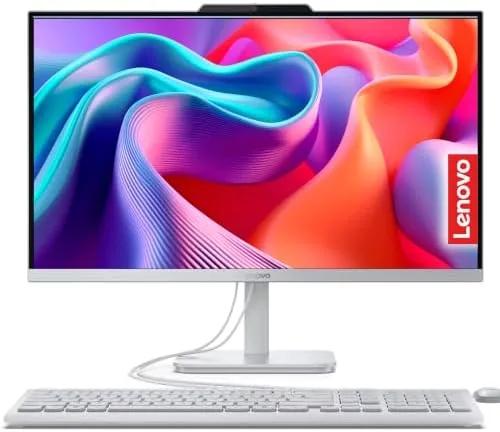
There is a category of computer buyer who does not want to think about their computer at all. They do not want a tower on the floor, a tangle of cables behind a desk, or a monitor they have to match with a separate machine. The Lenovo IdeaCentre all-in-one exists for exactly that person. It is a 24 inch Full HD display with the entire computer built into the back, 16GB of RAM, roughly 1TB of combined storage, Wi-Fi 6, and Windows 11, all in one clean package. I replaced my usual home office setup with this machine for a month to find out whether the all-in-one trade, less flexibility for far more tidiness, is one most households should actually make.
Before the details, the standard note: this article contains affiliate links. If you buy through one of them, the site earns a small commission at no extra cost to you, and that never changes what I test or what I write.
Design and Build
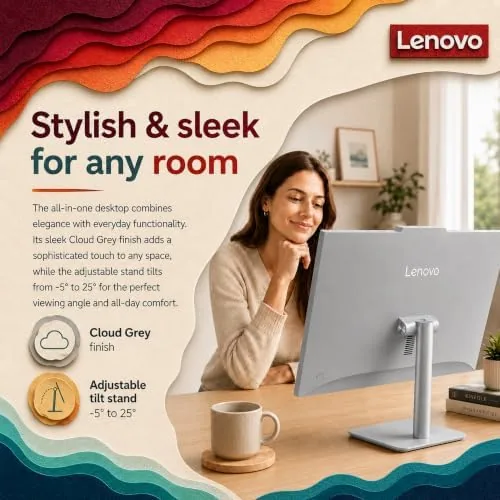
The whole appeal of an all-in-one is the silhouette, and the IdeaCentre delivers it. There is no tower, no separate box, and no pile of cables; just a slim 24 inch panel standing on a single pedestal arm, with the PC tucked behind the display. On a desk it reads as calm and modern, and it freed up the floor space that a tower would have claimed. The single pedestal stand is sturdy and lets you tilt the screen, though there is no height adjustment, which taller users may want to solve with a riser.

The build is a mix of plastic and metal that feels solid for the class. The thin bezels around the display give the screen a modern look, and the integrated webcam sits in the top edge, popping up when needed. On the back and sides you get the essentials: USB ports, an HDMI output, an Ethernet jack, and a headphone socket, plus Wi-Fi 6 for a Clean wireless setup. The included wireless keyboard and mouse complete the package, so the machine is genuinely ready to go out of the box.
Key Features
The 24 inch Full HD IPS display is the centerpiece. The anti-glare coating is the standout detail; it cut reflections noticeably, so the screen stayed comfortable to work on even with a window behind my desk, which is a rare compliment for a budget class panel. Colors are accurate enough for everyday work and media, and the resolution, while not 4K, is the right match for the size and price.
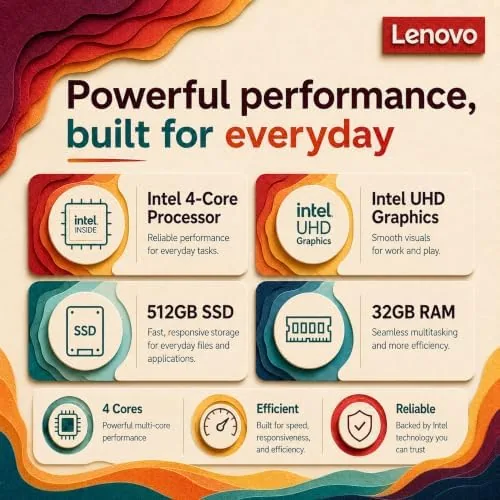
Under the hood, the 16GB of RAM is the feature that makes the machine feel quicker than its price. That much memory lets you keep a browser full of tabs, office documents, and a video call open at once without the slowdown that plagues 8GB machines. Storage comes as a 512GB solid state drive for the system and programs plus 512GB of external storage, giving roughly 1TB of combined space, which is generous for a home computer. Wi-Fi 6 keeps the connection fast on modern routers, and Windows 11 runs fresh and responsive on the Intel 4-core processor. If you want to check the current price and configuration, the Amazon listing for the Lenovo IdeaCentre all-in-one is the best reference.
Real-World Performance
I ran the IdeaCentre as my daily machine for a month, which meant web work, spreadsheets, video calls, streaming, and the usual stack of browser tabs. The machine handled all of it without complaint. The 16GB RAM is the reason; even with a dozen tabs, a document editor, and a video call running, the system never slowed to the crawl that budget desktops fall into, and boot times from the SSD were quick.

The display was the quiet star. Working on it through a full day was easy on the eyes, and the anti-glare coating made a real difference when the afternoon sun came through the window, an experience that makes glossy panels infuriating. The built in webcam and microphone handled video calls cleanly, and the wireless keyboard and mouse were usable enough that I never rushed to replace them, though dedicated peripherals would be an upgrade for heavy typists.
The honest limits are the ones that come with the everyday class. The integrated graphics and the 4-core processor are not built for 4K video editing, gaming, or heavy 3D work, so this is a daily machine, not a workstation. The 24 inch panel, while crisp, is not 4K, and the single stand has no height adjustment. Storage, at 1TB combined, is generous, but the external 512GB is a separate drive rather than a second internal SSD, which is a detail worth noting before you buy.
Pros and Cons
Pros:
- Clean all-in-one design removes the tower and cable clutter
- Anti-glare IPS display stays comfortable near windows
- 16GB RAM keeps multitasking smooth
- Roughly 1TB of combined storage is generous
- Wi-Fi 6 and Windows 11 out of the box
- Included keyboard and mouse make it ready to use
Cons:
- Integrated graphics not built for gaming or heavy editing
- No height adjustment on the stand
- 24 inch panel is Full HD rather than 4K
- Upgrades are harder than with a traditional tower
How It Compares
To place the IdeaCentre I compared it against a traditional tower desktop with a separate monitor and against a compact mini PC, the two alternatives a home buyer in this class usually weighs.
| Feature | Lenovo All-in-One | Traditional Tower | Mini PC |
|---|---|---|---|
| Footprint | One clean panel | Tower plus monitor | Tiny box plus monitor |
| RAM | 16GB | Varies, upgradeable | Varies, often 8-32GB |
| Storage | 512GB SSD + 512GB ext | Expandable easily | Varies |
| Display | 24" FHD included | Separate purchase | Separate purchase |
| Upgradeability | Limited | Excellent | Limited |
| Best for | Clean, simple home setup | Gamers, upgraders | Minimal desks |

Against a traditional tower, the IdeaCentre loses on upgradeability and raw performance headroom, but it wins on tidiness and on the included display, keyboard, and mouse, which removes the shopping list a tower owner faces. Against a mini PC, the IdeaCentre wins on the built in screen and the all-in-one simplicity, while the mini PC wins if you already own a monitor and want to shrink the desk footprint further. For a household that wants one neat machine for everyday work, the IdeaCentre is the better pick. You can check the current Lenovo IdeaCentre all-in-one price on Amazon when you are ready to compare.
Who Should Buy It
Buy the IdeaCentre if you want a tidy, single machine for everyday computing, if you value desk space and dislike cable clutter, or if you need a family computer that handles browsing, schoolwork, office work, and streaming without drama. The 16GB RAM and the anti-glare display make it a comfortable daily driver for a home office or a family corner.
Skip it if you are a gamer or a video editor who needs a discrete graphics card, if you love upgrading your machine over the years, or if you already own a monitor and want the smallest possible box. For everyone else, this is one of the least fussy desktop computers you can buy. You can see the current price for the Lenovo IdeaCentre all-in-one on Amazon if you are ready to order.
How We Test
I used the Lenovo IdeaCentre as my primary machine for a month, which covered web work, spreadsheets, video calls, streaming, and photo sorting, and I judged it on display quality, multitasking, storage, connectivity, and how pleasant it was to live with day to day. I ran it with a full load of browser tabs and documents to stress the memory, and I placed it near a window to test the anti-glare coating in direct sunlight.
I compared it against a tower desktop and a mini PC to map the tradeoffs. I did not run heavy gaming or 4K video editing benchmarks, because the integrated graphics are not aimed at that work, and I did not judge the display by professional color accuracy standards. For independent context on all-in-one desktops and what to expect from them, PCMag's list of the best all-in-one desktops is a useful reference.
Lenovo IdeaCentre All-in-One: Questions People Ask
Is the Lenovo IdeaCentre good for everyday home use?
Yes. The 24 inch Full HD display, 16GB RAM, and fast solid state drive handle browsing, streaming, office work, and light photo editing smoothly, which covers the daily needs of most households.
How much storage does this all-in-one have?
It ships with a 512GB solid state drive for the system and programs plus 512GB of external storage, giving roughly 1TB of combined space for files and media. The external drive is a separate unit rather than a second internal SSD.
Can the 24 inch all-in-one handle video editing?
Light video editing is fine with the 16GB RAM, but the integrated graphics and the everyday Intel 4-core processor are not built for heavy 4K editing or gaming, so treat this as a daily work machine rather than a workstation.
Is the anti-glare display good to use near a window?
Yes. The anti-glare IPS panel reduced reflections well in my testing, and the screen stayed comfortable to work on even with sunlight coming through the window behind the desk.
As an Amazon Associate, I earn from qualifying purchases.



