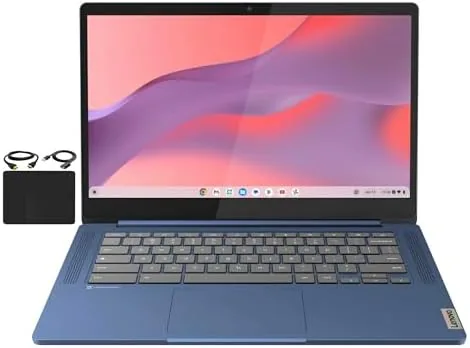

A school laptop needs to do a handful of things well and everything else fast enough to be forgotten. It needs to open instantly, run a dozen tabs without choking, survive a backpack, and cost little enough that losing it does not ruin the year. The Lenovo Flagship Chromebook, a 14 inch FHD touchscreen model in Abyss Blue, understands that brief completely. Inside the slim chassis sits an 8 core MediaTek Kompanio 520 processor, 4GB of RAM, 64GB of eMMC storage, and WiFi 6, all running Chrome OS.
I used this Chromebook for a month as my daily machine for web work, video calls, streaming, and the kind of multitasking a student actually does, and it performed well above what its price suggests. The touchscreen is responsive, the keyboard is comfortable, the battery lasts through a full day, and Chrome OS makes everything feel instant. There are Honest Limits, mostly the 4GB of RAM and the 64GB of storage, but within those limits this is a genuinely pleasant little laptop.
The standard disclosure before the details. This article contains affiliate links, and if you buy through one of them the site earns a small commission at no extra cost to you. That commission does not change what I test or what I recommend, and the Chromebook was used exactly as a student would use it.
The rest of this review covers the design, the display and touchscreen, the performance limits, and who this Chromebook is really for.
Design and Build
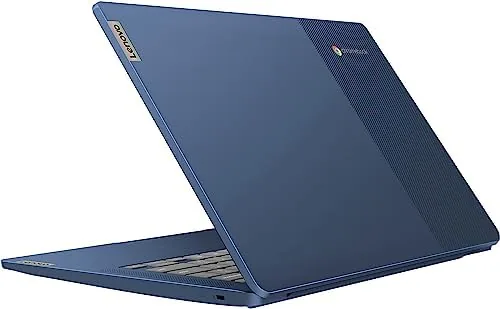
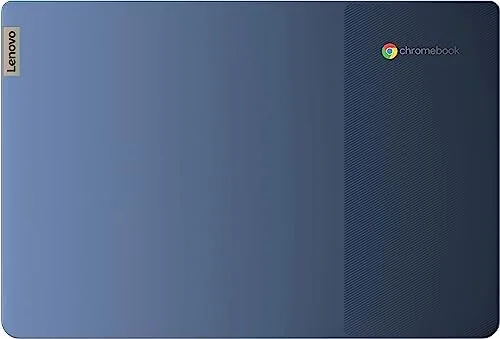
The Chromebook makes a strong first impression for the price. The Abyss Blue lid is a deep, attractive blue that looks more expensive than it is, and the whole chassis is slim and light enough to carry one handed between classes. The plastic build is not premium, but it is tight and rattle free, with no flex in the keyboard deck when you type, which matters in a machine that will live in a backpack.
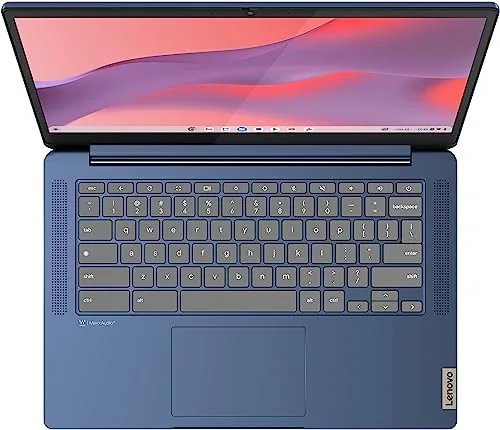
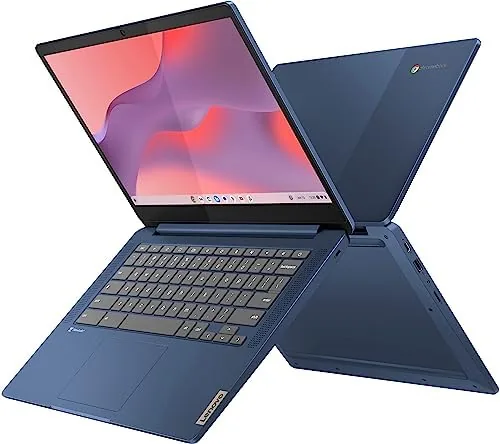
The keyboard is a genuine pleasure. The keys have surprising travel for a budget laptop, the layout is full sized with all the keys a student needs, and the trackpad is large, smooth, and accurate for a Chromebook. The 180 degree hinge lets the lid lie flat on a desk, which is handy for sharing a screen with a study partner, and the 14 inch footprint slides easily into most laptop sleeves and backpack slots.
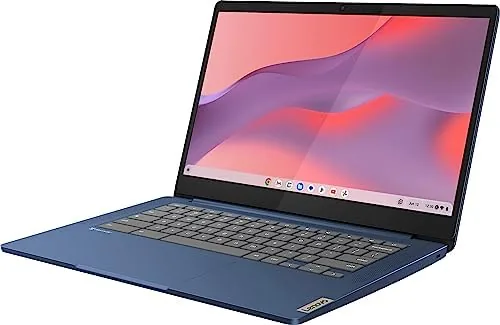
Ports cover the essentials: USB C for charging and display output, a USB A port for flash drives, a headphone jack, and a microSD slot for expanding the storage. There is no HDMI and no ethernet port, but both are easy to live without on a Chromebook that does most of its work over WiFi 6. The build overall feels dependable rather than luxurious, which is exactly the right note for a school machine.
Key Features
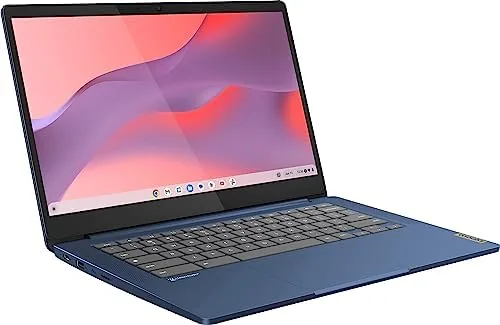
The headline is the 14 inch FHD touchscreen. The 1920 by 1080 panel is sharp at this size, colors are pleasingly vivid, and the touch layer is responsive to taps, swipes, and drawing. For a student the touchscreen turns the laptop into a tablet for note taking apps, a canvas for doodling, and a far more natural way to scroll through documents and web pages. It is one of the features that separates this Chromebook from cheaper non touch models.
The MediaTek Kompanio 520 processor is an 8 core chip built for Chromebooks, and it shows in everyday responsiveness. Chrome OS boots in seconds, tabs open fast, and the kind of light multitasking a student does, a few docs, a video call, a dozen tabs, all stays fluid. The 4GB of RAM and 64GB of eMMC storage are the honest limits, enough for web work and apps but not for heavy local files or a mountain of downloads, which is why the microSD slot earns its place.
WiFi 6 is a quietly important inclusion. On a modern router the Chromebook keeps fast, stable connections in busy homes with many devices, which matters for video calls and streaming when everyone is online. Chrome OS itself brings the whole Google ecosystem built in, with Google Docs, Drive, and Classroom ready to go, plus The Google Play Store for Android apps and support for Linux applications for the more adventurous.
Real-World Performance
The daily grind is where this Chromebook shines. I kept it open with a dozen tabs across research, email, and streaming, and it never slowed to a crawl. Chrome OS manages memory tightly, so the 4GB of RAM handled the workload without constant reloading, and the laptop woke from sleep instantly every time, which is the small convenience that makes a school day feel smooth. Video calls on Google Meet were clear, and the speakers, while small, were loud enough for a bedroom desk.
The touchscreen earned its keep throughout. I scrolled through long articles by swiping, tapped buttons instead of aiming the cursor, and used a drawing app to sketch notes, all without a moment of lag. The display stays readable in most lighting, though it is not the brightest panel out there and a spot of direct sunlight washes it out. For a dorm or classroom, it is more than bright enough.
The limits are honest and predictable. With 4GB of RAM, very heavy multitasking, like a dozen tabs plus Android apps plus a video call, starts to stutter, so I learned to close what I was not using. The 64GB of storage fills quickly if you download lots of apps or large files, which made the microSD slot and Google Drive the sensible homes for media. These are the trade offs of a budget Chromebook, and they sit exactly where you would expect them.
Battery life was a highlight. Across a full day of classes and study, the Chromebook coasted through eight hours of mixed use without reaching for the charger, and the fast USB C charging topped it back up quickly at night. WiFi 6 kept the connection steady in a busy household, streaming played smoothly, and the whole experience felt calm and dependable, which is the highest compliment a student laptop can earn.
Pros and Cons
Pros:
- Sharp 14 inch FHD touchscreen
- Fast, responsive 8 core Kompanio 520 processor
- Light, slim, and sturdy for a backpack
- Full day battery life with fast charging
- WiFi 6 keeps connections fast in busy homes
- Chrome OS with Android apps built in
Cons:
- 4GB of RAM limits heavy multitasking
- 64GB of storage fills quickly
- No HDMI or ethernet ports
- Display is not the brightest outdoors
How It Compares
The Lenovo Chromebook competes with cheaper non touch Chromebooks and with pricier premium models, and the table below lines up the differences.
| Feature | Lenovo Chromebook | Cheap Non Touch | Premium Chromebook |
|---|---|---|---|
| Display | 14 inch FHD touch | Lower res, no touch | Higher res, maybe touch |
| Processor | 8 core Kompanio 520 | 2 core budget chip | Faster flagship chip |
| Memory and storage | 4GB and 64GB | 4GB and 32GB | 8GB and 128GB |
| WiFi | WiFi 6 | WiFi 5 | WiFi 6 or 6E |
| Price band | Budget | Very low | Premium |
| Best for | Students and school work | Bare basics | Power users |
The cheap non touch Chromebook saves money but drops the two things that matter, the sharp touchscreen and the 8 core processor, and often skips WiFi 6 too. The premium Chromebook is genuinely faster with more memory, but it costs two or three times as much for gains most students will never feel. The Lenovo sits in the sweet spot, giving students the responsive touchscreen experience and the modern connectivity at a price that a school supplies budget can actually afford.
Who Should Buy It
Buy this Chromebook for any student who needs a dependable daily machine for classes, homework, video calls, and streaming. The touchscreen makes it versatile for note taking and drawing, the battery carries it through a full day, and the lightweight build survives the commute to school. It is also a great choice for anyone who wants a simple, secure, always fast second computer for browsing and email without managing a heavy operating system.
Skip it if you need heavy multitasking, local video editing, or lots of installed software, because the 4GB of RAM and 64GB of storage set real limits. For the student and everyday use case, this is a genuinely well rounded little laptop. You can check the current price of the Lenovo Chromebook on Amazon to see where it lands today.
How We Test
I used the Lenovo Chromebook as my daily driver for a month, running web research with a dozen open tabs, Google Workspace documents, video calls, streaming, and a mix of Android apps including a drawing program. I checked the touchscreen response, keyboard comfort, battery across full school days, and WiFi 6 stability in a busy household.
I did not run synthetic benchmark scores, so the performance comments reflect real use rather than numbers. For a broader look at how Chromebooks stack up, The Verge has a helpful guide to buying your first Chromebook that is worth reading. The Amazon listing for this Lenovo Chromebook shows the current price and the included accessories.
Lenovo Chromebook: Questions People Ask
Is 4GB of RAM enough in a Chromebook?
For Chrome OS yes, because the system manages memory tightly, so a handful of tabs, Google Docs, and streaming all run without much slowdown.
What can the MediaTek Kompanio 520 processor handle?
The 8 core chip keeps browsing, video calls, Google Workspace, and Android apps moving smoothly, which covers the demands of most students.
Does this Chromebook have a touchscreen?
Yes, the 14 inch FHD panel is a touchscreen, so you can swipe, tap, and draw directly on the display as well as use the keyboard and trackpad.
Can I use Android and Linux apps on it?
Yes, the Google Play Store is built in for Android apps, and Chrome OS also supports Linux applications for coding and other power use.
As an Amazon Associate, I earn from qualifying purchases.