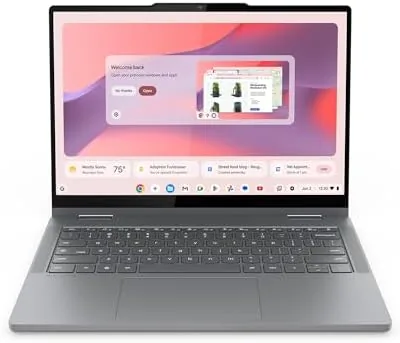

Chromebooks have a reputation problem. They are still remembered as underpowered web browsers from a decade ago, even though the modern version runs Android apps, handles Linux tools, and now packs an AI assistant called Gemini straight into the operating system. The Lenovo Chromebook 2-in-1 reviewed here is a good example of how far the platform has come. It pairs an Intel N150 processor with a 14 inch WUXGA touchscreen, 4GB of RAM, and 128GB of storage in a lightweight convertible body, and it arrives with Gemini access baked in. I used it as my main laptop for two weeks, mixing work, web browsing, and streaming, to see whether a budget Chromebook can carry a real daily routine.
Before the details, the standard note. This article contains affiliate links, and if you buy through one of them the site earns a small commission at no extra cost to you. That commission never changes what I test or what I recommend.
Design and Build
The Lenovo Chromebook is impressively light. Picking it up, the weight surprises you, and the slim chassis makes it feel like a device designed to travel, not a desk anchor. The Luna Grey finish is understated, with a textured lid that resists fingerprints and a keyboard deck that stays clean. The build is plastic but executed well, with a rigid base that does not flex under typing pressure and a hinge that holds the screen at any angle.
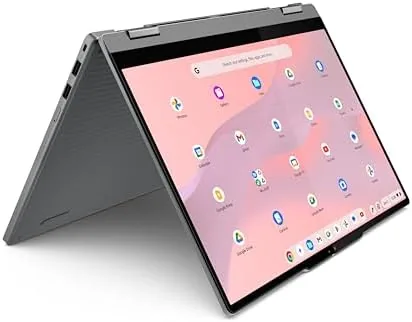
The 360 degree hinge is what makes it a 2-in-1. The screen folds back into tent mode for watching, flat into tablet mode for touch use, and any angle in between for sharing a screen across a table. The keyboard is comfortable for a budget laptop, with decent travel and a solid feel, and the trackpad is responsive. For a device at this price, the overall fit and finish punches above its class.
Key Features
The Intel N150 is a modern, efficient entry level chip built for Chromebooks and lightweight laptops. It is not a powerhouse, but it does not need to be, because ChromeOS is light on its feet. Booting is quick, the interface stays responsive, and the N150 sips power, which contributes to the excellent battery life this class of device delivers. The 14 inch WUXGA IPS display is a highlight, sharp and bright with wide viewing angles, and it is a touch panel, so the 2-in-1 modes work as intended.
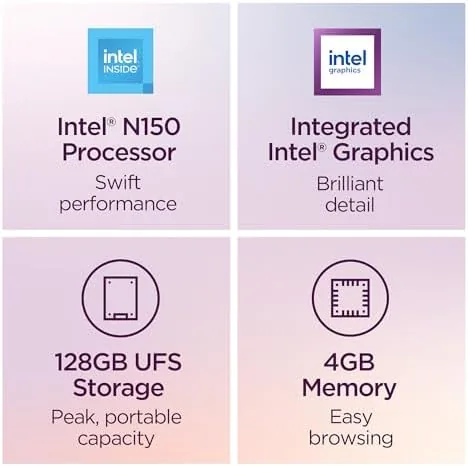
Google Gemini is the differentiating feature. The assistant is built into ChromeOS, accessible with a button press, and it can answer questions, draft text, summarize pages, and pull information across your Google apps. It feels like a genuinely useful layer over the laptop rather than a bolt on. Storage is 128GB of UFS, which is fast for a budget machine, and the integrated Intel graphics handle video and light creative work without complaint.
Real-World Performance
In daily use, the Chromebook handled my routine without drama. A browser full of tabs, a document editor, a music stream, and a video call ran smoothly side by side, and the N150 stayed quiet and cool throughout. Typing felt responsive, the display was pleasant to Work on, and the battery lasted through long workdays and into the evening, which is the quiet superpower of this class of machine. You can check the current price of the Lenovo Chromebook 2-in-1 on Amazon.
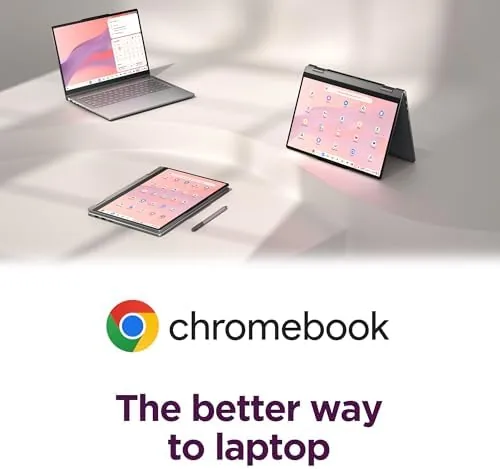
Gemini was the most surprising part. Asking it to summarize a long article or draft an email produced useful, fast results, and the integration with the rest of the machine made it feel native. As a tablet, the 14 inch touchscreen was fine for reading and touch apps, though the weight makes it a lap tablet more than a hand held one. The honest limit is the 4GB of RAM. With a very heavy load, dozens of tabs plus several Android apps, the machine slowed, and it occasionally reloaded a tab after memory pressure. For typical use it is fine, but it rewards keeping your tabs reasonable.
Android apps were another pleasant surprise. The Chromebook ran the Play Store version of my main note taking app, a music player, and a reading app, and they behaved as they do on a phone, with the larger screen making them more usable. Compatibility is good on modern Chromebooks, and the touchscreen makes the tablet position genuinely useful for those apps. It is not a replacement for a Windows laptop, but it is a far cry from the limited web browser box that Chromebooks used to be, and for most daily tasks it simply disappears into the workflow.
Pros and Cons
Pros:
- Extremely light and easy to carry anywhere
- Sharp, bright 14 inch touchscreen with wide viewing angles
- All day battery life from the efficient Intel N150
- Gemini assistant built in and genuinely useful
- Versatile 360 degree 2-in-1 design
Cons:
- 4GB of RAM limits heavy multitasking
- Plastic build, though well executed
- Storage is fine but not expandable for serious libraries
How It Compares
To give the Chromebook context I compared it against two alternatives: a more expensive premium Chromebook and a budget Windows laptop at a similar price.
| Feature | Lenovo Chromebook 2-in-1 | Premium Chromebook | Budget Windows Laptop |
|---|---|---|---|
| Processor | Intel N150 | Faster Intel or ARM | Intel Celeron or N series |
| RAM | 4GB | 8GB to 16GB | 4GB to 8GB |
| Battery life | All day | All day | Often shorter |
| AI assistant | Gemini built in | Gemini built in | Windows tools vary |
| Weight | Very light | Light | Heavier |
| Price | Budget | Higher | Comparable |

Against a premium Chromebook, the Lenovo trades some RAM and processing power for a much lower price, and the experience for everyday tasks is closer than the price gap suggests. Against a budget Windows laptop, the Chromebook wins on speed of use, battery life, and simplicity, while the Windows machine wins on traditional software compatibility. For most students, casual users, and anyone living in the browser, the Chromebook is the more pleasant daily companion.
Who Should Buy It
Buy this Lenovo Chromebook if you want a light, fast laptop for school, work, or daily browsing, if you live inside Chrome and Google apps, or if you want to try Gemini without buying a premium device. It is a natural fit for students who need a reliable machine for essays and research, for travelers who value battery life and weight, and for households that want a simple second computer.

Skip it if you need heavy multitasking with many apps open at once, if your work depends on Windows only software, or if you want a large local file library. For everyone else, this is one of the best values in light computing, and the built in Gemini makes it feel more modern than its price suggests.
Consider the long game before deciding. A Chromebook this light and this battery efficient is the kind of device that keeps working for years, because ChromeOS updates itself quietly in the background and the hardware is not asked to do more than it was designed for. That makes it a sensible choice for a student who needs a machine to survive four years of essays, or for a household that wants a dependable second laptop that will not nag for maintenance. The 4GB of RAM is the one spec that will age, so buy knowing that heavy power users should look at a higher memory configuration, while everyone else will find this machine ages gracefully.
How We Test
I used the Lenovo Chromebook as my main laptop for two weeks across writing, research, streaming, video calls, and light photo work. I tracked battery life across full workdays, tested the 2-in-1 modes in tent and tablet positions, pushed the browser and Android apps to find the multitasking ceiling, and used Gemini for a range of real tasks. I did not run heavy gaming or professional video editing, because this is a budget productivity machine, and I treated it as most owners will, as an everyday web and work device.
For independent coverage of Chromebooks and ChromeOS, Chrome Unboxed has extensive reviews of Lenovo Chromebooks and the N150 platform. The Lenovo Chromebook 2-in-1 listing on Amazon shows the current price and available configurations.
Lenovo Chromebook 2-in-1: Questions People Ask
Is the Lenovo Chromebook 2-in-1 good for everyday use?
For browsing, documents, video, and Google services the Chromebook is responsive and easy to use, and Gemini adds helpful built in assistance that feels native to the machine.
Can the Lenovo Chromebook be used as a tablet?
Yes. The 360 degree hinge and 14 inch touchscreen let you fold it into tent and tablet modes for reading, watching, and touch apps.
Is 4GB of RAM enough in the Lenovo Chromebook?
For standard ChromeOS tasks 4GB works fine, but heavy multitasking with many tabs and apps can push it, so lighter usage is the sweet spot.
Does the Chromebook support Android and Linux apps?
ChromeOS supports Android apps through the Play Store on compatible devices, and Linux containers are available on many Chromebooks, expanding what the machine can run.
As an Amazon Associate, I earn from qualifying purchases.