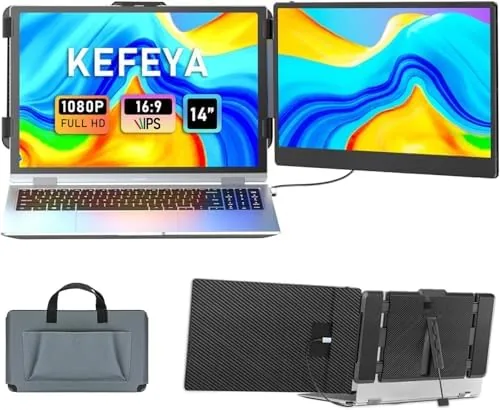

My daily workload lives on a laptop screen that simply runs out of room. Email on one side, a document in the middle, and a reference site on the other means constant tab switching, and a permanent desktop monitor only helps when I am sitting at my desk. The KEFEYA 14 inch laptop screen extender promised a way to take a second display everywhere, clipping onto a 13 to 17 inch laptop and connecting over a single USB-C Cable. I tested it as my portable productivity companion for a month, on a desk, in a coffee shop, and on the road, and this review is the honest record of how well it delivers.
Before the details, the standard note. This article contains affiliate links, and if you buy through one of them the site earns a small commission at no extra cost to you. That commission never changes what I test or what I recommend, and the extender reviewed here was set up the way any owner would set it up.
Below I cover the design, the key features, real world performance, the honest pros and cons, and who this second screen suits best.
Design and Build
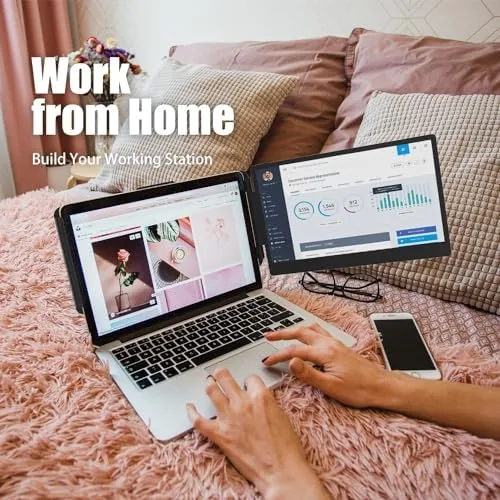
The KEFEYA is a 14 inch FHD IPS panel mounted in a slim housing with a hinged clamp that grips the side of a laptop lid. The whole assembly is noticeably light for a second display, and it tucks into a padded sleeve with the laptop when you fold it flat against the lid. The hinge has just enough friction to hold the panel at any angle you choose, from a flush extension of the lid to a forward angled position that helps when the desk space is tight.
Build quality is better than the Price class suggests. The housing is rigid with no flex in the panel, the bezels are reasonably slim, and the matte finish resists fingerprints. The included cables are short and tidy, which matters because a screen extender with a spaghetti mess of cables defeats the point of being portable. The clamp opens wide enough for a 17 inch laptop lid, and the foam padding on the jaws keeps the clamp from scratching the laptop frame.
Key Features
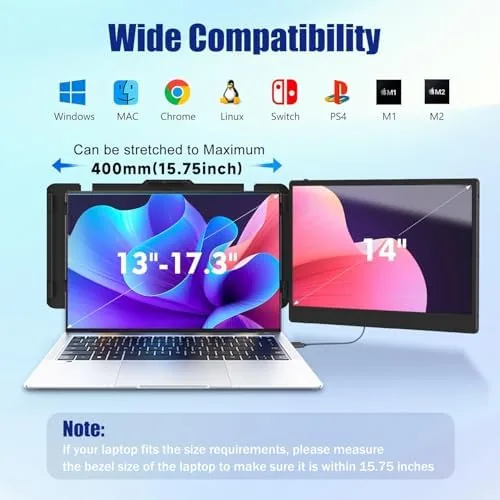
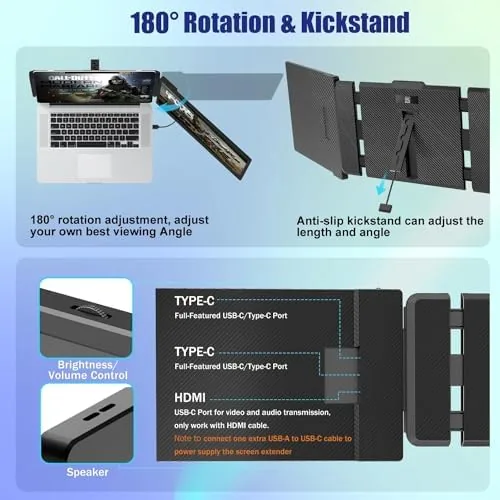
The core feature is the 14 inch FHD IPS panel at 1920 by 1080, which matches the resolution of most laptop screens and keeps text and images sharp. The extender connects over USB-C using DisplayPort Alternate Mode, so a single cable carries both the video signal and the power for the panel, which is the plug and play promise that KEFEYA makes. For machines without a USB-C video port, an HDMI cable is included as a fallback.
Compatibility is broad on paper and true in practice. The panel works with Windows laptops, MacBooks, Android phones that support display out, and even the Nintendo Switch and PlayStation 5 over the HDMI input. The panel is an IPS type, so viewing angles stay consistent when you glance at it from an angle, and the matte surface cuts most of the glare you would fight on a glossy panel in a bright cafe.
Real-World Performance
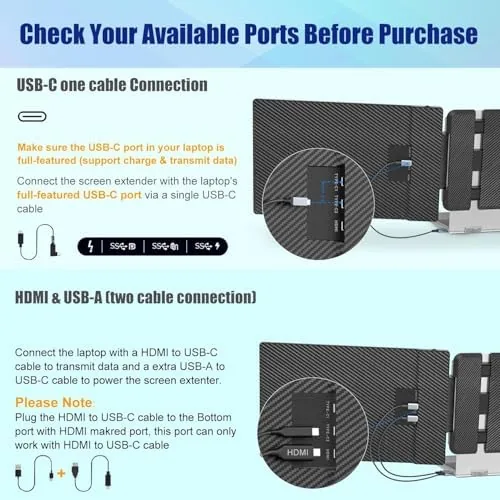
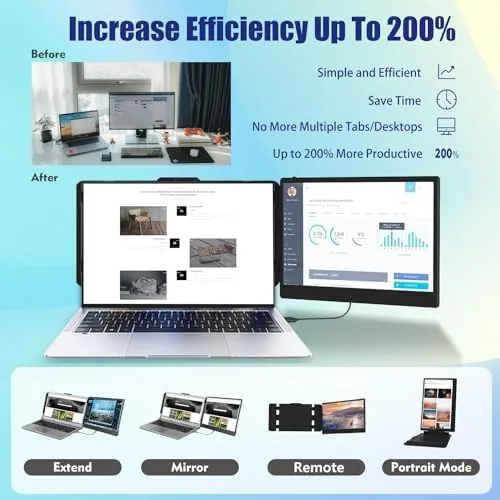
Setting the extender up was exactly as easy as advertised. I clipped it to the left side of my laptop lid, plugged in the USB-C cable, and within seconds the panel lit up as a second display with no driver installation. Windows extended the desktop automatically, and dragging windows across felt natural. On a machine with a single USB-C port that supports video, the extender also handled a pass through connection so I could keep charging the laptop at the same time.
For productivity the difference was immediate. A research document could sit on the side panel while I typed in the main screen, and a video call window could stay open without covering my work. The panel is bright enough for indoor use and holds up in a bright room, though it is not a high nits outdoor panel, so direct sunlight will wash it out. Color is decent for a portable screen, which is good enough for documents and video, though a color critical editor should not trust it for print work.
The honest limitations are worth flagging. The first is that the panel runs over a single USB-C cable only if the laptop port supports DisplayPort Alternate Mode, so older or budget laptops without that capability need the HDMI cable, which also requires a USB power connection. The second is that the clamp, while secure, adds noticeable weight to one side of the lid, so the laptop feels slightly top heavy when carried by hand. The third is that the panel has no touch support, which is standard at this price but worth knowing if you want to jab at a second screen.
One more thing surprised me positively: the extender stayed put during the whole month. The hinge never loosened, the clamp never scratched my laptop, and the cable connection stayed solid through a dozen open close cycles. For a device that lives its life attached to a laptop lid, that reliability is the difference between a useful tool and a frustrating one. I also appreciated that the panel drew its power from the single USB-C connection in most cases, which meant no second brick to carry in my bag, and the included storage sleeve kept the screen scratch free between stops. When I used it with a console on a hotel TV, the HDMI input worked without any setup, which made the extender feel less like a niche gadget and more like a general purpose screen that happened to clip onto a laptop.
Pros and Cons
Pros:
- Plug and play over a single USB-C cable
- Sharp 14 inch FHD IPS panel with good viewing angles
- Broad compatibility across laptops, phones, and consoles
- Lightweight and portable, folds flat against the lid
- Solid hinge and clamp that stay secure in daily use
- HDMI fallback for laptops without USB-C video
Cons:
- Requires USB-C DisplayPort Alternate Mode for single cable use
- Adds noticeable weight to one side of the laptop lid
- No touch support on the panel
- Not bright enough for use in direct sunlight
How It Compares
The main alternative to a clip on screen extender is a standalone portable monitor, and the two serve different people. The table below lines up the KEFEYA extender against a standard 15.6 inch portable monitor.
| Feature | KEFEYA Extender | Standalone Portable Monitor |
|---|---|---|
| Panel | 14 inch FHD IPS | 15.6 inch FHD IPS |
| Mount | Clamps to laptop lid | Sits on its own stand |
| Setup | Single USB-C cable | Video plus power cable |
| Portability | Folds with the laptop | Separate carry item |
| Best for | Travel and field work | Fixed portable desk setup |
If you move between desks and want the display to disappear into your bag with the laptop, the KEFEYA is the cleaner answer. If you want a bigger panel and a more traditional monitor experience, a standalone portable screen gives you more real estate at the cost of another thing to carry.
Who Should Buy It
Buy the KEFEYA laptop screen extender if you work from a laptop every day and constantly fight for screen space, if you travel or work from cafes and do not want to haul a separate monitor, or if you want to turn a single screen laptop into a dual screen setup without a desk. It is a natural fit for students, remote workers, and anyone who edits documents or code on the move.
Skip it if you already have a desk monitor you love and never work portably, or if your laptop lacks a USB-C video port and you do not want to deal with the HDMI cable setup. For everyone else, this is the closest thing to a pocket second screen I have used. You can check the current price of the KEFEYA laptop screen extender on Amazon when you are ready.
How We Test
I used the KEFEYA extender for a full month as my portable second display, splitting my time between a home desk, a coffee shop, and a hotel room. I tested the single cable USB-C setup on a Windows laptop, the HDMI fallback, and compatibility with a MacBook and a Nintendo Switch.
I also carried the laptop with the extender attached through a week of travel to judge durability and the hinge. For a broader look at how portable monitors and dual screen setups compare, Tom's Hardware has a guide to the best portable monitors that is worth a read. The KEFEYA extender listing on Amazon shows the current price and included cables.
KEFEYA Laptop Screen Extender: Questions People Ask
Is the KEFEYA laptop screen extender plug and play?
Yes, a single USB-C cable with DisplayPort alternate mode carries both video and power, so most laptops run it without extra drivers.
Will the extender work with any laptop?
It suits laptops between 13 and 17 inches, and it needs either a USB-C port that supports video or an HDMI connection.
Does the screen extender work with a Switch or PS5?
Yes, the HDMI input lets you drive it from a Switch, PS5, or other console as a compact secondary display.
Does the extender have a touch screen?
No, this is a standard FHD IPS display without touch support, which keeps the weight and price down.
As an Amazon Associate, I earn from qualifying purchases.