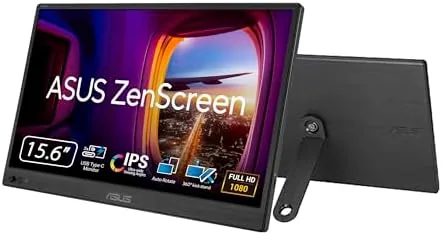

Photographers, writers, and remote workers share a quiet frustration: the laptop screen is never quite big enough. You want a second display at the coffee shop, in the hotel, or on location, but a full-size monitor does not travel, and many portable screens feel like cheap compromises. The ASUS ZenScreen MB169CK aims higher. It is a 15.6 inch 1080p IPS panel in a frame thinner than most phones, driven over a single USB-C Cable, with a kickstand that spins through a full 360 degrees. I carried one through a week of travel and photo editing to see whether ASUS has built the portable monitor that actually earns its place in the bag.
Before the details, the standard note. This article contains affiliate links, and if you buy through one of them the site earns a small commission at no extra cost to you. That commission does not change what I test or what I recommend.
Design and Build
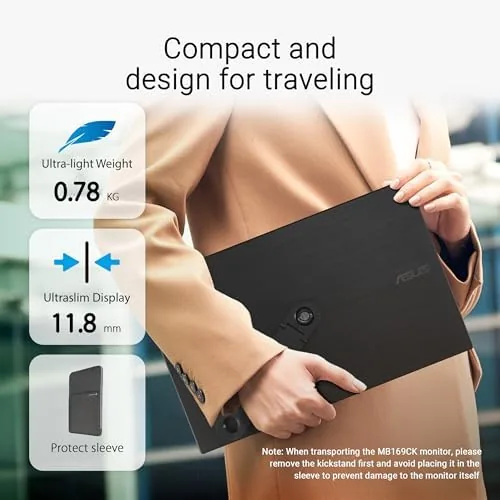
The first thing you notice is the profile. At the edges the MB169CK is startlingly thin, with the panel sitting in a brushed metal frame that feels far more premium than the portable monitor average. It slips into a laptop sleeve without adding noticeable bulk, and the included fabric pouch protects the screen on the move. The slim footprint means it slides into bags, backpacks, and even larger camera bags without protest.
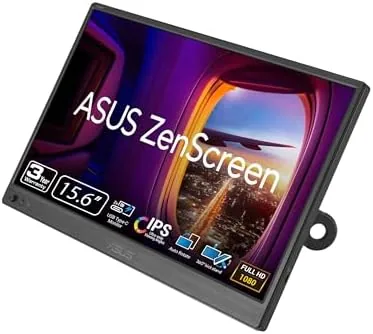
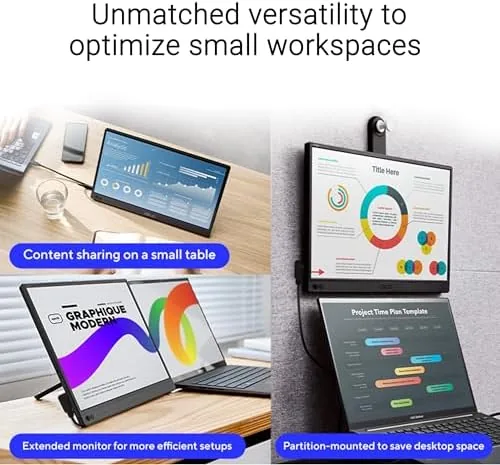
The stand is the standout design decision. A folding kickstand on the rear spins through 360 degrees, which sounds like a gimmick until you use it: the same mechanism props the screen upright in landscape, flips it around for portrait orientation, and adjusts the lean angle at any point in between. For editing vertical photos or scrolling long documents, that portrait mode is genuinely useful, and few portable monitors offer it.
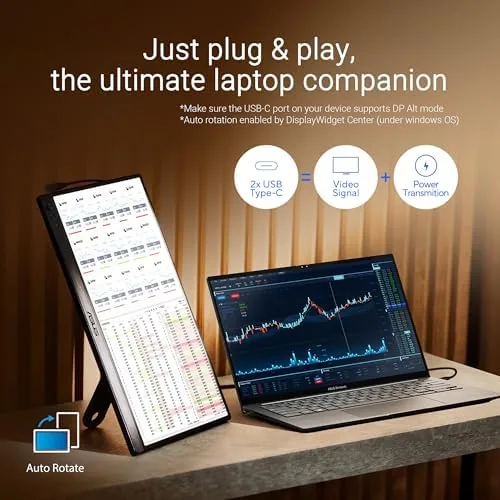
Ports are minimal by design. A single USB-C connection handles both video and power, and ASUS keeps the panel clean so it travels well. The control buttons are small and recessed, driving a simple on-screen menu for brightness and picture modes. The construction feels solid throughout, and nothing creaked or flexed during a week of constant packing and unpacking.
Key Features
The headline feature is the anti-glare IPS panel. ASUS uses a matte coating that cuts reflections hard, and the difference is obvious the moment you work near a window. Where glossy portable screens turn into mirrors, the ZenScreen stays readable, which makes it one of the few portable monitors you can genuinely use on a bright coffee shop table or a sunlit hotel desk.
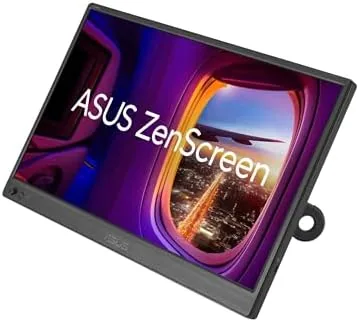
Dual USB-C is the other key feature. The panel has USB-C ports on two sides, so you can connect from whichever side suits your setup, and the plug and play behavior is exactly as advertised: connect a compatible laptop, and the display appears in seconds with no drivers and no configuration. The 1080p resolution at 15.6 inches is sharp for editing work, and the IPS panel holds color from wide angles, which matters when you share the screen with someone beside you.
The 360 degree kickstand completes the package. In landscape it supports the screen for classic dual-monitor work, and spun to portrait it turns the panel into a tall editing display. The kickstand locks positively at each position, and the screen stayed firmly in place even when I tapped and typed near it.
Real-World Performance
I put the ZenScreen to work during a travel week that mixed photo editing, long-form writing, and video calls. Over a single USB-C cable from a MacBook, the display came up instantly and ran the classic two-screen flow: the camera roll and photo editor on the ZenScreen, notes and references on the laptop. The anti-glare coating earned its keep at a café by the window, where the screen stayed readable while my phone glare went opaque.
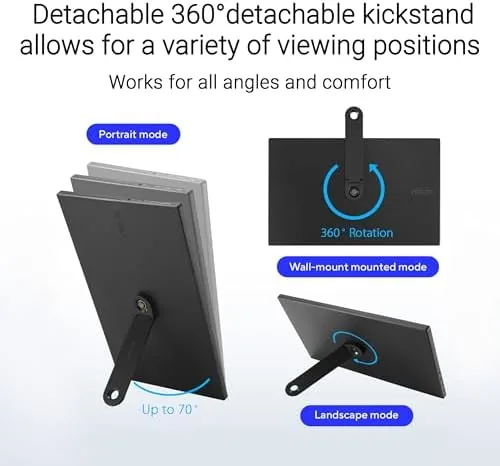
Portrait mode became my favorite trick. I spun the kickstand, set the panel vertical, and stacked a long vertical photo sequence alongside the editor. The resolution held up well for reviewing images, and colors looked accurate enough for confident editing decisions on the road. The panel ran cool and quiet for hours, with no fan noise and no heat collecting behind the screen.
The compromises showed up outdoors and in the extremes. The panel is bright enough for indoor work, but under full sun it falls short of being comfortably readable, which is a fair trade for a bus-powered screen. And because the display draws power from the laptop over that single cable, a demanding editing session pulls noticeable battery life, so the ZenScreen is best paired with a charger when you work long hours away from a plug.
Video calls worked cleanly as a secondary screen, and the panel showed no lag or ghosting when I dragged windows between displays. For a travel accessory, it behaved like a permanent desk monitor, which is exactly what I wanted.
Over the week I also came to appreciate the small design decisions that only surface with constant use. The single USB-C cable meant there was no tangle of adapters on the café table, and the panel reconnected instantly when I plugged it back in after a break. The on-screen menu stayed out of the way during work, and the power behavior was predictable, with the display sleeping cleanly when the laptop lid closed. Small as they are, those details are the difference between a monitor that feels like an accessory and one that feels like part of the workflow.
Pros and Cons
Pros:
- Ultra-thin build that packs easily into any bag
- Anti-glare matte panel readable near windows
- 360 degree kickstand supports portrait orientation
- Single USB-C cable carries video and power
- Accurate IPS color for on-the-go photo work
Cons:
- Brightness is modest for direct sunlight
- Bus-powered display drains the laptop battery
- No built-in speakers or media controls
How It Compares
The portable monitor market is crowded, and the MB169CK sits against both budget panels and premium OLED competitors. I compared it with the two most common alternatives.
| Feature | ASUS ZenScreen MB169CK | Budget USB-C Panel | Premium OLED Portable |
|---|---|---|---|
| Panel | 15.6 inch FHD IPS | 15.6 inch FHD IPS | 15.6 inch FHD OLED |
| Anti-glare coating | Yes | Rare | Varies |
| Kickstand | Full 360 degree | Fixed or simple | Adjustable |
| Connectivity | Dual USB-C | USB-C plus mini HDMI | Dual USB-C |
| Speakers | No | Often yes | Yes |
| Color accuracy | Very good | Good | Excellent |
| Price | Mid | Low | High |
Against a budget panel, the ZenScreen wins on build quality, the anti-glare coating, and the portrait-capable kickstand, which all matter in daily travel. Against a premium OLED, it loses on black levels and peak brightness but costs far less and remains bus-powered. For photographers and writers who value portability and reading comfort, the MB169CK is the stronger all-rounder.
Who Should Buy It
Buy the ZenScreen MB169CK if you travel with a laptop and work across two screens, if you edit photos or video on the road, or if you have been putting up with a glare-prone portable display. The anti-glare panel and portrait kickstand make it a genuine editing companion, and the slim build means it never feels like a burden to carry.
Skip it if you need built-in speakers, if you will work mostly outdoors in direct sun, or if you want OLED black levels for movie watching. For everyone else, this is one of the most refined portable monitors you can carry. You can check the current price for the ASUS ZenScreen MB169CK on Amazon when you are ready.
How We Test
I carried the ZenScreen MB169CK through a week of travel and used it for photo editing, writing, and video calls in cafés, hotel rooms, and by airport windows. I tested the single-cable USB-C connection on a MacBook and a Windows laptop, spun the kickstand through landscape and portrait, and measured color accuracy with test images.
I evaluated the anti-glare coating in bright window light, checked battery draw during a full editing session, and confirmed the plug and play behavior across devices. I did not test the monitor for professional color grading, and it is not aimed at that role. For a broader view of portable displays, TechRadar roundups of portable monitors are a useful starting point.
The ASUS ZenScreen MB169CK listing on Amazon shows the current price and shipping details.
ASUS ZenScreen MB169CK: Questions People Ask
Does the ASUS ZenScreen MB169CK work with a MacBook?
Yes. It connects over a single USB-C cable to MacBooks and modern Windows laptops, and it is recognized as a display without extra drivers.
How does the 360 degree kickstand work on the ZenScreen?
The folding kickstand rotates fully, so you can prop the screen in portrait or landscape orientation and adjust the angle to suit your setup.
Is the ZenScreen MB169CK anti-glare?
Yes. The matte anti-glare panel cuts reflections and makes the screen more readable near windows and under bright office lighting.
Does the ZenScreen MB169CK need a power adapter?
No. When connected to a compatible USB-C laptop it is bus-powered, so the single cable carries both video and power with no wall adapter required.
As an Amazon Associate, I earn from qualifying purchases.



