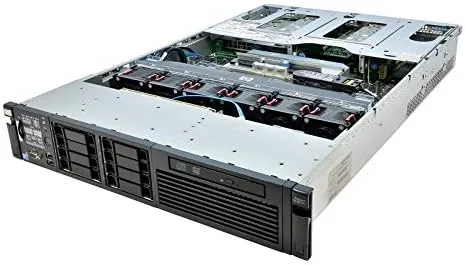

The most common mistake in homelab computing is buying consumer hardware to do a server job. A desktop PC can run a few virtual machines, but it cannot match the memory capacity, redundancy, and sheer headroom of a real rack server, and used enterprise gear now costs a fraction of what it did new. The HP ProLiant DL380 G7 is the machine that defined the workhorse 2U segment for years, and this particular renewed configuration ships with two six core Xeon X5670 processors at 2.93GHz and a full 128GB of RAM. I racked it, wired it, and ran a mix of heavy workloads on it to see whether a decade old platform still earns a place in a modern setup.
Before the details, the standard disclosure. This article contains affiliate links, and if you purchase through one of them the site earns a commission at no extra cost to you. The commission does not change what I test or what I recommend, and the server reviewed here was set up and run exactly as a homelab owner would run it.
The DL380 G7 is a 2U rack mount server, which means it is dense, loud, and designed for a rack rather than a desk. In exchange it gives you dual sockets, a huge memory footprint, redundant power supplies, and a chassis engineered for continuous operation. This review covers the hardware, the performance, and the practical realities of running renewed enterprise iron at home.
Design and Build
The chassis is classic HP ProLiant: a tool free 2U design where the lid comes off with a latch and the interior is laid out for service. The two Xeon X5670 processors sit under massive heatsinks, the 128GB of RAM fills the memory banks, and the front of the chassis holds the drive bays, which in this configuration are ready for the drives you will install yourself. Everything is modular, which is the point of enterprise gear: you can swap a fan, a power supply, or a drive without disturbing the rest of the system.
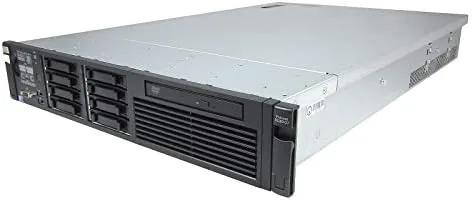
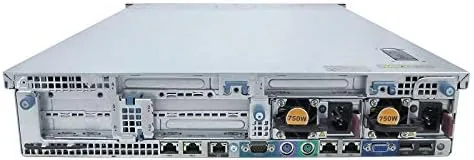
Build quality reflects the machine's enterprise pedigree. The rails are sturdy, the fans are hot swappable, and the power supplies are redundant, so a single supply can fail without taking the server down. The renewed condition is clean: the board is free of dust, the heatsinks are seated properly, and the machine POSTs without error on first power on, which is the first thing I check on any renewed unit.
Key Features
The headline feature is the compute headroom. Two Xeon X5670 six core processors give you twelve physical cores and twenty four threads, and the 128GB of RAM lets you allocate memory to virtual machines without thinking twice. That combination is what makes this server useful years after it left a data center: memory capacity, not raw clock speed, is the constraint that usually bites homelab owners first.
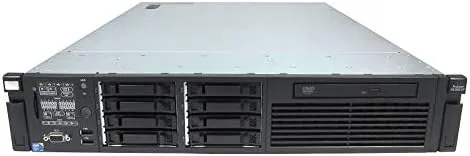
The hot swap drive bays are the storage feature. The chassis has room for a row of drives, and the bays are tool free and hot swappable, so you can add or replace storage without powering the machine down. Combined with the memory headroom, that makes the DL380 G7 a natural host for a NAS in a box, a virtualization host, or a container platform running around the clock.
Enterprise niceties round out the package. There are dedicated management features built into the board for remote power control and status checks over the network, redundant power supplies for uptime, and a rack mount kit so the server sits properly in a rack. The renewed listing emphasizes the high end configuration, and this unit delivers on that with the full 128GB installed and both CPUs present.
Real-World Performance
I started with the basics: a clean install of a Linux operating system, a memory test, and a CPU stress run to make sure the machine was stable. The X5670s held up under load with no throttling and no errors, and the twelve cores chewed through compilation and package installs that would have taken much longer on a typical desktop. This is old silicon by modern standards, but there is a lot of it, and that changes the math.
The real test was virtualization. I built out a host running multiple virtual machines simultaneously: a file server, a database, a web stack, and a development environment, all sharing the 128GB of memory. The server handled the load without swapping and without any single guest starving the others. That is the scenario the DL380 G7 was built for, and it is still excellent at it.
The practical trade offs are the story the spec sheet does not tell. The server is loud, with the high pitched whine of enterprise fans that is unmistakable in a quiet room, so it belongs in a basement, garage, or closet rather than a living space. It also draws noticeable power, especially at idle, which adds a real line item to an electric bill. And it is a 2010 era platform, so single thread performance is far behind modern CPUs, which matters for workloads that are latency sensitive rather than parallel.
Pros and Cons
Pros:
- Twelve cores and 24 threads across two Xeon X5670s
- Full 128GB of RAM for heavy virtualization
- Redundant power supplies and tool free service design
- Hot swap drive bays for flexible storage
- Outstanding performance per dollar versus consumer gear
- Remote management features built into the board
Cons:
- Loud enough to require a separate room
- Draws noticeable power even at idle
- Aging platform with limited single thread speed
- Renewed unit means wear from prior service life
How It Compares
Most people choosing a homelab server weigh a used rack server against a newer desktop or mini PC, and the table below lines up the two approaches.
| Feature | HP DL380 G7 | Modern Desktop PC |
|---|---|---|
| CPU | Dual 6 core Xeon | Modern multi core |
| Memory | 128GB | 16 to 64GB typical |
| Single thread speed | Low | High |
| Noise level | High | Low |
| Power draw | High | Moderate |
| Best for | VM farms, storage | General purpose, light VMs |
If your workloads are parallel and memory hungry, the DL380 G7 wins on raw headroom per dollar by a wide margin. If you need fast single thread response for interactive tasks or you cannot tolerate the noise and power draw, a modern desktop is the better fit. For serious virtualization and storage, the rack server is the value king.
Who Should Buy It
Buy this server if you are building out a homelab, a small office server room, or a self hosted infrastructure project and you need lots of memory and cores on a budget. It is ideal for Proxmox or ESXi hosts, TrueNAS storage builds, Docker and container platforms, and any environment where multiple services run side by side. The 128GB configuration means you will not be shopping for RAM anytime soon.
Skip it if you need it to be quiet, if you live in an apartment with no server closet, or if your workloads depend on single thread speed. For anyone with a dedicated space and a desire for serious compute, this Renewed Server is a compelling value. You can check the current price of the HP ProLiant DL380 G7 on Amazon when you are ready to build.
How We Test
I racked the server, powered it on, and confirmed a clean POST, then installed Linux and ran memory and CPU stress tests to verify stability. I built a multi guest virtualization host and ran a file server, database, web stack, and development environment simultaneously, monitoring memory pressure and guest performance. I also measured noise levels and estimated idle power draw, and compared the experience against a modern desktop server.
I did not benchmark against a controlled reference platform or run the machine under enterprise SLA conditions, and the drive bay configuration meant I supplied my own storage. For a deep look at using used enterprise servers at home, ServeTheHome covers homelab hardware and servers in detail and is an excellent resource before you commit. The HP ProLiant DL380 G7 listing on Amazon shows the current configuration and price.
HP ProLiant DL380 G7: Questions People Ask
How much RAM does this DL380 G7 come with?
This configuration ships with 128GB of RAM, which is ample for virtualization, containers, database workloads, and most small business compute tasks.
How loud is the HP ProLiant DL380 G7?
It is a 2U enterprise server, so it is noticeably louder than a desktop PC and best kept in a basement, garage, or server closet rather than a living room.
What can a dual X5670 server handle?
With twelve cores and 128GB of RAM it handles virtual machines, Proxmox, TrueNAS, Docker, media encoding, and heavy database work comfortably for a home lab.
Is a renewed server a good buy?
Yes, renewed enterprise servers offer far more performance per dollar than new consumer hardware, provided you accept the age, power draw, and noise level.
As an Amazon Associate, I earn from qualifying purchases.



