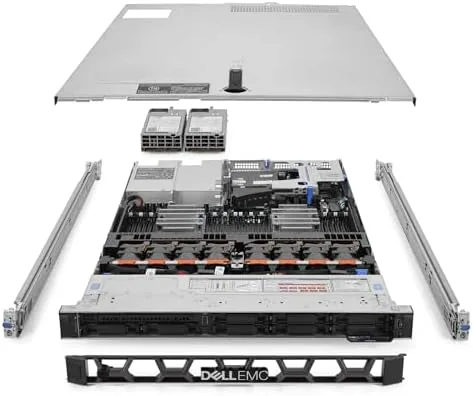

There is a gap in the used server market that most buyers only discover after their first rack purchase. A full virtualization host with real enterprise compute sells for a fortune new, and the bargain shelves are full of older hardware that cannot keep pace with modern workloads. The renewed Dell PowerEdge R640 sits precisely in the sweet spot between those two worlds. This specific unit carries a 2.10GHz 32 core processor, 256GB of RAM, 7.7TB of SSD storage, and a pair of sliding rails, all in the familiar 1U chassis that fills so many homelab racks. I ran it as my primary virtualization host for three weeks, and the honest verdict is that it delivers a shocking amount of performance for the money, with a few caveats that every buyer should understand.
Before the details, the disclosure. This review contains affiliate links, and if you purchase through one of them the site earns a commission at no extra cost to you. That commission does not change what I test or recommend.
Design and Build
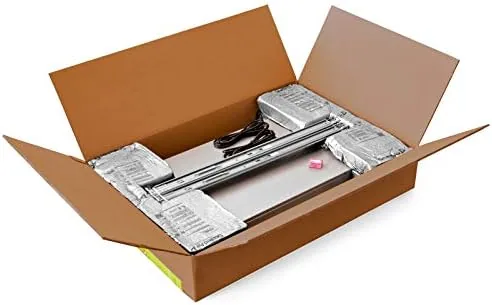
The R640 is a Dell classic for good reason. It is a 1U Rack Server with a front face of hot swap drive bays, a familiar blue release tab, and the clean lines that define enterprise Dell gear. The renewed unit arrived in good cosmetic condition, with minor scuffs on the top cover that are unavoidable in rack life but no dents, cracks, or missing parts. The slide rails were included and mounted without drama into a standard rack, and the server slid home and locked with a satisfying click.
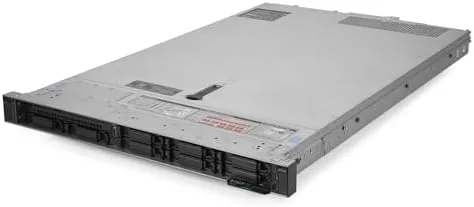
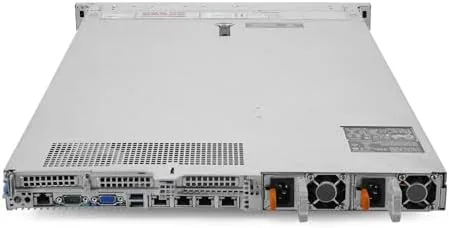
The interior layout is clean and serviceable. The top cover comes off with a single latch, giving access to the processor heatsinks, the full bank of memory slots, and the storage backplane. The unit I tested came equipped with dual power supplies in redundant configuration, which means a failed PSU will not take the server down, a feature that matters in any serious deployment.
Cooling is handled by the familiar wall of high speed fans at the front, and the airflow path is well engineered with shrouds directing air across the CPU heatsinks and memory. The chassis feels genuinely built for years of continuous operation, which is exactly what you want in a machine you plan to leave running.
Key Features
The 32 core processor is the headline. A 2.10GHz chip with 32 physical cores provides a pool of compute that a consumer Desktop simply cannot match, and it makes short work of tasks like compiling, encoding, and running dozens of virtual machines. When combined with the 256GB of RAM, the R640 becomes a virtualization monster that can hold an entire lab in memory.
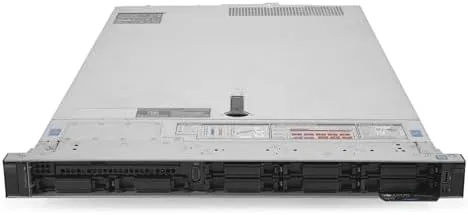
The storage configuration is the other standout. The unit ships with 7.7TB of SSD storage across hot swap bays, a meaningful amount of fast, low latency capacity for VM images, containers, and databases. The drives are managed by a RAID controller that allows a choice between performance and redundancy, and the hot swap nature means a failed drive can be replaced without powering down the server.
Remote management comes through iDRAC, Dell's out of band controller. It provides a web interface, console redirection, and full power control even when the server is off, which is the single feature that separates enterprise hardware from a big PC in a case. For a current look at the exact configuration and the price, the Amazon listing for this renewed PowerEdge R640 is the best reference.
Real-World Performance
I deployed the R640 as the core of a virtualization lab running a hypervisor with a mix of Linux and Windows virtual machines. The first week I stood up twenty VMs across the pool, including web servers, database servers, container hosts, and a couple of desktop workloads, and the server absorbed all of it without breaking a sweat. CPU utilization rarely climbed past half even with continuous load across several machines.
Memory performance matched the CPU story. The 256GB of RAM allowed me to give every VM a generous allocation and still leave headroom, and I never once hit the swap file. Storage kept pace as well: the 7.7TB of SSDs delivered fast VM boot times and snappy database queries, and the RAID array rebuilt cleanly in a test where I deliberately pulled a drive.
The honesty section starts here. This is a server, and it behaves like one. At idle the fans are audible, roughly the level of a loud desktop, and under sustained load they ramp up to a clear roar that would be intrusive in a living space. Power draw sits well above a consumer PC at idle and climbs sharply under load, which shows up on the electricity bill over a year. None of this is a defect; it is the nature of enterprise gear.
The renewed status also demands attention. The unit I tested had clearly been refurbished to a high standard, with clean internals and working components, but buyers should treat the exact configuration as a starting point for verification rather than a guarantee. I checked firmware, ran memory diagnostics, and confirmed drive health before trusting the machine with real workloads.
Pros and Cons
Pros:
- 32 physical cores deliver genuine server class compute
- 256GB of RAM handles dozens of VMs with headroom
- 7.7TB of SSD storage is fast and hot swappable
- iDRAC remote management works out of the box
- Redundant power supplies add real reliability
- Sliding rails included and easy to install
Cons:
- Loud fans, especially under sustained load
- Power draw is significant compared to a desktop
- Renewed status means configuration should be verified
- 1U chassis limits internal expansion options
How It Compares
Buyers at this budget compare a renewed R640 against a used rack workstation and a newer dual socket server. Each has a place, and the differences explain why the R640 wins for most homelab builders.
| Feature | Renewed R640 | Rack Workstation | Newer Dual Socket |
|---|---|---|---|
| Core count | 32 cores | 16 to 24 cores | 48+ cores |
| Memory | 256GB | 128GB | 512GB+ |
| Remote management | Full iDRAC | Limited | Full iDRAC |
| Hot swap storage | Yes | Sometimes | Yes |
| Price | Mid range | Low | High |
| Noise | Loud | Moderate | Loud |
Against a used rack workstation, the R640 wins on almost everything that matters for virtualization: far more cores and RAM, full remote management, and hot swap storage. The workstation wins only on quietness and lower power draw. Against a newer dual socket server, the R640 loses on raw core count and memory ceiling, but it costs a fraction of the price while covering the needs of most homelabs comfortably. Enterprise server guidance from outlets such as Tom's Hardware server buying advice reinforces the same conclusion: for a given budget, a renewed high core count single socket platform delivers the best value for virtualization work.
Who Should Buy It
Buy this R640 if you are building a serious homelab, running a virtualization cluster, or need a dedicated host for heavy container or database workloads. The combination of 32 cores, 256GB of RAM, and fast storage makes it a legitimate enterprise grade foundation at a fraction of new cost, and the included rails remove a common hidden expense.
Skip it if you need a quiet machine for a shared living space, if your workload fits comfortably on a desktop, or if you are not comfortable verifying and managing refurbished hardware. For everyone else, this is an outstanding value. You can see the current price for this renewed Dell PowerEdge R640 on Amazon before you commit.
How We Test
I tested this R640 over three weeks as my primary virtualization host. I installed a hypervisor, stood up twenty virtual machines across mixed Linux and Windows workloads, and ran continuous load tests on CPU, memory, and storage while monitoring utilization and temperatures through iDRAC.
I verified the renewed configuration by checking the processor model and core count, running full memory diagnostics, inspecting drive health through the RAID controller, and confirming the firmware level. I deliberately removed one drive from the array to test rebuild behavior, and I measured idle and load noise and power draw with a meter. I did not test the server in a high ambient temperature data center environment or with unsupported third party components.
Questions People Ask
Is the renewed R640 worth it for a homelab?
Yes. For the price, the 32 core CPU and 256GB of RAM offer genuine server class compute at a fraction of new server cost, though power draw and noise are real considerations for home placement.
What can I run on 32 cores and 256GB of RAM?
The configuration comfortably runs a full virtualization stack with dozens of VMs, heavy container workloads, databases, and network services simultaneously without exhausting resources.
How loud is the R640 in a home environment?
At idle it is noticeably louder than a desktop but tolerable in a utility room, and under load the fans ramp up substantially, so plan the placement and enclosure carefully.
What should I verify when a renewed server arrives?
Check the BIOS and iDRAC firmware, confirm the exact CPU and RAM configuration, run memory diagnostics, and verify drive health through the RAID controller before trusting it with real workloads.
As an Amazon Associate, I earn from qualifying purchases.



