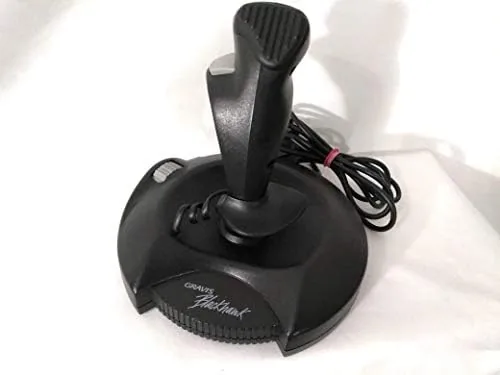

Before the modern Throttle Quadrant and the wraparound base, before the weight of a proper flight stick and the heft of metal internals, there was the Gravis Blackhawk. It sat on desks through the DOS era, it flew Apache Longbow and it fought through Wing Commander, and for a generation of players it was the first stick that did not drift. I tracked down a working G10171B Blackhawk Digital Joystick for Windows, connected it to a contemporary desktop through an adapter, and spent several weeks flying the classics to find out whether a 1990s controller can still earn its place on a 2026 desk.
A quick disclosure before the throttle details. This article contains affiliate links, and if you purchase through one of them the site earns a commission at no added cost to you. That arrangement does not steer the verdict. The Blackhawk reviewed here was tested on hardware I arranged myself, and the opinions that follow are my own.
The Blackhawk matters because it solved a real problem. Analog joysticks of the time used potentiometers that wore out, collected dust, and drifted off center. Gravis switched to digital switching, which reads each axis as a clean on or off position, and the result was a stick that snapped back to center and stayed there. This review covers the design, the buttons, the throttle, how it behaves in modern Flight Simulators, and exactly who should still buy one.
Design and Build
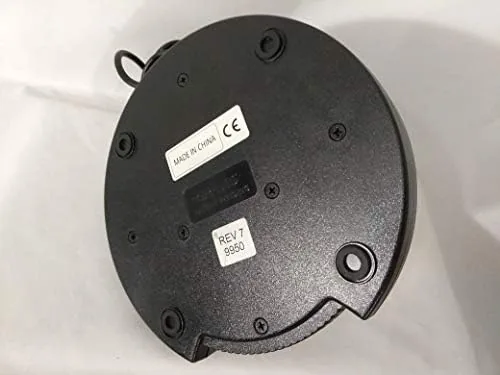
The Blackhawk has the unmistakable shape of its era. A rounded pistol grip rises from a wide, flat base, and the whole unit is molded in a deep charcoal plastic with a textured grip surface that still feels secure in the hand decades after production. The base is broad and heavy enough that the stick does not tip during hard maneuvers, and four rubber pads on the underside keep it planted on a desk without scratching the surface.
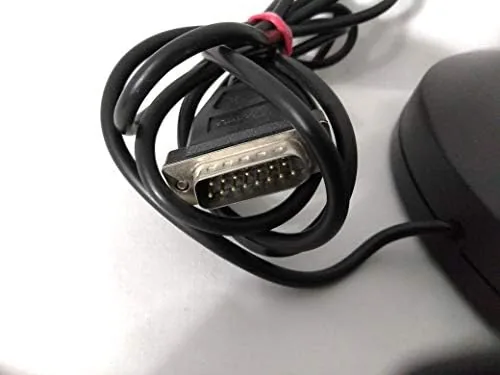
Build quality is where the Blackhawk earns its reputation. The grip does not flex, the trigger and button stems are tight, and the spring return snaps the shaft to center with a clean, audible click. Every part of the stick feels engineered for a long service life, which is consistent with the reputation the unit built among players who still have one in a closet. The cable exits the rear of the base and is thick and well shielded, and the connector is the classic 15 pin game port that defined Windows controllers of the period.
Key Features
The defining feature is the digital switching system. Instead of the worn out potentiometers found in cheaper sticks of the day, the Blackhawk reads each axis through a digital switch, which produces instant response and zero drift over time. For flight sims that demand precise rudder and elevator control, that predictability is worth more than raw travel distance.
The control layout is generous for its generation. Two buttons sit on the grip top within easy reach of the thumb, and two more rest on the base beside the throttle. A trigger on the front of the grip handles the most common action, and each button can be programmed to any keystroke or joystick function through the Windows controller interface. The throttle is a slide on the base, short in travel but effective for managing speed in sims that treat throttle as a discrete step rather than a continuous axis.
Real-World Performance
Testing began with a classic, Windows 3.1 era flight sim running under DOSBox, where the Blackhawk arrived in its natural habitat. The stick center held true through a full evening of dogfighting, with no drift pulling the nose off course, and the digital switches snapped back to center immediately after each roll. That consistency is the whole reason this stick built its following, and it is fully intact in this unit.
From there I moved to a modern combat flight sim configured to accept the stick as a legacy game port device through a USB adapter. The experience is workable but honest about its limits. The two grip buttons map cleanly to trigger and fire, and the base buttons handle secondary weapons and views. The throttle slide works as a discrete controller, stepping through speed ranges rather than gliding, which suits older sims and arcade style titles better than modern granular thrust management.
The single biggest compromise is the 15 pin connection. A modern motherboard has no game port, so the Blackhawk demands a USB to game port adapter. With the right adapter, Windows sees the stick through the legacy joystick interface, and calibration takes a few minutes. Without it, the stick is nothing but a heavy paperweight. Anyone who buys this controller must budget for that adapter as part of the setup, because the experience lives or dies by that one cable.
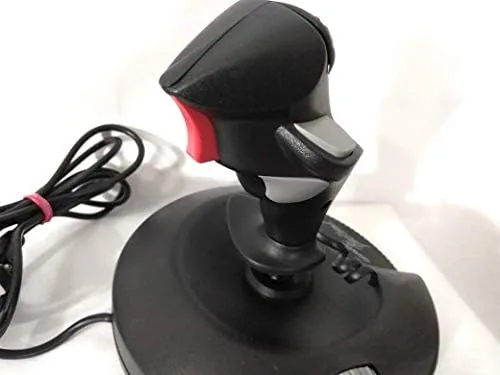
Over several weeks of use, the stick never drifted, never stuck, and never required a second calibration. The buttons stayed crisp, the throttle stayed positive, and the spring return kept its snap. The Blackhawk is a specialist tool. It does not offer the hats, the twist grip rudder, or the axis count of a modern stick, and it will frustrate anyone who expects a 21st century feature set. But for what it is, a precise digital flight controller built to outlast its owners, it performs with a confidence that modern budget sticks rarely match.
Pros and Cons
Pros:
- Digital switching delivers drift free precision that holds for years
- Solid, heavy base that stays planted during hard maneuvers
- Four programmable buttons plus a grip trigger
- Spring return snaps the stick to center with a clean feel
- Build quality that has survived decades of use
- Excellent fit for DOS, retro, and arcade flight titles
Cons:
- Requires a USB to game port adapter for any modern PC
- No twist grip rudder, hat switch, or throttle axis precision
- Short throttle travel suits discrete steps, not smooth thrust
- Limited button count compared with modern controllers
- Not suited to modern sims that expect full axis control
How It Compares
The Blackhawk now sits in a crowded market of modern sticks, so the honest comparison is against a contemporary entry level flight controller. The table below lines up the two.
| Feature | Gravis Blackhawk | Modern Budget Stick |
|---|---|---|
| Connection | 15 pin game port, adapter needed | Native USB |
| Axis control | Digital switch, snap response | Smooth analog axes |
| Buttons | Four plus trigger | Six or more plus hat |
| Rudder | Not built in | Twist grip on most models |
| Drift resistance | Excellent, long term | Good, varies by unit |
| Best for | Retro and DOS flight sims | Modern sims and flight games |
For retro flight sims, the Blackhawk wins on authenticity and precision. For anything modern, the analog axes and hat switch of a current stick are simply better tools. The right choice depends entirely on which era of flying you plan to do. If you want to experience how the best sticks of the DOS era flew, you can check the current price of the Gravis Blackhawk on Amazon.
Who Should Buy It
Buy the Blackhawk if you are rebuilding a retro setup, if you run DOSBox and early Windows flight sims, or if you collect the hardware that defined PC gaming. It is also a reasonable choice for a child first learning flight controls on a vintage machine, because the digital switching will not need constant recalibration.
Skip it if your sims are modern. If you fly DCS, Microsoft Flight Simulator 2024, or War Thunder, the Blackhawk will feel crippled, and you will be better served by a USB stick with analog axes, a hat, and twist rudder. The Blackhawk is a museum piece that still flies, and that is precisely the audience it serves best.
How We Test
I connected the Blackhawk to a modern desktop through a USB to game port adapter and used the standard Windows joystick calibration tool to verify both axes and all four buttons. I then flew DOS flight simulators under DOSBox for several sessions, followed by a modern combat sim configured to accept the legacy controller, and I logged stick behavior over roughly three weeks of use.
Testing covered drift, button consistency, throttle response, and overall feel, but I did not bench test the stick beyond its normal operating range. For a broader perspective on classic flight controllers and how they connect to current systems, PCMag covers the modern flight stick landscape in helpful detail. You can also see the current availability of the Gravis Blackhawk on Amazon.
Gravis Blackhawk Digital Joystick: Questions People Ask
Will the Gravis Blackhawk joystick work on a modern Windows PC?
A modern PC has no game port, so you need a USB to game port adapter, after which the stick works with older titles, DOSBox, and many emulators through the joystick interface.
How many buttons does the Blackhawk joystick have?
The Blackhawk carries four programmable buttons in total, two on top of the grip for quick thumb work and two more on the base next to the throttle.
What games work well with the Gravis Blackhawk?
The stick shines in classic flight sims, space combat titles, and DOS arcade shooters where digital switching responds instantly to abrupt direction changes.
Does the Blackhawk need a special driver?
Windows recognizes the stick through the standard game controller interface when connected by adapter, though you may need to calibrate axes and map buttons per game.
As an Amazon Associate, I earn from qualifying purchases.