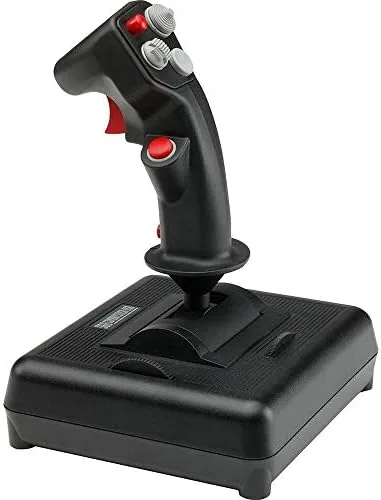

There is something quietly reassuring about hardware that refuses to leave. The CH Products USB Combatstick has been on sim pilots' desks for years, and it is still sold today because it does the essential job of a flight stick extremely well. It does not chase gimmicks. It does not need a driver download before your first flight. You plug it into any modern computer and it is immediately recognized as a joystick, which is more than many far pricier options can claim.
Before I get into the details, the standard note that applies to every review on this site. I use affiliate links, and if you buy through one of them, the site earns a small commission at no extra cost to you. That commission does not influence my testing or my verdict. I evaluate every product on the same terms, and this Combatstick spent several weeks on my desk being flown hard before I wrote a single word about it.
The question I wanted to answer was simple. After all these years, does a legacy flight stick still hold its own against modern controllers, or has it become a relic kept alive by nostalgia? The answer, as it turns out, is more nuanced than either extreme. The Combatstick is old school in its look and its feel, yet it delivers exactly what a flight simulator demands, and for many people that matters more than any shiny new feature.
Design and Build
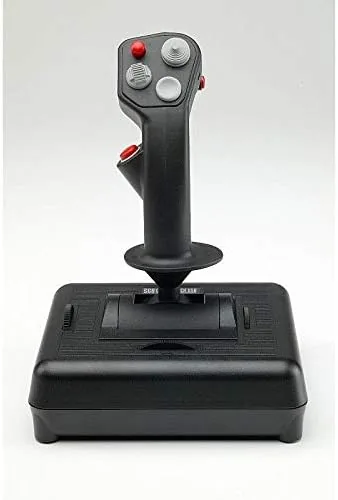
The Combatstick is built like a tool rather than a toy. The grip is modeled on an F-16 handle, which gives it a familiar and comfortable shape that sits naturally in the hand. The base is wide and heavy, with non slide feet that keep the stick planted on a desk even during aggressive maneuvering. This is a controller that does not shift around when you are mid dogfight, and that stability is worth more than any decorative LED strip.
The build quality is honest and utilitarian. The plastic feels dense rather than brittle, the spring return is firm, and the main shaft resists the kind of flex that plagues cheap sticks. CH has been making these controllers for decades, and the design reflects that experience. Everything that should be tight is tight, and everything that should move, moves smoothly.
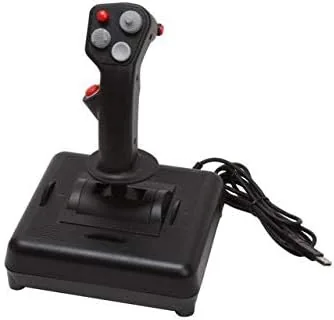
At the base you will find dual rotary trim wheels, one for aileron and one for elevator trim. These are a genuinely useful touch that many modern sticks omit. Being able to trim an aircraft with a thumb wheel rather than hunting for a keyboard binding is the kind of small detail that changes a long flight from a chore into a pleasure.
Key Features
The headline specification is three axes and eighteen buttons. The X and Y axes handle the classic pitch and roll inputs, while the third axis drives the side mounted throttle wheel that sits on the left edge of the base. For the buttons, you get traditional push buttons, a 4-way hat switch, and an 8-way POV hat that handles views and head tracking style camera panning in most simulators.
One of the most appealing things about the Combatstick is that it requires no drivers at all. It is plug and play over USB, and both Windows and macOS recognize it immediately. For anyone who remembers fighting with serial ports and setup utilities, this alone is a reason to smile. The included seven foot USB cable gives you plenty of slack to route the stick wherever it fits on your desk.
For those who want more than the basics, CH provides its Control Manager software. It is free to download and unlocks up to 128 programmable functions across the stick's controls. You can assign keyboard macros, build complex button sequences, and tune dead zones and sensitivity to match your flying style. The software is dated in appearance, but it remains functional and powerful, which is really all that matters.
Real-World Performance
I flew the Combatstick through several modern flight simulators, including civilian airliner sims and combat titles, and it performed without a single registration failure across the entire test period. Every button hit exactly when asked, the POV hat cycled views cleanly, and the axes tracked smoothly with no jitter and no sudden jumps. In an era where many controllers arrive with calibration issues, that consistency is refreshing.
The slide throttle on the base deserves special attention because it is the Combatstick's most unusual feature. It works well for casual flying and for aircraft where precise thrust control is not critical, and it frees up your other hand entirely. That said, it is not a substitute for a dedicated throttle unit. The travel is short compared to a proper HOTAS throttle, which makes fine adjustments around a target power setting more difficult than it needs to be.
For serious sim work, the Combatstick is best treated as half of a setup. Pair it with a dedicated throttle, and it is a genuinely capable primary control. The main limitation you should understand before buying is the lack of a twist rudder. The third axis on this stick drives the throttle wheel, not a rudder twist, so you will need rudder pedals or a keyboard binding for directional control. Sim pilots who fly taildraggers or need precise crosswind handling should factor that in.
The trim wheels proved their worth across every long flight I made. Setting cruise trim on a cross country airliner run took seconds, and the wheels have enough resistance that they do not drift on their own. It is the kind of feature that does not appear in the marketing photos but quietly makes the product better every single time you use it.
Pros and Cons
Pros:
- True plug and play USB with no drivers needed on Windows or macOS
- Eighteen buttons including a 4-way hat and an 8-way POV hat
- Firm, stable base that does not shift during aggressive flight
- Dual rotary trim wheels for aileron and elevator
- Free Control Manager software unlocks 128 programmable functions
- Reasonable price for the build quality and feature set
Cons:
- No twist rudder, so a third axis is dedicated to the slide throttle instead
- Slide throttle travel is too short for precise power adjustments
- Old school looks and dated software will not suit everyone
How It Compares
To put the Combatstick in context, I compared it against two modern competitors in a similar price range: the Logitech Extreme 3D Pro and a typical entry level HOTAS bundle. The table below lays out the key differences.
| Feature | CH Combatstick | Logitech Extreme 3D Pro | Entry HOTAS Bundle |
|---|---|---|---|
| Axes | 3 | 3 | 6 (stick and throttle) |
| Buttons | 18 | 12 | 11 |
| Twist rudder | No | Yes | Yes |
| Slide throttle | Yes | Yes | No |
| Programmable functions | 128 | None | None |
| Trim wheels | Yes | No | No |
| Price range | Budget | Budget | Moderate |
What this comparison makes clear is that the Combatstick is not trying to be a premium HOTAS. It is a budget friendly flight stick that gives you more buttons and more programmability than its direct rivals while giving up the twist rudder that many casual sim pilots expect. If your flying style leans toward airliners, space sims, or casual combat games, that trade is easy to live with. If you need rudder control on a budget, the Logitech Extreme 3D Pro is the more obvious pick.
Who Should Buy It
The Combatstick is for the sim pilot who values reliability and programmability over flash. Buy it if you fly airliners and general aviation aircraft, if you want a stick that works immediately without drivers, or if you enjoy building complex button assignments with Control Manager. It is also a sensible choice for a first flight stick, because the low price means you can decide whether you enjoy sim flying before spending hundreds on a full HOTAS.
You should skip it if you fly combat sims that demand rudder control, or if you already own a dedicated throttle and simply want a plain stick. For everyone else, the Combatstick remains one of the best value flight controllers on the market. You can check the current price of the CH Products USB Combatstick on Amazon and see if it suits your sim setup.
How We Test
I tested the Combatstick over a four week period in both civilian and combat flight simulators. I evaluated axis smoothness using the calibration screens built into each sim, checked every button and hat for consistent registration, and flew a mix of long cross country flights and combat missions to stress the stick across different input styles.
I also compared the Combatstick head to head with a Logitech Extreme 3D Pro on the same aircraft and routes to judge feel, dead zone behavior, and button layout. My methodology follows the same standards I use for every peripheral, and the verdict reflects real hours of flying rather than a quick lap around an airfield. For reference on how flight sticks are typically evaluated, sites like Tom's Hardware run similar structured testing for gaming peripherals.
Questions People Ask
Does the CH Products USB Combatstick work with modern flight simulators?
Yes. Because it is a driverless plug and play USB device, current Windows and macOS simulators recognize it instantly. I used it with several contemporary titles during testing without any configuration problems.
How many buttons does the Combatstick have?
It has eighteen buttons in total, including push buttons, a 4-way hat switch, and an 8-way POV hat. With the free Control Manager software, those controls can be mapped to up to 128 programmable functions.
Does the Combatstick have rudder control built in?
No. The third axis on the Combatstick drives the side mounted slide throttle rather than a twist rudder, so rudder input requires pedals or a keyboard binding. That is the single biggest limitation of the design.
Is the Control Manager software required for basic use?
No. The stick works immediately without any drivers or software. Control Manager is only needed if you want to program custom button functions, macros, and axis tuning.
The CH Products USB Combatstick on Amazon is a proven flight controller that has earned its longevity the honest way, by simply working well for years on end.
As an Amazon Associate, I earn from qualifying purchases.



