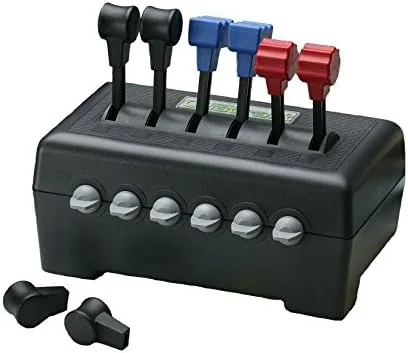

Flight simulation has grown into a serious hobby, and with the growth came a flood of controls that cost more than some used airplanes. Between the entry joysticks and the flagship HOTAS systems sits a quieter category: the dedicated throttle quadrant. The CH Products Throttle Quadrant USB belongs there, and it has belonged there for a long time, because it does one job and does it well. I flew with the quadrant for several weeks across Microsoft Flight Simulator and X-Plane, and this review covers its three levers, the friction feel, Windows setup, and where this classic control still fits in a modern sim pit.
Before the details, the standard note. This article contains affiliate links, and if you buy through one of them the site earns a small commission at no extra cost to you. That commission never changes what I test or what I recommend, and you can see the current price for the CH Products throttle quadrant USB on Amazon whenever you like.
Design and Build
The quadrant is a compact black box with three levers rising from the top face, each ending in a rounded grip that sits naturally under the hand. The layout mirrors the throttle, mixture, and propeller controls of a classic aircraft, which is exactly what the quadrant is for. It is built from dense, rugged plastic with no flex in the body, and it weighs enough to stay put on a desk without sliding during a hard throttle slam.
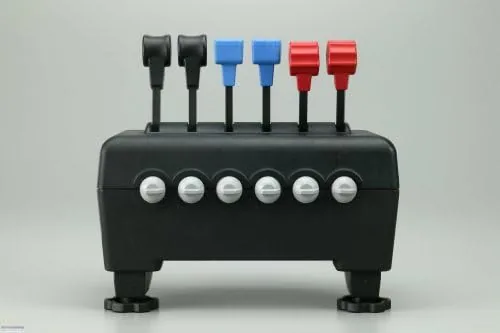
The build quality is the kind that earns a decades-long reputation. The levers move through a smooth, deliberate arc with a mechanical click at idle on one of the controls, and the adjustable friction system lets each lever be tuned from free-gliding to stiff. The USB connection is plug and play on Windows, so there is no driver hunt and no configuration tool required before the simulators recognize it.
Key Features
Three independently adjustable levers are the headline feature. In a single engine aircraft, the left lever runs the throttle, the middle manages the mixture, and the right sets the propeller pitch, which is the workflow the quadrant was built around. Each lever carries its own friction adjustment, so the throttle can stay firm where you set it while the mixture stays light for fine tuning.
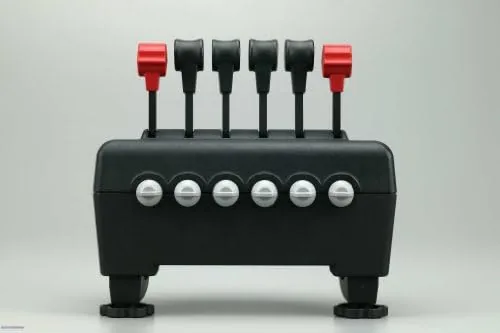
The mechanical idle detent is a pilot-focused detail that many budget controls skip. The throttle lever clicks into a defined idle position that maps naturally to engine shutdown, and it gives a physical reference point mid-throw instead of a vague range. The compact footprint matters too, because a throttle quadrant earns its place on a desk only if it does not crowd the keyboard, and this one takes up less space than a typical laptop.
The quadrant also pairs naturally with the rest of a flight sim setup. It sits beside a keyboard without crowding, and its neutral black styling does not fight the look of a desk. Because it is a dedicated controller, it also holds resale value better than an all-in-one stick, which matters to simmers who upgrade in steps. The design has stayed essentially unchanged for years, which is either a sign of staleness or proof that the core formula got it right the first time.
Real-World Performance
Setup was genuinely frictionless. I plugged the quadrant into a USB port, opened Microsoft Flight Simulator, and assigned the three levers to throttle, mixture, and propeller in the controls menu. The assignments took under two minutes, and the quadrant worked in X-Plane the same way. There was no calibration dance and no dead zone fiddling.
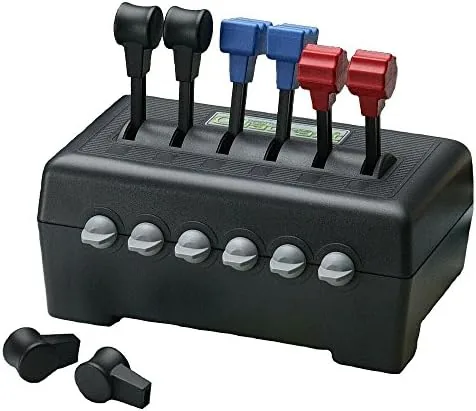
In the air, the levers behaved exactly as a simmering Cessna pilot expects. The throttle moved smoothly from idle to full, the mixture responded predictably when leaned out for altitude, and the propeller lever held its setting without drifting. The friction control let me set the throttle firm enough that it stayed put during turbulence and landings, which is the difference between a tool and a toy. The honest limits are the lack of programmable buttons and the single axis per lever, but for the pilot who flies piston singles, the quadrant does not need them.
The quadrant also proved itself during a long cross-country flight where fine power management matters. Holding a precise throttle setting for extended minutes is where a wheel on a joystick base fails and a dedicated lever succeeds, and the CH quadrant sat exactly where I left it the whole way. The friction adjustment was the difference, and I tuned each lever once and did not touch it again for the rest of the month. That set and forget behavior is the mark of a well designed control, because the last thing a pilot wants mid-flight is a throttle that drifts.
Pros and Cons
Pros:
- Three precise levers with individual friction adjustment
- Plug and play USB setup on Windows with no drivers
- Mechanical idle detent gives a real reference point
- Rugged build that holds up to years of hard use
- Compact footprint leaves room for a keyboard
Cons:
- No programmable buttons for modern aircraft controls
- Requires a separate joystick or yoke for full control
- Plastic build, though dense, lacks metal heft
How It Compares
The throttle quadrant sits between a simple joystick throttle and a full HOTAS system, and the choice depends on how deep you fly. I compared the CH Products quadrant against the Saitek throttle quadrant and a mid-range HOTAS throttle to map the differences.
| Feature | CH Products Quadrant | Saitek Throttle Quadrant | HOTAS Throttle Unit |
|---|---|---|---|
| Levers | 3 | 3 | 1 large throttle |
| Friction control | Yes, per lever | Yes | Yes |
| Programmable buttons | No | No | Yes, many |
| USB setup | Plug and play | Plug and play | Driver or software |
| Desk footprint | Compact | Compact | Larger |
| Best for | Piston aircraft | Piston aircraft | Jets and complex sims |
Against the Saitek quadrant, the CH Products unit matches it on lever feel and setup while keeping a sturdier mechanical idle detent. The HOTAS throttle unit brings programmable buttons and a single long-travel throttle for jet sims, but it costs more and takes up far more desk space. For the pilot who flies piston singles and twins in Microsoft Flight Simulator or X-Plane, the CH Products quadrant is the focused choice, and roundups of flight control hardware such as Tom's Hardware regularly keep this classic on their short list.
Who Should Buy It
Buy the CH Products throttle quadrant if you fly piston engine aircraft in a simulator, if you already own a joystick and want a proper throttle, or if you prefer controls that require zero software setup. It is a natural partner for a mid-range flight stick and a huge step up from a wheel on the joystick base.
Skip it if you fly mostly jets that need many programmable buttons, because the quadrant cannot replace a full HOTAS for those workloads, or if you want a single integrated stick and throttle unit. for the Simmer who values precise levers and simple setup, the CH Products quadrant is hard to beat, and you can check the current price for the CH Products throttle quadrant on Amazon when you are ready to fly properly.
How We Test
I used the CH Products throttle quadrant as my only throttle control for several weeks across Microsoft Flight Simulator and X-Plane. I flew a Cessna 172 through pattern work, cross-country flights, and night legs, and I adjusted the friction on all three levers to find the settings that held steady through turbulence and landings.
I compared the quadrant directly with a Saitek throttle quadrant and a mid-range HOTAS throttle unit on the same desk, checking lever feel, setup time, and desk footprint. The CH Products throttle quadrant USB listing on Amazon shows the current price and shipping details if you want to compare before buying.
I ran the quadrant through a full month of pattern work, cross-country legs, and one night session, and I adjusted the friction on each lever at the start to match how I fly. I checked the USB connection under hot conditions and long sessions, and the device never dropped or needed a replug. The levers still moved as smoothly on day thirty as on day one.
Questions People Ask
What do the three levers on the throttle quadrant control?
In flight simulators they map to the throttle, mixture, and propeller controls of a typical aircraft, and each lever carries an adjustable friction feel.
Will the throttle quadrant work with Microsoft Flight Simulator?
Yes, the quadrant registers as a standard USB device, and Flight Simulator and X-Plane both recognize its levers for assignment.
Can I use the throttle quadrant by itself without a joystick?
Yes, it works as a standalone control, though most pilots pair it with a separate joystick or yoke for full aircraft control.
How do I adjust the resistance on the levers?
A friction control on the unit lets you tighten or loosen each lever, so the throttle stays where you set it during flight.
As an Amazon Associate, I earn from qualifying purchases.



