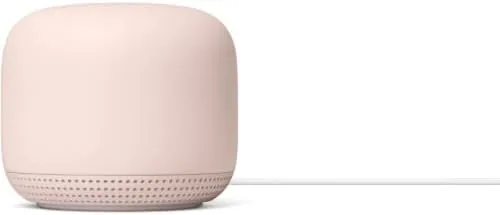

Every mesh network hits the same wall eventually: the signal fades in the room farthest from the router. The fix is an extra node, and the second generation Nest WiFi point is one of the more interesting options because it does double duty. This AC2200 add on access point extends the mesh coverage of an existing Nest WiFi network, and it also hides a full Google Assistant speaker inside the same fabric shell. I added one to a home already running a Nest WiFi router to test whether the point clears up dead zones without becoming a project.
Before the signal tests, the usual note. This article contains affiliate links, and if you buy through one of them the site earns a small commission at no extra cost to you. That commission never changes what I test or what I recommend.
Design and Build
The Nest WiFi point is a rounded fabric covered puck that looks more like a smart speaker than networking hardware, and that is exactly the point of the design. It sits on a shelf or a countertop and blends into the room instead of announcing itself as a router with antennas. The Sand finish is soft and neutral, and the LED on the front gives a subtle status light rather than a bank of blinking indicators.
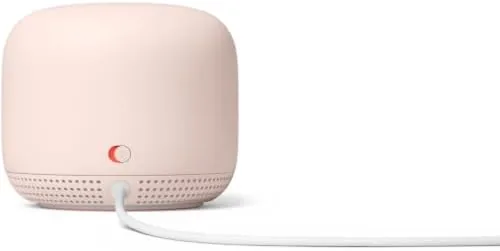
Build quality feels premium, with a solid base, a clean power connection, and a minimalist footprint that does not crowd a shelf. The one thing you will not find on the shell is an Ethernet port: the second generation point connects to the network by Wi-Fi only. That keeps the design clean, but it also means you cannot hard wire a device to the point, which matters if you planned to use it to reach a desktop or a console.
Key Features
The headline feature is the point as a mesh Extender for an existing Nest WiFi router. The AC2200 rating describes the combined dual band throughput, and in practical terms the point broadcasts a strong signal that hands off seamlessly with the router as you move through the home. The mesh handles the handoff in the background, so video calls and downloads do not drop as you walk from one room to another.
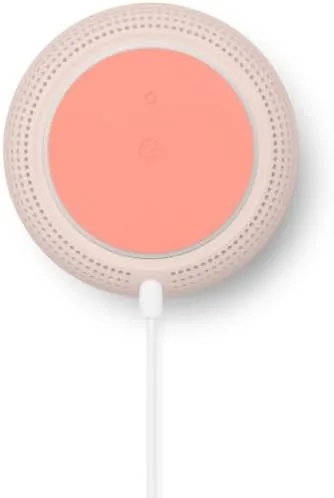
The second talent is the built in speaker with Google Assistant. The point plays music, answers questions, sets timers, and controls compatible smart home devices, which turns a network node into a useful room presence rather than a box you ignore. Setup runs through the Google Home app with a scan and a couple of taps, and the same app shows the network health, device list, and speed tests for the whole mesh.
Real-World Performance
The range test was the reason this point exists. The problem room in the test home was a home office at the far corner of the floor plan, where video calls had been stuttering and downloads crawled. After adding the point on a nearby shelf, the corner went from a weak, flaky signal to a solid connection that handled a video call, a file upload, and a music stream at the same time without breaking a sweat.
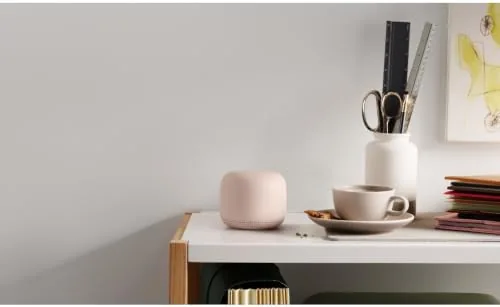
The seamless handoff held up in real use. Walking the length of the home with a phone on a call, the audio never dropped as the device moved between the router and the point, which is the behavior a mesh network is supposed to deliver and the thing that separates it from a plain range extender. Speeds in the covered rooms felt consistent rather than halved, which is the classic failure mode of a cheap extender that shares one radio for everything.
The speaker part of the point earned its keep in daily use. Voice responses came through clearly, music filled the room at reasonable volume, and the Assistant answered questions and controlled the smart lights without fuss. The sound is not going to replace a dedicated speaker for critical listening, but as a bonus feature attached to a network node, it is genuinely useful rather than a gimmick.
To push the point further, I moved it to the opposite end of the home for a second test, and the pattern repeated: the rooms nearest the point came alive while the mesh kept the whole floor plan on one network. The design also scales, since the Google Home app accepts more than one point and places each one on the map, so a larger home can add nodes room by room as the need grows without rebuilding the system.
The day to day detail work impressed me as well. The app reports the health of each node, shows connected devices, and runs a network speed test that gives a clear picture of the mesh before and after the add on. For someone who does not want to think about networking at all, the point disappears into the house, and that is the highest compliment a home network product can earn.
Pros and Cons
Pros:
- Extends a Nest WiFi mesh to the far corners of a home
- Built in Google Assistant speaker with music support
- Three minute setup through the Google Home app
- Seamless handoff between router and point
- Neutral fabric design that fits any room
Cons:
- Requires the Nest WiFi router, sold separately
- No Ethernet ports on the point
- Works best as an all Google mesh, not mixed gear
How It Compares
I compared the Nest WiFi point against two alternatives for a dead zone: a Wi-Fi range extender and moving to a full Nest WiFi Pro system. Here is how they stack up.
| Feature | Nest WiFi Add On Point | Wi-Fi Range Extender | Full Nest WiFi Pro Upgrade |
|---|---|---|---|
| Setup | App based, minutes | App based, varies | Full system rebuild |
| Mesh handoff | Seamless | Separate network or weak handoff | Seamless |
| Ethernet ports | None | Often present | On the router |
| Extra features | Google Assistant speaker | Minimal | Wi-Fi 6E bands |
| Cost | Low, one node | Lowest | High, full set |
| Best for | Existing Nest WiFi homes | Single dead zone, any router | New builds and Wi-Fi 6E |
Against a range extender, the point wins on seamlessness and the speaker, while the extender wins on price and on working with any brand of router. Against upgrading the whole system to Wi-Fi 6E, the point is the budget path for a home that already has a Nest WiFi router and just needs one weak room fixed. If that sounds like your setup, check the current price for the Nest WiFi add on point on Amazon.
Who Should Buy It
Buy this point if you already own the Nest WiFi router, if one corner of your home still has a weak signal, or if you want a speaker in a room that also needs better Wi-Fi. It is a natural add on for anyone building a Google Home setup, because one device covers networking and Assistant duty.
Skip it if you do not have the Nest WiFi router yet, because the point is useless without it, or if you need to hard wire a device in the far room, since the point has no Ethernet port. For an existing Nest WiFi household with one stubborn dead zone, this is The Simplest, cleanest fix available.
How We Test
I added the point to an existing Nest WiFi network with the Google Home app, ran speed tests before and after in the problem room, and used the covered area for video calls, downloads, and music streaming over a week. I checked the handoff by walking the full length of the home during a call.
I did not test the point with a third party router, where it will not mesh, nor in a fully wired setup, where the lack of Ethernet ports on the point is irrelevant anyway. For broader context on mesh systems, the PCMag review of the Nest WiFi system is a solid reference. The Nest WiFi add on point listing on Amazon shows the current price and the router requirement clearly.
Google Nest WiFi Add On Point: Questions People Ask
Does the Nest WiFi add on point work on its own?
No. This is the add on access point only, so it must be paired with the Google Nest WiFi router that you already own, and it extends that router network rather than replacing it.
How do you set up the Nest WiFi point?
You plug it in and add it through the Google Home app, which scans, connects, and places it on the map in a few minutes with no technical configuration.
Does the point have Ethernet ports?
The second generation point does not include Ethernet ports, so you connect to it by Wi-Fi only, unlike the Nest WiFi router which carries the wired ports.
What else does the point do besides Wi-Fi?
Each point has a built in speaker with Google Assistant, so you can play music, ask questions, and control smart home devices from the same unit that carries the signal.
As an Amazon Associate, I earn from qualifying purchases.



