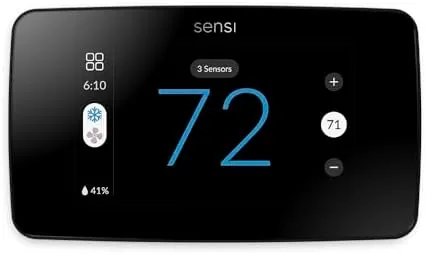
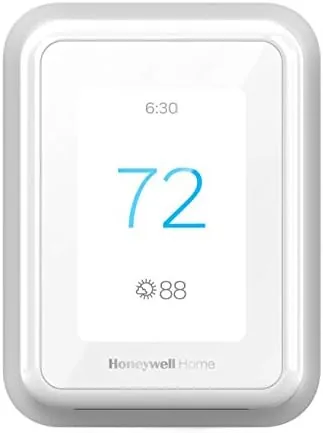
Thermostats occupy a strange place in the modern home. They control the comfort of every room, yet most people interact with them for five seconds a day, twisting a dial or tapping a button without a second thought. The Google Nest Thermostat sets out to change that relationship with a mirror finished display, schedules that learn from your habits, and control through the Google Home app, all at a price that undercuts the original Nest Learning Thermostat by a wide margin. This is the record of a month with the Sand edition, installed in a home with central heating and air conditioning, testing installation, the daily experience, and whether the promised energy savings actually materialize.
Before the details, the standard note. This article contains affiliate links, and if you buy through one of them the site earns a small commission at no extra cost to you. That commission never changes what I test or what I recommend.
Design and Build
The Nest Thermostat is a study in restraint. It is a small round device with a glossy mirror display that shows the temperature in a clean, minimal typeface, and the finish reflects the room softly when the screen is idle. The Sand color is a warm neutral that blends into a painted wall far better than the glossy white of many competitors, and it gives the thermostat a piece of jewelry quality that most smart home devices lack.
Build quality is excellent. The unit is light but feels solid, the outer ring is the primary control and rotates with a satisfying detent, and the screen is crisp and readable from across a room. The thermostat mounts on a base plate that attaches to the wall, and the wiring connections are clearly labeled for a straightforward install. There are no sharp edges and no cheap plastic seams; it looks like a product designed by a company that takes industrial design seriously.

The device runs on the wire power from the HVAC system, so there is no battery to change and nothing to recharge, and the display sleeps when unused to preserve the finish and save energy. The physical design is deliberately minimal, which is exactly right for a device that lives on a hallway wall and needs to suit any decor.
Key Features
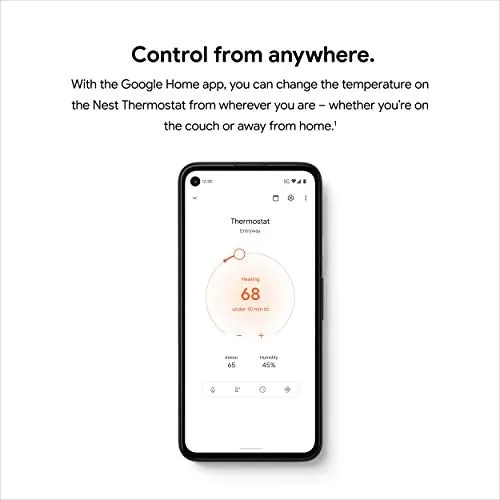
The mirror display is the first feature anyone notices, but the substance is in the software. The Nest Thermostat connects over WiFi and lives in the Google Home app, where you set schedules, adjust temperature remotely, and see the thermostat status from anywhere. That remote control is the feature that changes daily life, letting you warm the home before you arrive and save energy when you are away.
Scheduling is the heart of the device. You can build a weekly schedule in the app with different temperatures for morning, day, evening, and night, and the thermostat follows it reliably. Unlike the pricier Learning Thermostat, this model does not auto learn your habits, but the manual schedule is easy to set and easy to adjust, and for most people that is all the intelligence they need.

Eco mode is the energy saving feature. The thermostat switches to a more efficient temperature when you are away, either through a schedule, a manual switch, or detection of your absence, and it raises or lowers the temperature enough to save energy without making the home uncomfortable on return. Energy history in the app shows your usage over time, giving you a clear picture of when the system runs and how much it costs. The thermostat also integrates with the Google Home ecosystem, so voice control through a Nest speaker or a phone is a natural part of the experience.
Real-World Performance
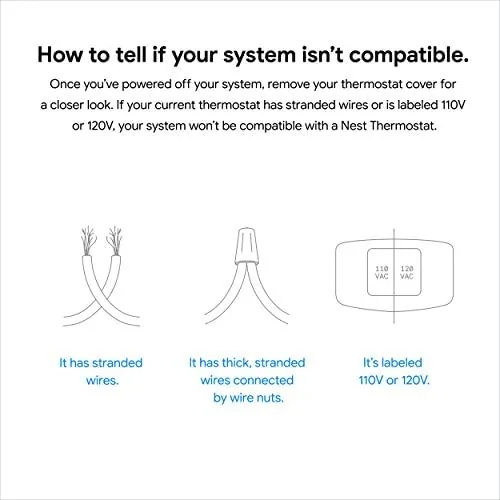
Installation was the biggest practical hurdle, and it was manageable. The Nest Thermostat works with most standard HVAC systems, and the app includes a compatibility check before you buy. My system had a C wire, which made the install straightforward: turn off power, connect the labeled wires to the base, attach the thermostat, and follow the app setup. The whole process took about forty minutes, and the in-app instructions were clear enough for a confident DIY user.
The daily experience is where the thermostat earns its keep. The mirror display shows the current temperature at a glance, the rotating ring makes adjustments feel natural, and the app responds instantly when I change the temperature from another room or while away. I found myself using the remote control constantly, warming the home before returning from a cold day out and lowering the temperature when I left, in a way I never did with the old thermostat.
The energy savings were real but modest in my test. By setting a sensible schedule and relying on Eco mode when away, I used noticeably less heating than the same period in prior years, with no sacrifice in comfort. The savings depend heavily on your habits: someone who already adjusts the thermostat manually will save less, while someone who leaves heating running all day will save more. The energy history feature made my usage visible in a way that encouraged better habits, which may be the device's most valuable effect.
The honest limitations are worth naming. The schedule is manual rather than self learning, so there is no week of watching before the thermostat figures out your routine. There is no remote sensor in the box, which some competitors include for balancing the temperature of different rooms, and very old or unusual HVAC systems may need a professional install. None of these are deal breakers for the intended buyer, but they define the line between this thermostat and the pricier models.
Pros and Cons
Pros:
- Clean mirror display that looks beautiful on a wall
- Simple schedule setup through the Google Home app
- Remote control from anywhere is genuinely useful
- Eco mode and energy history help cut usage
- Most systems install without a professional
- Voice control through the Google Home ecosystem
Cons:
- Schedules are manual, not self learning
- No remote room sensor included
- Compatibility varies for very old systems
- Mirror display shows fingerprints
How It Compares
The smart thermostat market has a clear structure, so the table below compares the Nest Thermostat against the premium Nest Learning Thermostat and a budget programmable model to clarify where the value sits.
| Feature | Nest Thermostat | Nest Learning Thermostat | Budget Programmable |
|---|---|---|---|
| Price | Most affordable | Premium | Lowest |
| Scheduling | Manual in app | Self learning | Manual on unit |
| Remote control | Yes, Google Home app | Yes | No |
| Eco mode | Yes | Yes | No |
| Display | Mirror finish | Round metal | Basic LCD |
| Best for | Smart value | Hands free learning | Plain scheduling |
Against the Nest Learning Thermostat, the plain Nest loses the self learning algorithms and the metal ring design, but it costs significantly less and covers the core smart features for most homes. Against a budget programmable thermostat, the Nest wins on the app, remote control, and Eco mode, which are the features that actually deliver savings. For the majority of buyers who want smart control without paying for machine learning, the Nest Thermostat is the sensible middle, and you can check the current price at the Google Nest Thermostat on Amazon.
Who Should Buy It
Buy the Nest Thermostat if you want a smart thermostat at a fair price, if you like the idea of controlling your heating and cooling from your phone, or if you want a device that makes energy use visible and encourages better habits. It is ideal for renters and homeowners with standard systems, for people who already live in the Google ecosystem, and for anyone upgrading from a plain programmable thermostat.
Skip it if you want a thermostat that learns your schedule entirely on its own, in which case the Learning Thermostat is the right choice, or if you need to balance the temperature of multiple rooms with remote sensors. For everyone else, the Nest Thermostat is one of the simplest upgrades a home can make, and the Nest Thermostat listing on Amazon shows current pricing and color options.
How We Test
I installed the Nest Thermostat in a home with central heating and air conditioning and used it daily for a month. I tested the schedule feature across weekdays and weekends, used remote control from away, and relied on Eco mode to confirm the energy savings over a full billing period.
My assessment is based on real home use and bill comparison rather than laboratory measurement. For independent technical coverage of the Nest Thermostat, PCMag's review of the Google Nest Thermostat offers useful measurements and context. The current Nest Thermostat price on Amazon is the last detail to check before deciding.
Questions People Ask
Do I need a C wire to install the Google Nest Thermostat?
In most cases yes, though the included power adapter or a compatible conversion can often cover the gap, and it is worth running the compatibility check before purchase.
Does the Nest Thermostat work with Google Home?
Yes, it is designed around Google Home and pairs with the Google Home app on Android and iOS, with clean voice control when you want it.
Does the Google Nest Thermostat actually save energy?
It helped in my test, because the schedules, Eco mode, and remote control kept my heating bill lower than the same month in prior years, though actual savings vary by home.
Is this thermostat hard to install?
No, the standard version is straightforward for a confident DIY user, and I did mine myself in under an hour with the in-app guide and the included backplate.
As an Amazon Associate, I earn from qualifying purchases.