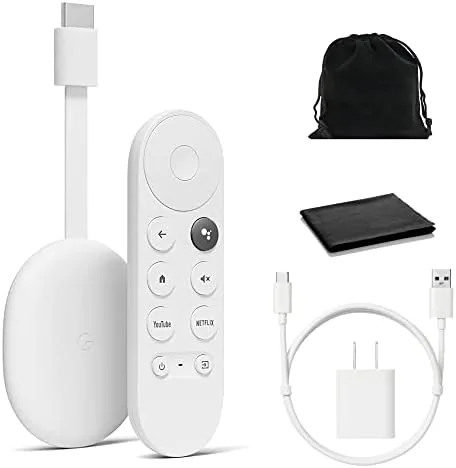

Television software ages badly. A smart TV bought five years ago now drags through menus, and a non smart TV never had any menus to drag through at all. The Google Chromecast with Google TV solves both problems with a dongle the size of a USB stick, plug it into an HDMI port and your television gains a modern streaming platform, voice search, and 4K HDR playback. I ran one for a month in my living room to see whether the little dongle really does change a television.
This review is based on daily use. Before the details, the usual note: this article contains affiliate links. If you buy through one of them, this site earns a small commission at no extra cost to you, and it does not affect what I test or what I recommend in this Chromecast review.
Design and Build
The Chromecast is small enough to disappear. A short oval dongle plugs straight into an HDMI port, and a flexible HDMI cable on the same body lets you tuck it behind a wall mounted television or into a crowded cabinet. In Snow white it is unobtrusive, and the whole thing weighs almost nothing, so it hides behind the set and does its work out of sight.
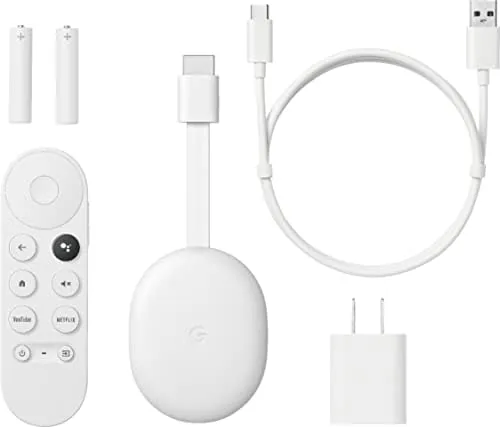
The remote is where the design shows. A compact white wand with a large, rounded directional pad, dedicated buttons for YouTube and Netflix, and a voice search button on the side. It feels good in the hand, and the buttons click with a satisfying response. The remote connects over Bluetooth, so it does not need to point at the television, and it is powered by two standard AAA batteries.
The box adds a thoughtful touch: a small pouch for carrying the remote and a cleaning cloth for the dongle. It is a minor thing, but it signals a product designed with travel and care in mind, and the whole kit fits in a pocket or a small travel bag.
Key Features
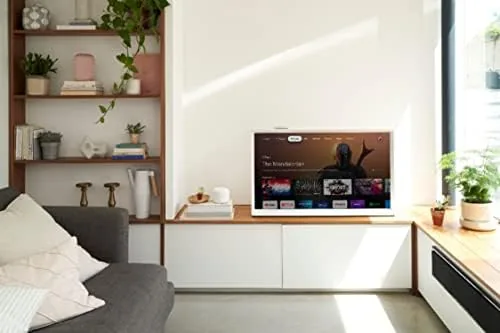
The star is the Google TV interface. Instead of casting from a phone and hoping, the Chromecast puts a full home screen on your television with apps arranged in rows, personalized recommendations, and a search that spans every service. You pick a show and it tells you which app has it, which saves the pointless app by app hunt that older streaming devices force on you.
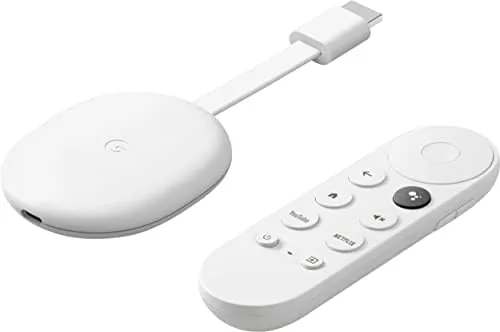
Picture quality backs up the interface. The dongle streams 4K Ultra HD with HDR including Dolby Vision, and it passes through Dolby Atmos audio, so it gets the most out of a modern television. On a 1080p set it simply upscales and delivers a clean picture, which means the same dongle works whether you own an old screen or a new one.
Voice search is the feature you will use constantly. Press the mic button, say the name of a movie or an actor, and the result appears in a moment across all your apps. Google Assistant also answers questions, controls smart home devices, and sets timers. The device works with all the major services, from Netflix and Prime Video to YouTube and live TV apps, and it still supports casting from a phone for anything the interface misses.
Real-World Performance
The interface speed surprised me. Menus open without the lag that plagues built in smart TV software, apps launch in a couple of seconds, and scrolling through rows stays smooth. That responsiveness is the whole point of the product, and the Chromecast delivers it every time. I stopped reaching for the television's own remote within the first week.
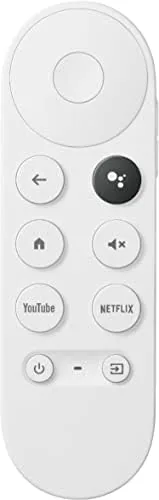
The picture on my 4K set was excellent. A Dolby Vision film looked rich and detailed, and even a standard 1080p stream looked clean and well presented. The dongle handled a busy family evening with multiple services without dropping a connection, and the Wi Fi stayed solid in a room a floor away from the router. Casting from a phone worked instantly, and the voice search found an obscure documentary by name alone.
The remote's Bluetooth link never dropped once in a month, and the voice button heard commands from across the room. Google Assistant handled my smart lights and answered the odd question between shows. The only small annoyance is the occasional personalized recommendation row that does not match my taste, but that is a minor quibble easily fixed by clearing watch history. For a device this small and this cheap, the performance is remarkably complete.
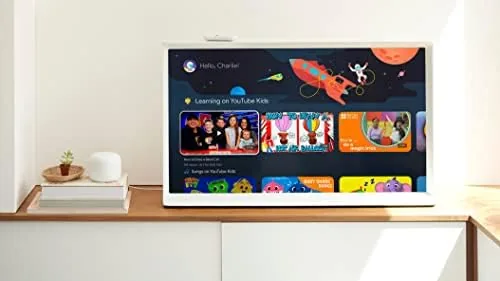
Multi user support is a quiet win for a family device. Each member of the household gets their own profile, watch history, and recommendation rows, and the kids profile locks content behind a PIN so young viewers only see age appropriate titles. Switching profiles takes one press on the remote, and the interface remembered my spot in a series the moment I switched back. It is the kind of feature you do not notice until a house full of people shares one screen, and then it becomes essential.
Pros and Cons
Pros:
- Fast, responsive Google TV interface with cross app search
- 4K HDR with Dolby Vision and Dolby Atmos support
- Voice remote with reliable Google Assistant integration
- Tiny design that disappears behind a television
- Works on any HDMI television, smart or not
Cons:
- Requires a USB power source in addition to the HDMI port
- Personalized recommendations are not always accurate
- No Ethernet port, so a strong Wi Fi signal matters
How It Compares
The Chromecast with Google TV faces the Amazon Fire TV Stick, the Roku Streaming Stick, and the Apple TV 4K. Against the Fire TV Stick, the Chromecast counters with a cleaner interface and fewer ads in the menus, though the Fire Stick has a slight edge in Amazon content integration. The Roku is simpler and cheaper, but its search is less complete than Google TV's across app results.
Against the Apple TV 4K, the Chromecast loses on raw speed and premium feel but wins decisively on price, and the Apple TV only makes sense if you live inside the Apple ecosystem. For most households the Chromecast with Google TV is the best balance of price, picture quality, and search, especially because it also performs well as a smart home hub for Google Assistant. You can compare the Snow model against the Fire TV Stick at the Chromecast listing on Amazon to see which bundle fits your setup.
| Feature | Chromecast with Google TV | Fire TV Stick 4K | Apple TV 4K |
|---|---|---|---|
| Resolution | 4K HDR | 4K HDR | 4K HDR |
| Interface | Google TV | Fire TV | tvOS |
| Voice search | Google Assistant | Alexa | Siri |
| Ads in menus | Few | Many | None |
| Price | Low | Low | High |
Who Should Buy the Chromecast with Google TV
Buy it if your television's built in software is slow or missing apps, if you have a non smart television that deserves a second life, or if you want one interface that searches across every streaming service you own. It is ideal for households with mixed services, for a bedroom television that needs a simpler remote, and for anyone who wants Google Assistant in the living room without buying a new television.
You can check the current price of the Snow model at the Chromecast with Google TV on Amazon. If you want an even cheaper option, the HD version of the same device covers basic streaming on older sets.
How We Test
I used the Chromecast with Google TV for a month as my primary streaming device on a 4K HDR television. I judged interface speed, picture quality with Dolby Vision and Atmos content, voice search accuracy, casting reliability, and how well the dongle handled a household sharing several streaming subscriptions.
The Verge has reviewed the Chromecast with Google TV and its place in the streaming market at The Verge, and their assessment of the interface aligns with my experience: Google TV is the strongest reason to buy. A month of evening viewing keeps the verdict honest. This little dongle genuinely upgrades a television.
Questions People Ask
Does the Chromecast with Google TV support 4K HDR?
Yes. It streams 4K Ultra HD with HDR including Dolby Vision and supports Dolby Atmos audio, so it makes the most of a 4K television and a sound bar. On a 1080p set it still delivers a clean, upscaled picture.
Does it work with my existing TV?
The dongle plugs into any HDMI port, so it upgrades a smart television or a non smart television as long as the set has an HDMI input and a USB power source. It does not need a particular brand of television to work.
Can I use it without a remote?
Yes. The Google TV mobile app includes a remote on your phone, and the included voice remote works with Google Assistant for hands free search and control. You can also cast to it from any phone or laptop.
As an Amazon Associate, I earn from qualifying purchases.



