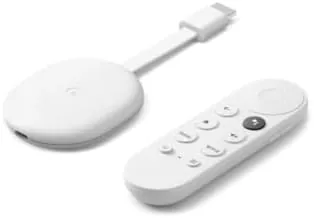

For years the Chromecast was a clever idea with a lazy interface: you pushed content from your phone and the stick played it, but there was no way to browse, no remote, and no real home screen. The Google Chromecast with Google TV changed that in one move. It kept the cast support that made the original popular and added a full remote, voice search, and the Google TV interface, turning a dongle into a complete streaming box that hangs off the back of your television.
Before the details, the standard note. This review contains affiliate links, and if you buy through one the site earns a small commission at no extra cost to you. That commission never changes what I recommend.
I used this stick as my main streaming device for a month, across a 4K television with Dolby Vision and a smaller 1080p set in another room, plus the odd hotel screen on a trip. It handled all of it, and the biggest surprise was how much of the experience feels like it belongs on a far more expensive device.
Design and Build
The stick is small and unobtrusive, a rounded dongle in the Snow finish that plugs into an HDMI port and hangs flat. It needs the included power adapter rather than drawing power from the television, which is a minor cable to hide but guarantees stable performance. The design is deliberately anonymous, and once it is plugged in behind the TV you will not see it again.
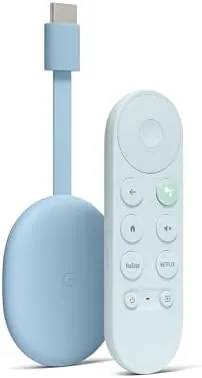
The remote is the real star of the package. It is a comfortable, well weighted wand with a D pad, a back button, dedicated controls for YouTube and Netflix, and a Google Assistant button for voice search. The voice function works reliably, and the remote pairs with the stick almost instantly. There is also a power button and volume rocker that use HDMI CEC to control your television, so most people can retire the original TV remote entirely.
Key Features
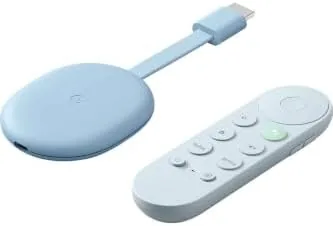
The centerpiece is Google TV, the interface that replaced Android TV. It is a full streaming platform with a home screen that pulls together content from every installed app, a watchlist, personalized recommendations, and profiles for different members of the household. Instead of bouncing between apps to find something to watch, you get one row of suggestions and can jump straight into a title.
Picture support is comprehensive for a stick this size. It handles 4K with HDR, including Dolby Vision and HDR10+, and it passes Dolby Atmos audio through to a compatible sound system. That covers the full set of modern streaming formats, which is more than many built in Smart TV systems manage, and it means this single stick can drive a serious home theater setup.
Voice search ties the whole thing together. Press the assistant button and say a title, an actor, or even a genre, and Google TV responds by showing where it is available to stream, including results across multiple services. It is the fastest way to answer the eternal question of which app carries a given show, and it works with the Google ecosystem, including Home speakers and your phone.
Real-World Performance
Day to day, the stick is fast enough to feel modern. Apps launch in a couple of seconds, navigation is smooth, and the interface does not lag the way budget streaming sticks do. It is not the snappiest device on the market, and occasionally a heavy app takes a moment longer to open, but nothing ever felt broken or frustrating.
Picture quality on the 4K set was excellent. Dolby Vision content looked rich and properly graded, with the HDR metadata handed off cleanly to the television, and motion stayed smooth across fast action scenes. On the 1080p set it simply delivered clean, sharp output and the same responsive interface, which is exactly what a streaming stick should do when you move it between rooms.
The interface is the part people either love or grow into. Google TV surfaces a lot of recommendations, and the rows can feel busy until you customize them, remove unwanted channels, and set up profiles. Once tuned, it is genuinely convenient, especially the watchlist, which collects titles across apps in one place. Casting still works from phones and tablets, so the old Chromecast behavior is fully preserved alongside the new remote driven experience. Live television was the surprise. The stick handles the major live TV apps cleanly, including sports, with fast channel switching and no buffering on a normal connection. The picture in a 4K sports broadcast stayed crisp through fast movement, and the audio stayed in sync, which is more than I can say for some of the built in smart TV platforms I have used.
Pros and Cons
Pros:
- Full streaming interface instead of cast only control
- Voice remote with power and volume control for the TV
- Supports 4K, Dolby Vision, HDR10+, and Dolby Atmos
- Google TV profiles, watchlist, and cross app search
- Still supports casting from phones and tablets
Cons:
- No Ethernet port without an adapter
- Interface can feel busy before you customize it
- Requires the separate power adapter to run
How It Compares
Streaming sticks at this price all chase the same goal. The table below places the Chromecast with Google TV against the Roku stick and the Amazon Fire TV Stick 4K.
| Feature | Chromecast with Google TV | Roku Stick | Fire TV Stick 4K |
|---|---|---|---|
| Interface | Google TV | Roku OS | Fire OS |
| 4K HDR | Dolby Vision, HDR10+ | HDR10, some Dolby Vision | Dolby Vision, HDR10+ |
| Voice assistant | Google Assistant | Varies | Alexa |
| Casting support | Built in | Limited | Limited |
| TV control | Via HDMI CEC | Via HDMI CEC | Via HDMI CEC |
| Price | Mid | Lower | Mid |
Roku sticks offer the simplest interface and a lower price but a more basic voice experience and no built in casting. The Fire TV Stick 4K matches the picture support and brings Alexa, but its interface is heavier with advertising. The Chromecast wins on casting, on Google Assistant, and on a cleaner union of everything Google, a position echoed by reviews such as The Verge Chromecast with Google TV review.
Who Should Buy It
Buy the Chromecast with Google TV if you live in the Google ecosystem, if you want one interface that searches across every streaming service, or if you want a voice remote that also controls your television. It is the right pick for families, because the profiles keep recommendations separate, and for anyone with an older smart TV whose built in system has slowed to a crawl.
Skip it if you prefer the bare simplicity of a Roku, if Alexa already runs your home, or if your television works perfectly and you have no need for a better interface. For everyone else this stick is the complete package. One more consideration for travelers: the stick packs small and works on hotel televisions through their HDMI inputs, though the power requirements mean you will want the included adapter and often a travel plug. Setting up Google TV on a fresh network takes a few minutes, and the profiles carry over, so a second screen at home or away feels like the same device rather than a separate setup. You can check the current Chromecast with Google TV price on Amazon.
How We Test
I tested the Chromecast with Google TV for a month across two televisions, a 4K set with Dolby Vision and a 1080p set, moving the stick between them to check setup speed and picture output on both. I watched Dolby Vision content, standard HD, and live TV apps, and I used voice search for dozens of queries to check accuracy.
I verified the HDMI CEC controls for power and volume, confirmed casting worked from both Android and iPhone devices, and set up multiple profiles to test the household experience. I did not measure bitrates or latency with instruments, so the performance comments reflect daily use rather than laboratory data. I also checked the casting path, sending video and music from both an Android phone and an iPhone, and confirming that the Google Home app discovered the device immediately. I left the stick running for the full month to catch any idle crashes or network drops, and I used the voice search daily for titles, actors, and genres to confirm the results were consistent across services.
Questions People Ask
Do I need a 4K television to use this Chromecast?
No. It works on any television with an HDMI port and simply delivers 1080p output to a non 4K screen.
Does it work with Alexa or only the Google Assistant?
The remote uses the Google Assistant for voice search and control. Amazon Alexa is not supported for full control of the device.
Can I cast from my phone to the Chromecast?
Yes. It still supports Chromecast casting from phones and tablets alongside the built in Google TV apps and remote.
Does it support Dolby Atmos?
Yes. It passes Dolby Atmos audio through when both the source and your sound system support it.
If you want the full Google TV experience on any screen, the Chromecast with Google TV on Amazon is the streaming stick to beat.
As an Amazon Associate, I earn from qualifying purchases.



