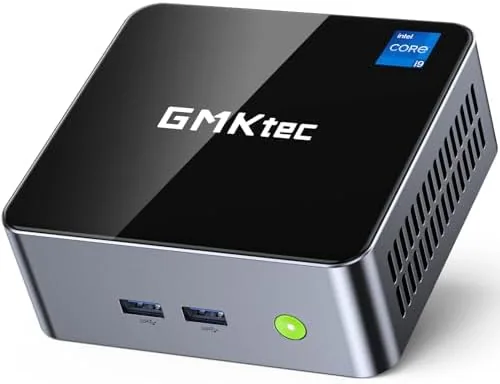

The desktop computer has spent the last decade shrinking, and the GMKtec M3 is a strong argument that the tower is no longer necessary for most households. Inside a black chassis roughly the size of a thick paperback sits an Intel Core i5 12450H with eight cores and twelve threads, 16GB of DDR4 memory, a 512GB SSD, dual HDMI 4K output, WiFi 6, and 2.5 gigabit Ethernet. I ran this mini PC as my primary Desktop for two weeks, doing office work, streaming, light photo editing, and a bit of light gaming, to find out where the compromises hide.
One note before the findings: this review contains affiliate links. Purchases through them support the site at no extra cost to you, and they never steer the verdict.
Design and Build
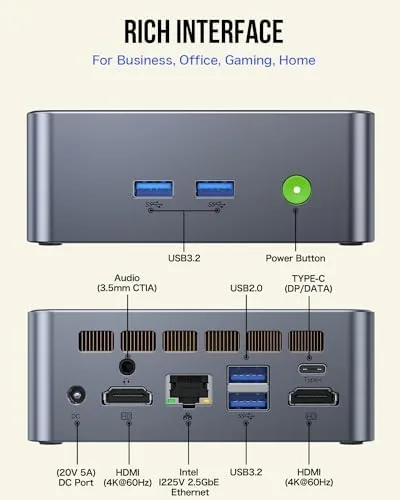
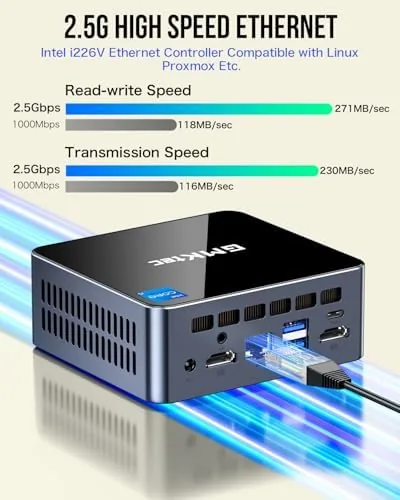
The M3 is a compact aluminum and plastic chassis in matte black, measuring roughly five inches on each side. The finish is a soft textured black that resists fingerprints, and the top panel carries a subtle GMKtec logo. On the front sit two USB 3.2 ports, a USB Type C port, and a headphone jack, which are the ones you use daily. The rear holds two full HDMI ports, two more USB 3.2 ports, a 2.5 gigabit Ethernet jack, and the barrel power input.
The build quality is genuinely good for the price. The chassis feels dense and solid rather than hollow, the rubber feet keep it from sliding, and a wall mount plate and stand are included if you want to hide the unit behind a monitor. The top vents and the rear fan are the only visible cooling, and the fan is where most of the physical engineering effort has gone.
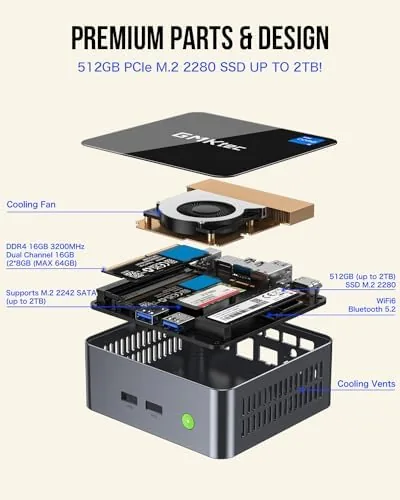
Underneath the unit, four screws release a bottom panel that exposes the two SODIMM memory slots and the M.2 SSD slot. Upgrading both is a genuinely easy job, which is rare in the budget mini PC world and a real point in the M3's favor.
Key Features
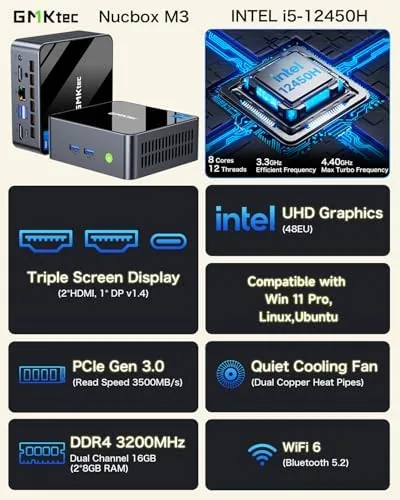
The engine is the Intel Core i5 12450H, a processor normally found in laptops. Its eight cores and twelve threads clock up to 4.4 gigahertz, which gives the M3 more compute headroom than the low power chips used in many rival mini PCs. Paired with 16GB of DDR4 in dual channel configuration and a 512GB NVMe SSD, this is a configuration built for real multitasking rather than single app use.
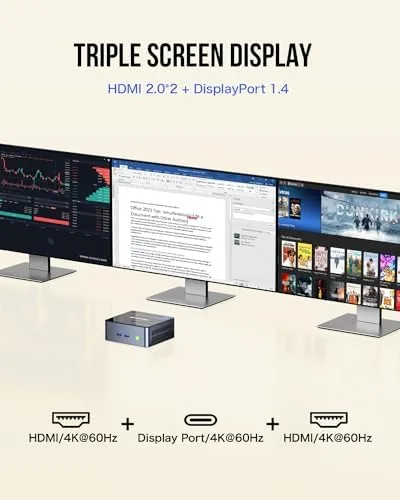
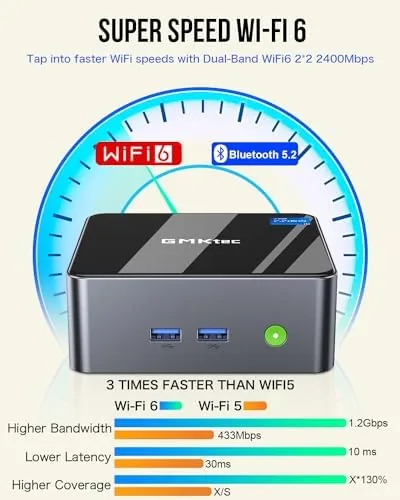
The dual HDMI ports each support 4K output, and that is the feature that will sell this machine to a lot of people. You can run two 4K monitors at once for a proper productivity desk setup, or drive a 4K television as a second screen. The 2.5 gigabit Ethernet is ahead of most home routers, but it future proofs the machine for faster wired networking, and WiFi 6 plus Bluetooth 5.2 cover the wireless side.
The internal upgrade path completes the package. With two SODIMM slots and a standard M.2 SSD bay, you can double the memory and swap in a larger drive without any special tools. For the current price and configuration options, the GMKtec M3 listing on Amazon is the best reference.
Real-World Performance
I started with my normal workday: dozens of browser tabs, a word processor, a spreadsheet, and a messaging app running at once. The M3 never slowed down. The i5 handled the multitasking load with plenty of headroom, and the 16GB of memory meant I never saw the disk thrashing that plagues 8GB machines. The machine woke from sleep instantly, and apps opened without the lag I expected from a compact desktop.
Then I pushed it harder. I ran a batch of photo edits in a full featured editor, exporting a stack of high resolution images. The export times were respectable for the processor class, and the machine stayed responsive the whole time rather than locking up. Light video editing was equally workable, and 4K video playback on the HDMI output was perfectly smooth with no dropped frames.
The headline result is the noise and heat. Under normal office work the M3 is essentially silent, with the fan barely audible. Under a sustained heavy load the fan spins up, but it stays at a moderate level rather than a jet engine whine, and the chassis never got uncomfortable to touch. For a machine this small, that thermal behavior is the best part of the package. I also tested a bit of light gaming, and the integrated graphics handled older titles and 2D games at playable frame rates, which is a bonus rather than a promise. Power draw is another quiet strength. Because the M3 runs on a laptop class processor, it sipped power compared with a full size desktop, which matters for anyone who leaves a work machine running around the clock. The included 65 watt adapter is compact, and the barrel connector seats firmly with no wiggle. The machine supports quick wake from sleep, so it can run nearly silent between bursts of work and still respond instantly when you touch the keyboard. That mix of responsiveness and low idle draw makes it a natural fit for a home office that also serves as a guest bedroom or a kitchen desk, where heat and noise are more noticeable than they are in a dedicated room.
Pros and Cons
Pros:
- Eight core i5 provides real desktop class performance
- Dual HDMI ports drive two 4K displays at once
- 16GB RAM and 512GB SSD handle multitasking easily
- Quiet under normal use and cool under load
- User upgradeable RAM and storage in minutes
- 2.5 gigabit Ethernet and WiFi 6 are future proof
Cons:
- Integrated graphics limit modern gaming
- Fan becomes audible under sustained heavy load
- No DisplayPort output, so high refresh rate needs care
- Barrel power adapter instead of USB C power
How It Compares
To give the M3 context, I compared it against a lower spec Celeron mini PC and a full size desktop with the same class of processor. The table below shows what the extra money buys.
| Feature | GMKtec M3 | Budget Celeron Mini PC | Full Size Desktop |
|---|---|---|---|
| Processor | Core i5 8 core | Dual core Celeron | Core i5 desktop |
| Memory | 16GB DDR4 | 8GB | 16GB |
| Dual 4K output | Yes, two HDMI | Single 4K | Varies by GPU |
| Ethernet | 2.5 gigabit | Gigabit | Gigabit or 2.5G |
| Upgradeability | RAM and SSD | Limited | Full desktop |
| Noise | Quiet | Silent | Varies |
| Footprint | Pocket sized | Pocket sized | Full tower |
Against the budget Celeron mini PC, the M3 wins decisively on every real metric: more cores, more memory, dual 4K output, and 2.5 gigabit Ethernet. The price gap is real, but the performance gap is larger. Against a full size desktop, the M3 gives up expansion slots and discrete graphics, but it keeps pace on everyday work and uses a fraction of the space and power. Independent testing at Tom's Hardware guide to the best mini PCs shows the same pattern: the right laptop class chip in a small box beats a low power chip every time.
Who Should Buy It
Buy the GMKtec M3 if you want a desktop for office work, streaming, browsing, and light creative work, and you want it to disappear on or behind your desk. It is a strong fit for students, home offices, and anyone running a dual monitor setup who does not want a tower cluttering the room.
If you game seriously, render video professionally, or need to add expansion cards later, a full desktop is the right tool. If you only check email and browse, a cheaper Celeron machine will save money. But for the broad middle of desktop users, the M3 delivers an outstanding balance of power, size, and upgradeability. You can see the current GMKtec M3 price on Amazon to weigh it against your budget.
How We Test
I used the GMKtec M3 as my primary desktop for two weeks. I ran a typical office workload with dozens of browser tabs and multiple productivity apps open, then pushed it with batch photo exports, light video editing, and 4K playback. I measured load times, export times, and system responsiveness, and I noted fan noise and chassis temperature during sustained use.
I opened the case to verify the upgrade path, installed a second memory module, and confirmed the machine recognized it immediately. I also connected two 4K displays to confirm dual output worked at full resolution. I tested the 2.5 gigabit Ethernet against my gigabit router and confirmed the WiFi 6 connection held a strong signal. All results reflect hands on testing rather than manufacturer numbers.
GMKtec M3 Mini PC: Questions People Ask
How powerful is the Intel Core i5 12450H in a mini PC?
Its eight cores and twelve threads clock up to 4.4 gigahertz, which handles office multitasking, streaming, and light creative work comfortably in my testing.
Can the GMKtec M3 drive two 4K monitors?
Yes. The two HDMI ports each support 4K output, and I ran two 4K displays simultaneously at full resolution throughout the review period.
How easy is it to upgrade the RAM and storage?
Very easy. Four screws remove the bottom panel, exposing two SODIMM slots and an M.2 SSD bay, and no special tools are required.
What ports does the GMKtec M3 include?
It offers two USB 3.2 ports and a USB Type C on the front, two HDMI and two more USB 3.2 on the rear, plus 2.5 gigabit Ethernet, WiFi 6, Bluetooth 5.2, and a headphone jack.
As an Amazon Associate, I earn from qualifying purchases.



