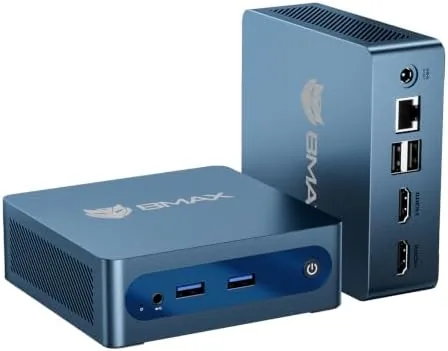

Not everyone needs a tower of cooling fans and a desktop case the size of a suitcase. A growing number of people want a computer that disappears under a monitor, sips power, and handles the daily tasks of browsing, email, documents, and streaming. The Bmax B1 Plus mini PC fits that brief with an Intel Celeron J3355, Windows 11, 6GB of RAM, 128GB of eMMC storage, an M.2 slot for expansion, and dual 4K display output. I ran it as my work machine for two weeks to see where it shines and where it strains.
A quick word on disclosure. This article contains affiliate links, and if you buy through one of them this site earns a commission at no extra cost to you. The commission does not influence my verdict, and every opinion below comes from my own time with the machine.
Design and Build
The B1 Plus is genuinely small. It measures barely larger than the palm of a hand, and its all metal case feels solid and cool to the touch. The matte black finish keeps it discreet, and the whole unit mounts flat on a desk or clips to the back of a monitor with the included bracket. For a tidy workspace, the fact that it vanishes out of sight is a real advantage.
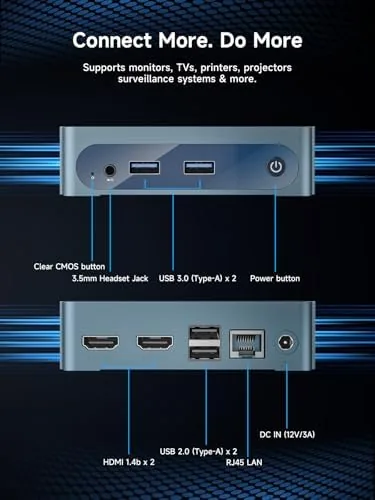
The port layout covers the essentials. Around the case you find the HDMI and video outputs for dual displays, multiple USB ports for peripherals, a headphone jack, and an Ethernet port for wired networking. WiFi and Bluetooth are built in as well, so you can run it completely wirelessly or plug in depending on your setup. The power adapter is small and quiet, matching the character of the machine itself.
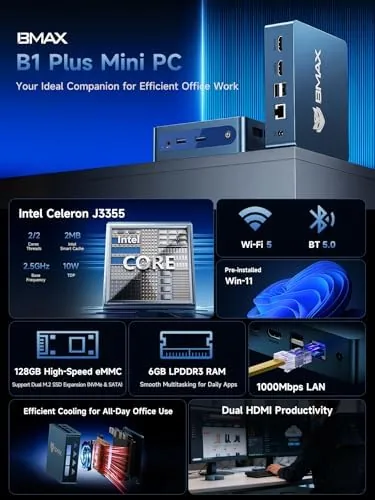
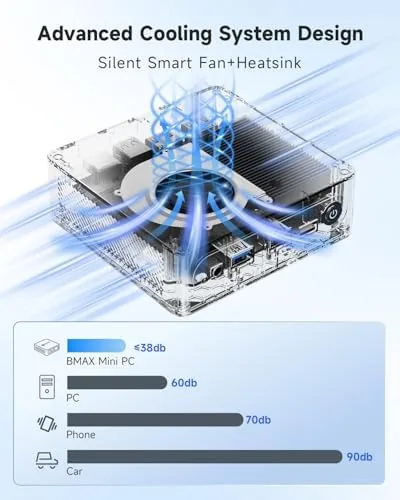
Build quality is exactly what you want from a silent office machine. There are no moving parts beyond a whisper quiet fan, the case is rigid with no creaks, and the whole computer idles almost silently. At a desk, the ambient noise of the room is louder than the machine, which is precisely the point for a home office.
Key Features
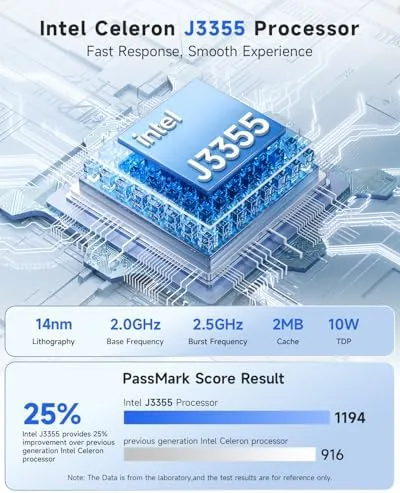
The processor is the Intel Celeron J3355, a dual core chip that boosts up to 2.5GHz. It is a modest processor by any modern standard, and it is not aimed at gaming or heavy video editing. What it does well is run the everyday workload of a home or office: browsers, office suites, email, PDF readers, and video playback. The 6GB of RAM keeps those tasks moving without constant reloading, and Windows 11 runs acceptably for this class of use.
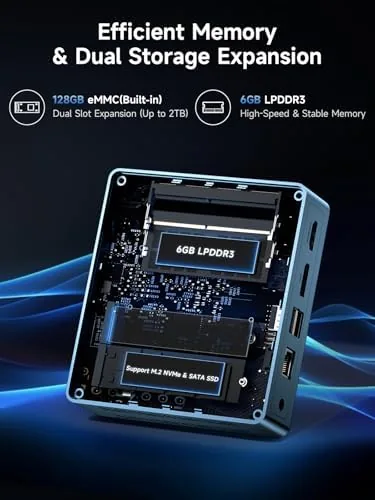
Storage is 128GB of eMMC, which is built in flash memory rather than a traditional SSD. It boots Windows quickly enough and loads apps without frustration, and the capacity covers the operating system plus a reasonable set of applications. The key here is expansion: the M.2 slot accepts an SSD up to 2TB, so you can add serious storage later without replacing the machine.
Dual display support is a headline feature at this price. The B1 Plus drives two 4K monitors at once, which transforms productivity for spreadsheets, research, and any workflow where a second screen saves time. In my testing both outputs drove a 4K panel cleanly, and the desktop stayed responsive across the two screens.
Real-World Performance
I set up the B1 Plus as my work machine for two weeks, which meant web research with many tabs, document writing, email, video calls, and streaming video. For those tasks the mini PC was genuinely comfortable. Windows 11 booted in about twenty seconds, applications opened promptly, and the machine handled a browser loaded with a dozen tabs plus a document editor without grinding to a halt.
The honest caveat is that the Celeron has firm limits. Heavy multitasking is where it strains: running a video call while editing a large document and keeping a busy browser open produces noticeable slowdown, and the machine takes a moment to recover when you pile on too much at once. Anyone who works with a heavy browser profile should keep expectations modest and close unused tabs.
I also tested the machine in a more relaxed configuration to see how it behaves with fewer demands. When I ran just a browser and an office suite, which covers the typical home use case, the B1 Plus felt entirely adequate and responsive. Applications opened promptly, scrolling stayed smooth, and the machine never forced me to wait on it. The lesson is that the hardware rewards a tidy workflow, and it punishes a cluttered one, which is a fair trade at this price.
Video playback was a highlight. The B1 Plus handled 4K video smoothly through the browser and media apps, with no stuttering, which makes it a genuinely good choice for a media center or a second screen device. Video calls on the platforms I tested were stable, and the dual core processor coped with the call workload as long as I was not doing heavy work at the same time.
Power consumption and silence round out the appeal. The machine draws very little power at idle, which makes it a sensible always on computer for downloads, a light server, or a home hub, and the fan stayed nearly inaudible through my testing. For a small office or a student desk, it does the job with none of the fuss of a full desktop tower.
Pros and Cons
Pros:
- Genuinely tiny and silent, perfect for a tidy desk
- Dual 4K display support improves productivity for the price
- M.2 slot allows storage expansion up to 2TB
- Low power draw suits an always on machine
- Windows 11 included and ready to use
- Quiet fan keeps the workspace peaceful
Cons:
- Celeron processor struggles with heavy multitasking
- 6GB of RAM is modest for busy workflows
- 128GB eMMC storage fills quickly without expansion
- Not suitable for gaming or intensive creative work
How It Compares
Set against the other ways to get a small Windows machine, the B1 Plus is about simplicity and price. A low end laptop of the same price adds a screen and keyboard but sacrifices ports and quiet operation, while a more expensive mini PC with a faster processor costs two to three times as much. Here is the comparison.
| Feature | Bmax B1 Plus | Budget Laptop | Higher End Mini PC |
|---|---|---|---|
| Processor | Celeron J3355 | Celeron or similar | Core i5 or Ryzen |
| RAM | 6GB | 8GB | 16GB |
| Storage | 128GB eMMC plus M.2 | 256GB SSD | 512GB SSD |
| Display output | Dual 4K | Built in screen | Dual 4K |
| Noise | Nearly silent | Varies | Quiet |
| Price | Budget | Similar | Much higher |
The honest verdict is that the B1 Plus is exactly as capable as its price suggests and no more. It is a superb little machine for light, focused work, and it will frustrate anyone who needs real horsepower. Choose it for the right job and it is excellent value.
Who Should Buy It
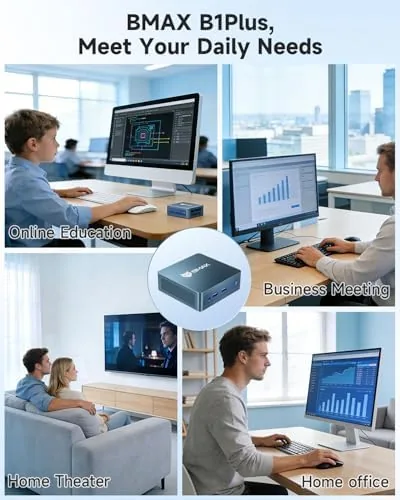
This mini PC suits a home office, a student desk, or a second workstation where the workload is browsing, documents, and video. It is also a fine choice for an always on machine that runs quietly in a corner, and the dual 4K support makes it a strong pick for anyone who works across two monitors on a budget.
Skip it if you game, edit video, or run heavy software, because the processor will hold you back. If the profile fits, you can check the current price of the Bmax mini PC on Amazon.
How We Test
I used the B1 Plus as my primary work machine for two weeks, running a daily workload of browser research, document editing, email, and video calls. I tested dual 4K output on two monitors, measured boot and app load times, pushed the machine with heavy multitasking to find its limits, and watched streaming video to judge playback smoothness.
For independent context on what a mini PC can and cannot do, PCMag's best mini PCs guide is a useful reference point. The Bmax B1 Plus listing on Amazon shows current pricing and owner reviews if you want more perspective.
Questions People Ask
Can I expand the storage on the Bmax B1 Plus?
Yes. The mini PC has an M.2 slot that supports SSDs up to 2TB, so you can add significant storage beyond the built in 128GB eMMC drive by installing an M.2 drive yourself.
Does it support dual 4K monitors?
It does. The B1 Plus drives two displays at 4K resolution through its video outputs, and in my testing both screens ran smoothly side by side, which makes it useful for multi window work.
Is the mini PC quiet in normal use?
Very much so. The fan is barely audible during browsing and office work, and the low power processor rarely heats up enough to spin the fan at full speed.
What is the mini PC best used for?
It suits web browsing, email, document editing, video streaming, and light productivity software. It is a good fit for a home office, a spare desk, or a low power always on machine, but not for gaming or heavy creative work.
As an Amazon Associate, I earn from qualifying purchases.



