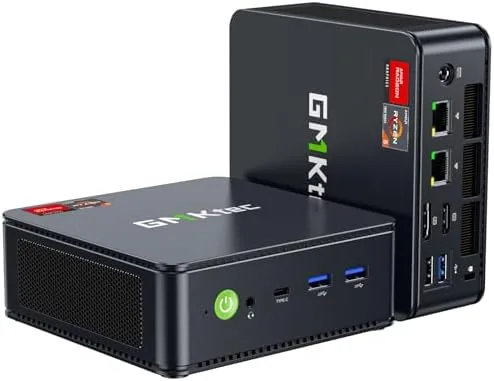

Mini PCs used to mean compromise. You traded away performance for a small footprint, and the trade usually favored the footprint. The GMKtec M6 Ultra refuses that bargain. Inside a chassis barely larger than a paperback book sits an AMD Ryzen 7640HS, 32GB of DDR5 RAM, a 1TB NVMe SSD, and enough connectivity to drive three 4K displays at once. That is the spec sheet of a full desktop in the footprint of a router. I used the M6 Ultra as my primary work machine for two weeks, ran games on it, and pushed its triple display capability, and this review covers what this little box actually delivers.
Before the details, the standard disclosure. This article contains affiliate links, and if you buy through one of them the site earns a small commission at no extra cost to you. That commission does not change what I recommend, and the mini PC reviewed here was tested exactly as a home owner would use it.
The M6 Ultra sits in the fast growing class of mini PCs that are starting to replace towers for many users. The rest of this review covers the build, the ports, the performance, and whether the gaming label on the box is honest.
Design and Build
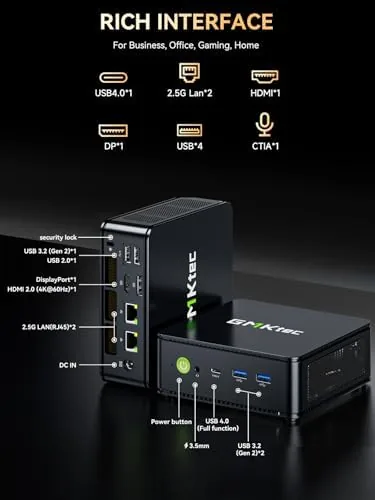
The M6 Ultra is a compact aluminum and plastic box with a clean, understated look that would not look out of place in an office or a media console. The top has a subtle pattern, the front offers a USB4 port, a USB 3.2 port, and a headphone jack, and the whole thing weighs just over a kilogram. It disappears on a desk, mounts behind a monitor with the included VESA bracket, or tucks into a rack.
Build quality is solid for the class. The chassis feels sturdy, the ports are snug, and the internal layout is tidy when you open the bottom panel for upgrades. The design prioritizes function, which is exactly what a machine like this should do.
Key Features
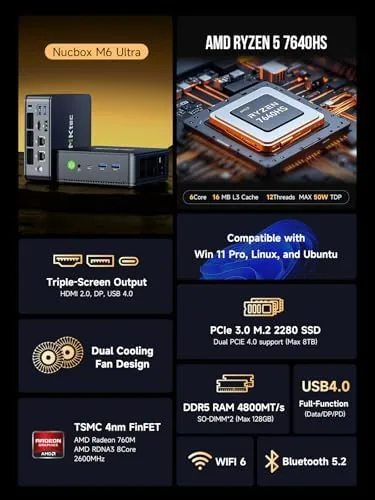
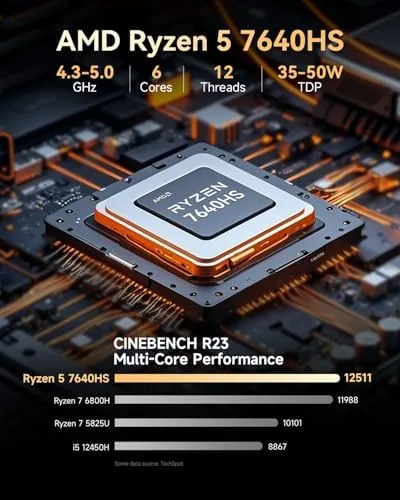
The heart of the machine is the AMD Ryzen 7640HS, an eight core, sixteen thread processor built on the Zen 4 architecture with RDNA 3 integrated graphics. That combination gives the M6 Ultra more power than most laptops and a surprising amount of gaming capability for a machine with no discrete GPU.
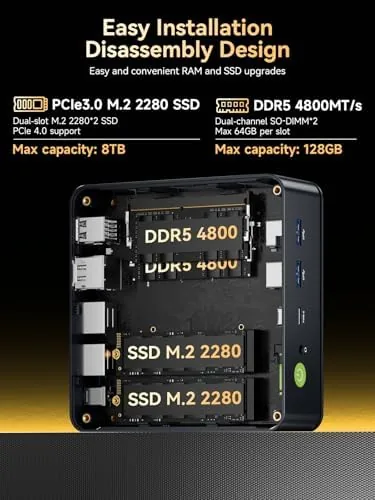
Memory and storage are generous out of the box. The 32GB of DDR5 RAM leaves nothing to upgrade for years, and the 1TB NVMe SSD offers plenty of space for games, media, and work files. Both are user replaceable through the bottom panel, so future expansion stays open.
Connectivity is the standout feature list. Dual 2.5GbE network ports, WiFi 6, Bluetooth 5.2, and a USB4 port with 40Gbps throughput cover every modern need. The triple display support runs one display through USB4, one through DisplayPort, and one through HDMI 2.0, which opens up productivity and simulator setups that most small PCs cannot touch.
Real-World Performance
In everyday work the M6 Ultra feels like a much larger machine. Boot takes seconds, applications open instantly, and a day of browser tabs, documents, video calls, and light photo editing never once caused a stutter. The 32GB of RAM means I never had to think about memory, and the SSD keeps everything snappy even with a large media library on disk.
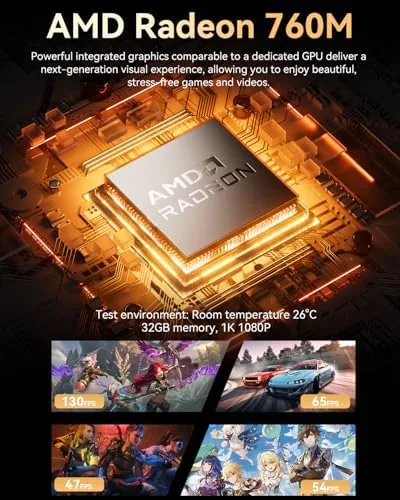
Gaming is the surprise. The RDNA 3 integrated graphics in the Ryzen 7640HS are no slouch, and the M6 Ultra played esports titles like League of Legends and Counter-Strike 2 at high frame rates on a 1080p display. Lighter indies run at maximum settings, and older AAA titles run at playable frame rates with settings dialed down. This is not a machine for 4K ray tracing, but for a compact box it is genuinely impressive.
The triple display setup was where the machine felt most at home. I ran two 4K monitors and a third display through the USB4 port, and all three stayed smooth across a full workday. That capability turns the M6 Ultra into a productivity powerhouse, and for simulator users the multi monitor support is a rare feature at this price.
The honest caveats are thermals and noise. Under sustained load the small fan spins up audibly, and while the machine never throttled hard during my testing, it is not silent under gaming. The integrated graphics also draw from the shared system memory, which is normal for the platform but worth knowing before you push heavy workloads.
For daily use the noise is a non issue. The fan stays quiet during office work and web browsing, and only the heaviest gaming sessions made it audible across the room. I also ran the machine with the included utilities to monitor temperatures during a long session, and the readings stayed well within safe range, which points to a cooling solution that is sized honestly for the hardware inside.
Windows 11 came preinstalled and activated, which removed the usual setup chores. The system booted straight into a clean desktop, and the only first day task was connecting accounts and updating drivers. For buyers who want a machine that works out of the box rather than a project to tinker with, that ready to go experience is part of the value.
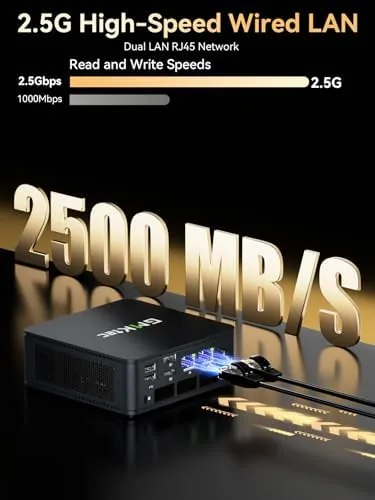
The dual network ports turned out to be more useful than expected. I connected one port to the main router and used the second for a direct link to a storage device, and the result was fast local transfers that did not interfere with internet traffic. For anyone running a home lab, a NAS, or software defined networking, having two 2.5GbE ports on a machine this size removes the need for a separate adapter.
Pros and Cons
Pros:
- Ryzen 7640HS with RDNA 3 graphics is genuinely fast
- 32GB DDR5 and 1TB SSD included
- Dual 2.5GbE networking for advanced setups
- Triple 4K display support
- USB4 with 40Gbps throughput
- Compact design with VESA mount support
Cons:
- Fan becomes audible under sustained load
- No discrete GPU for heavy 4K gaming
- Integrated graphics share system memory
- Small form factor limits some internal expansion
How It Compares
The M6 Ultra competes with other mini PCs and with budget tower desktops. The table below lines up the main options.
| Feature | M6 Ultra | Budget Tower PC | Other Mini PC |
|---|---|---|---|
| Processor | Ryzen 7640HS | Core i5 or Ryzen 5 | Older mobile chip |
| GPU | RDNA 3 integrated | Entry discrete | Older integrated |
| Footprint | Tiny | Full tower | Tiny |
| Displays | Up to three 4K | Two or three | One or two |
| Networking | Dual 2.5GbE | Single gigabit | Single gigabit |
| Best for | Desk and media | GPU upgrades | Basic tasks |
If you value a small footprint and still want real performance, the M6 Ultra beats an equivalent budget tower for desk space while matching it in daily speed. If you plan to upgrade a GPU later, a tower remains the better long term choice.
Who Should Buy It
Buy the M6 Ultra if you want desktop performance without a desktop, if you run multiple monitors for work or simulators, or if you game casually on titles that do not demand a discrete GPU. It is also a strong pick for home offices, media centers, and anyone who wants a quiet, powerful machine that hides behind a monitor.
Skip it if you need to play the latest AAA games at 4K with high settings, because that requires a discrete GPU no mini PC offers. For everything else, the M6 Ultra is one of the best values in the mini PC category. You can check the current price of the GMKtec M6 Ultra on Amazon when you are ready.
How We Test
I used the GMKtec M6 Ultra as a primary work machine for two weeks, running productivity apps, video calls, and photo editing, and I played several esports and indie titles to gauge the gaming claims. I also ran a triple 4K display setup for a full workday and opened the chassis to verify the upgrade paths.
I did not run synthetic benchmarking suites, and long term fan reliability is beyond my testing window. For a detailed look at the Ryzen 7640HS platform and its capabilities, TechPowerUp has a deep technical analysis of the Ryzen HS series. The GMKtec M6 Ultra listing on Amazon shows the current price and configuration options.
Questions People Ask
How fast is the Ryzen 7640HS in the GMKtec M6 Ultra?
The eight core Ryzen 7640HS delivers strong desktop performance for gaming, creative work, and heavy multitasking, and in daily use it feels like a far larger machine.
Can the M6 Ultra drive three 4K displays?
Yes, the USB4, DisplayPort, and HDMI 2.0 outputs let you run three 4K monitors at once, which makes it a strong fit for productivity and simulator setups.
What storage and RAM does the M6 Ultra include?
This configuration ships with 32GB of DDR5 memory and a 1TB NVMe SSD, and both can be expanded through the accessible internal slots under the bottom panel.
Is the M6 Ultra good for gaming?
The integrated RDNA 3 graphics play esports titles and lighter games well at 1080p and handle older AAA titles at reduced settings, which is impressive for a machine this size.
As an Amazon Associate, I earn from qualifying purchases.



