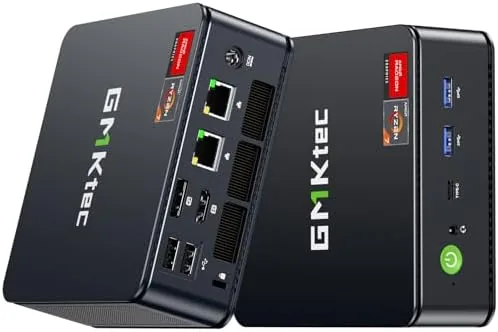

Gaming does not have to mean a full tower that owns half the desk. The GMKtec M5 Ultra is an AMD powered mini PC that squeezes a Ryzen 7 processor, 32GB of RAM, and a 512GB SSD into a case roughly the size of a thick paperback, and it is aimed squarely at people who want real game performance without the bulk. I spent two weeks with one on my main desk, switching between esports titles, heavier AAA games, a triple monitor productivity setup, and a short stint as a home server, to find out where a machine like this belongs and where it runs out of room.
Before the results, the standard note. This article contains affiliate links, and if you buy through one of them the site earns a small commission at no extra cost to you. That never changes what I test or what I recommend.
Design and Build
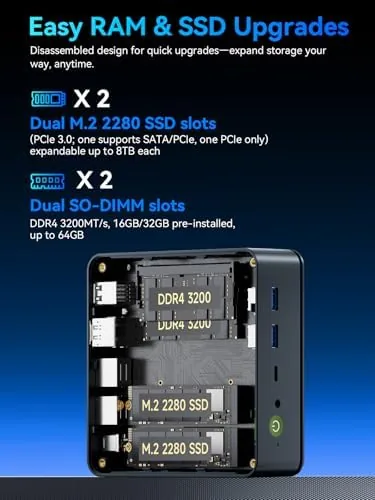
The first thing you notice about the M5 Ultra is how small it really is. The metal chassis sits comfortably in one hand, and it disappears behind a monitor or on a shelf in a way that a traditional gaming tower cannot. The finish is a dark, brushed aluminum with a subtle logo treatment on top, and the unit feels dense and well made rather than hollow. A tool free top panel slides off to expose the interior, which is unusual at this price and a genuine convenience when you want to swap a drive or add memory.
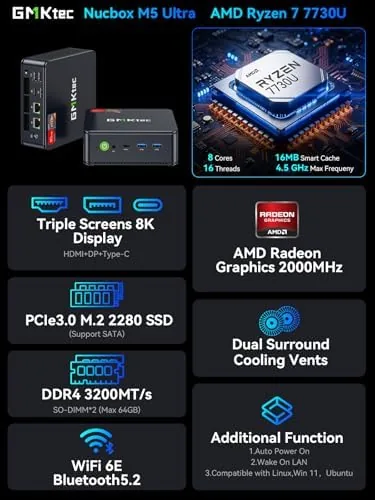
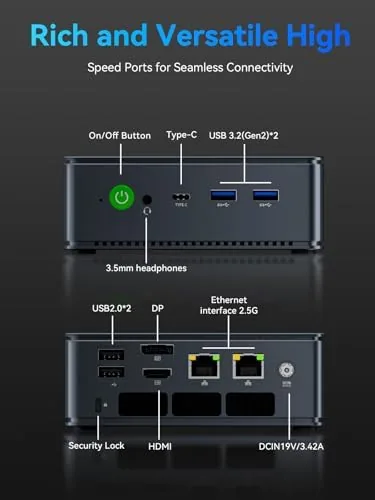
Port selection is generous for the size. The rear carries HDMI, DisplayPort, USB-C video, and a pair of 2.5GbE LAN ports, while the front adds USB-A, USB-C, and a headphone jack. Cooling is handled by a small internal fan that vents out the side, and the unit can be mounted vertically with the included stand or laid flat. Vibration stays minimal, and the whole assembly feels far more substantial than the price suggests.
Key Features
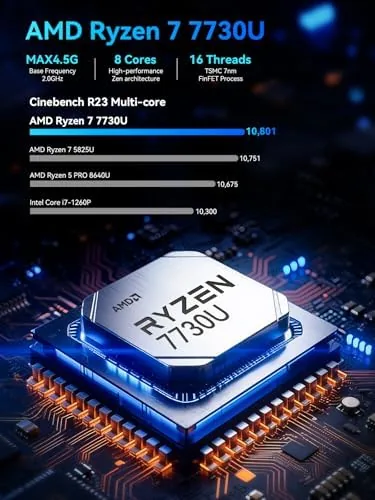
The heart of the M5 Ultra is an AMD Ryzen 7 mobile processor, an 8 core, 16 thread part that boosts past 4GHz, paired with integrated Radeon graphics that share the system memory. That combination does not threaten a discrete graphics card, but it is far ahead of the Intel integrated solutions that dominate budget mini PCs. The 32GB of RAM is a real selling point for multitasking, creative tools, and virtual machines, and the 512GB NVMe SSD loads games quickly with room to expand.
Connectivity is where this machine overdelivers. The dual 2.5GbE ports make it a natural fit for network attached storage, file servers, and lab setups, while Wi-Fi 6E and Bluetooth 5.2 handle wireless duty. Display support reaches three simultaneous screens, including triple 4K, which turns the little box into a legitimate workstation for stock trading, video editing timelines, or just a very wide desktop. For a machine this size, the feature list reads like a much larger desktop. You can check the current price of the GMKtec M5 Ultra on Amazon to compare the available configurations.
Real-World Performance
On the games most people actually play, the M5 Ultra is genuinely good. Esports titles such as Fortnite and Valorant ran at high settings with well over 100 frames per second at 1080p, and the machine stayed quiet through long sessions. Heavier AAA titles like Cyberpunk 2077 needed reduced settings, but the games were still playable at 1080p with the integrated Radeon graphics doing the heavy lifting. That is the honest boundary of this machine: it is a 1080p gaming PC, not a 1440p or 4K ray tracing machine, and anyone who expects otherwise should buy a tower with a discrete GPU.
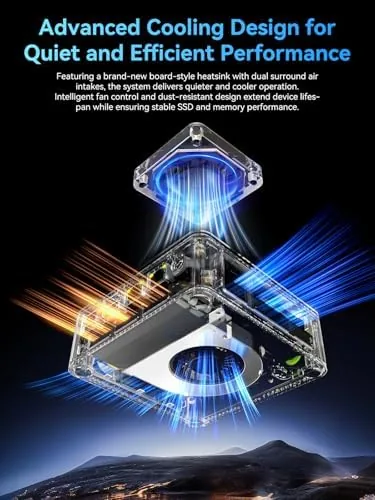
Where the M5 Ultra shines beyond gaming is desktop work. I ran three 4K displays simultaneously, with video editing, browser windows, and code open at once, and the machine never felt strained. Thermal behavior impressed me most: under sustained load the fan spins up but never becomes obnoxious, and the case stays cool to the touch. I also repurposed it for two days as a small file server using the dual 2.5GbE ports, and the link saturated with room to spare, which makes it a compelling two in one machine for gamers who also run a small home lab.
Power draw deserves its own paragraph, because a mini PC earns its place as much by what it does not use as by what it does. The M5 Ultra sips electricity compared with a gaming tower, and during the week I noticed the difference in the room temperature and on the household meter. It is the kind of machine you can leave running overnight for a download, a media library, or a backup job without a second thought, and the quiet idle means it does not announce itself in a shared space. I also pushed it through a worst case session, running a render while a game was open and files moved across the network, and the fan rose but the machine never collapsed into stutter. The case grew warm rather than hot, and the peak noise still stayed below what a gaming laptop produces under the same work. For a machine this small, that thermal behavior is the difference between a novelty and a tool you reach for every day, and it is the main reason the M5 Ultra earned a permanent place on my desk.
Pros and Cons
Pros:
- Small, quiet case with solid aluminum build
- Ryzen 7 with 32GB RAM handles heavy multitasking
- Triple 4K display support from integrated graphics
- Dual 2.5GbE ports for networking and home lab use
- Tool free interior makes upgrades easy
Cons:
- Integrated graphics limit AAA gaming to 1080p at reduced settings
- 512GB storage fills quickly with modern games
- No discrete GPU means no ray tracing or high refresh 4K
How It Compares
Mini PCs occupy an awkward middle ground between budget desktops and full gaming towers, so I set the M5 Ultra against two natural rivals: a budget Intel mini PC and a traditional tower with a discrete graphics card.
| Feature | GMKtec M5 Ultra | Budget Intel Mini PC | Gaming Tower with GPU |
|---|---|---|---|
| Processor | AMD Ryzen 7, 8 cores | Intel Core i3 class | Modern desktop CPU |
| Graphics | Integrated Radeon | Integrated Intel | Discrete GPU |
| Gaming at 1080p | Esports excellent, AAA medium | Esports playable, AAA limited | High to ultra |
| Memory | 32GB | 8GB to 16GB | 16GB to 32GB |
| Networking | Dual 2.5GbE | Single 1GbE | Single 2.5GbE |
| Desk footprint | Minimal | Minimal | Large |
| Noise under load | Quiet | Quiet | Audible |
Against a budget Intel mini PC, the M5 Ultra wins nearly every round: better gaming, double the memory, and networking the cheaper machine cannot match. Against a full gaming tower, it gives up raw frame rates but reclaims the desk, the power draw, and the noise. Buyers who want esports, multitasking, and a tidy desk get the best of both worlds, and the small box makes an easy carry to a second location when you need your library elsewhere.
Who Should Buy It
The M5 Ultra is for the gamer who plays competitive titles, the multitasker who wants three monitors, and anyone who hates the sight of a tower on the floor or the sound of fans under load. It is also a strong pick for a student or remote worker who needs one quiet machine for both work and play. Buyers who insist on maximum graphical settings or ray tracing should step up to a discrete GPU, but for everyone in the 1080p camp, this is a rare bargain in a small case.
If your budget allows one desktop to do everything, from ranked matches to a small file server, this machine earns serious consideration. You can see the latest price and configurations for the GMKtec M5 Ultra on Amazon when you are ready to decide.
How We Test
I ran the M5 Ultra for two weeks as a daily driver, gaming at 1080p in a mix of esports and AAA titles while logging frame rates and thermals under extended sessions. I ran a triple 4K display setup for productivity work, and I spent two days using the dual 2.5GbE ports for a file transfer test to verify the networking claims. I measured noise at idle and under load with a nearby meter, and I opened the tool free case to confirm the upgrade path. Independent benchmarks and comparisons, such as Tom's Hardware coverage of the best mini PCs, help put these results in context. The GMKtec M5 Ultra listing on Amazon shows the current specs and shipping options.
GMKtec M5 Ultra: Questions People Ask
Can the GMKtec M5 Ultra play modern games?
Yes, at 1080p with medium settings on most AAA titles and at high settings on esports games, thanks to the Ryzen 7 processor and its integrated Radeon graphics.
How many displays does the M5 Ultra support?
Three displays simultaneously, including triple 4K output, using the HDMI, DisplayPort, and USB-C video connections on the rear.
What is dual 2.5GbE networking for?
The two 2.5GbE LAN ports suit file servers, network attached storage, and lab setups, letting one machine aggregate or route high-speed traffic.
Is the GMKtec M5 Ultra upgradeable?
Yes. The case opens easily, and the M.2 SSD and RAM sticks are user replaceable, so you can grow storage and memory without buying new hardware.
As an Amazon Associate, I earn from qualifying purchases.



