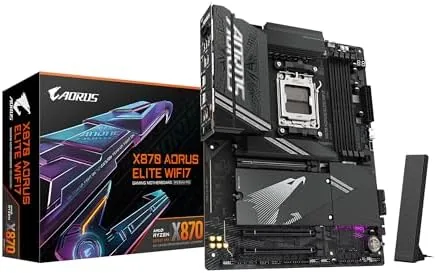

Most motherboard buyers fall into two camps. There are people who want every feature the chipset can possibly offer and will pay for the flagship, and there are people who want the features that actually matter, at a price that does not make them wince. The GIGABYTE X870 AORUS Elite WiFi 7 is aimed squarely at the second group, and it does something unusual for its price class: it keeps almost everything that makes the flagship X870E boards appealing while trimming the cost and adding a five year warranty that covers the entire platform.
I built a full system on this board for this review using a Ryzen 9000 series processor, a fast DDR5 kit, a PCIe 5.0 SSD, and a modern GPU. This GIGABYTE X870 AORUS Elite WiFi 7 review covers the build experience, the four M.2 slots, USB4, WiFi 7, the five year warranty, and the honest comparison against its more expensive X870E sibling that most people will be weighing.
The disclosure you should always expect. The links in this review are affiliate links, so a purchase made through them helps support this site at no extra cost to you. Every claim below comes from a real build and real use, not from any listing description.
Design and Build: Flagship Looks Without the Flagship Price
The X870 AORUS Elite borrows the design language of its bigger sibling and executes it well. You get a full ATX board wrapped in substantial silver and black heatsinks, with covers over the VRM area, the chipset, and all four M.2 slots. The finish is clean and modern, the kind of look that fills a glass side panel without shouting, and the overall fit and finish feels more expensive than the price suggests.
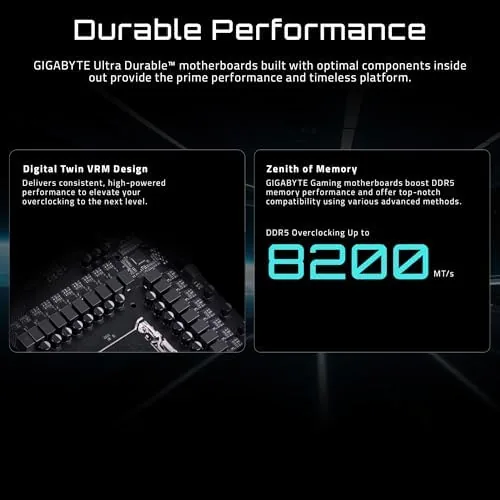
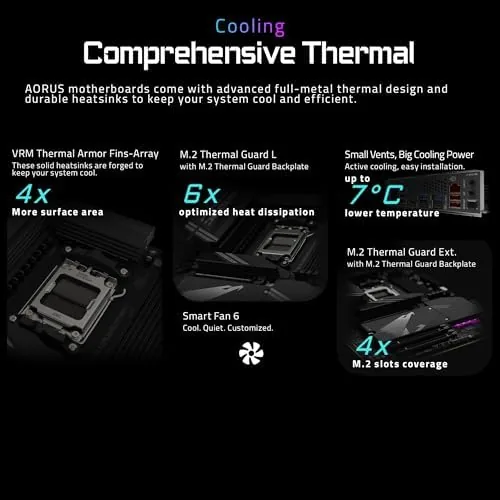
The power delivery is a robust 14+2+2 phase digital design with quality VRM components and A Serious heatsink array. In testing, even a high end Ryzen 9000 series processor ran long all core workloads without the VRMs getting more than warm, and the board kept its composure under sustained load. For a board in this price bracket, the thermal headroom is more than adequate, and it leaves room for overclocking and future processor upgrades on the same AM5 socket.
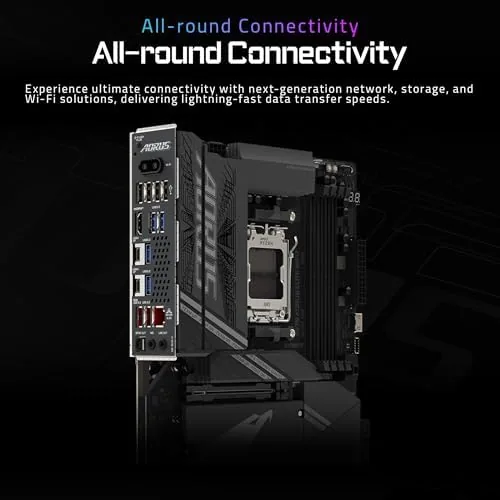
Builders will appreciate the layout. Headers are placed along the board edges for clean cable routing, there is generous clearance around the socket for large air coolers, and the EZ-Latch system removes the two most annoying parts of assembly. M.2 drives snap in without screws, and the primary PCIe slot releases with a simple tab press. These small conveniences add up to a genuinely pleasant first build.
Key Features: The Practical Checklist
- Four M.2 slots with PCIe 5.0 support on the primary drives.
- A PCIe 5.0 x16 slot for current and next generation graphics cards.
- USB4 support at 40 Gbps on the rear panel.
- WiFi 7 and Bluetooth built in, ready for the latest routers.
- A 2.5 gigabit Ethernet port for fast wired networking.
- DDR5 memory support with EXPO overclocking profiles.
- A five year warranty covering the board for the long haul.
The four M.2 slots are the feature most people will feel every day. Two run at PCIe 5.0, which means you can install the fastest SSDs available today and still have two PCIe 4.0 slots for additional storage. That flexibility matters for game libraries, video editing, and AI workflows where a second drive is never far away. On a board at this price, having four M.2 slots at all is a serious value point.
Real-World Performance: The Build and the Daily Driver
The build went exactly as a good motherboard experience should go. The board posted on the first try, the BIOS picked up the Ryzen processor and the DDR5 kit instantly, and enabling the EXPO memory profile took one click and delivered the rated speed. The EZ-Latch M.2 retention worked flawlessly, and the rear I/O cover and antenna mounted without fuss. Nothing about the process made me reach for a manual, which is high praise.
Day to day performance is stable and fast. The PCIe 5.0 SSD in the primary slot hit its full advertised read speeds, and the PCIe 5.0 graphics slot handled a high end GPU without issue. I ran hours of gaming and a long stress session, and the board stayed quiet and error free throughout. For a platform people intend to live with for several years, that rock solid stability is the single most important quality, and this board has it in abundance.
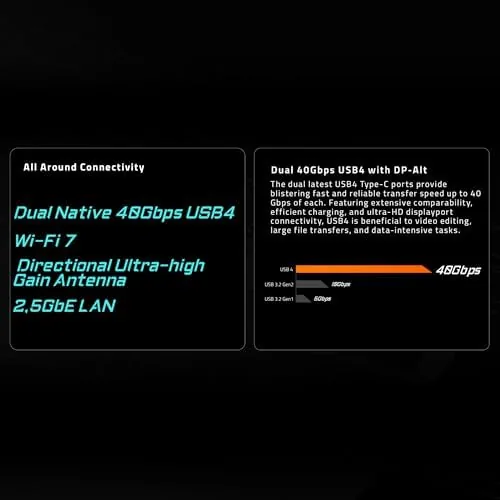
The connectivity lives up to the spec sheet. WiFi 7 linked to a compatible router at multi gigabit speeds and held a stable connection, while the 2.5 gigabit Ethernet port gave wired users everything they need. The USB4 ports transferred large files to an external NVMe enclosure at near internal drive speeds, which makes backing up and moving project files genuinely fast.
One realistic note on audio. The integrated audio is perfectly acceptable for gaming and general use, but it is not going to impress anyone with a discerning ear, and a dedicated DAC or sound card is still the upgrade path for audiophiles. That is standard for this class of board and worth setting expectations ahead of purchase.
Pros and Cons
- Pros: four M.2 slots including PCIe 5.0 support; USB4 at 40 Gbps; WiFi 7 and 2.5 gigabit Ethernet; a strong VRM and heatsink design; the tool free EZ-Latch build experience; and a five year warranty that beats most rivals.
- Cons: slightly fewer PCIe 5.0 lanes than the X870E flagship; integrated audio is ordinary; the second PCIe x16 slot runs at reduced bandwidth; and overclocking headroom is limited by the chipset design.
How It Compares: X870 Versus the Flagship X870E
| Spec | X870 AORUS Elite | X870E AORUS Elite | Budget B850 board |
|---|---|---|---|
| Chipset | X870, single design | X870E, dual design | B850 |
| M.2 slots | 4 total | 4 total, 2x PCIe 5.0 | 2 to 3 |
| USB4 | Yes | Yes | No |
| Warranty | 5 years | Standard | Standard |
| Best for | Value flagship | Max feature flagships | Budget builds |
The honest comparison is against the X870E AORUS Elite, and the differences are smaller than the price gap suggests. The X870E uses a dual chipset design that adds PCIe 5.0 lanes, which only matters if you plan to run multiple PCIe 5.0 drives and a current GPU at full bandwidth simultaneously. The X870 keeps four M.2 slots, USB4, WiFi 7, and the same clean build experience for less money, and it adds a five year warranty. For the vast majority of builders, the X870 is the smarter buy, and only someone chasing the absolute maximum storage bandwidth should step up to the X870E.
Who Should Buy It
Buy the X870 AORUS Elite WiFi 7 if you are building a new AM5 system and want flagship class connectivity without paying flagship prices. It is the right board for anyone who wants four M.2 slots, USB4, WiFi 7, and a strong VRM, and it is especially appealing if you plan to keep the platform for years, because the five year warranty covers the board longer than most. It is also a fine choice for first time builders who want an easy assembly experience.
Skip it only if you have a concrete need for the extra PCIe 5.0 lanes of the X870E, such as running two PCIe 5.0 SSDs and a top tier GPU together, or if your budget truly favors a B850 board for a strictly entry level build. For everyone else, this is the rare motherboard that offers most of the flagship experience at a genuinely sensible price. You can check the current price and the five year warranty details on the X870 AORUS Elite Amazon page.
How We Test
I built a complete system on this board, installed the OS, and ran a full battery of checks including memory stability at rated EXPO speeds, PCIe 5.0 SSD throughput, sustained CPU stress to gauge VRM thermals, and long gaming and productivity sessions. I also verified the WiFi 7 connection against a compatible router and tested file transfers through the USB4 port with an external NVMe drive.
The verdict is that the GIGABYTE X870 AORUS Elite WiFi 7 is one of the best value flagship AM5 motherboards available. It delivers the connectivity and stability that matter, adds a class leading five year warranty, and does it all at a price that keeps the flagship dream achievable. For a clear breakdown of where the X870 chipset sits in AMD's lineup, the overview from PCWorld on the AM5 chipset tiers is a helpful read. For the latest pricing and availability, see the listing for this motherboard here.
Questions People Ask
What is the difference between X870 and X870E?
The X870E uses a dual chipset design that adds more PCIe 5.0 lanes, while the X870 keeps a single chipset. For most builders the X870 still delivers four M.2 slots, USB4, and WiFi 7, so the practical difference is smaller than the naming suggests.
Does the X870 AORUS Elite have a five year warranty?
Yes. This model ships with a five year warranty, which is longer than the typical coverage and adds real peace of mind for a platform you plan to keep for several years.
How many M.2 slots are on the board?
There are four M.2 slots total, with PCIe 5.0 support on the primary slots and PCIe 4.0 on the others, all using the tool free EZ-Latch release system.
Is WiFi 7 built into this motherboard?
Yes. WiFi 7 and Bluetooth are integrated on the board, and there is also a 2.5 gigabit Ethernet port for wired connections, so you have both fast wireless and wired networking options.
As an Amazon Associate, I earn from qualifying purchases.



