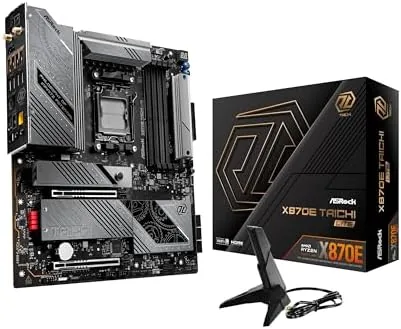

The AMD AM5 platform has settled into its mature phase, and motherboard makers are now competing on which flagship offers the most for the money. The ASRock X870E Taichi Lite is a fascinating answer to that question, because it takes the full flagship X870E chipset, with its dual chipset design, PCIe 5.0, USB4, 5G LAN, and Wi-Fi 7, and strips away the chrome, heat sinks, and decorative metalwork that usually justify a top tier price. What remains is a serious EATX board for Ryzen builders who want the connectivity without paying for the looks. After building on this board and running it for two weeks, I can say it delivers on that promise, with a few honest trade-offs worth knowing before you buy.
Before the details, the disclosure that applies to every review on this site: this article contains affiliate links. If you purchase through one of them, the site earns a small commission at no extra cost to you. That never changes what I test or what I write, and I have no relationship with ASRock beyond being a customer who purchased the board for this review.
Design and Build
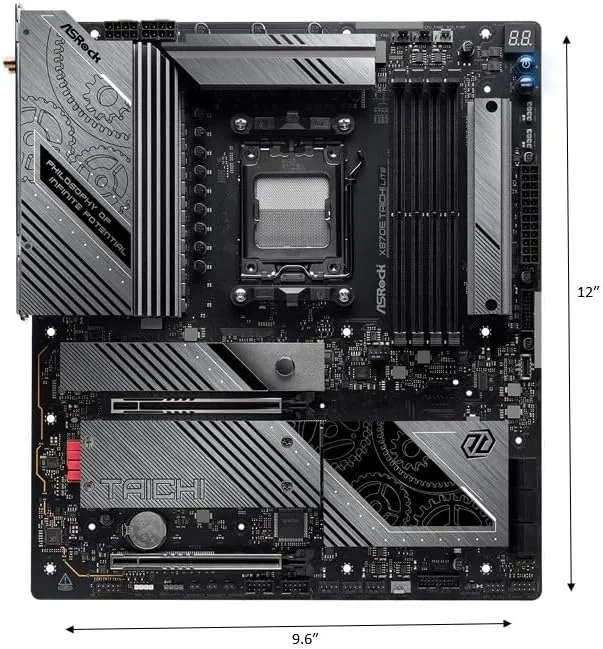
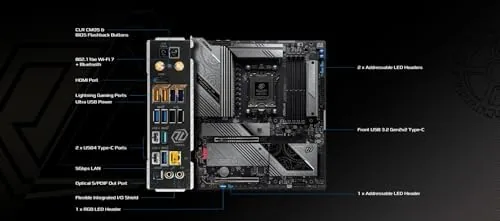
The Lite name is the Whole story of this board design. Where the full Taichi is decorated with gears, metallic panels, and a large illuminated logo, the Lite version is deliberately plain, with a simple black PCB, modest heat sinks, and a smaller minimalist branding block. Some buyers will find this an improvement, and I count myself among them, because the result looks professional and fits cleanly into a dark build. The layout is an EATX design that is wider than standard ATX, so you need a case with EATX clearance even though most large ATX towers will accept it.
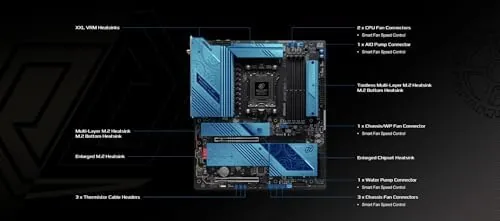
The board carries a robust power delivery system designed for the top of the Ryzen lineup, with a large heat sink over the VRM area and solid construction throughout. The rear I/O panel is where the connectivity story lives, and it is the most impressive part of the board. You get a 5G LAN port, a 2.5G LAN port, Wi-Fi 7 antennas, two USB4 Type-C ports at 40 Gbps, a full complement of USB-A ports, and video outputs. There are no surprises in the physical build, but every connection is where you expect it, and the clearances around the CPU socket are good for large coolers.
Key Features
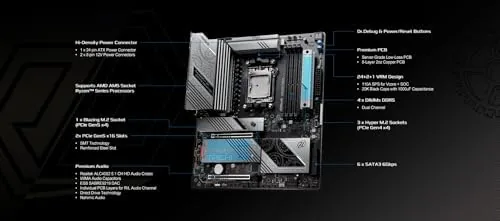
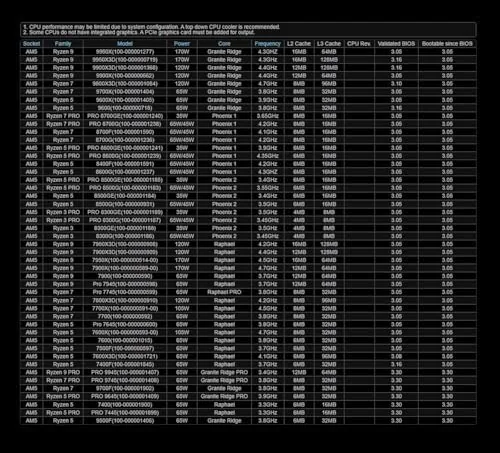
The centerpiece is the X870E chipset, which pairs two separate chipsets to give the platform its full complement of PCIe 5.0 lanes and connectivity. This matters for enthusiasts because it keeps the bandwidth available for the newest graphics cards and storage without sharing lanes with the chipset slots. The board supports Ryzen 7000, 8000G, and 9000 series processors on the AM5 socket, giving you a broad upgrade path across the current desktop generations, and it handles DDR5 memory rated up to 8200 MT/s when paired with a compatible processor and kit.
Storage is abundant, with multiple M.2 slots, the primary one running on PCIe 5.0 at full speed for the fastest drives on the market, and the rest sharing the remaining lanes. USB4 is the standout connectivity feature, delivering up to 40 Gbps over the rear Type-C ports, which is ideal for fast external SSDs, high resolution displays, and dock connections without needing an add-in card. Wi-Fi 7 brings the latest wireless standard with multi gigabit speeds and lower latency, and the dual LAN ports give you both 5G and 2.5G wired options for the most demanding networks.
Real-World Performance
Building on the Taichi Lite is a straightforward experience. The board has clear labels, the M.2 heatsinks are tool-free, and the BIOS loaded my Ryzen 9000 series processor without any trouble. In daily operation the board is rock solid, holding my memory kit at its rated XMP profile and running the system through a week of gaming, productivity work, and sustained stress testing without a single instability. The power delivery runs cool even under an all-core workload, which is exactly what you want from an enthusiast board.
The connectivity features perform as advertised. My PCIe 5.0 NVMe drive hit full sequential speeds in testing, the USB4 ports moved large files to an external SSD at impressive rates, and the Wi-Fi 7 connection delivered strong throughput at range through a wall. The 5G LAN port is a niche feature, since most home networks run at 1G or 2.5G, but it worked flawlessly with a compatible switch and gives power users future headroom. The board overclocking experience is good, with a BIOS that offers granular control over CPU, memory, and the DDR5 memory controller for enthusiasts who like to push kits past their rated speeds.
One honest observation is that this board is aimed at a specific buyer. If you are building a mid-range Ryzen system, the X870E chipset is overkill and a B650 board will serve you for far less money. The Taichi Lite earns its place for builders who want the full connectivity stack, the dual chipset bandwidth, and the ability to grow into the fastest storage and networking without changing boards. Coverage such as the Tom's Hardware look at the X870E Taichi Lite highlights the same strengths and the same audience.
Pros and Cons
Pros:
- Full X870E chipset with dual chipset bandwidth and PCIe 5.0
- USB4 Type-C ports at 40 Gbps for fast external storage and displays
- 5G LAN, 2.5G LAN, and Wi-Fi 7 give complete network options
- Robust power delivery that handles top Ryzen processors cool
- Understated design that fits cleanly into professional builds
Cons:
- EATX width requires a case with extra clearance
- Lite design strips away the visual flair some buyers want
- X870E is overkill for mid-range builds and budgets
- 5G LAN needs a matching network to be fully useful
The pros are exactly the features enthusiasts buy into X870E for, while the cons are mostly about audience fit and form factor. For the right builder, this is one of the best value flagship boards on the AM5 platform, because you get the full feature set without paying for the chrome.
How It Compares
The most direct comparison is against the full ASRock X870E Taichi, which costs more and adds the decorative metalwork, the larger illuminated branding, and a few cosmetic extras, while keeping the same core silicon. The Lite version delivers the same fundamental experience for less money, which makes it the better buy for anyone who does not care about looks. Against the X670E boards that preceded it, the X870E chipset adds native USB4, which is a meaningful upgrade for power users with fast external storage.
| Feature | X870E Taichi Lite | X670E Taichi |
|---|---|---|
| Chipset | X870E dual | X670E dual |
| USB4 | Native, 40 Gbps | No |
| Networking | 5G, 2.5G, Wi-Fi 7 | 2.5G, Wi-Fi 7 |
| Form factor | EATX | EATX |
| Design | Minimalist | Decorative |
Compared with the full Taichi, the Lite is simply the smarter buy unless you want the looks. Compared with mid-range boards, the X870E chipset is clearly in a higher class, and the difference shows up in bandwidth, USB4, and the networking stack. If you plan to build a top-tier Ryzen system now and keep it for years, this board has the headroom to stay relevant.
Who Should Buy the X870E Taichi Lite
Buy this board if you are building a high-end Ryzen system with a top processor, fast PCIe 5.0 storage, and a serious graphics card, and you want the full connectivity stack without paying a premium for decorative heat sinks. It is ideal for power users who need USB4 for fast external drives, Wi-Fi 7 for wireless speed, and the dual chipset bandwidth that lets everything run without sharing lanes. Builders who value function over flash will appreciate the design.
Skip it if you are on a mid-range budget, if you do not need USB4 or 5G LAN, or if your case cannot fit EATX. In those cases a B650 or a standard ATX X870 board will serve you better for less money. When you are ready, you can check the ASRock X870E Taichi Lite price on Amazon and compare it against the full Taichi before deciding.
How We Test
I built a complete system on the X870E Taichi Lite with a Ryzen 9000 series processor, a PCIe 5.0 NVMe drive, a high-end graphics card, and a 64GB DDR5 kit rated at high speed. I ran the system through a week of gaming, productivity workloads, and sustained all-core stress tests to verify stability, and I pushed the memory kit to its rated speed to confirm the XMP profile worked cleanly on this board.
I tested the PCIe 5.0 storage speeds with a benchmark run, moved large files through the USB4 port to an external SSD, and verified Wi-Fi 7 throughput at range through a wall. I checked the 5G LAN with a compatible switch to confirm link speed, and I reviewed the BIOS for overclocking controls and ease of use. I did not run calibrated laboratory instrumentation beyond standard storage and network benchmarks, so I describe connectivity in practical terms. The honest verdict is that the Taichi Lite is a genuine flagship at a discount, and it earned its place in my build. The ASRock X870E Taichi Lite on Amazon is worth checking if you are planning an AM5 flagship build.
ASRock X870E Taichi Lite: Questions People Ask
What CPUs does the X870E Taichi Lite support?
It supports AMD Ryzen 7000, 8000G, and 9000 series processors on the AM5 socket, giving you a broad upgrade path across the current desktop generations.
Does the board support DDR5-8200 memory?
Yes. The X870E Taichi Lite is rated for DDR5 memory up to 8200 MT/s with a compatible Ryzen processor and memory kit installed in the right slots.
What is USB4 used for on this board?
USB4 delivers up to 40 Gbps over the rear Type-C ports, which is ideal for fast external SSDs, high resolution displays, and dock connections without needing an add-in card.
Is this an EATX or ATX motherboard?
The Taichi Lite uses an EATX layout that is wider than standard ATX, so you need a case with EATX clearance, though many large ATX towers will accept it.
As an Amazon Associate, I earn from qualifying purchases.



