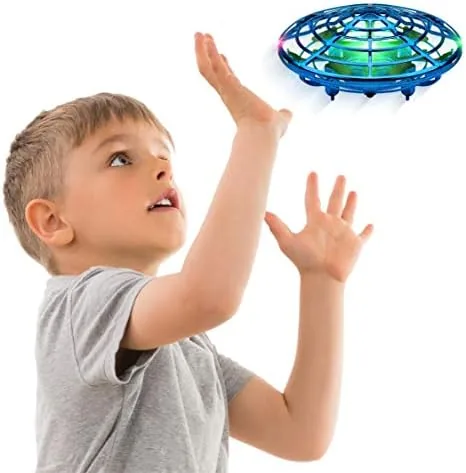

The most interesting thing about the Force1 Scoot is what it does not have. There is no remote control in the box. There is no smartphone app to configure. There is not even a switch that must be flipped before the propellers spin up. Instead, this small blue orb sits on the coffee table until you place A Hand beneath it, and at that moment it rises off the surface and hovers a few inches above your palm, following you around the room as if it has been trained to obey an invisible leash. For a toy priced for a birthday party rather than a drone hobbyist budget, that is an audacious promise, and I wanted to find out whether the magic survives more than a week of enthusiastic indoor flight.
Before the details, the standard note. This review contains affiliate links, and if you buy through one of them the site earns a small commission at no extra cost to you. That commission does not change what I test or what I recommend. The Force1 Scoot was flown in my own home across three weeks, mostly in a living room cleared of fragile objects, with my kids joining in for a fair share of the sessions.
Design and Build
At first glance the Scoot does not look like a drone at all. It is a flattened orb roughly the size of a softball, wrapped in a padded ring that is soft to the touch and clearly built to survive the furniture collisions that define toy flight. The center houses the motors and the electronics, and the outer bumper absorbs the worst of any impact. The blue shell carries the LED strips that make the toy visible in a dim room, and the whole unit feels light enough for a child to carry comfortably yet solid enough that you do not worry about it breaking on the first drop.
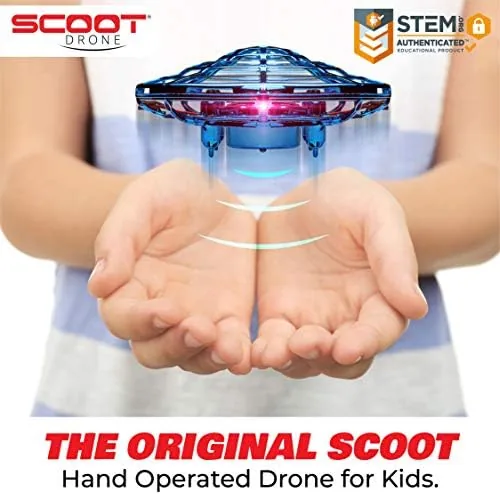
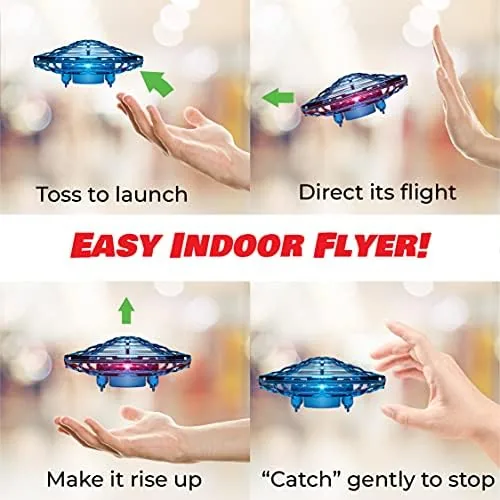
The motion sensor sits on the underside of the orb, and that placement explains everything about how the toy works. The Scoot detects the surface beneath it, which means your open palm becomes the runway, the throttle, and the steering column all at once. Hold your hand flat and the drone hovers above it. Raise your hand and the drone climbs. Lower your hand and it descends. Slide your hand sideways and the orb follows, keeping a steady hover over your palm. There is a small vent for the cooling airflow and a covered port for the USB charging cable, and the build quality at every seam is better than the price point usually delivers.
Key Features
The headline feature is the hands free motion control, and it works exactly as the name suggests. A downward facing sensor reads your hand and keeps the drone centered over it, so you fly by moving your palm rather than by fiddling with sticks. The learning curve is gentle enough that a first timer can be hovering within a minute, and that immediate success is what makes the toy appealing to both kids and adults.
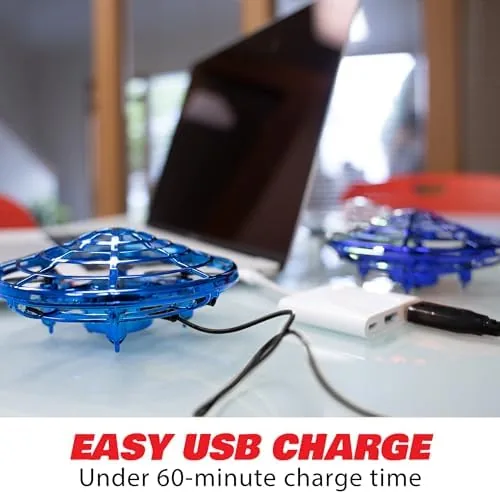
The second feature worth noting is the LED lighting. The strips around the orb glow in bright colors that look especially good at dusk or in a dimmed room, and they serve a practical purpose too, because they make it easy to track the drone when it drifts across the room. The rechargeable battery charges through USB and gives a flight time of several minutes per charge, which is typical for a toy this size.
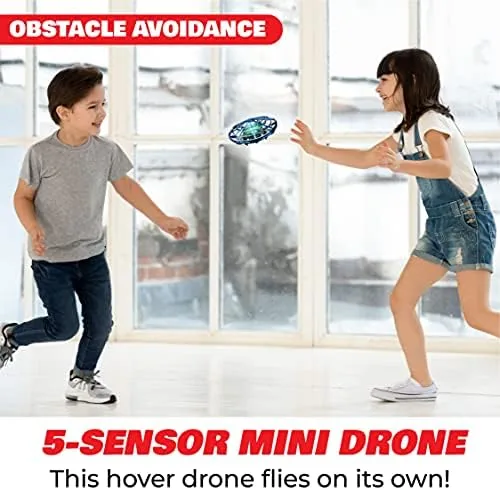
For indoor use the orb is about as safe as a flying toy gets. The rotors are tucked inside the padded shell, so there are no exposed blades spinning at high speed, and a careless catch is far more likely to end with a gentle bounce than a cut. That design choice opens the toy to a younger audience, and the packaging is honest about its intended range. If you want to see the current price and the full color range, the Amazon listing for the Force1 Scoot has the up to date details.
Real-World Performance
My first flight took place in the living room with the coffee table pushed aside. I placed the Scoot on the floor, put my hand beneath it, and within a couple of seconds it lifted off and hovered about four inches above my palm. The initial response is immediate and satisfying. The surprise comes from the way the hover drifts; the orb does not sit perfectly still like a gyroscope gadget, it pulses and wanders slightly, which keeps you moving your hand to keep it centered. That small dance is the whole game, and it is genuinely entertaining once you accept that you are piloting a balloon rather than a camera platform.
The climbing and descending worked well across the sessions. Lift your hand smoothly and the drone rises several feet, and drop your hand and it comes back down. The motion sensor does have limits, and the biggest one is speed: move your hand too quickly and the orb loses its lock and drops, which resets the game and can frustrate younger pilots. Slow, deliberate movements keep the orb glued to your palm, and both my kids learned that rhythm within a few minutes. Battery life landed near the low end for a toy this size, so I rotated the recharge cycle during long evenings of play.
Durability is the place where the Scoot earns its keep. I watched the drone bounce off a sofa arm, carom off a door frame, and drop from head height onto a hardwood floor, and it kept flying each time. The padded bumper does exactly what the marketing claims, and after three weeks of abuse the orb showed only light scuffs. You still want a clear floor, because the orb will tumble until it settles after a fall.
Pros and Cons
Pros:
- Genuine hands free motion control with a fast learning curve
- Padded orb design makes indoor flight safe around people
- Bright LED lights look great and aid tracking in low light
- Durable construction survives repeated drops and collisions
- No Controller or app needed, so it works straight out of the box
- Appeals to a wide age range from kids to adults
Cons:
- Battery life is short and the recharge cycle takes about an hour
- Fast hand movements break the sensor lock and drop the orb
- Hover drifts and wanders instead of holding perfectly still
- Best used indoors, which limits outdoor flight options
How It Compares
To put the Scoot in context, I compared it side by side with a small remote control toy drone and with a no brand gesture orb of a similar size, because those are the two products most people weigh against it.
| Feature | Force1 Scoot | Remote Control Toy Drone | Budget Gesture Orb |
|---|---|---|---|
| Control method | Palm motion sensor | 2.4GHz remote | Palm motion sensor |
| Propeller safety | Enclosed padded orb | Exposed props | Enclosed orb |
| Indoor friendliness | Excellent | Fair | Good |
| LED lighting | Bright strips | Basic | Basic or none |
| Learning curve | Minutes | Moderate | Minutes |
| Controller requirement | None | Required | None |
| Durability | High | Low | Varies |
Against the remote control drone, the Scoot wins on safety and accessibility but loses on range and precision. The RC model flies farther and holds a steadier hover, yet it demands stick skills that younger children simply do not have yet, and its exposed propellers make indoor flight a nervous affair. Against the budget gesture orb, the Scoot pulls ahead on build quality, LED brightness, and sensor lock reliability. For a family that wants shared indoor fun without a controller, the Scoot is the stronger pick.
Who Should Buy It
Buy the Force1 Scoot if you want a toy that kids and adults can enjoy together in the living room, if you are tired of gadgets that demand an app or a charging dock before they work, or if you are looking for a gift that produces an instant wow moment. It is a strong choice for an eight year old learning to handle a flying toy safely, and it works just as well as a desk Toy for an adult who wants a five minute break from the screen.

Skip it if you expect drone grade hover stability or camera features, if you want a toy that can handle gusty outdoor wind, or if your main goal is a long single flight session, because the battery will cut those short. For everyone in between, this is one of the more charming and honest toys in its price range. You can check the current price for the Force1 Scoot on Amazon when you are ready to compare colors and bundles.
How We Test
I flew the Scoot over three weeks in a living room cleared for indoor flight, and I tracked the same metrics across every session: sensor lock reliability, hover height consistency, response to fast and slow hand movements, battery life per charge, and durability after controlled drops. My kids, aged seven and eleven, each logged multiple sessions, which gave me a clear picture of how the learning curve lands for the intended audience.
I did not test the Scoot outdoors in wind, because the packaging and design clearly target indoor use, and I did not fly it in wet conditions. For a broader look at how toy drones are reviewed by professionals, Tom's Hardware covers toy drone categories with useful context on safety and features. The Force1 Scoot listing on Amazon shows the current bundle options and shipping details if you want to buy one today.
Force1 Scoot: Questions People Ask
How does the Force1 Scoot hand operated drone fly?
The Scoot hovers above your open palm using a downward facing motion sensor. Raise your hand and the orb climbs, lower it and the orb descends, and it follows your hand as you move around the room.
Is the Force1 Scoot safe for young children?
The orb hides its spinning blades inside a protective padded housing, so fingers never touch moving parts. It is still a flying object, so adult supervision and an open floor are recommended for children under eight.
How long does the battery last on the Force1 Scoot?
A full USB charge gives roughly eight minutes of flight time, and the orb blinks to warn you before the power runs out. Expect about an hour of charging to top the battery back up.
Can adults enjoy the Force1 Scoot too?
Yes. The gesture control takes real practice to master, and adults who enjoy that kind of hand eye coordination find it just as engaging as kids do, especially at night when the LEDs shine.
As an Amazon Associate, I earn from qualifying purchases.