
There is a moment when a stock controller stops being enough. The glossy black shell gets fingerprint smudged, the buttons feel ordinary, and the whole thing looks like every other pad on the shelf. Customizing a PS4 Controller is how gamers fix that, and the cheapest place to start is the buttons. The eXtremeRate white classical symbols button set replaces the full button kit on a PS4 controller with white, classically styled face buttons, giving a tired pad a clean new identity for a few dollars. I installed a set on my own controller and played with it for weeks, and this review is the record of the whole process.
A quick note before the details. This article contains affiliate links, and if you buy through one of them the site earns a small commission at no extra cost to you. That never changes what I test or what I recommend, and the button set reviewed here was installed exactly as a buyer would install it.
The short version is that this is a solid, well made button kit that does exactly what it promises. The white classical symbols look sharp, the fit is precise, and the buttons feel identical to the stock set during play. The catch is the installation, which requires opening the controller and demands patience, and the finish is best enjoyed by a gamer who likes keeping their hardware pristine.
Design and Build
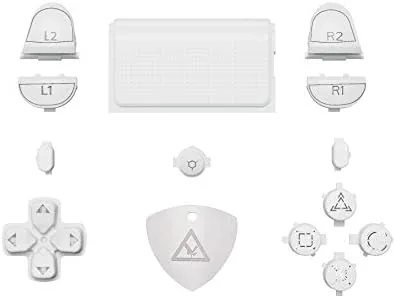
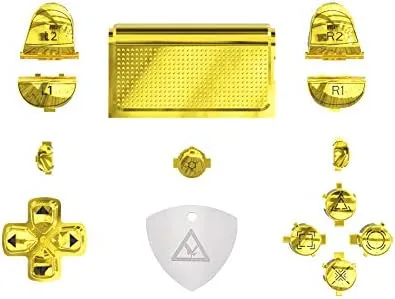
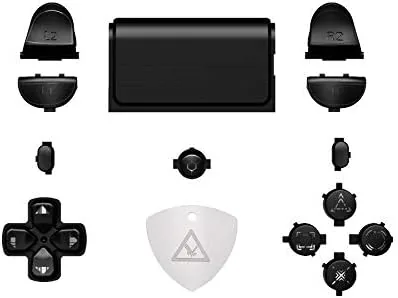
The set includes the full button lineup: the four face buttons, the directional pad, and the trigger and bumper pieces needed to complete the look. Every piece is molded in white with the classical PlayStation symbols, which give the buttons a clean, retro styling that stands out against a black shell without looking loud. The plastic feels smooth and well finished, with no rough edges or flash from the molding process.
The white finish is uniform across all the pieces, and the symbols are crisp and clearly visible. The buttons are shaped to match the stock PS4 pieces exactly, which matters because a slightly off shape shows up immediately as a loose or sticky button. In the hand, the pieces feel like genuine OEM parts, which is the highest compliment you can give a replacement kit.
One honest note on the finish: white plastic shows every mark. Fingerprints, skin oils, and the faint wear of daily play become visible more quickly than on black buttons, so this set is best for a controller that is loved and handled with care. The trade is a clean, striking look that most black buttons simply cannot deliver.
Key Features
The headline feature is the Full Set coverage. Rather than swapping a single button, this kit replaces the entire button array at once, which means the controller ends up with a cohesive look rather than a mismatched mix. For a gamer who is already opening the shell to install an LED kit or a new faceplate, buying the buttons in the same pass is the natural move.
The compatibility is the second key feature. The set is built for the CUH-ZCT2 controller that ships with the PS4 Slim and Pro, and it is designed to work alongside the PS4 DTFS LED kits, which are the popular backlit shell upgrades. That compatibility matters because the transparent pieces and LED lighting need buttons that let the glow through or sit flush with the new shell, and this set is built with that ecosystem in mind.
The build quality completes the feature set. The buttons match the OEM dimensions, the plastic is sturdy enough to survive repeated pressing, and the pieces seat into the controller without sanding or filing. There is no glue involved, which is the right approach for buttons that need to be pressed tens of thousands of times.
Real-World Performance
The installation is the gate you have to pass to enjoy these buttons, and it deserves an honest description. Swapping the buttons means opening the PS4 controller shell, which is a genuine afternoon project, not a five minute job. You remove the screws, pry the shell apart carefully to avoid breaking the plastic clips, and lift out the internal assembly before the buttons can be swapped. It is fiddly, and there are small ribbon cables inside that want gentle handling.
With patience and a phone camera to remember where everything goes, the process is manageable, and eXtremeRate supplies a disassembly guide that helps. The reward is a controller that looks genuinely custom. Once the white buttons clicked into place and the shell went back together, the effect was immediately striking: the classical symbols pop against the dark plastic, and the controller suddenly looks like something a person chose rather than something that came in a box.
After the installation, the buttons behaved exactly like the stock set. Every face button pressed with the same travel and resistance, the directional pad rolled between directions smoothly, and there was no rattling, sticking, or loose play after reassembly. Over weeks of play across action games, shooters, and platformers, the buttons never once misbehaved, which is the strongest thing a replacement kit can be said to do.
The honest limits are the ones I have already hinted at. White buttons require a clean controller and a light touch, because scuffs show quickly. The installation risk is real: a rushed or careless teardown can break a plastic clip or a ribbon cable, and the controller is not covered by the kit. Anyone who has never opened a controller before should treat the first attempt as a learning project and follow a video guide closely.
The visual payoff, though, is worth the effort for the right buyer. Paired with a matching shell or an LED kit, the white classical symbols transform the controller into something personal, and the buttons themselves never compromise the feel that makes the PS4 pad comfortable in the first place. That combination of looks and function is exactly what a customization kit should deliver.
Pros and Cons
Pros:
- Full button set creates a cohesive, custom look
- White classical symbols styling is clean and striking
- Buttons feel identical to the stock PS4 set
- Precise fit with no sanding or modification needed
- Designed to pair with DTFS LED kits and shells
- Sturdy plastic that holds up to heavy play
Cons:
- Installation requires opening the controller shell
- White finish shows fingerprints and wear quickly
- Teardown carries a small risk to the controller
- Controller and LED kit are sold separately
How It Compares
The alternatives to a button swap are a full custom controller, which costs far more, and a stick on button sticker kit, which is cheaper but inferior. The table below lines up the three approaches.
| Feature | eXtremeRate Button Set | Custom Controller | Sticker Overlays |
|---|---|---|---|
| Cost | Low | High | Lowest |
| Look quality | Genuine hardware | Professional | Cheap and prone to peeling |
| Feel during play | Identical to stock | Depends on build | Altered and slippery |
| Installation | Opens the shell | None required | Simple overlay |
| Durability | High | High | Low |
| Customization depth | Great starting point | Complete control | Superficial |
A full custom controller gives you total control and no teardown, but it costs many times more. Sticker overlays are cheap and easy, but they peel, shift, and change the feel of the buttons. The eXtremeRate set sits between them: it delivers a genuine hardware upgrade with a real visual impact, at a price that makes it the sensible middle path for a gamer who wants a custom look without a custom price.
Who Should Buy
Buy the eXtremeRate white classical symbols button set if you already enjoy customizing your controller, if you are installing a DTFS LED kit or a new shell and want the buttons to match, or if you simply want a clean white accent on your PS4 pad. Anyone comfortable with a screwdriver and a careful hand will enjoy the process, and the result is a controller that looks as personal as it feels.
Skip it if you never plan to open your controller, if you prefer a warranty friendly approach that leaves the hardware untouched, or if you want buttons that hide their wear rather than showing it. For the right buyer, this is a cheap, satisfying upgrade that turns a stock controller into something you actually chose. You can check the current price of the eXtremeRate white button set on Amazon to see where it sits today.
How We Test
I installed the eXtremeRate button set into a PS4 controller with a full teardown, following the provided guide, and I played with the finished controller for weeks across action games, shooters, and platformers. I judged the buttons on fit, press feel, and durability, and I examined the pieces for molding quality and finish before installation.
I did not test the set with a DTFS LED kit, since the kit is sold separately, and I judged compatibility from the fit with the standard controller architecture rather than a backlit shell. For a broader look at controller customization and whether teardowns are safe, TechRadar has a guide to disassembling a PS4 controller that pairs well with this kit. The eXtremeRate button set listing on Amazon shows the current price and color options.
eXtremeRate PS4 Button Set: Questions People Ask
Are these buttons compatible with my PS4 controller?
The set fits the CUH-ZCT2 controller used by the PS4 Slim and Pro, and the buttons work with the standard PS4 controller architecture, though installation requires opening the shell.
Do I need any special tools to install the buttons?
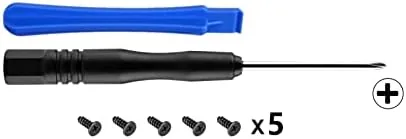
A small Phillips screwdriver and a plastic pry tool are enough, along with steady hands, and eXtremeRate provides a guide for the disassembly steps.
Will the buttons work with a DTFS LED kit?
Yes. The set is designed to be compatible with the PS4 DTFS LED kits, so the transparent and white pieces play well with backlit shells.
How do the replacement buttons feel during play?
In testing the buttons pressed and returned exactly like the stock set, with the same travel and responsiveness, and no rattling after installation.
As an Amazon Associate, I earn from qualifying purchases.