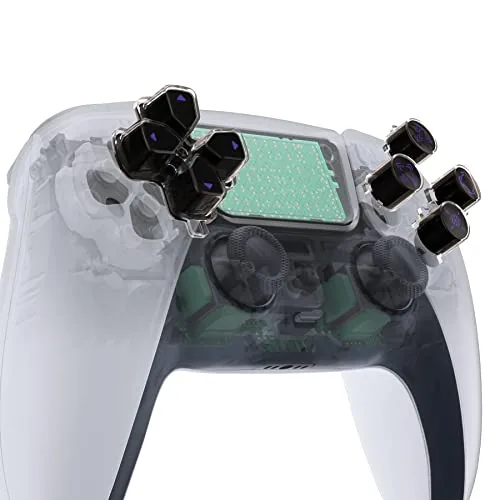

The DualSense controller is a fine piece of hardware, but fine is not the same as personal. After a few months of use, every PlayStation 5 owner ends up holding the exact same black and white controller as everyone else, with the same glossy buttons and the same familiar symbols. The eXtremeRate Replacement Custom D-pad and Action Buttons offer a way out of that sameness, a three-tone set in black and clear with purple redesigned symbols that changes the look of the controller without changing the way it plays. I installed a set into a standard DualSense and lived with the result through a full season of games, and this review covers the fit, the install, and whether the upgrade is worth the trouble.
Before the details, the standard note. This article contains affiliate links, and if you buy through one of them the site earns a small commission at no extra cost to you. That commission does not change what I test or what I recommend. The buttons used here came from a retail kit exactly like the one you would order.
Custom controller parts are a growing corner of the accessory market, and eXtremeRate is one of the established names in it. The set in question is the D-pad and action buttons in a black and clear two material finish with purple symbols, and the review below walks through the materials, the install process, the feel in games, and the honest comparison to the stock parts.
Design and Build
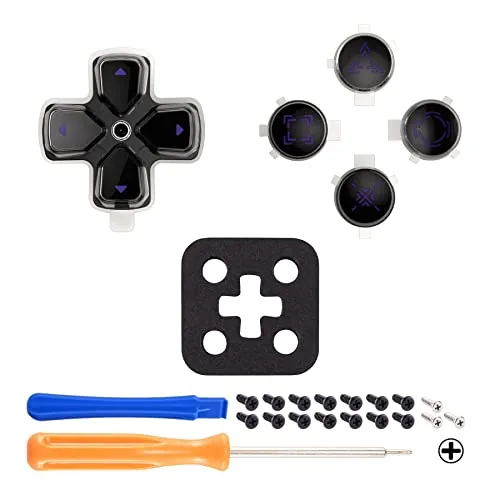
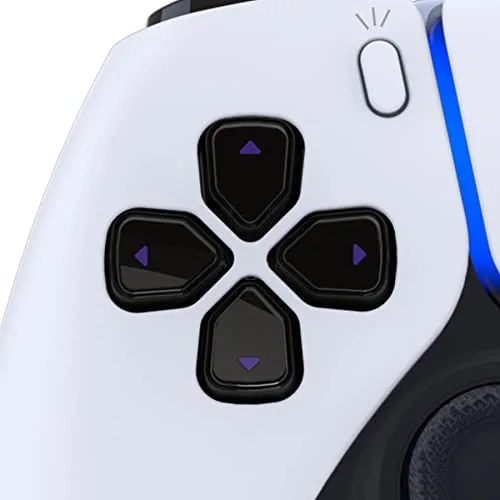
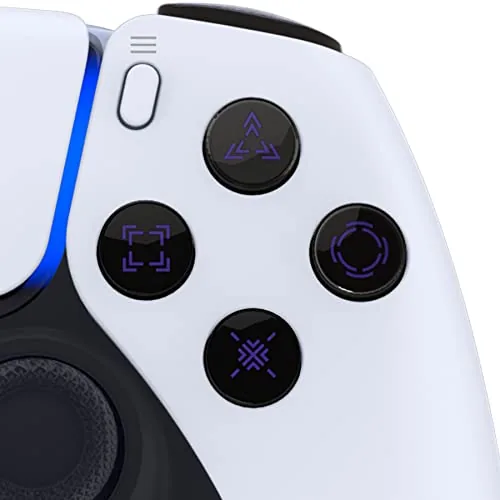
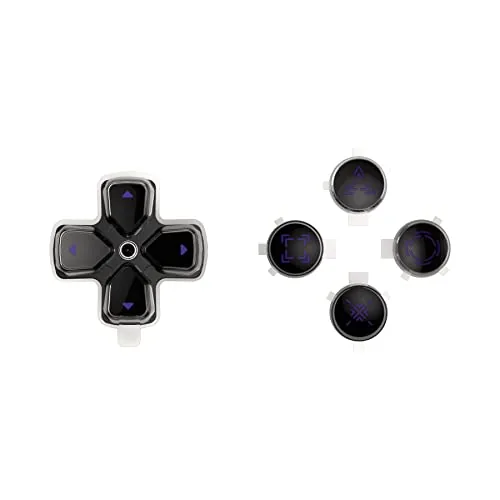
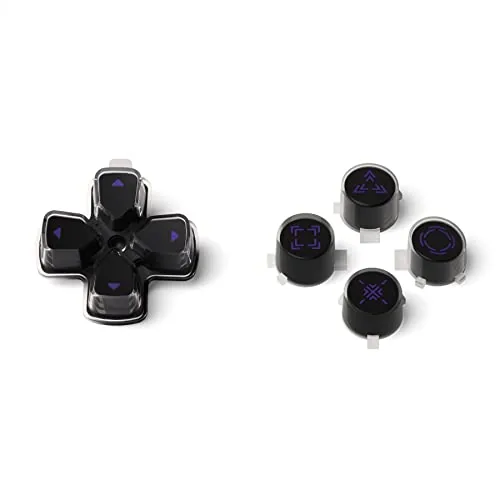
The set contains a cross shaped D-pad and four action buttons, molded in a three-tone scheme that mixes solid black with translucent clear plastic and purple printed symbols. The effect is noticeably more dramatic than stock, catching light through the clear sections while the black base keeps the buttons looking cohesive. The purple symbols are a redesign of the classic PlayStation shapes, and they read clearly at a glance, which matters more than it sounds in the middle of a game.
The plastic quality holds up to inspection. The buttons are molded cleanly with no rough edges, and the transparent sections are polished rather than cloudy. Each button has the same stem and cradle geometry as the originals, which is the detail that decides whether an aftermarket part feels native or loose. On the bench, the eXtremeRate pieces match the stock parts almost exactly in dimension, which is the first good sign for a swap like this.
Key Features
The headline feature is the appearance, and the three-tone design is the point. The clear sections act like a window into the controller, the black base gives the set depth, and the purple symbols tie the whole thing together. For anyone customizing a DualSense, this set changes the most visible part of the controller with one swap.
The practical features are the precise fit and The Complete coverage of the kit. The set replaces the full D-pad and all four face buttons, so nothing is left half stock, and the parts are molded to the exact geometry of the DualSense. Because the buttons keep the factory shape, the travel and press feel remain identical to stock, which is the difference between a cosmetic mod and a functional downgrade. The kit is also sold as a standalone set, which makes it a low cost entry into controller modding for someone who wants to start small.
Real-World Performance
Installation is the gate every aftermarket part has to pass, and the eXtremeRate set clears it with a couple of warnings. The DualSense opens with a small screwdriver and a little care, and the inside is a ribbon cable maze that demands patience. I followed the disassembly steps carefully, popped the stock buttons out from the underside of the shell, and dropped the new pieces into the same cradles. The whole swap took about twenty minutes the first time, and every button seated with the same positive click as the originals.
Once the controller was back together, the feel test was the important one. The D-pad presses with the same diagonal and cardinal response as stock, which is a relief because a poorly fitted D-pad can introduce misses in fighting games. The face buttons return with the same spring and travel, and no button stuck or wobbled during extended play. Over several weeks of games including platformers, action titles, and menu heavy RPGs, the buttons performed exactly like the originals they replaced, which is the quiet vote of confidence a modder wants.
The visual payoff lands where advertised. The clear sections catch the light differently than glossy stock buttons, and the purple symbols give the controller an identity that the factory look does not. In a dim room the buttons are easy to read, and in bright light the black and clear contrast is striking without being garish. The mod transforms the front face of the controller while leaving the rest of the shell untouched, which makes it an easy first step for someone not ready to reshell the whole device.
The honest limitations are real but narrow. The install requires opening the controller, and that is not a zero risk activity for someone who has never worked on electronics, because the ribbon cables inside are delicate. The parts are also cosmetic only, so they add no durability or grip benefit over stock. And while the three-tone look is distinctive, it is a specific style, so what suits one person may not suit another. None of these are flaws in the parts themselves, but they are the context anyone considering the swap should know.
Pros and Cons
Pros:
- Distinctive three-tone black and clear design with purple symbols
- Buttons keep the exact stock geometry and press feel
- Clean molding with no rough edges or cloudy plastic
- Complete set covers the D-pad and all four face buttons
- Low cost way to personalize a DualSense
Cons:
- Requires opening the controller with care around ribbon cables
- Cosmetic upgrade only, no performance or grip benefit
- Three-tone style will not suit every taste
How It Compares
The main alternative to a button swap is a full shell replacement, and the table below compares the two approaches to customizing a DualSense.
| Feature | eXtremeRate Button Set | Full Shell Replacement |
|---|---|---|
| Scope of change | Buttons and D-pad only | Whole controller exterior |
| Install difficulty | Moderate, one reassembly | Higher, more parts and clips |
| Cost | Low | Higher |
| Risk of breaking | Lower | Higher with more ribbons |
| Visual payoff | Front face only | Full color and texture change |
A full shell replacement changes the entire controller and is the path for someone who wants a complete look, but it adds cost and install risk. The button set is the cheaper, safer entry point that changes the most visible part of the controller. For most people starting out with controller mods, the button swap is the smarter first step, and a shell can come later if the bug bites.
Who Should Buy It
Buy the eXtremeRate button set if you want to personalize your DualSense without the expense or risk of a full reshell, if you have some patience for careful disassembly, or if the black and clear three-tone look is exactly the style you have been picturing. It is also a good pick for a gift, since the low price makes it an easy way for someone to try controller modding.
Skip it if you would never open a controller, if you want a complete shell color change instead of just the buttons, or if you prefer the look of the stock parts. For everyone who likes the look, this is the least intimidating way to make your controller yours. You can check the current price of the eXtremeRate button set on Amazon when you are ready to order.
How We Test
I installed the eXtremeRate buttons into a standard DualSense controller following the included instructions and a standard disassembly guide, using a small screwdriver and opening tools. I played a variety of games over several weeks, checking the D-pad for missed inputs, the face Buttons for sticking or wobble, and the overall feel against a stock controller used side by side. I did not modify the shell or any internal components beyond the button swap.
For guidance on working inside the DualSense safely, The Verge has a thorough teardown of the PS5 controller that shows what is under the shell before you open yours. The eXtremeRate button set listing on Amazon shows the current price and available color combinations.
eXtremeRate Custom Buttons: Questions People Ask
Are these buttons compatible with every PS5 controller?
The set fits the standard DualSense controller body, and eXtremeRate lists compatibility clearly, so check the listing for the exact controller revision you own.
Do I need to disassemble the controller to install them?
Yes, replacing the D-pad and face buttons means opening the controller shell and separating the button assembly, which requires a screwdriver and a careful hand.
Will the new buttons change how the controller feels?
The three-tone buttons keep the same shape as the stock parts, so the press feel is nearly identical while the black and clear styling changes the look.
Do the redesigned purple symbols show up well in use?
The purple symbols contrast cleanly against the black and clear surfaces, and they stay visible under normal room lighting and during gameplay.
As an Amazon Associate, I earn from qualifying purchases.