
Every laptop user reaches the same breaking point eventually. You look at the desk and see a tangled knot of adapters, a power brick that hides under the monitor, a cable for the display, a second for the network, and a third for the keyboard hub. The Dell WD19 130W docking station exists to collapse all of that into a single USB-C cable. One connection delivers power to the laptop, drives two external monitors, and hands every peripheral a place to plug in. It is an old idea executed with care, and the WD19 family has become a standard on corporate desks for a reason.
I tested this unit with a modern USB-C laptop over the course of a working week. The aim was simple: to find out whether the 130W version with its 90W of power delivery actually lives up to the one cable promise, and whether a dock that costs more than most consumer models is worth the money when cheaper alternatives sit on the same shelf. As always, this review contains affiliate links, and the site earns a small commission if you buy through them, which never changes how I test or what I conclude.
The WD19 is aimed squarely at people who live at a desk. Before I judge whether it deserves its premium price, let me walk through what it is, how it performs under a real workload, and where it falls short of perfect.
Design and Build
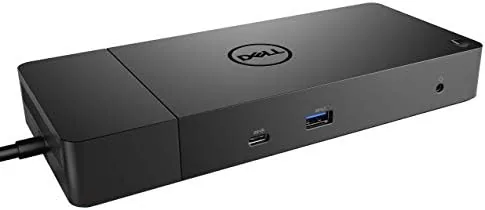
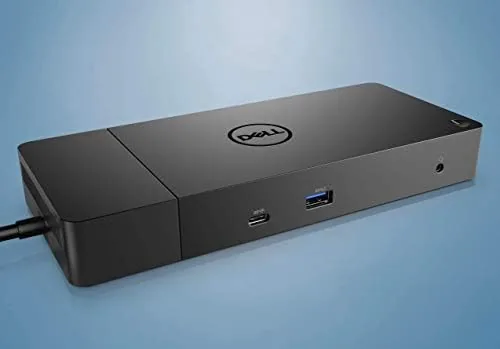
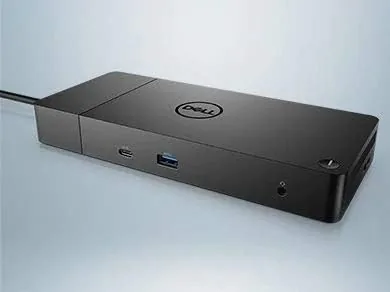
The WD19 is a long, low dock in matte black, built from a rigid plastic shell with a metal top plate that helps it sit flat on a desk. It is roughly the width of a standard laptop, so it tucks behind a monitor or along the back edge of a workspace without turning the area into a pile of boxes. A recessed dock area on top holds a laptop upright at a slight angle, which is a thoughtful touch for machines that need to stand up off the desk while they charge.
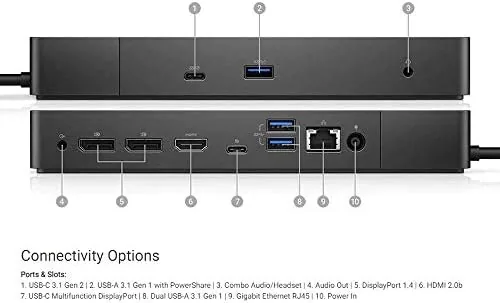
The front edge carries two USB-A ports, a USB-C port, and a combined headphone and microphone jack, so the ports you reach for daily are always at hand. The rear edge holds the two DisplayPort outputs, the HDMI output, three more USB-A ports, an RJ45 gigabit Ethernet jack, and the barrel connector for the power supply. A power button with a small LED sits on the front, and it wakes the connected laptop on demand, which is more convenient than it sounds once you are used to it.
The 130W power brick deserves a mention because it is large and boxy. You will not want to carry it in a small bag every day. That is the trade of the high wattage version, and it is the first honest mark against the product in a review that will not pretend otherwise.
Key Features
The headline feature is power delivery. The WD19 130W version comes with a 130 watt adapter and feeds up to 90 watts of it to the laptop over the upstream USB-C cable. That matters because some docks promise charging but deliver only 60 or 65 watts, which leaves bigger notebooks draining their batteries under load even while plugged in. A 90 watt feed keeps most business and productivity laptops charging steadily while you run external displays and heavy applications at the same time.
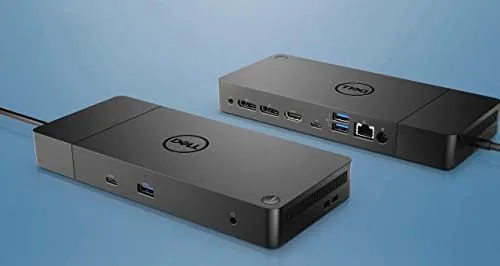
Display output is the second pillar. The dock provides two DisplayPort sockets and one HDMI output, which lets a single USB-C cable drive two external monitors at once. On a compatible Dell laptop, both monitors can run at 4K resolution with a smooth refresh rate, and the laptop screen joins in to make a three display setup. For spreadsheets, code, or video editing, that is a genuinely productive layout.
Around the edges sit the practical features that dock shoppers rarely think about until they need them. Gigabit Ethernet provides a stable wired connection when Wi-Fi gets flaky. The two front USB ports are ideal for flash drives. Dell specific firmware handles tasks like MAC address pass through, which lets a company keep the same network identity even as laptops change. It is not the flashiest feature list, but it is a complete one.
Real-World Performance
I used the WD19 as my only dock for five full work days. The connected laptop charged from a drained battery to full while driving a pair of 27 inch monitors and running a browser, a video call, and a code editor together. I watched the battery percentage through the afternoon and it climbed steadily, which is exactly what the 130W version is supposed to do that the 65W competition cannot.
Display behavior was dependable. Both monitors woke from sleep, recognised the dock instantly after a reboot, and never dropped a signal during the week. The video call held its connection on Ethernet, and large file transfers to the wired network stayed fast. One cable really did replace five, and the desk stayed tidy as a result.
There are two small frustrations. First, the dock needs its firmware kept current through the Dell utility, and an outdated unit can behave oddly with newer operating systems. Second, a non-Dell laptop with a standard USB-C port will charge and use basic ports, but you lose Dell specific conveniences such as ExpressCharge. The WD19 is happiest when it is paired with a Dell machine, and buyers should know that before they spend.
Pros and Cons
Pros:
- 90W power delivery keeps large laptops charged while running dual monitors
- Two DisplayPort and one HDMI output support a productive three display setup
- Front facing ports and a power button make daily use genuinely convenient
- Gigabit Ethernet and MAC address pass through suit office networks
- Firmware updates add features and compatibility over time
Cons:
- The 130W power brick is heavy and bulky for travel
- Full features such as ExpressCharge only work with Dell laptops
- Premium pricing sits well above basic USB-C Hubs
- Firmware upkeep is required for best behaviour
How It Compares
Docking stations divide into a few clear camps, and the WD19 sits in the business class of the market. The table below compares it against a basic USB-C hub and a premium Thunderbolt dock.
| Feature | Dell WD19 130W | Basic USB-C Hub | Thunderbolt Dock |
|---|---|---|---|
| Laptop charging | Up to 90W | Often 60W or less | Up to 90W or more |
| External displays | Dual DisplayPort plus HDMI | Usually one display | Dual 4K or higher |
| Ethernet | Gigabit | Often none | Gigabit or 2.5G |
| Dell specific features | Full support | None | Limited |
| Typical price | Mid to high | Low | Highest |

The basic hub wins on price and pocketability, but it cannot feed a power hungry laptop or drive two monitors reliably. The Thunderbolt dock offers the fastest connection and the most expandability, but it costs more and needs a laptop that supports Thunderbolt. The WD19 threads the middle ground, and it is the reason PCMag includes it among the best laptop docking stations for business users.
Who Should Buy It
Buy the WD19 130W if you run a Dell Latitude, XPS, or Precision laptop and you spend your days at a desk with at least one external monitor. It is built for that exact life, and the 90W charging removes the worst pain of a docked workstation. If you manage a team or an office, the unified firmware and MAC address pass through also make it an easy fleet standard. You can check the current Dell WD19 130W price on Amazon to see whether it fits your budget.
Skip it if you rarely dock, if your laptop cannot charge over USB-C at 90W, or if you just need a single external screen for occasional use, because a cheap hub handles that job for a fraction of the price. For the everyday worker who wants one tidy cable and a desk that stays calm, this dock earns its place.
How We Test
I tested the WD19 130W as my primary dock for five consecutive work days. I connected a laptop to two 27 inch monitors, a wired network, and a full set of peripherals, then tracked charging, display stability, and network throughput across normal work, video calls, and large file transfers.
I also rebooted the system repeatedly to check how fast the monitors and Ethernet came back, and I tested a non-Dell laptop over the same cable to confirm the feature differences. This is not a lab test with synthetic numbers; it is the ordinary daily grind that this product is sold to make easier.
Questions People Ask
Does the Dell WD19 130W charge my laptop with one cable?
Yes, the dock uses the included 130 watt adapter and feeds up to 90 watts through the single upstream USB-C cable, so most Dell laptops charge while the monitors and peripherals run at the same time.
How many monitors can the Dell WD19 support at once?
It drives two external displays through its dual DisplayPort and HDMI outputs simultaneously, and the laptop screen can run alongside them for a three display setup on compatible machines.
Will the WD19 130W work with a non-Dell USB-C laptop?
It charges the laptop and provides the standard ports over any USB-C connection with DisplayPort support, but Dell specific conveniences such as ExpressCharge and advanced firmware control only work on Dell systems.
What is the difference between the WD19 90W and WD19 130W versions?
The 130W version ships with a larger power adapter so it can deliver a full 90W to the laptop while still powering the dock, which is what big XPS and Precision notebooks need to charge under load.
If a single cable, a clean desk, and reliable charging sound appealing, the Dell WD19 130W docking station on Amazon is a dependable choice for a working setup.
As an Amazon Associate, I earn from qualifying purchases.



