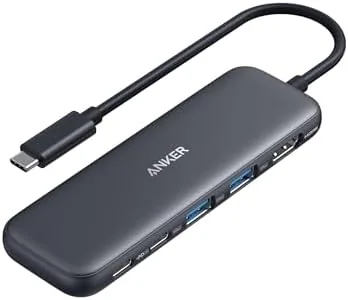

My laptop has one USB-C port that has to do everything at once, and juggling a monitor, a drive, and a charger across a single connection was my daily friction. This Anker 332 5-in-1 USB-C hub review is the record of three weeks spent with the Anker 332 as the fixed bridge between my laptop and the desk. It is small, it needs no power brick of its own, and it simply does the job without ever drawing attention to itself.
Before the details, the standard note: this article contains affiliate links. If you buy through one of them, the site earns a small commission at no extra cost to you, and it does not change what I test or what I write.
Design and Build
The Anker 332 is a compact block, roughly the size of a phone and just thick enough to feel solid. It is built to travel and to sit on a desk, and its aluminium touch approaches zero fingerprint drama. The single cable stores flat, so the whole hub slips into a laptop sleeve without adding bulk.
In the palm of a hand it feels properly made. There is no creak, the ports seat cables with a satisfying click, and the panels align cleanly. For a device whose whole job is to be forgotten, that solidity is the point; the bad ones wobble and fail in a month, and this one simply does not.
The port layout is well spaced. An HDMI port, a USB-C data port, two USB-A ports, and the power delivery input all sit around the edges with room to spare between them, so you never have to unplug one thing to reach another, even with bulky adapters in place.
Key Features
The headline is the 4K HDMI output. The hub pushes a single display at 4K and 30Hz, which is far more than I need for a spreadsheet and a browser, and it works with both a Mac and a Windows laptop without drivers.
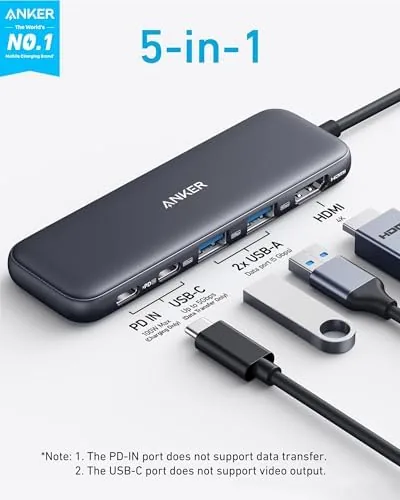
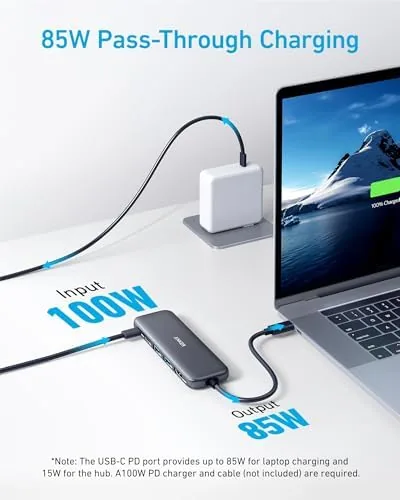
The second headline is 85W of pass-through charging. You plug your laptop charger into the hub and it feeds the machine while the other ports run their own traffic, which means no separate power brick and no second cable draped across the desk. For a thin laptop that is a genuine convenience.
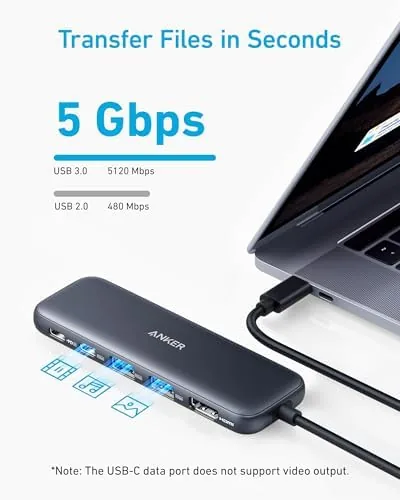
Then there are the data ports: one USB-C and two USB-A, all running 5Gbps. That handles external SSDs, phones, mice, and memory card readers comfortably. There is no video output beyond the single HDMI and no separate monitor for daisy-chaining, which is the honest limit of a compact 5-in-1.
Real-World Performance
Here is where I put the spec sheet aside and describe what it is like to live with, because performance is the real test. The daily rhythm was simple: plug the laptop in at the desk, and the monitor lights, the mouse works, and charging starts, all through the single hub. I set it up once and never touched it again.
The 4K output held rock solid. I drove a 4K monitor for most of my working minutes, and the picture stayed stable with no dropouts, no flicker, and no need to replug the HDMI. For a 4K monitor paired with a browser and several apps, that reliability is everything, because the cheap hubs are precisely the ones that flake out here.
Pass-through charging earned its keep. With an 85W adapter, my laptop charged at its normal rate while the monitor and an SSD worked at the same time. The hub warmed only slightly under sustained load, which is a good sign, though a heavier adapter would be needed to power a 15-inch Pro at full speed.
An honest note. The 4K limit is 30Hz, so if a 120Hz gaming monitor or a fluid 4K refresh is your goal, this hub is not that. It is a productivity hub, and it stays honest about that; for everyday work the speed is more than enough.
Pros and Cons
Pros:
- Single cable adds a 4K monitor and fast data without extra power
- 85W pass-through charging keeps a laptop topped up all day
- 5Gbps on all the data ports covers SSDs and phones well
- Compact, solid, and pocketable for a laptop bag
- Straightforward plug-and-play on Mac and Windows
Cons:
- 4K tops out at 30Hz, no high refresh display output
- No SD card slot, so photographers need a separate reader
- Only a single HDMI output, no monitor daisy-chaining
How It Compares
The Anker 332 is best compared with a hub with a few more ports or with the built-in dock that ships as an accessory. Against a full dock it lacks the extra display outputs, but it wins on price and on the fact that you can carry it in a bag, which makes it the practical pick for most on-the-move users.
| Feature | Anker 332 5-in-1 | Full USB-C Dock |
|---|---|---|
| Video output | 4K HDMI, one display | HDMI and DP, multiple |
| Pass-through power | 85W | Up to 100W or more |
| Data ports | 1 USB-C, 2 USB-A | More, with Ethernet |
| Portability | Pocketable | Desk-bound |
| Typical cost | Lower | Higher |
Against a cheaper single-HDMI adapter, the 332 adds the two USB-A data ports and full pass-through, which turns a risky compromise into a real workstation in the same footprint. For an everyday worker, that is the meaningful difference.
Who Should Buy the Anker 332 5-in-1 Hub
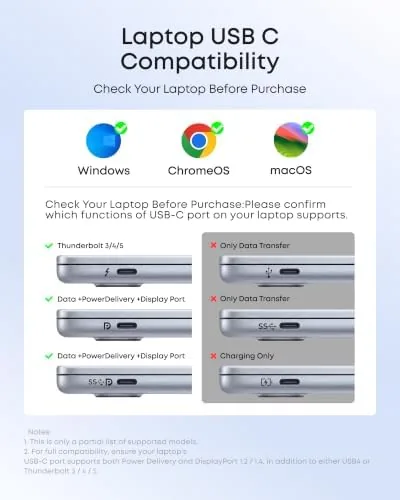
Buy it if you use a USB-only laptop and want to attach a monitor, a mouse, and a phone or SSD with one clean connection and without a dock on the desk. It is the sensible bridge for a MacBook Air, a thin Windows machine, or anyone who takes their setup on the road.
or if you are a gamer chasing a high refresh display. You can check the Anker 332 hub price and options on Amazon when you are ready.
How We Test
I ran the Anker 332 5-in-1 for three weeks as the only bridge from my USB-C Mac to a 4K monitor on a daily desk. I judged the display output, the pass-through charge, the data port speed with an SSD and a phone, and how stable the whole setup stayed during full working days.
I compared it side by side with a full dock and a single-HDMI adapter so the verdict reflects the hub rather than a spec sheet. Independent testing, such as TechRadar's Anker 332 hub review, notes the same balance of ports and 4K output for the price.
When you are ready to decide, the Anker 332 hub listing on Amazon has the current options.
Anker 332 5-in-1 Hub: Questions People Ask
Does the Anker 332 hub support 4K?
Yes, the HDMI port outputs 4K at 30Hz, which is smooth enough for a desktop monitor and a television but not for high-refresh gaming.
Can the hub pass through laptop charging?
Yes. The USB-C input accepts up to 85W of pass-through power, so a laptop stays charged while the transport ports run at the same time.
Is the hub compatible with a MacBook or a Dell?
Yes. It works with MacBook Pro, MacBook Air, Windows laptops, and most USB-C devices without needing drivers or extra configuration.
How fast are the data ports?
The USB-C and USB-A data ports all run at 5Gbps, which comfortably handles external SSDs, phones, and everyday peripherals.
As an Amazon Associate, I earn from qualifying purchases.



