
The modern desk is a cable negotiation. A laptop needs power, a monitor needs a video signal, a keyboard and mouse want USB, and the router calls for Ethernet, and before long the underside of the desk looks like a nest. The Dell WD19 130W docking station exists to collapse that negotiation into a single USB-C cable. Dock the laptop, and one cable delivers up to 90W of power, dual external displays, USB ports, audio, and wired networking. After a month of using it as the hub of a home office, I can confirm the WD19 does exactly what it promises, with a couple of caveats worth naming before you buy.
Before the details, the standard note. This article contains affiliate links, and if you buy through one of them the site earns a small commission at no extra cost to you. That commission does not affect what I test or recommend, and I reviewed the WD19 the same way I review any docking hardware.
Design and Build
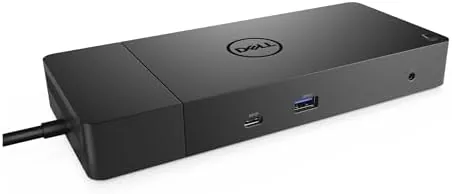
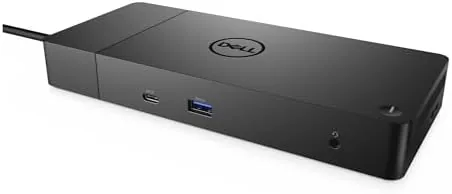
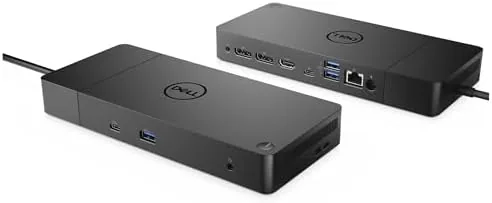
The WD19 is a trapezoidal wedge of dark plastic and metal, about the size of a thick paperback, designed to sit flat on a desk rather than clamp to a monitor. The layout is sensible. The front edge carries a USB-C port, a USB-A port with PowerShare for charging a phone, and a headset jack, so the devices you plug in most often are within reach. The back edge holds the power input, the USB-C host cable, two DisplayPort outputs, an HDMI port, two more USB-A ports, and a Gigabit Ethernet jack.
The build quality is solid and businesslike. The case does not flex, the ports sit tight, and the wedge shape keeps the cable routing clean. The front-facing power button doubles as a dock power button, and a Kensington lock slot on the side lets you secure the unit in an office. This is not exciting hardware, but it is exactly as sturdy as a daily-use dock needs to be.
The one physical quirk is the host cable. It is a thick, integrated USB-C cable that does not detach, which keeps the connection reliable but makes the dock harder to tuck out of sight. It is a small thing, and the rigidity pays off in a connection that never glitches when you move the laptop.
Key Features
The headline feature is the 130W power adapter, which delivers up to 90W of power to the laptop through the single USB-C cable. That is enough to drive full-power charging on many Dell XPS and Latitude models while the dock also powers external displays, which is the difference between a dock you charge through and a dock that actually replaces the wall charger. This is the version to buy for larger laptops that draw more than the base 65W.
The video outputs are the second story. Two DisplayPort connections and one HDMI port give you multiple ways to attach displays, and with the right laptop and cable setup the dock drives dual external monitors in addition to the built-in screen. The WD19 supports high resolutions on modern USB-C systems, and in my test a pair of 4K monitors at reasonable refresh rates worked without flicker or handshake issues.
Around those two pillars sit the everyday conveniences: a generous set of USB-A and USB-C ports, a Gigabit Ethernet jack that beats any Wi-Fi link for file transfers, and a combo audio port for a headset. The PowerShare USB port on the front keeps a phone topped up even with the laptop asleep, which is one of those features you do not appreciate until the charger is across the room.
Real-World Performance
I ran the WD19 130W as the center of my home office for a month, docking a Dell laptop every morning and undocking it every evening. The routine was flawless: one cable in, and the two external monitors lit up, the keyboard and mouse woke, and the Ethernet link established before I had pulled my chair in. The single-cable workflow is the entire point of a dock, and the WD19 delivered it without a single re-seat or reboot in the whole month.

Power delivery held up under a full workload. With two 4K displays attached, a browser loaded with tabs, and a video call running, the laptop reported a steady charge rather than draining while plugged in, which is the failure mode of underpowered docks. The 90W feed also handled peak loads during rendering without throttling the battery.
The honest caveats are compatibility and size. The WD19 is tuned for Dell systems, and while it works over USB-C with many modern laptops, the highest video modes and full power delivery are best guaranteed on a Dell machine that supports the same USB-C Alt Mode spec. On the desk, the wedge is larger than a compact travel hub, so this is a fixed-desk solution rather than a bag companion.
Pros and Cons
Pros:
- Single USB-C cable carries power, video, data, and network
- 130W adapter feeds up to 90W to the laptop
- Dual DisplayPort plus HDMI supports multiple external monitors
- Gigabit Ethernet and a generous spread of USB ports
- Solid build with a front-facing PowerShare USB port
Cons:
- Best feature support requires a compatible Dell laptop
- Large footprint suits a fixed desk, not a travel bag
- Integrated host cable does not detach for replacement
How It Compares
The WD19 sits between a compact USB-C Hub and a full enterprise dock. A hub gives you ports on the go, and a flagship dock adds features like Thunderbolt and more display channels at a higher price. The table below lines up the three options.
| Feature | WD19 130W | Compact USB-C Hub | Thunderbolt Dock |
|---|---|---|---|
| Laptop power | Up to 90W | Usually 60W to 100W | Up to 90W or more |
| Video outputs | 2x DisplayPort, 1x HDMI | 1 to 2 ports | 2 to 3 ports |
| Ethernet | Gigabit included | Often omitted | Gigabit included |
| Footprint | Full desk wedge | Pocket size | Full desk wedge |
| Dell tuning | Yes | No | No |
| Price | Mid to high | Budget | High |

If you only need a port or two on the road, the compact hub saves money and weight. If you run a Mac or a Thunderbolt laptop and want maximum bandwidth, the Thunderbolt dock pulls ahead. For a Dell laptop on a fixed desk, the WD19 130W is the sweet spot: it matches the power and display demands of real Dell systems at a lower price than the Thunderbolt flagship.
Who Should Buy It
Buy the Dell WD19 130W if you dock a Dell laptop every day and you want One Cable to handle everything. It is the right upgrade for anyone juggling three cables to a monitor, a charger, and a hub, and it is the version to choose if your laptop draws more than the base 65W feed. Home office workers and anyone with a fixed desk will feel the benefit immediately, because the workflow becomes plug in, sit down, work. You can check the current Dell WD19 docking station price on Amazon before deciding.
Skip it if you work mostly on a non-Dell laptop and need the broadest device compatibility, if you need to travel with your dock, or if a pair of USB ports and a monitor output is all your desk demands. For everyone with a Dell system and a real desk, this is one of the most dependable ways to build a clean, productive setup.
How We Test
I tested the WD19 130W over a month as a daily-use hub, docking and undocking a Dell laptop at least once a day. I connected two 4K monitors through the DisplayPort and HDMI outputs, ran a keyboard and mouse through the USB ports, and used the Gigabit Ethernet for large file transfers. I monitored the laptop's charge level under a full workload to confirm the 90W power delivery held steady, and I compared the WD19 against a compact USB-C hub on the same desk.
I verified the video output combinations the dock could drive and confirmed the front PowerShare port charged a phone with the laptop asleep. For independent perspective on choosing a docking station, TechRadar's best USB-C docking stations guide is a useful reference. The Dell WD19 130W listing on Amazon shows the current price and wattage options.
Dell WD19 130W Docking Station: Questions People Ask
Does the Dell WD19 work with non-Dell laptops?
The WD19 connects through USB-C, so many modern USB-C laptops will work, but full feature support and power delivery are best with Dell systems.
How much power does the WD19 deliver to a laptop?
The 130W adapter version delivers up to 90W of power to the laptop through the USB-C cable, enough for many Dell XPS and Latitude models.
How many monitors can the WD19 support?
With two DisplayPort outputs and one HDMI port, you can run multiple external displays, depending on your laptop graphics and cable setup.
Does the WD19 include an Ethernet port?
Yes, it has a Gigabit Ethernet port, so you can connect to a wired network while everything else docks through one cable.
As an Amazon Associate, I earn from qualifying purchases.