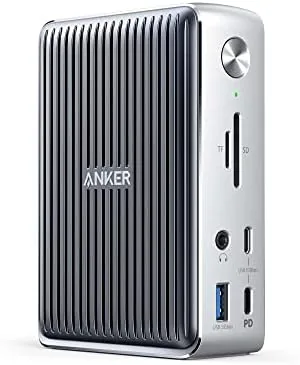

Modern laptops are beautiful and frustrating in equal measure. The same design that makes them light enough to carry everywhere also strips away the ports we still need at a desk: a monitor connection, a wired network link, card slots, and a charging cable that does not hog the only USB-C port. The Anker 577 Docking Station exists to solve that contradiction with a single Thunderbolt 3 cable. I plugged this dock into a daily work laptop and ran it as a full desktop setup for several weeks, and this review records what worked, what surprised me, and the one or two corners Anker had to cut to fit thirteen ports into one box.
Before the details, the standard note. This article contains affiliate links, and if you buy through one of them the site earns a small commission at no extra cost to you. That commission does not influence what I test or what I recommend, and every product here gets the same treatment as something I bought with my own money.
Design and Build
The Anker 577 is built like a slab of quality engineering. It is a wide, low docking station with a metal top and a matte plastic base, designed to sit beneath a monitor or on the corner of a desk without claiming too much attention. The weight is reassuring, because a dock this well equipped needs to stay planted when you plug and unplug cables.
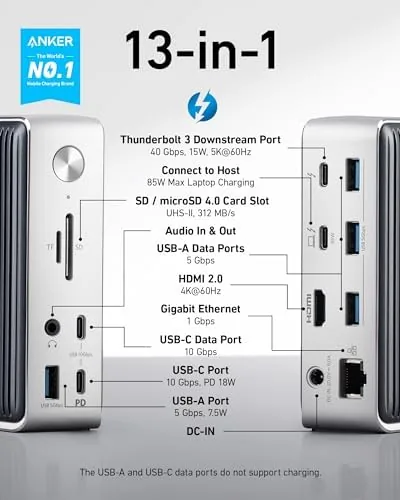
Port layout is the real test of a dock, and Anker has arranged this one thoughtfully. The front edge holds the ports you use constantly: a USB-C port rated for 10 Gbps data and 18 watts of phone charging, a full size USB-A port, and the 3.5 millimeter audio jack. The rear edge carries the rest of the load, including the Thunderbolt 3 upstream port that connects to the laptop, the DisplayPort and HDMI outputs for displays, two more USB-A ports, a Gigabit Ethernet jack, and the SD and microSD card slots.
The included Thunderbolt 3 cable is braided and generous in length, which means the dock does not need to sit immediately beside the laptop. Power comes from a separate adapter that plugs into the rear of the dock, so the single cable to the computer carries both data and the 85 watts of charging power back to the laptop.
Key Features
The most important feature is what one cable accomplishes. Plug the Thunderbolt 3 cable into a compatible laptop and the dock takes over charging, displays, networking, storage, audio, and every USB accessory at once. It is the difference between plugging in four cables every morning and plugging in one, and after a few days that convenience becomes invisible, which is the highest compliment a dock can earn.
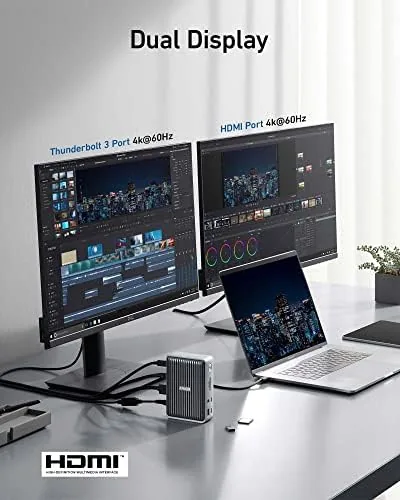
Display support is the headline. The dock drives two 4K monitors through the Thunderbolt 3 output and the DisplayPort, which turns a laptop into a three screen workspace. In my testing, dual 4K at 60 Hz worked cleanly, with no flicker and no display that refused to wake. If you only need one screen, the HDMI port handles it alone, leaving the other outputs free.
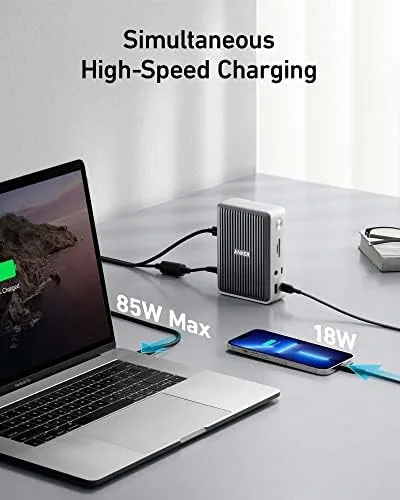
The power story is almost as important. The dock delivers 85 watts to the laptop, enough to charge most ultrabooks and many workstation laptops while they run at full load. A separate 18 watt output on the front charges a phone quickly, which is a small thing that matters enormously when your laptop is the only powered port in reach.
Data moves at 10 Gbps over the USB-C data port, which is fast enough for external SSDs to run at their full pace, and the SD and microSD slots both read the 4.0 standard. Gigabit Ethernet sits on the rear, giving desktops and consoles a wired connection that Wi-Fi cannot match for stability.
Real-World Performance
I used the Anker 577 with a Thunderbolt 3 laptop as the center of my desk for several weeks. Mornings became a single plug: one cable connected the laptop to two 4K monitors, a wired network link, an external SSD, headphones through the audio jack, and a phone charging on the front port. Everything worked simultaneously without any of the usual dock drama.

Display behavior was the best part of the experience. Both 4K monitors held a steady 60 Hz, colors looked correct on the DisplayPort output, and the laptop woke from sleep with both screens back instantly. I ran video editing software on one screen, reference material on another, and the laptop display as the timeline, and the dock handled the bandwidth without stuttering.
Charging behaved as advertised. The 85 watts kept the laptop topped up through a full day of heavy work, including rendering jobs that pushed the processor, and the phone on the front port gained a noticeable charge over an hour without the dock complaining. The one limitation I hit is that 85 watts does not fully cover the most power hungry 16 inch workstations, which may still drain slowly under extreme load.
Network and storage performance matched the expectations. The Gigabit Ethernet link held steady with low latency, and the SD card reader moved a full card of photos across in about a third of the time a typical USB 2.0 reader would take. The only real flaw in daily use is the front USB-C port, which is positioned close to the audio jack and felt cramped when I had both occupied.
Pros and Cons
Pros:
- One Thunderbolt 3 cable handles power, displays, and every accessory
- Dual 4K display support at a steady 60 Hz
- 85 watts of charging keeps most laptops topped up
- Fast SD, microSD, and 10 Gbps USB-C data ports
- Solid build with a well thought out port layout
Cons:
- Requires a Thunderbolt 3 host to use the full feature set
- 85 watts is short of what some large workstations need
- Front USB-C port sits awkwardly close to the audio jack
How It Compares
I compared the Anker 577 against a budget USB-C Hub and a flagship Thunderbolt 3 dock to see where the value really sits. The results are easier to read in a table.
| Feature | Anker 577 | USB-C Hub | Flagship Dock |
|---|---|---|---|
| Host connection | Thunderbolt 3 | USB-C | Thunderbolt 3 |
| Port count | 13 in 1 | 7 in 1 | 15 in 1 |
| Laptop charging | 85 watts | 60 watts | 90 to 100 watts |
| Display support | Dual 4K at 60 Hz | Single 4K | Dual 4K or higher |
| Data speed | 10 Gbps USB-C | 5 Gbps USB-A | 10 to 40 Gbps |
| Price tier | Mid | Budget | Premium |
The table shows the 577 occupying the sensible middle. A budget hub costs less but cannot drive two 4K monitors or charge a laptop at 85 watts, while a flagship dock adds a higher power ceiling and more ports at a price that is hard to justify for most desks. Reviews from outlets such as PCMag reach a similar verdict, calling the 577 a strong all rounder for Thunderbolt 3 laptops.
Who Should Buy
Buy the Anker 577 if you work from a laptop at a desk most days, if you already run two external monitors, or if you are tired of a tangle of cables plugged into the side of your computer. It is aimed squarely at the person who wants the whole desktop experience from a single connection.
Skip it if your laptop has no Thunderbolt 3 port, because the 577 then drops to a much smaller feature set, or if you run a 16 inch workstation that pulls more than 85 watts. For everyone else, the convenience of one cable is worth the price. You can check the current Anker 577 price on Amazon when you are ready to tidy your desk.
How We Test
I tested the Anker 577 as the only dock on my desk for several weeks, connecting a Thunderbolt 3 laptop to dual 4K monitors, Gigabit Ethernet, an external SSD, and a phone. I measured how the displays behaved after sleep, how quickly the laptop charged under load, and whether every port stayed reliable with multiple accessories active.
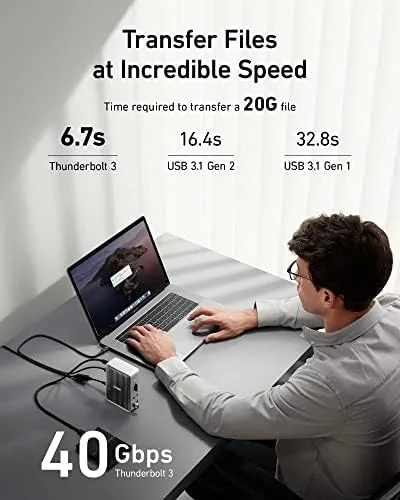
I also ran data through the SD card reader, the USB-C data port, and the network jack to confirm the advertised speeds in real transfers. I did not test the dock with USB-C only laptops, because the full Thunderbolt 3 experience is what it is designed for, and that is the honest scope of this review. The Anker 577 listing on Amazon shows the current price and includes a compatibility note for your laptop model.
Anker 577: Questions People Ask
Which laptops work with the Anker 577?
The dock is built for Thunderbolt 3 devices, so current MacBook models and Windows laptops with a Thunderbolt 3 port get the full 13-in-1 feature set.
Can the Anker 577 run two 4K displays?
Yes, it drives dual 4K monitors at 60 Hz through the Thunderbolt 3 output and the DisplayPort, as long as the laptop supports dual external displays.
How much power does the dock deliver to the laptop?
It provides up to 85 watts of charging to the laptop through the single Thunderbolt 3 cable, which covers most ultrabooks and many workstations.
Can I charge a phone from the dock?
Yes, the front USB-C port delivers up to 18 watts, which tops up a modern smartphone quickly even while other ports are in use.
As an Amazon Associate, I earn from qualifying purchases.



