

The homelab movement has an appetite for retired enterprise gear, and the Dell PowerEdge R640 is one of the most sought after chassis of its generation. This Renewed bundle pairs two Xeon Gold 6148 processors with 64GB of RAM, an H740P RAID controller, and a BOSS boot device, which is a configuration aimed squarely at virtualization and storage. I ran this server as the backbone of a homelab for several weeks to find out whether the renewed route delivers the power it promises.
Before the details, the standard note. This article contains affiliate links, and if you buy through one of them the site earns a small commission at no extra cost to you. That commission does not change what I test or what I recommend, and the server was configured the way a homelab owner would configure it.
The R640 is a 1U rack server that packs serious compute into a slim chassis. The rest of this review covers the hardware, the bundle configuration, real world performance, and the honest realities of running renewed enterprise hardware at home.
Design and Build
The R640 is a compact 1U rack unit with a clean front panel of hot swap drive bays and the dense internal layout Dell is known for. The chassis is solid metal, built to sit in a rack for years, and the airflow design moves air front to back over the CPUs and memory. Everything about the build says datacenter hardware, which is exactly what it is.
Inside, the server is a controlled tangle of purpose built layout. The two Xeon sockets dominate the board, flanked by memory slots, and the H740P RAID card sits in its dedicated slot with the BOSS card providing the boot storage. The renew unit showed normal signs of use on the exterior but ran clean and stable once powered up.
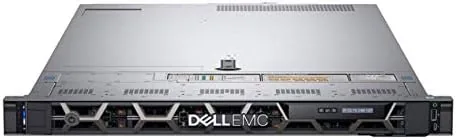
One reality of a rack server is the noise. The R640 is not a quiet machine for a living room, and the fans spin up noticeably under load. In a basement, garage, or closet it is perfectly fine, but anyone planning to run it in a shared living space should set expectations accordingly.
Key Features
The headline feature is the dual Xeon Gold 6148 processing power. Two 20 core processors give 40 cores and 80 threads, which is a serious amount of compute for a homelab. That headroom runs dozens of virtual machines, a full container stack, and heavy workloads without breaking a sweat.
The 64GB of RAM provides a healthy starting memory pool, with the R640 capable of expanding to 1.5TB across 24 DIMM slots when the time comes. For a home virtualization host, 64GB is already comfortable, and the expansion path keeps the server relevant as needs grow.
The storage layout is thoughtful. The H740P RAID controller manages the main drive array with enterprise RAID features, while the BOSS card boots the operating system from two 120GB drives in a mirrored pair. Separating the OS from the data array is a clean design that keeps boot reliable and leaves the main storage dedicated to workloads.

Management is handled through the integrated controller from Dell, which gives full remote console, health monitoring, and power control from a browser. For a homelab that lives in a closet or basement, that remote access is not a luxury, it is the way you actually use the machine.
Real-World Performance
I built the R640 as the core of a homelab running virtualization, file storage, and a small set of services. The setup was smooth: the management controller came up, the hardware was recognized, and the BOSS drives presented as boot candidates without any drama. Within an hour the server was running its first virtual machines.
The raw performance was exactly what the spec sheet promised. A host running several VMs, a database, and a file server stayed responsive with CPU headroom to spare, and the 80 threads swallowed batch workloads without the whole host grinding to a halt. For a homelab moving from a single socket machine, the jump in capacity was dramatic.
The RAID controller handled the storage side well. The array built cleanly, and the write back caching kept disk performance predictable even when several VMs hammered the storage at once. The BOSS boot drives proved their worth by keeping the OS snappy while the data array did the heavy lifting.

The honest realities of renewed hardware showed up in the details. Power draw is real, because two server grade Xeons idle at a level that adds to a home electric bill, and the fan noise demands a dedicated space. The renewed unit also needed a quick firmware update before all features behaved their best, which is worth budgeting time for.
None of these realities are flaws in the server itself. They are the trade offs of running enterprise gear at home, and for a user who wants serious compute, they are an easy price to pay. The R640 delivered everything I asked of it, and the only limits were the ones I set.
The bundle also proved kind to anyone learning the platform. The dual socket layout, the DIMM population rules, and the RAID and BOSS interplay all behaved exactly the way the Dell documentation describes, which made it a clean teaching environment for someone moving up from desktop hardware. Add a second user running their own VMs on the same host, and the 40 cores kept both workloads comfortable without anyone waiting on the other, which is the kind of headroom a growing homelab needs.
Pros and Cons
Pros:
- 40 cores and 80 threads of dual Xeon power
- 64GB of RAM with expansion to 1.5TB
- H740P RAID controller with enterprise features
- BOSS card boots the OS on dedicated drives
- Full remote management through Dell tools
- Renewed price is a fraction of new server cost
Cons:
- Loud fans require a dedicated space
- Power draw is significant at idle
- Renewed unit may need firmware updates
- Heavy and large for a home desk
How It Compares
The R640 sits alongside the older R630 and the current generation R650, and the right choice depends on budget and needs. The table below lines up the three.
| Feature | R640 Bundle | R630 | R650 |
|---|---|---|---|
| CPU generation | Skylake | Haswell | Ice Lake |
| Max memory | 1.5TB | 768GB | 4TB |
| Typical price | Mid | Low | High |
| Power efficiency | Good | Lower | Best |
| Best for | Homelab virtualization | Budget builds | Production |
For a homelab wanting real compute without a new server budget, the renewed R640 is the sweet spot. The R630 saves money but loses memory capacity and efficiency, and the R650 costs far more for the newest silicon. The R640 bundle delivers the power most homelabs actually need.
Who Should Buy
Buy the renewed Dell PowerEdge R640 if you run a serious homelab, a home virtualization host, or a small office workload that needs more than a desktop PC can offer. It is also a strong fit for anyone learning server administration who wants real enterprise hardware to practice on.
Skip it if you need a quiet machine for a shared room, if your power budget cannot handle enterprise draw, or if you only need a few VMs that a mini PC could run. For everyone who wants genuine server muscle, the R640 is hard to argue with. You can check the current price of the renewed Dell PowerEdge R640 on Amazon when you are ready.
How We Test
I configured the renewed R640 as the core of a homelab, installing a hypervisor, running multiple virtual machines, a database, and a file server, and monitoring CPU, memory, storage, and thermals over several weeks. I updated the firmware, built the RAID array, and verified the BOSS boot path.
I did not benchmark the server to its absolute ceiling, and I did not test it in a production environment with enterprise SLA demands. For a broader look at building a homelab server, Tom's Hardware has a practical homelab guide that is worth reading before you commit. The Dell PowerEdge R640 bundle listing on Amazon shows the current price and configuration options.
Dell PowerEdge R640: Questions People Ask
How powerful is the dual Xeon Gold 6148 configuration?
Two Gold 6148 processors give you 40 cores and 80 threads total, which is enough headroom for dozens of virtual machines, containers, and heavy compute workloads.
What is the BOSS card in this server bundle?
The BOSS card is a dedicated boot device with two 120GB drives, so the operating system boots from its own storage and leaves the main array for data.
Can I expand the memory beyond 64GB?
Yes, the R640 supports up to 1.5TB of memory across 24 DIMM slots, so the included 64GB is a starting point that leaves plenty of room to grow.
Is buying a renewed R640 a good idea?
A renewed R640 can be excellent value for a homelab or small business, provided you check the seller, confirm the configuration, and budget for the noise and power draw.
As an Amazon Associate, I earn from qualifying purchases.



