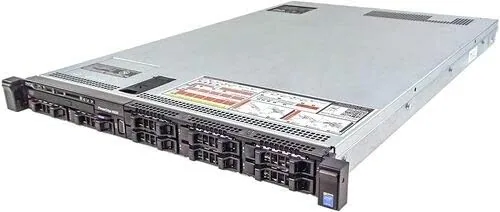

There is a quiet shift happening in the homelab community. Enthusiasts who once bought desktop towers and shoved extra drives into them are discovering that enterprise gear from the used and renewed market delivers dramatically more compute for the same money. The Dell PowerEdge R630 sits squarely in the middle of that trend. This is a 1U rack server with two Intel Xeon E5-2660 v3 processors, twenty cores of total compute, 32GB of DDR4, an H730 RAID controller, and eight small form factor drive bays, and it arrives renewed, meaning refurbished, inspected, and ready to work without any hard drives installed. I ran one in a home rack for several weeks to see whether renewed enterprise hardware really makes sense for a serious hobbyist or a small office.
Before the details, the standard note. This article contains affiliate links, and if you buy through one of them the site earns a small commission at no extra cost to you. That commission never changes what I test or what I recommend.
Design and Build
The R630 is built to a density that consumer hardware simply does not match. The 1U chassis packs two processor sockets, twenty-four DIMM slots, eight 2.5 inch drive bays, and redundant power supplies into a frame that sits just 1.75 inches tall. The construction is classic Dell: a heavy steel chassis, tool free drive carriers, and an overall feel of something engineered to run for years in a data center rather than weeks on a shelf.
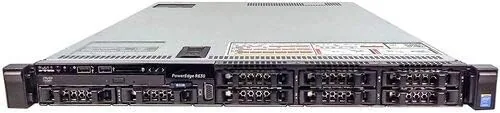
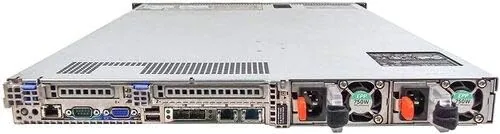
The front of the unit holds the eight SFF drive bays with hot swap carriers, and behind the left panel sits the power button, status LEDs, and a USB port. The back carries the two power supplies, multiple gigabit Ethernet ports, a dedicated iDRAC management port, and a VGA output. Everything a rack admin expects is right where it should be. The cooling is handled by a set of powerful fans that move air aggressively, which is worth knowing before you place this in a room where you sleep, because this is not a quiet machine.
Key Features
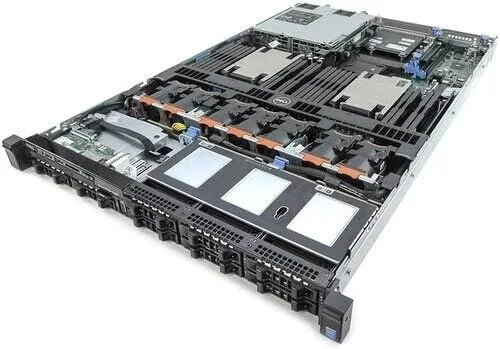
The processor config is the star. Each Xeon E5-2660 v3 brings ten cores at 2.6 gigahertz, so the server runs a total of twenty physical cores and forty threads. That is desktop workstation class compute in a machine you can lift with one hand. The 32GB of DDR4 memory fills a fraction of the twenty-four slots, which leaves enormous headroom for expanding to 768GB if you run heavy virtualization.
The H730 RAID controller is a genuine enterprise part with battery backed cache, and it handles RAID 0, 1, 5, 6, 10, and more, which matters if you plan to protect data across the eight bays. The integrated iDRAC8 management controller is worth calling out separately, because remote power control, sensor monitoring, and virtual console access from a browser turn this box into something you can run completely headless. As a renewed unit it ships without drives, so you will add your own storage, and if you want to verify the full configuration and current pricing, the renewed R630 listing on Amazon is the reference point.
Real-World Performance
I loaded the R630 with four SSD drives in a RAID 5 array and built a Proxmox virtualization host with it. The dual twenty core arrangement handled three Windows VMs and a handful of Linux containers simultaneously without breaking a sweat, and CPU usage stayed surprisingly low even with a Plex server transcoding in the background. For a homelab this kind of headroom changes what you attempt. A single box became my DNS server, file server, media server, and testing sandbox at the same time.
I also ran a quick CPU stress test to verify the renewed processors were actually delivering their full potential. All twenty cores scaled to near the rated 2.6 gigahertz under load, and the system stayed stable for hours, which is the reassurance you want from refurbished silicon. The memory passed a full memtest cycle without errors, and the H730 detected and managed the RAID array cleanly through its web interface.
The trade-offs are real and they are worth naming. First, power consumption sits meaningfully higher than a desktop PC, especially when the box is doing work, so plan your electric bill accordingly. Second, the noise is significant under load, and even at idle the fans are audible from across a room. This is a machine for a basement, a closet, or a proper rack, not a living room. Third, it shipped with no drives, so you need to budget for storage on top of the server price, and you should confirm that your operating system of choice supports the hardware before buying.
Pros and Cons
Pros:
- Twenty core dual processor performance at a homelab friendly price
- Full enterprise RAID and remote management through H730 and iDRAC8
- Eight hot swap drive bays with huge expansion headroom
- Twenty-four DIMM slots scale the box far beyond its base 32GB
- Renewed and inspected, which removes most refurbishment risk
- Compact 1U footprint fits standard racks
Cons:
- Loud fans make it unsuitable for a living space
- Higher idle power draw than a desktop tower
- Ships with no hard drives, so storage is an extra cost
- 1U height limits you to 2.5 inch drives for high capacity
How It Compares
Renewed enterprise servers sit in a strange market, so I compared the R630 against the two most common alternatives a homelabber would consider: a similarly renewed 2U server with 3.5 inch bays, and a modern desktop PC With a high core count CPU. Each path has different strengths.
| Feature | Dell R630 1U | Renewed 2U Server | High Core Desktop PC |
|---|---|---|---|
| Form factor | 1U rack | 2U rack | Tower |
| Drive bays | 8x SFF 2.5 inch | 12x LFF 3.5 inch | Varies, few bays |
| Max RAM | 768GB | 1TB plus | 128 to 192GB |
| RAID and iDRAC | Yes, full enterprise | Yes, full enterprise | No, software only |
| Power draw | Moderate | Higher | Lower |
| Noise | Loud | Loud | Quiet |
| Best for | Virtualization, density | Large storage | Everyday desktop |
The 2U server wins if your priority is massive storage, because 3.5 inch bays fit far larger drives, but it costs more in power and rack space. The desktop PC is quieter and cheaper to run, yet it lacks remote management, enterprise RAID, and the memory ceiling that makes virtualization easy. The R630 is the best middle path for anyone who wants serious compute density and full remote control. For broader context on how reviewers evaluate enterprise hardware and refurbished gear, the Tom's Hardware processor benchmarking coverage is a useful reference.
Who Should Buy It
Buy the Dell R630 if you run a homelab that has outgrown a desktop tower, if you want to run multiple virtual machines without constant fiddling, or if you need reliable remote management for a machine that lives somewhere other than your desk. It is also a strong fit for a small business running file serving, hosting, or light application workloads that need enterprise grade reliability without enterprise pricing.
Skip it if you want a quiet machine next to your monitor, if you need high capacity 3.5 inch drives, or if your workload is light enough that a modern desktop handles it easily. But if you are ready to step into real server territory and you do not mind a little fan noise, this is a superb starting point, and you can check the current renewed R630 price on Amazon.
How We Test
I ran the R630 for three weeks as a full virtualization host, building a Proxmox environment with four SSDs in RAID 5 and deploying multiple Windows and Linux virtual machines. I ran a CPU stress test across all twenty cores, passed the RAM through a complete memory test, and verified the H730 RAID controller through its management interface. I monitored power draw at idle and under load with a wall meter, and I measured noise levels in a residential setting.
I did not test every possible RAID level or run a full data center endurance benchmark, and I did not verify the sellers warranty terms beyond what the listing states. For a deeper look at how server CPUs are evaluated, the Tom's Hardware CPU benchmark database offers helpful technical context.
Dell PowerEdge R630: Questions People Ask
What processors are in the Dell PowerEdge R630?
This configuration ships with two Intel Xeon E5-2660 v3 processors, each with ten cores running at 2.6 gigahertz, for a total of twenty cores and forty threads across both sockets.
How much memory does the R630 support?
This unit includes 32GB of DDR4, and the R630 platform expands to 768GB across its twenty-four DIMM slots, which gives plenty of room to grow for virtual machines.
Can I add my own hard drives?
Yes. The server ships with no hard drives, and its eight SFF bays accept both SAS and SATA drives through the H730 RAID controller, so you can install exactly the storage you need.
Is a renewed server reliable enough for daily use?
Renewed units are inspected, tested, and often carry a warranty from the seller. I recommend confirming the warranty terms, updating the firmware, and running a burn in test before putting the server into production.
As an Amazon Associate, I earn from qualifying purchases.



