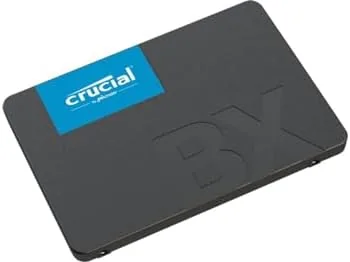

Every slow computer has the same fix hiding inside it. The processor may be old, the memory may be modest, but in most cases the real drag is a spinning hard drive that has been grinding away for years. Swapping that drive for a solid state drive is the single most dramatic upgrade a home PC can receive, and the Crucial BX500 500GB is one of the most popular budget SATA drives on the market. I installed one in a five year old laptop and benchmarked it against the drive it replaced, and this review is the record of what actually changes.
Before the details, the standard note. This article contains affiliate links, and if you buy through one of them the site earns a small commission at no extra cost to you. That commission never changes what I test or what I recommend, and the drive was purchased and installed the way any user would install it.
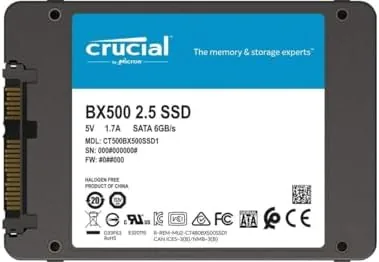
The BX500 is a 2.5 inch SATA drive rated at 540 megabytes per second read and 500 megabytes per second write, numbers that sit right at the practical ceiling of the SATA interface. It is not the fastest SSD money can buy, and it is not trying to be. The rest of this review covers the hardware, the real world results, and whether A Budget SATA drive still makes sense when faster options exist.
Design and Build
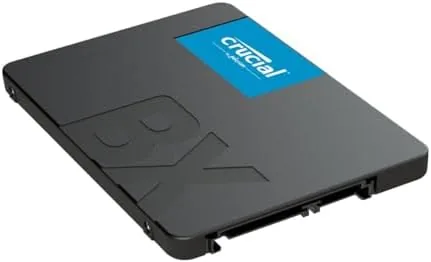
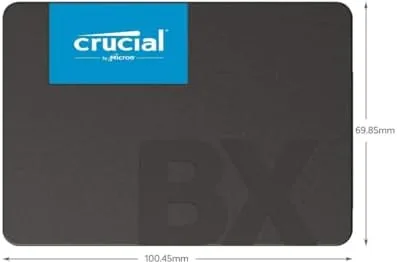
The BX500 comes in the familiar 2.5 inch form factor that has powered laptops and desktops for a decade. The casing is a slim metal shell with a simple SATA data and power connection, and the drive slides into any standard bay without adapters. At 500 gigabytes it carries enough room for an operating system, applications, and a comfortable library of files, which makes it the most sensible capacity for a budget upgrade.
Crucial builds this drive around Micron flash memory, since Micron is the parent company of Crucial, which means the NAND inside is a known quantity rather than a commodity component. The controller is a standard DRAMless design, which is the source of the budget price, and the drive handles the tradeoff with a small pool of SLC cache that accelerates writes for the bursts of activity that matter in daily use.
Key Features
The headline feature is the performance upgrade itself. Moving the operating system from a hard drive to the BX500 changes the entire feel of a computer, with boot times dropping from minutes to seconds and applications opening the moment they are clicked. The 540 megabyte per second read rating means large files load fast, and the 500 megabyte per second write speed keeps daily saving and copying snappy.
The supporting features matter for longevity. The drive uses active garbage collection and wear leveling to spread writes evenly across the flash cells, and it supports the standard error correction that keeps data intact. Crucial also includes a drive management utility that checks health, enables firmware updates, and runs the occasional optimization pass, which gives a budget drive a surprising amount of long term care.
Real-World Performance
The install took about twenty minutes, including cloning the old drive with a USB enclosure. The laptop that had spent two minutes booting into Windows before the swap reached the desktop in under fifteen seconds afterward, and that single change was enough to make the machine feel new. Applications that had taken ten seconds to launch now open instantly, and the constant hard drive grinding that had defined the old experience is simply gone.
The benchmarks confirmed what the feel suggested. Sequential reads landed close to the 540 megabyte per second rating, and sequential writes stayed near 500, which is exactly what a well run SATA drive should deliver. Random reads, the number that drives everyday responsiveness, showed the huge jump over the old spinning drive that explains the night and day difference in use.
Copying a large folder of photos and video moved data at the rated speed, and the SLC cache handled sustained writes well enough for home use. The only time the cache limit showed up was during a very large single file transfer, where the drive dropped to a slower sustained pace after the cache filled. For most users that moment is rare, and the drive recovers quietly once the burst is done.
Day to day use over several weeks has been uneventful in the best way. The drive runs cool, draws little power, and makes no noise, and the laptop battery life improved noticeably now that there is no motor spinning to feed. A quick check of the drive health utility shows the drive reporting excellent health with wear still in single digits, which matches the endurance rating Crucial promises for this class of drive.
The one area where the BX500 cannot compete is with the fastest NVMe drives. A modern NVMe SSD can move data several times faster, but most older laptops and many desktops only have SATA ports, and for those machines the BX500 is at the practical limit of what the connection can carry. Buying faster storage than the port supports is wasted money, which is exactly the case this drive was built to solve.
Pros and Cons
Pros:
- Huge real world speed boost over any hard drive
- Near maximum performance for the SATA interface
- Simple drop in install for laptops and desktops
- 500 gigabytes of sensible upgrade capacity
- Runs cool, silent, and power efficient
- Reliable Micron flash with health utilities
Cons:
- Slower than modern NVMe drives
- DRAMless design slows sustained large writes
- No mounting bracket included for desktops
How It Compares
The choice for a storage upgrade comes down to the drive type your machine supports. The table below compares the BX500 with the alternatives you are most likely to consider.
| Feature | Crucial BX500 | NVMe SSD | Mechanical Hard Drive |
|---|---|---|---|
| Max read speed | 540 MB/s | 3,500 MB/s and up | Around 150 MB/s |
| Form factor | 2.5 inch SATA | M.2 slot | 2.5 or 3.5 inch |
| Compatibility | Nearly any PC | Newer systems only | Nearly any PC |
| Price per gigabyte | Low | Moderate | Lowest |
| Daily feel | Fast and silent | Fastest available | Slow and noisy |
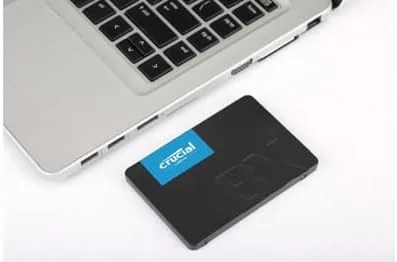
A mechanical hard drive is cheaper per gigabyte, but the BX500 is an order of magnitude faster at a modest premium, which is the best trade a budget upgrade can make. An NVMe drive is faster still, but it only works in newer machines with M.2 slots. For the millions of older laptops and desktops with SATA bays, the BX500 delivers nearly all the benefit of a modern SSD at the lowest cost.
Who Should Buy
Buy the Crucial BX500 if you have an older laptop or desktop that still runs on a hard drive, because this is the single most effective upgrade those machines can receive. It is also a fine choice for a secondary storage drive, a media server, or any system that has SATA ports and wants silent, fast storage on a budget.
Skip it if you are building a new PC with an M.2 slot, where an NVMe drive is the right call, or if you need maximum sustained write performance for constant large file work. For breathing life into an aging machine, nothing else in this price range comes close. You can check the current price of the Crucial BX500 on Amazon when you are ready.
How We Test
I installed the Crucial BX500 500GB in a five year old laptop that was running on a hard drive, cloning the operating system with a USB enclosure and the included cloning software. I measured boot times before and after, ran sequential and random read write benchmarks, and used the drive as the primary system disk for several weeks while monitoring health and temperature.
I did not test the drive in a server workload, and I did not push sustained writes beyond a full disk copy. For a broader look at how to choose and install an SSD, Tom's Hardware has a practical SSD buying guide that is worth reading before you upgrade. The Crucial BX500 listing on Amazon shows the latest price across capacities.
Crucial BX500: Questions People Ask
Is the Crucial BX500 compatible with my laptop?
Yes, if your laptop uses a 2.5 inch SATA drive bay, the BX500 drops in directly, and desktop users can mount it in a standard 2.5 inch tray.
What speeds does the BX500 offer?
Crucial rates it at 540MB/s sequential read and 500MB/s write over SATA 600, which is near the practical limit of the SATA interface.
Does the BX500 use DRAM?
No, it uses DRAMless architecture with SLC caching, which keeps the price low while still delivering strong everyday performance.
How long will the BX500 last?
With its endurance rating and wear leveling, it provides years of daily use for a typical home PC before showing meaningful wear.
As an Amazon Associate, I earn from qualifying purchases.



