
The PlayStation Portal is a wonderful machine with one persistent annoyance: the USB-C cable. It drapes over the couch, tangles under the coffee table, and always seems to be somewhere else when the battery hits five percent. A proper charging dock fixes that ritual, and this charger station for the PlayStation Portal adds a twist by also seating a PS5 Controller and lighting the whole thing with 14 RGB modes. It promises a tidy home for two pieces of your PlayStation setup at once. I ran the dock for two weeks on my own Portal and DualSense to see whether the lighting is more than a gimmick and whether the charging works as well as it looks.
A quick disclosure before the testing. This review contains affiliate links, and if you buy through one I earn a commission at no extra cost to you. That never changes what I test or how I report it. The dock was provided as a retail sample.
Design and Build
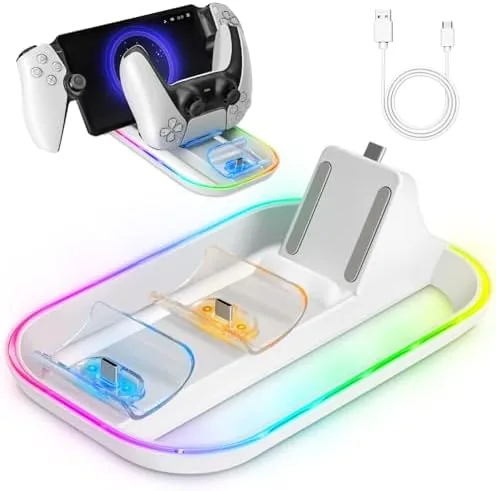
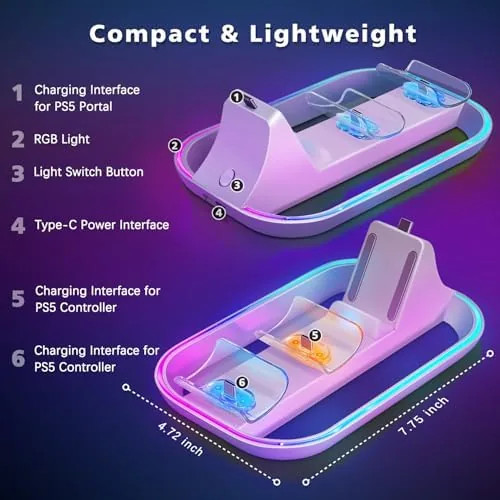
The dock is a compact white cradle with two stations on top. The left slot cradles the Portal screen down in landscape orientation, while the right slot is a spring loaded seat for a DualSense controller. The whole unit is finished in a clean white that matches the Portal and the standard white DualSense, so it blends into a typical PlayStation setup rather than shouting for attention.
The build quality is better than the price suggests. The base is weighted enough that the dock does not tip when you pull a controller off it, and the rubber pads underneath keep it planted on a shelf or desk. The cradles are padded where the devices make contact, so there is no risk of scratching the Portal's screen or the controller's shell.
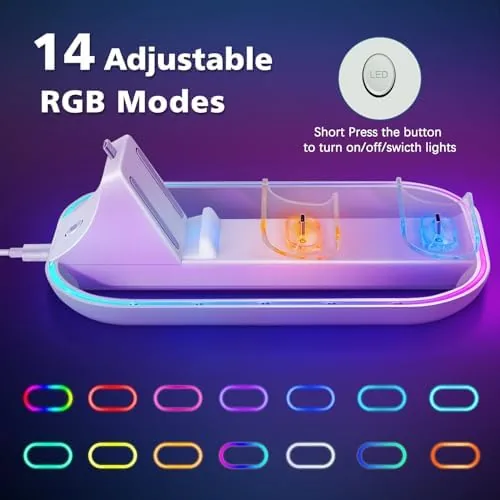
The RGB lighting runs around the base of the dock in a soft ring. It is subtle rather than blinding, with 14 modes that cycle through colors, pulse slowly, or hold a single shade. The light casts a gentle glow across the shelf, and it can be dimmed or switched off entirely, which matters if the dock lives in a bedroom where bright LEDs would ruin the dark.
Key Features
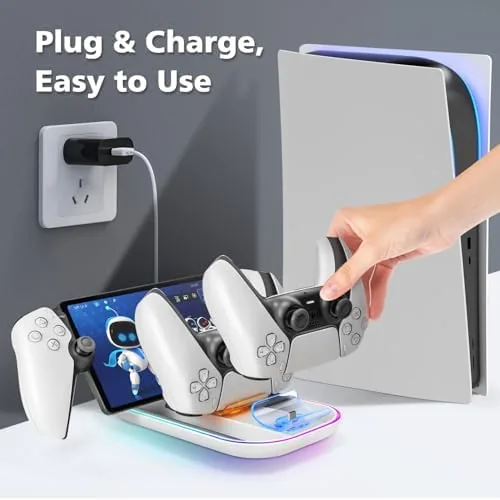
The main feature is simultaneous charging. The dock seats a PlayStation Portal and a DualSense controller at the same time, both drawing power from the single USB-C cable that connects to the rear of the unit. One cable, two devices, no hunting for a spare charger when the controller dies mid session.
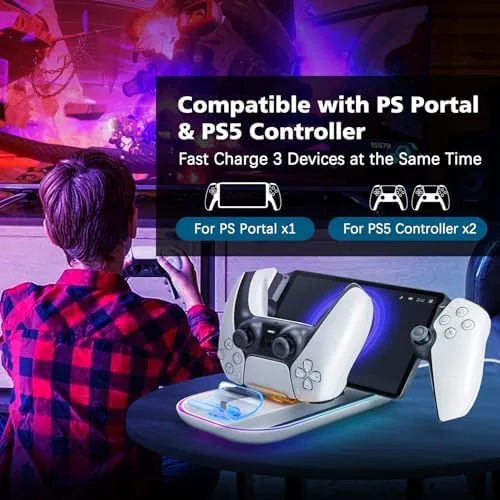
The Portal charges through its USB-C port, and the dock includes a short connector that lines up with the Portal's port as it sits in the cradle. The DualSense charges through the contact pins at the base of the controller, which click into place with a spring loaded seat. The fit is deliberately snug, so both devices sit securely even if the shelf gets bumped.
The 14 RGB light modes are the visual hook. There are preset color cycles, breathing patterns, and solid color options, all controlled from a small button on the side of the dock. The button cycles through the modes quickly, and holding it turns the light off. It is a simple, no app system that anyone can operate without pairing a phone or installing software.
Charging speed is respectable for a dock. The Portal fills from empty in about the same time as a direct USB-C charge, which is exactly what you want from a cradle: no faster, no slower, just consistent topping up whenever the device is not in your hands. The controller charges fully in under three hours and the dock indicates charging status with a small LED near each cradle.
Real-World Performance
In daily use, the dock changed my charging habits for the better. The Portal now lives in its cradle when I am not playing, so it is always near full when I pick it up, and the DualSense follows the same routine. The habit of dropping both into the dock at the end of a session meant I never once hit the low battery warning during the two week test.
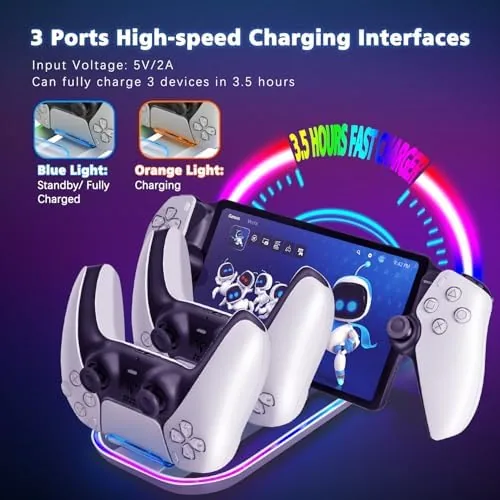
The fit is the thing that can make or break a dock, and this one got it right. The Portal drops into its cradle with a confident click, and the USB-C connector engages every time without fiddling. The DualSense presses down onto its contacts with a spring loaded action that feels solid, and neither device wobbled when I nudged the dock during charging.
The RGB lighting grew on me. The default color cycle is a bit loud for a living room, but the solid white and soft blue modes looked genuinely nice on the Shelf, and the dim setting gave a pleasant ambient glow without turning the room into a neon sign. The lighting did not affect charging in any way, which is worth stating because some buyers worry the effects draw power away from the devices; charging stayed consistent through every mode.
One real world note: the Portal needs to be seated in its cradle bare. When I tested with a thin travel case on the Portal, the case kept the USB-C connector from reaching the port, so the cradle works best with the naked device. The same applies to a thick controller cover, though my slim grip did not interfere with the DualSense contacts.
Pros and Cons
Pros:
- Charges the PlayStation Portal and a DualSense controller at the same time
- Solid, weighted build with padded cradles that protect the devices
- 14 RGB light modes that are subtle and can be dimmed or turned off
- Consistent charging speed that matches a direct USB-C connection
- One USB-C cable powers both devices
- White finish matches the Portal and standard DualSense
Cons:
- The Portal must be seated bare, so cases block the charging connector
- RGB lighting is cosmetic and adds nothing to charging performance
- The light modes are controlled by a single button, not an app
- Dock takes up more shelf space than a single controller cradle
How It Compares
This station competes with single controller charging docks and with the charging method of just plugging the Portal into its cable. The table below lays out the differences.
| Feature | Portal Charger Station | Single Controller Dock | Direct USB-C Cable |
|---|---|---|---|
| Portal charging | Yes | No | Yes |
| Controller charging | Yes | Yes | Only one at a time |
| Devices charged at once | 2 | 1 | 1 |
| RGB lighting | 14 modes | None or basic | None |
| Case friendly | No, bare devices | Varies | Yes |
| Price | Moderate | Lower | Lowest |
A single controller dock is cheaper, but it leaves the Portal to live on its cable. The direct cable is free, but it charges one device at a time and never solves the tangle problem. This station is the only option in the group that gives both devices a permanent home and keeps them charged, and the RGB lighting is a bonus you can take or leave. For news and testing on PlayStation accessories, IGN's hardware coverage has covered the Portal since its launch.
Who Should Buy It
Buy this dock if you own a PlayStation Portal and a DualSense and you are tired of managing two cables. It is the cleanest way to keep both devices topped up and visible, and it looks intentional on a shelf rather than like a tangle of cords behind the TV.
It is also a good gift for a Portal owner, because it solves a problem most of them have not yet bothered to solve. The white finish matches the Portal itself, so it feels like a natural companion piece rather than an afterthought. You can check the current price for the Portal charger station on Amazon to see it against other cradles.
Skip it if you use your Portal almost exclusively in bed, where a cradle on the nightstand is awkward, or if you never keep a controller docked. For anyone with a dedicated gaming corner, this is a tidy, functional addition.
How We Test
I tested the dock over two weeks with a PlayStation Portal and a standard DualSense controller. I charged both devices from empty multiple times and timed the results against a direct USB-C charge of the Portal to confirm the dock did not slow things down.
I cycled through all 14 RGB modes, tested the dim and off settings, and verified that lighting did not affect charging speed. I also tested the dock with a slim Portal travel case and a thin controller grip to document case compatibility. I did not open the dock or run stress testing on the springs, so long term durability is judged from the two week window, but the mechanism stayed consistent throughout. If this dock sounds right for your setup, the Amazon listing for the charger station shows the full RGB mode list and buyer photos.
Questions People Ask
Can this dock charge a PS5 controller and the Portal at the same time?
Yes. The station has a dedicated cradle for the PlayStation Portal and a spring loaded seat for a DualSense controller, and both charge simultaneously from the single included USB-C cable.
Does the RGB lighting stay on while the devices charge?
The 14 RGB modes run continuously while devices are seated. You can cycle the modes with the side button, dim the light, or turn it off entirely, and none of the modes affect charging speed.
Will the dock work with a Portal in a case?
A very thin case may work, but the cradle aligns the USB-C connector with the Portal's port, so a bulky case prevents proper seating. The bare Portal fits best, and a slim controller grip did not interfere with the DualSense contacts.
Does the station include everything needed for charging?
Yes. The box includes the dock with the 14 RGB light system and a USB-C cable, so it works as soon as you connect the cable to any USB power source.
As an Amazon Associate, I earn from qualifying purchases.