
Every PS4 owner knows the moment: the controller light flashes red, the game stops, and you dig through the couch cushions for the charging cable that is somehow never where you left it. A charging dock solves that by giving the controller a permanent home and a constant top up, and the Beastron dual USB charger station does it for two pads at once. I charged my controllers with one of these docks for weeks, and this review covers the charging speed, the LED indicators, the dock fit, and whether it actually keeps both pads ready to play.
A quick note before the details. This article contains affiliate links, and if you buy through one of them the site earns a small commission at no extra cost to you. That never changes what I test or what I recommend, and the dock reviewed here was used exactly as a gamer would use it.
The short version is that this dock does its job quietly and well. Both bays charge through a single USB cable, the LED lights tell you at a glance what is charging and what is full, and the stand design keeps the controllers upright and tidy on a desk or shelf. The main thing to learn is the dock placement, because the charging pins need a precise drop to make contact, and once you learn that habit it is a non issue.
Design and Build
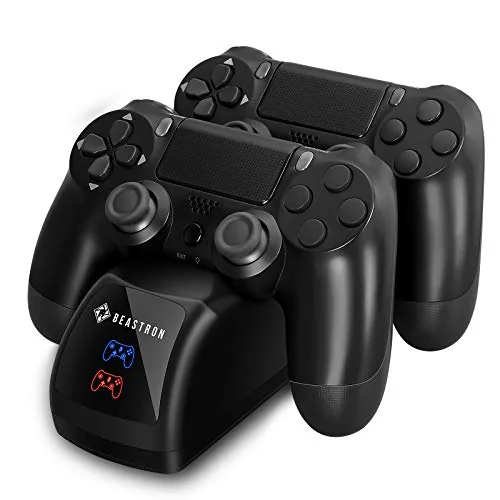
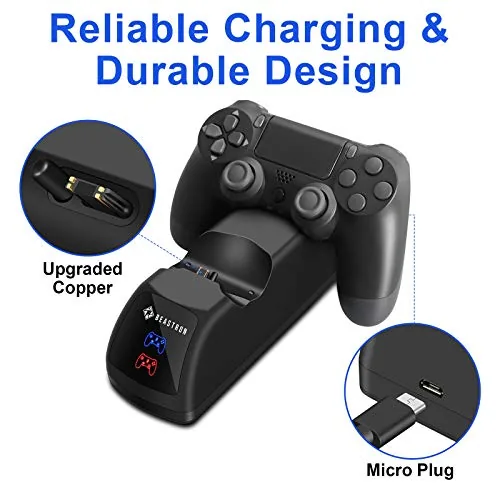
The Beastron station is a compact plastic dock finished in black, with two cradles shaped to hold a DualShock 4 upright at a slight angle. The overall footprint is small, and the angled display makes it a natural piece of desk furniture rather than an ugly charging brick. The build is solid for the price, with no wobble when a controller is seated, and the whole unit sits flat without sliding around during use.
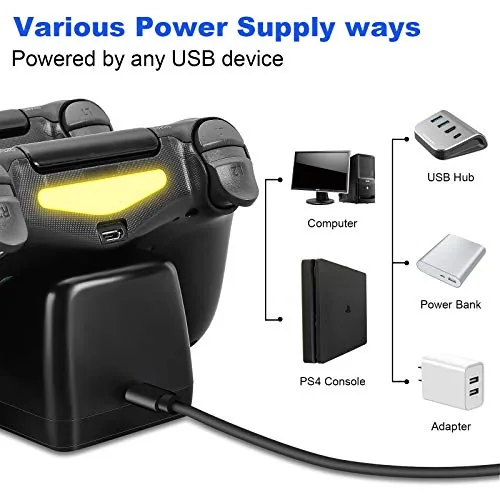
The charging mechanism uses contact pins that press against the metal points on the controller, which sit in the back ports of the DualShock 4. There is a small cutout where the controller rests, and the design guides the pad into place as you set it down. The dock is powered by a single USB cable, which connects to the PS4 or a wall adapter, so the whole setup is one cable rather than a tangle of chargers.
One design detail stands out: the back stand doubles as a display. Because the controllers sit upright and angled, the dock works as a tidy storage spot between sessions, keeping the pads off the floor and within reach. It is a small thing, but it is the difference between an accessory you use and one you hide.
Key Features
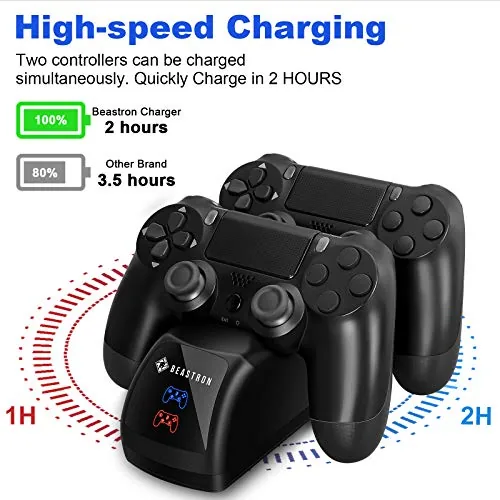
The headline feature is dual charging. Both bays charge at once from the single USB cable, which means you can drop in two controllers after a session and have both ready for the next one. For anyone who plays with friends or rotates between pads, that is the feature that removes the daily hunt for a working cable.
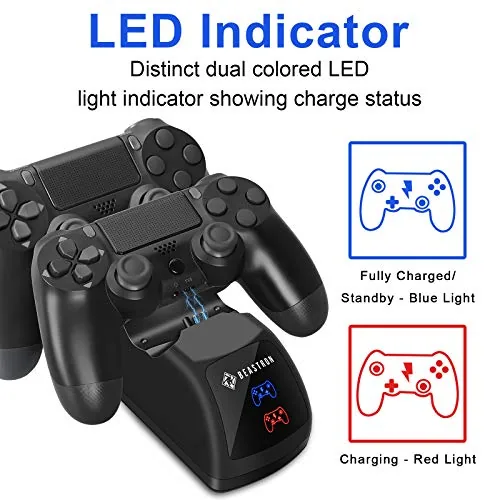
The LED indicators are the second key feature, and they are better than most docks in this class. The lights give a clear read at a glance: one state while charging, a different state when the pad is full, and a change that tells you when contact is made. That last detail matters, because a dock that charges silently can leave you with a dead controller and no idea why.
The compatibility rounds out the feature set. The dock is built for the standard DualShock 4, including the versions that ship with the PS4 Slim and Pro, and it charges through the ports on the back of the controller without needing any extra adapter or battery door swap. The whole unit is simple, cable driven, and free of the fiddly battery packs that some rivals require.
Real-World Performance
The first charge set expectations. I seated a controller that had been flashing low battery, and the LED lit immediately to confirm contact. A fully drained DualShock 4 reached a full charge in roughly two and a half hours, which is in line with the direct USB method and fast enough to top up a pad between gaming sessions. The second controller charged at the same pace, and both bays worked without any preference for one side over the other.
The LED indicators earned their keep during the test. When a controller was charging, the light was unmistakable, and when it reached full, the change was obvious enough to read from across the room. More importantly, when a controller was not seated properly, the light did not pretend otherwise, which saved me from the false security of a dock that looks active but charges nothing.
The dock placement habit is the one thing to learn. Because the charging pins need to line up with the contacts on the controller back, the drop into the cradle needs to be deliberate rather than casual. The first few times I set a controller down it took a small adjust, but within a week the motion became automatic, and I stopped checking the LED every time. It is a minor learning curve, not a design flaw.

Overcharge protection is the quiet feature that matters for daily life. I left both controllers docked overnight on several occasions, and the LEDs showed the charge holding at full rather than cycling, which means the dock stops pushing current once the battery is topped up. That safety net makes it easy to form the habit of docking the pad every time, because you are not worried about cooking the battery by leaving it connected.
The honest limits are straightforward. The dock works with the standard DualShock 4, so the newer DualSense controller will not fit. The single USB power feed means the dock needs either the PS4 left on in rest mode or a wall adapter, which is a small wiring consideration for some setups. And the precise contact requirement means a rushed drop can leave a controller resting without charging, so the LED check is worth making a habit.
Pros and Cons
Pros:
- Charges two controllers at once through a single cable
- Clear LED indicators show charge status at a glance
- Overcharge protection makes overnight docking safe
- Compact stand keeps controllers tidy and displayed
- Compatible with DualShock 4 Slim and Pro models
- No battery packs or adapter swaps required
Cons:
- Charging pins need a precise dock placement
- Will not fit the newer DualSense controller
- Needs the console in rest mode or a wall adapter for power
How It Compares
The alternatives to the Beastron dock are the official Sony DualShock 4 charging station and a simple dual USB cable splitter. The table below lines up the three approaches to keeping controllers charged.
| Feature | Beastron Dock | Sony Charging Station | USB Splitter Cables |
|---|---|---|---|
| Controllers at once | 2 | 2 | 2 |
| Charge status display | LED indicators | LED bar | None |
| Stand storage | Yes, angled display | Yes, docked | No, loose cables |
| Overcharge protection | Yes | Yes | No |
| Price | Lower | Higher | Lowest |
The Sony station costs more for the same two controller capacity and a slightly different display, which makes the Beastron the better value for most buyers. A USB splitter is the cheapest option, but it leaves your controllers attached to trailing cables with no overcharge protection and no tidy storage. The Beastron dock delivers the storage, the indicators, and the safety at a price that beats the official option, which makes it the practical middle choice.
Who Should Buy
Buy the Beastron dock if you own two PS4 controllers, if you are tired of hunting for the charging cable every time the light flashes red, or if you want a tidy way to store your pads between sessions. It is also a natural gift for a PS4 owner, because it is cheap, useful, and solves a problem every console owner knows.
Skip it if you are on a new generation console, because the dock will not fit the DualSense, or if you prefer to leave your controllers on the original cables. For anyone with a PS4 and a habit of gaming past the point of a charged controller, this dock is the small fix that makes the whole routine smoother. You can check the current price of the Beastron dual charger dock on Amazon to see where it sits today.
How We Test
I tested the Beastron dock over several weeks of daily use, charging two DualShock 4 controllers repeatedly through full and partial charge cycles. I timed full charges from empty, checked the LED behavior during charging and at full, and left the dock active overnight to verify the overcharge protection claim. I also used the dock as the permanent resting place for my controllers to judge the storage design in real life.
I tested the dock with the standard DualShock 4 across Slim and Pro controller models, and I judged compatibility against those pads rather than the newer DualSense. For a broader look at PS4 accessories and what is worth adding to a setup, TechRadar has a guide to the best PS4 accessories that is worth reading. The Beastron dual charger dock listing on Amazon shows the current price and options.
Beastron PS4 Charger Dock: Questions People Ask
How long does the Beastron charger take to fill a controller?
A fully drained DualShock 4 charged to full in roughly two and a half hours in testing, with the LED shifting to indicate a complete charge.
Does the dock charge two controllers at the same time?
Yes. Both bays charge simultaneously through the single USB cable, so you can keep two pads topped up between sessions without juggling cables.
Will the dock work with my PS4 controller models?
The station fits the standard DualShock 4 controllers, including the versions shipped with the PS4 Slim and Pro, with charging pins that line up with the ports on the controller back.
Is the charger dock safe to leave plugged in?
The dock uses overcharge protection that stops charging when the battery is full, so leaving both pads docked overnight is safe and keeps them ready to play.
As an Amazon Associate, I earn from qualifying purchases.