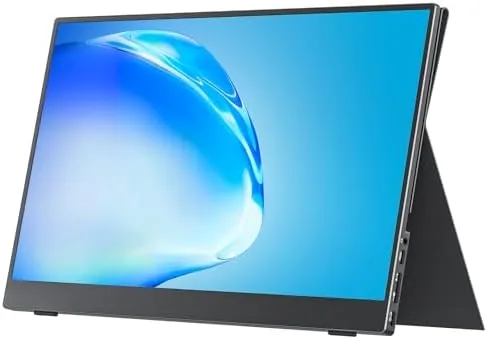

Laptops are portable in theory and cramped in practice. A 13 inch screen handles a single window well enough, but the moment you need a document beside a spreadsheet, or a video call beside a code editor, the workspace starts to feel small. A Portable Monitor solves that problem without asking you to carry a heavy desktop panel, and the cocopar 15.6 inch 1080p model has become one of the most popular choices in this category for good reason. I spent three weeks using the cocopar FHD portable monitor across hotel desks, coffee shop tables, and my home office, and this review covers how it connects, how it looks, and exactly where its limits sit.
One note before the details. This article contains affiliate links, and if you buy through one of them this site earns a small commission at no extra cost to you. That commission does not change what I recommend, and the monitor tested here was set up exactly the way a buyer would set it up on day one.
The core idea of a portable monitor is simple: a thin display that travels in a bag and turns any desk into a dual screen setup. The rest of this review looks at the build, the ports, the picture quality, and the small compromises that come with a panel this light.
Design and Build
The cocopar monitor arrives as a thin panel wrapped in a magnetic cover, and that cover is also the stand. The cover folds into a triangular kickstand, the panel snaps onto the front edge, and within seconds the whole unit stands upright on a desk. The hinge holds firm in both landscape orientations, which is useful for reading long documents or viewing code side by side, and the cover doubles as scratch protection when the monitor rides in a backpack.
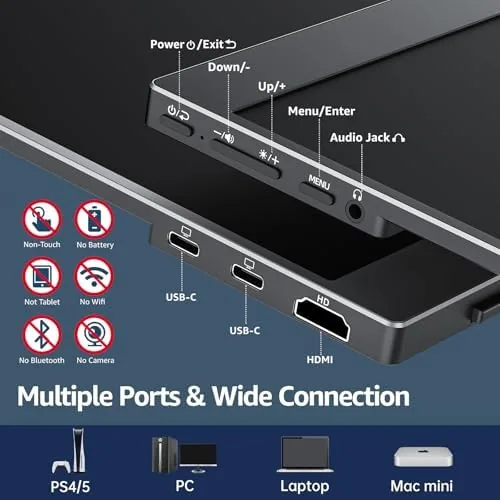
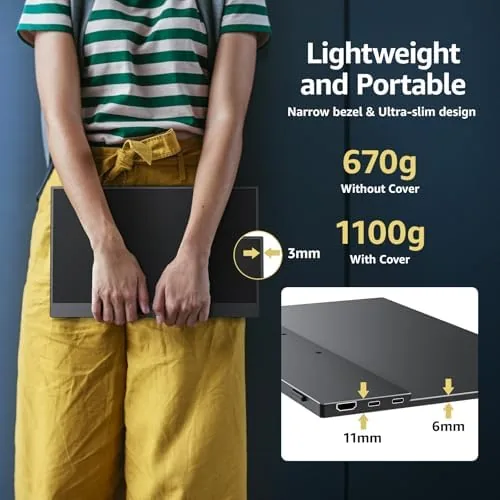
The shell is aluminum, the bezels are slim, and the panel is light enough to travel without dominating a bag. It feels sturdy in a way that cheap travel monitors do not. On the edges sit two USB-C ports, a mini HDMI input, and a 3.5 mm headphone jack. The USB-C ports handle both power and video, so a single cable does the job with a compatible laptop, while the mini HDMI covers older machines and gaming consoles. The 75 by 75 mm VESA pattern on the back is a small detail that expands where the monitor can live.
Key Features
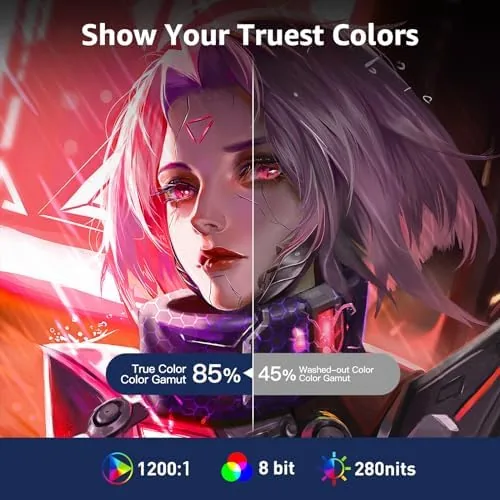
The headline spec is the 15.6 inch IPS panel at 1920 by 1080 resolution with a 60 Hz refresh rate. The cocopar rates the panel at 85 percent sRGB coverage, which is respectable for a travel display and plenty for office work, spreadsheets, and browsing. Text stays crisp at native resolution, and the anti glare surface keeps reflections manageable in most indoor lighting.
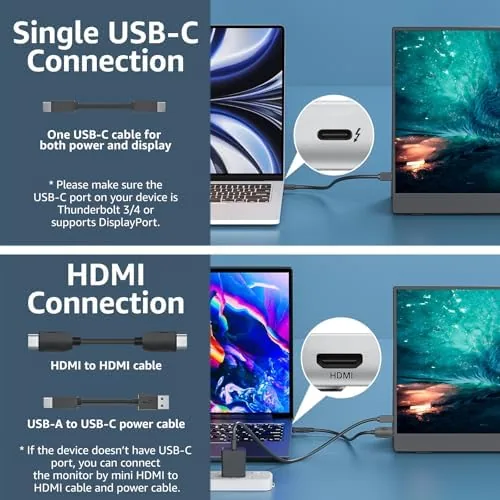
Connectivity is where the monitor earns its keep. The two USB-C ports support DisplayPort over USB-C, so a MacBook or Windows ultrabook can drive the panel with one cable while the second port handles incoming power. Older laptops and gaming consoles use the mini HDMI input, which covers the Xbox and PlayStation crowd nicely. Built in speakers, the VESA mount, and the headphone jack round out a surprisingly complete feature set for the price, and the magnetic cover stand means there is nothing extra to carry.
Real-World Performance
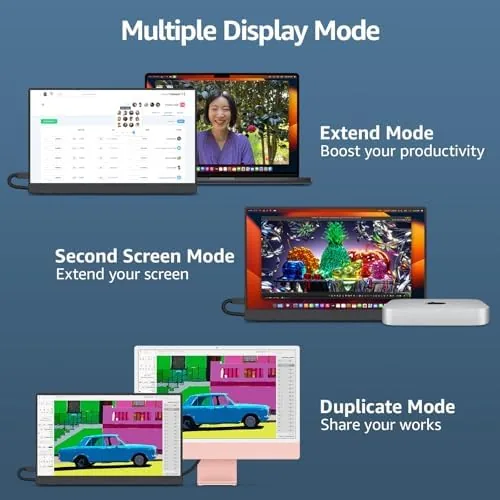
In daily use the monitor disappeared into the workflow, which is the highest praise a second screen can earn. Connected to a MacBook Air over a single USB-C cable, the panel came on instantly, extended the desktop, and required no driver setup. On a Windows laptop that lacks DisplayPort over USB-C, the mini HDMI cable plus a powered USB-C connection worked just as well, which is the fallback every buyer should understand before purchase.
The panel is bright enough for indoor work. At full brightness the roughly 250 nit output handles a well lit office without strain, though a seat by a sunny window will make you hunt for shade. Color is accurate for productivity, and while the 85 percent sRGB figure means this is not a colorist tool, spreadsheets, documents, and email look natural. Movies look good as well, and the built in speaker produces sound that is acceptable for video calls and casual viewing, though a decent pair of headphones is still the right call for anything serious.
Gaming is a pleasant surprise. Hooked to an Xbox Series S over HDMI, the 60 Hz panel rendered games smoothly with no tearing at the supported resolution, and the low input lag made it a solid travel companion for quick sessions. The cover stand sits low and stable, and the VESA mount on the rear means the monitor also works mounted to a monitor arm or a wall when it lives on a standing desk.
The compromises are predictable and honest. The panel is glossy enough to reflect in bright rooms, the stand offers no height adjustment, and the speaker is a small driver doing its best rather than a serious audio component. None of these matter for the monitor purpose, which is turning a cramped travel setup into a comfortable two screen desk.
Pros and Cons
Pros:
- Thin, light aluminum build with a magnetic cover stand
- Single cable USB-C connection on compatible laptops
- Mini HDMI input works with consoles and older laptops
- 75 by 75 mm VESA mount for desk arms and wall brackets
- 1080p IPS panel with crisp, readable text
- Reasonable price for the feature set
Cons:
- No height adjustment in the cover stand
- Modest brightness struggles in direct sunlight
- Built in speakers are basic, best for calls rather than music
- 85 percent sRGB coverage limits serious color grading work
How It Compares
Most portable monitor buyers decide between a budget 1080p panel and a pricier 4K model, so the cocopar earns its place by sitting squarely in the practical middle. The table below lines up the tradeoffs.
| Feature | cocopar 15.6 FHD | Premium 4K Portable | Basic 1080p Panel |
|---|---|---|---|
| Resolution | 1920 by 1080 | 3840 by 2160 | 1920 by 1080 |
| Connectivity | USB-C and mini HDMI | USB-C and HDMI | USB-C only |
| VESA mount | Yes, 75 by 75 mm | Rare | Rare |
| Cover stand | Included magnetic case | Separate stand often | Built in kickstand |
| Best for | Travel and desk work | Photo and video work | Lowest cost setups |
If the monitor will live on a desk docked to a MacBook, the single cable USB-C convenience and the VESA mount make the cocopar the more flexible choice. If you edit video or photos and want the extra pixel density, a 4K panel is worth the jump. For everyone else, the cocopar delivers the features that matter most at a price that makes sense.
Who Should Buy It
Buy the cocopar 15.6 inch portable monitor if you travel with a laptop and work from hotels, coffee shops, or client sites. It is a natural fit for consultants, students, and anyone who docks a laptop at home and wants a second screen without buying a full desk setup. It also works well for console players who want a compact screen on the road.
Skip it if you need high color accuracy for professional imaging, or if you want a display that runs entirely off battery power with no external cable. For the typical traveler, this is the upgrade that makes a cramped laptop session feel like a proper desk. You can check the current price of the cocopar 15.6 inch portable monitor on Amazon when you are ready.
How We Test
I used the cocopar monitor for three weeks as my primary second screen, connecting it to a MacBook Air, a Windows ultrabook, and an Xbox Series S. I tested single cable USB-C operation, the HDMI fallback path, brightness across lighting conditions, color accuracy against reference images, and the VESA mount on a monitor arm.
I did not run a colorimeter, so the sRGB figures come from the manufacturer specification rather than measured output. For a broader look at what to consider in a travel display, PCMag maintains a thorough guide to monitors that covers the specs worth comparing. The cocopar 15.6 inch portable monitor listing on Amazon shows the current price and package contents.
cocopar 15.6 Inch Portable Monitor: Questions People Ask
Does the cocopar portable monitor work with a single USB-C cable?
On laptops that support DisplayPort over USB-C, yes, a single cable carries both video and power, so the MacBook and many Windows ultrabooks drive the panel with one connection.
Can I use the monitor with an Xbox or PlayStation?
Yes, the mini HDMI input connects directly to consoles, and the 60 Hz 1080p panel delivers smooth play with no extra drivers needed.
Is the cocopar monitor VESA mountable?
Yes, the rear panel has a standard 75 by 75 mm VESA pattern, so it mounts to monitor arms, desk brackets, and wall plates.
How bright is the display?
The panel produces roughly 250 nits of brightness, which is comfortable for office lighting and most travel environments, though it will struggle in direct sunlight.
As an Amazon Associate, I earn from qualifying purchases.



