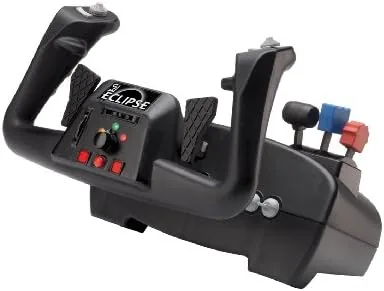

There are two ways to fly a simulator. The first is a keyboard and a mouse, which works and feels nothing like an airplane. The second is a yoke, the control column that a pilot actually pushes and pulls, and that is where the hobby becomes convincing. The CH Products Eclipse Yoke has been a fixture in flight simulation for years, and it holds a particular reputation as a solid, dependable, no frills control built around a piece of software called Control Manager. This review is about whether that older reputation still holds up in a simulator market that has moved on since the yoke first shipped.
This article contains affiliate links. If you buy through one of them, this site earns a small commission at no extra cost to you. That support never changes what we test or how we judge it.
Design and Build
The Eclipse Yoke is a full desktop unit that combines a steering column, an integrated throttle, and a control wheel into one heavy plastic base. The base is large and weighted enough that it stays put during aggressive flight, and it has a set of suction cup feet that grip a smooth desk surface firmly. The yoke itself is a chunky wheel that moves in both pitch and roll axes with a smooth, deliberate feel, and the whole assembly is clearly built for hours at a time rather than occasional use.
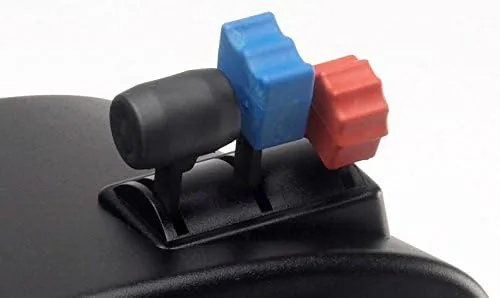
The integrated throttle sits below the yoke with a second axis for mixture or trim, and there is a row of buttons and hat switches spread across the base and the wheel. Every surface is a hard, matte plastic with a slightly industrial texture. It is not a beautiful product, and it will not match a modern gaming setup, but the build quality is genuinely durable. This is the kind of hardware that survives a decade in a closet and still works when you pull it out.
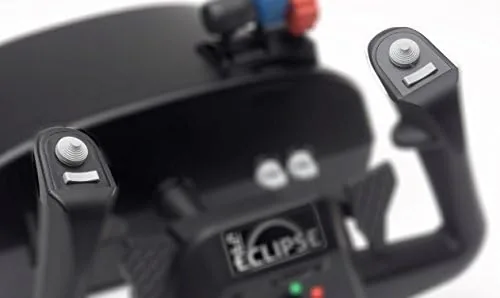
The most distinctive part of the design is the Control Manager software that comes with the unit. CH Products built its own tool for mapping buttons and creating profiles, and the Eclipse is sold around the promise of 144 programmable functions. That number counts every button, axis, and custom macro across the unit, and it is the feature that separates this yoke from simpler USB controllers.
Key Features
The headline is the programmable depth. Through Control Manager you can assign any button to any keyboard key, mouse movement, or sequence, and you can build profiles that switch when you load a different aircraft. A pilot can map the yoke so that one button talks to air traffic control, another cycles the landing gear, and a hat switch moves the camera, all without touching the keyboard. In practice, that turns the whole unit into a much larger control surface than its physical buttons suggest.
The yoke feel is the second feature that matters. Pitch and roll travel is smooth and linear, with a light centering spring that returns the wheel to neutral. It is not force feedback, and there is no resistance that increases with airspeed, but the mechanical feel is consistent and predictable. The integrated throttle moves with a firm detent at idle, and the separate trim axis adds a second throttle worth of control for aircraft that need it.
If you want to compare the current pricing and availability, the Amazon listing for the CH Products Eclipse Yoke is the place to start.
Real-World Performance
I flew with the Eclipse for three weeks across Microsoft Flight Simulator and X-Plane, concentrating on the two jobs that matter most: smooth instrument flying and accurate low level navigation. On a long IFR flight with constant trim changes, the yoke was steady and precise, and the light spring tension made small corrections feel natural rather than twitchy. Aileron and elevator inputs registered cleanly with no dead zone issues after the initial configuration.
The Control Manager software is where the experience splits. The current version works, and it is genuinely powerful, but it is an older program with an interface that looks dated and a learning curve that is real. It installs cleanly on a modern Windows system, and it reads the yoke correctly, but the mapping process takes an hour to learn and a lifetime to master. For a user who wants plug and play, the yoke also works as a basic USB controller in the simulator directly, though you lose the macro depth that way.
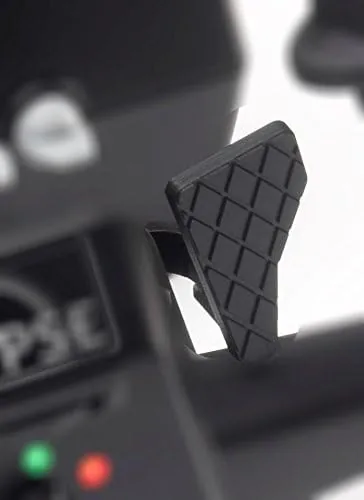
The one consistent complaint is the throw of the yoke. The pitch travel is shorter than a real aircraft column, which means small physical inputs translate into larger virtual ones, and it took time to adjust from the longer travel of competing yokes. The integrated throttle also lacks the separate lever feel of a dedicated quadrant, so airliner pilots who want separate throttles for each engine will still want a secondary device.
Pros and Cons
Pros:
- Deep programmability through the Control Manager software
- Durable construction that survives heavy long term use
- Integrated throttle and trim axis in one unit
- Smooth, predictable yoke feel for instrument flying
- Weighted base with suction feet stays planted on the desk
Cons:
- Control Manager software is powerful but dated and complex
- Shorter pitch travel than a real aircraft or competing yokes
- No force feedback of any kind
- Integrated throttle cannot split engines like a dedicated quadrant
How It Compares
I compared the Eclipse Yoke against a modern budget yoke and a dedicated throttle and stick setup to see where the older hardware still wins and where it does not.
| Feature | CH Eclipse Yoke | Modern Budget Yoke | Stick and Throttle |
|---|---|---|---|
| Programmable functions | 144 via software | Fewer, sim based | Moderate |
| Integrated throttle | Yes, with trim | Yes | Separate unit |
| Force feedback | No | No | No |
| Software depth | Very high | Low | Varies |
| Setup ease | Moderate | Simple | Simple |
| Build durability | Excellent | Good | Varies |
Against a modern budget yoke, the Eclipse wins on build quality and software depth but loses on setup simplicity and control travel. Against a stick and throttle, the yoke wins for transport and GA flying, because a yoke is the correct control for a nosewheel aircraft, while a stick suits fighters and aerobatics. The Eclipse is not the easiest product to set up, but for a pilot who takes the time to learn Control Manager, it offers a level of control that budget hardware cannot match.
Who Should Buy It
Buy the Eclipse Yoke if you fly airliners, cargo, or general aviation aircraft in a simulator, and if you want a single unit with the throttle built in. It is also a good choice for simmers who love tinkering with button mapping and building profiles, because the software rewards that kind of user with real depth. If you are flying a desk mounted yoke into your third year of simming, this is the kind of control that will not let you down.
Skip it if you want plug and play simplicity, if you prefer the longer throw of a modern yoke, or if you need separate throttles for multi engine aircraft. For everyone else, the Eclipse is a proven classic That Still Earns Its place. You can check the current price of the CH Products Eclipse Yoke on Amazon when you are ready to upgrade from the keyboard.
How We Test
Testing ran for three weeks across two simulators and several aircraft types. I flew a full instrument approach in a small GA aircraft to judge precision, a cross country flight to test trim and throttle control, and a short hop in an airliner to check how the integrated throttle handled a climb profile. I also spent time in Control Manager building custom profiles to test the 144 programmable functions claim.
I configured the yoke from a clean install to document the setup time, and I ran it through a long session to confirm the base stayed planted and the springs returned the wheel to neutral consistently. I did not test the unit on older operating systems or with console simulators, because those are outside its intended use. For independent guidance on choosing flight sim controls, Tom's Hardware has a guide to flight simulator controllers that is a useful companion to this review.
CH Products Eclipse Yoke: Questions People Ask
Does the Eclipse Yoke work with Microsoft Flight Simulator?
Yes. The yoke works directly in Microsoft Flight Simulator as a standard USB controller, and it gains extra depth when you set up profiles through the Control Manager software.
What does 144 programmable functions mean?
It counts every button, axis, and macro you can assign across the unit. Through Control Manager you can map any control to a keyboard key, mouse action, or a sequence of inputs.
Does the yoke have force feedback?
No. It uses a mechanical centering spring rather than force feedback, so you feel a light return to neutral but no airspeed dependent resistance.
Can I use the integrated throttle for multi engine aircraft?
You can assign the throttle and trim axes, but a single throttle cannot control two engines independently. Multi engine simmers usually add a separate throttle quadrant.
As an Amazon Associate, I earn from qualifying purchases.