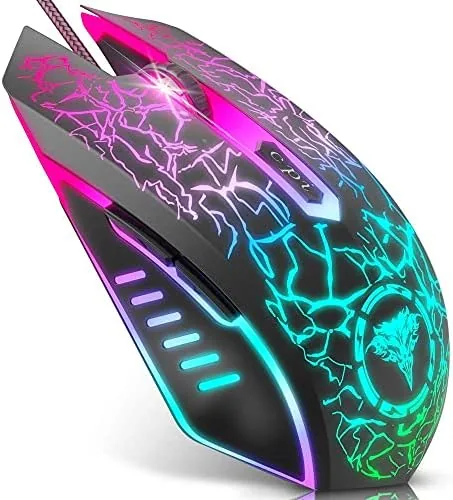

Most people do not need a mouse that costs more than the games they play. They need a pointer that tracks smoothly, sits comfortably for long sessions, and maybe lights up a little so the desk does not look so plain. The BENGOO wired gaming mouse sits squarely in that category. It is a budget optical mouse with four adjustable DPI levels up to 3600, six programmable buttons, and an RGB underglow that makes a modest setup feel more intentional. After several weeks of daily use and a fair amount of gaming, I can say it does more than its price tag promises.
A quick note on how this review works before the details. It contains affiliate links, and if you purchase through one of them the site earns a small commission at no extra cost to you. That commission does not influence the verdict, and the mouse was tested on its own merits.
The question at the heart of this review is simple: can a wired gaming mouse under twenty dollars keep up with games and everyday work? The BENGOO makes a good argument that it can, as long as you know what to expect from a budget sensor and a preset DPI system.
It is also worth setting expectations about the market this mouse competes in. Wireless gaming mice have become cheap and excellent, and plenty of brands now sell a reliable wireless pointer for a similar amount. The BENGOO does not try to match those on convenience, because a wire is a wire. What it does instead is put its limited budget into the things that matter at this price: a comfortable shape, a durable cable, and controls that work the moment you plug them in. If you already accept a wired connection, the money goes further, and that is the honest frame for judging what follows.
Design and Build
The BENGOO has the familiar gamer silhouette: a matte black shell with subtle contours, textured side grips, and a sculpted palm rest that suits medium hands nicely. It is not a tiny travel mouse, and it is not an oversized palm monster either. The shape is friendly to most grips, though claw users may find the length slightly generous.
Build quality is better than the price suggests. The shell feels rigid with no creaking when squeezed, the main buttons have a crisp tactile click, and the braided cable resists tangles far better than the rubber cords on other budget mice. The wheel is knurled and steps cleanly, though its rubber coating picks up dust quickly.
The RGB underglow wraps around the bottom edge and glows through the palm area, cycling through colors by default. There is no software control over the lighting on this model, so the color shift is fixed, but the effect looks genuinely nice in a dim room. The cable is about six feet long, which gives enough slack for a standard desktop tower placement.
Key Features
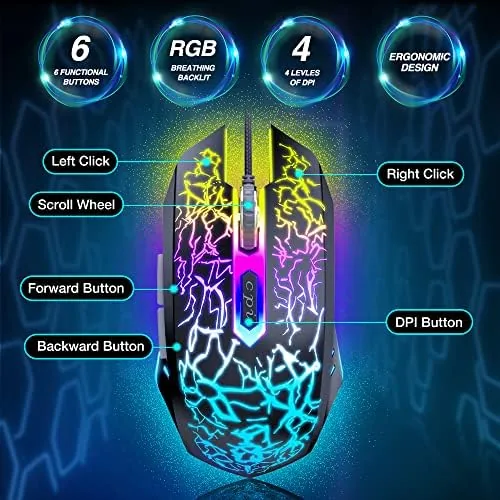
The headline feature is the four adjustable DPI settings that peak at 3600. A small button behind the scroll wheel cycles through presets, and an LED changes color to indicate the current sensitivity level. That on the fly switching is handy when you want a slower sweep for precision work and a faster sweep for wide turns in a game.

Six programmable buttons extend beyond the standard trio. Two side buttons sit right under the thumb and are useful for browser back and forward navigation out of the box. With the optional software installed you can remap all six buttons, set macros, and adjust the DPI stages to your liking, which is surprising flexibility for the price.
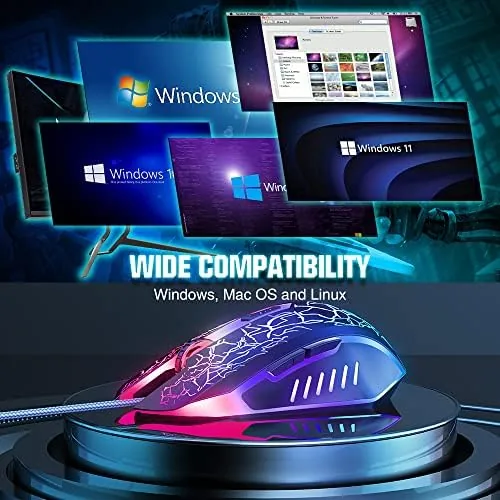
The sensor is a standard optical unit, which keeps the cost down while still providing reliable tracking on most surfaces. Plug and Play compatibility is a real strength here. The mouse is recognized instantly on Windows 7, 8, 10, XP, Vista, and Linux without any driver installation, and it also works on Mac systems. That breadth is rare in this price class and genuinely useful for people who move between machines.
Real-World Performance
I used the BENGOO for two weeks of office work, web browsing, spreadsheet editing, and a decent amount of shooter and strategy gaming. For desktop tasks the mouse is excellent. The 3600 DPI ceiling is more than enough for high resolution screens, and the cursor tracks smoothly with no skipped steps or erratic jumps.

In games the sensor holds up better than I expected. Tracking was consistent in fast paced sessions, and the main buttons responded reliably during rapid clicking. The optical sensor is not in the same league as a top tier gaming sensor, and very high speed flick movements show a touch of smoothing, but for the vast majority of players the difference is imperceptible.
The side buttons are placed well and did not get pressed by accident during tense moments. The on the fly DPI button worked as advertised, letting me drop sensitivity for pixel precise aiming and raise it again for exploration. The wheel stepped accurately through weapon selection in shooters and long documents in the office.
One honest weakness surfaced after extended use: the mouse is on the heavier side. At roughly 150 grams it does not glide with the lightness that competitive players prefer, and the cable drag adds a little resistance. For casual play and everyday work this weight is fine, even reassuring. For twitch competitive play it is a limitation.
Pros and Cons
Pros:
- Plug and play compatibility with Windows, Linux, and Mac
- Four adjustable DPI levels up to 3600 on the fly
- Six programmable buttons with macro support
- Attractive RGB underglow at a budget price
- Durable braided cable and solid shell
Cons:
- Heavier weight with noticeable cable drag
- RGB lighting offers no color customization
- Sensor smoothing appears during very fast flick movements
How It Compares
Budget gaming mice are a crowded field, so the table below compares the BENGOO with two other wired options commonly sold in the same price range.
| Feature | BENGOO Wired Mouse | Redragon M602 | Logitech G203 |
|---|---|---|---|
| Max DPI | 3600 | 7200 | 8000 |
| Programmable buttons | 6 | 9 | 6 |
| Adjustable weight | No | Yes | No |
| Software | Optional basic | Full featured | Full featured |
| Typical price | Lowest | Low | Mid |
The Redragon M602 brings more DPI range, a higher button count, and adjustable weights for a modest price increase, which makes it the better pick for players who want deeper customization. The Logitech G203 costs more but adds a well regarded sensor and polished software. The BENGOO wins on pure value and compatibility breadth, especially for Linux users. Budget mouse roundups from PCMag regularly include wired models in this class for exactly that reason.
Who Should Buy It
Buy the BENGOO if you want a reliable wired mouse for both work and play without spending much, if you run Linux and need a mouse that just works, or if you are setting up a first gaming PC on a strict budget. Students, office workers, and casual players will find it more than adequate.
Skip it if you are a competitive player chasing low weight and high polling rates, or if you want customizable RGB lighting. Those buyers should step up a price tier. For everyone else the BENGOO delivers surprising performance per dollar, and you can check the current BENGOO gaming mouse price on Amazon.
How We Test
I tested the BENGOO over two weeks as my primary mouse on a Windows 11 desktop. I used it for daily office tasks, spreadsheet work, web research, and sessions of first person shooters and real time strategy games. I also verified plug and play behavior on a Linux machine and a MacBook to confirm the advertised compatibility.

I cycled through all four DPI presets, remapped buttons in the software, and tested macros in a game. I tracked cursor consistency, click responsiveness, and comfort during multi hour sessions. My conclusions are based on that real world usage, supported by reference material on budget gaming mice from PCMag.
Questions People Ask
Does the BENGOO gaming mouse work without software?
Yes, the mouse works immediately on Windows, Linux, and Mac with no driver installation, and the DPI button cycles through presets without any software.
Can I program the six buttons on the BENGOO mouse?
Yes, the optional software lets you remap all six buttons and assign macros, though the mouse remains fully usable without it.
Is the BENGOO mouse good for small hands?
The shape suits medium hands best. Smaller hands can still use it comfortably with a claw or fingertip grip, but it is not a small mouse.
Does the RGB backlighting on the BENGOO need to be always on?
The underglow runs continuously while the mouse is powered, and it cannot be disabled or recolored on this model.
The BENGOO wired RGB gaming mouse on Amazon is a solid starting point for anyone building a budget gaming setup.
As an Amazon Associate, I earn from qualifying purchases.



