
The built in webcam on most laptops is a compromise everyone quietly accepts. The image is soft, the frame rate is low, and the microphone picks up every keyboard clatter in the room. The Asus ROG Eye is built for People Who stopped accepting that compromise. It promises 1080p video at a true 60 frames per second, a beamforming microphone that filters room noise, and autofocus that keeps a face sharp when you lean in and out. After a month of daily calls, streams, and recording sessions, I know exactly what this camera does well and where it runs out of road.
Before the details, the standard note. This article contains affiliate links, and if you buy through one of them the site earns a small commission at no extra cost to you. That commission does not change what I test or what I recommend, and I treat every product here exactly as I would treat one I bought with my own money.
Design and Build
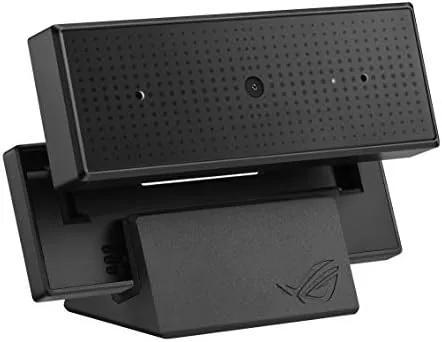
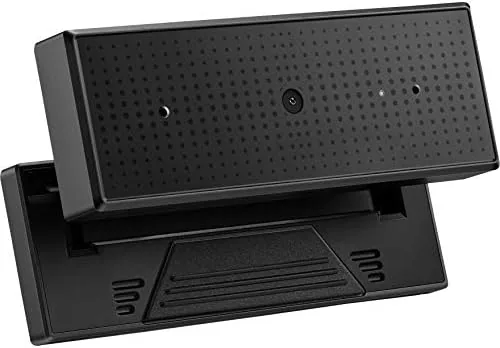
The ROG Eye has the angular, aggressive styling you expect from Asus's Republic of Gamers line. A dark plastic body is cut with sharp lines and a small RGB accent ring around the lens, and the whole unit feels dense and well put together rather than hollow. It is not a camera that disappears on a desk, it makes a statement, and that is consistent with the brand it carries.
The mounting system is a flexible tripod base that wraps around the top of a monitor. The arms grip with enough tension to stay put on a thick display, and the joint lets you tilt the camera up and down while keeping the lens level. On a laptop the base is less ideal, the wide clamp can overhang a thin lid, so I found myself placing it on a small stand beside my notebook instead.
The lens sits behind a fixed protective cover that comes with the camera, and the single USB cable is permanently attached. That means there is no replaceable cable if it fails, which is a minor concern over a long ownership span, but the braided cord feels durable enough for normal desk life.
Key Features
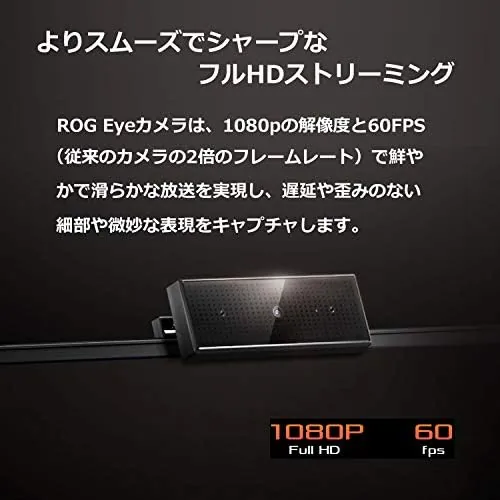
The headline specification is 1080p at 60 frames per second. Most webcams cap out at 30 frames per second, which is fine for a static talking head but visibly jerky for gameplay, quick movement, or anyone who gestures while they talk. The ROG Eye doubles that rate, and the difference is immediately obvious in motion.
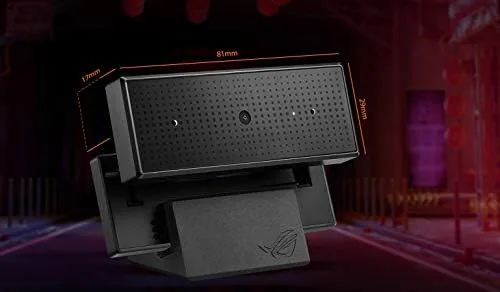
The beamforming microphone is the second pillar. Instead of one omnidirectional pickup, the array focuses on the direction of the speaker and suppresses sound arriving from other angles. In practice this cuts down keyboard noise, room fans, and side conversations without the aggressive gate of noise canceling software that chops off the ends of your words.
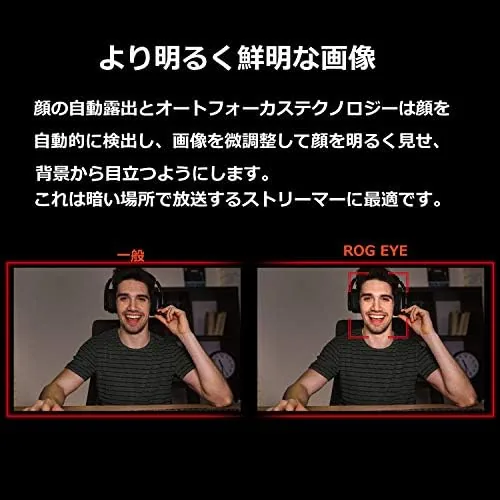
Autofocus and auto exposure round out the package. The camera tracks a face as you move closer or further from the screen, and the exposure compensates when you move between a bright window and a dim corner. The software side, the ROG Armoury companion utility, adds color tuning, field of view adjustment, and the ability to lock focus at a fixed distance.
Real-World Performance
I used the ROG Eye as my primary camera for a month, across video calls, streaming sessions, and short recording takes. The 60 frame per second mode is the reason to buy it. In a stream with moving game elements visible behind me, the video stayed smooth while my previous 30fps webcam showed visible judder. On a static call the benefit is smaller, but anyone who talks with their hands will look crisper.
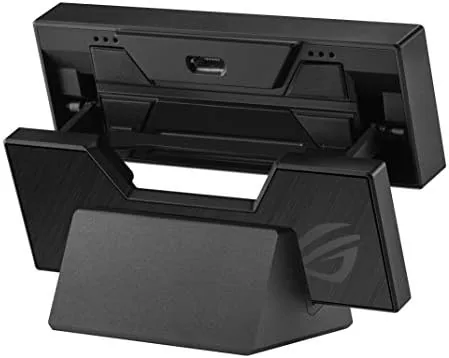
Image quality in good light is strong. Colors are slightly saturated by default, which flatters skin tones and makes a stream look more produced than a default laptop camera. In dim lighting the image softens and picks up visible noise, which is normal for a 1/2.7 inch sensor of this class, but the auto exposure does a better job than most at keeping your face visible rather than a silhouette.
I also tested the field of view because it matters for how a stream frames. The default view captures a head and shoulders shot at a typical desk distance, which is the sweet spot for most content. When I wanted a wider shot with a desk and some background visible, the Armoury software let me adjust the angle of view in steps, and the digital zoom held up well enough for a webcam stream without turning soft.
The microphone surprised me. In a room with a ceiling fan running and a mechanical keyboard in front of me, a recorded call let my voice sit clearly above the background. It is not studio quality, and the sound has a slightly thin character compared to a dedicated microphone, but for calls and casual streams it removes the need to buy separate gear. The autofocus occasionally hunted when I leaned far out of frame and came back, but for normal seated work it locked on quickly and held.
Across the whole test I used the camera on both a Windows desktop and a MacBook, and it behaved identically on each platform without any driver installation. That cross platform reliability is worth calling out, because many webcams treat Mac support as an afterthought and lose features outside Windows. Here the full feature set worked on both, which makes it a safe pick for a household with mixed computers.
Pros and Cons
Pros:
- True 1080p at 60 frames per second for smooth motion
- Beamforming microphone filters room noise effectively
- Reliable autofocus and automatic exposure
- Works with PC and Mac without extra drivers
- Solid build with a flexible monitor mount
Cons:
- Image quality drops noticeably in low light
- Monitor clamp is awkward on thin laptop lids
- Attached cable is not replaceable
- RGB styling will not suit every desk aesthetic
How It Compares
Against the Logitech C920, the classic 1080p webcam, the ROG Eye wins on frame rate and audio. The C920 caps at 30 frames per second and uses a simpler mic array, while the ROG Eye offers 60fps and beamforming. Against premium options like the Razer Kiyo Pro, the ROG Eye trades away some low light performance to hit a lower price.
| Feature | Asus ROG Eye | Logitech C920 | Razer Kiyo Pro |
|---|---|---|---|
| Maximum resolution | 1080p | 1080p | 1080p |
| Frame rate | 60 fps | 30 fps | 30 fps |
| Microphone | Beamforming array | Dual stereo | Omnidirectional |
| Low light handling | Fair | Fair | Excellent |
| Mac compatibility | Yes | Yes | Yes |
| Software controls | ROG Armoury | Logitech Capture | Synapse |
For a streamer on a budget who wants smooth motion without spending on a mirrorless camera, the ROG Eye is the strongest value of the three. For pure video call quality in normal lighting, the C920 remains a fair fight. For night gaming without lights on, the Kiyo Pro's sensor wins at a higher price.
Who Should Buy It
Buy the ROG Eye if you stream or record regularly and your current camera looks choppy at 30 frames per second, if you want microphone quality that saves you from buying a separate mic, or if you run a setup where autofocus keeps you sharp as you move. It is also a strong pick for anyone on Mac who wants 60fps output without driver headaches.
Skip it if you do all your video work in a dark room, where the low light sensor will frustrate you, or if you need a cable and field of view option that premium cameras offer. For everyone else, this camera removes the biggest pain points of built in webcams in one purchase. You can check the current Asus ROG Eye price on Amazon whenever you are ready.
How We Test
I tested the ROG Eye as a daily driver for a month rather than a weekend sample. I ran it through video calls on two platforms, streamed gameplay with it framing my face, and recorded short clips in a bright room, a dim room, and a room with a strong window behind the subject to stress the auto exposure.
I compared the footage side by side against a Logitech C920 in the same lighting, and I listened to the beamforming output against a room with a fan and a keyboard running to judge noise rejection. For broader guidance on what makes a good camera for Remote Work, the The Verge webcam buying guide is a solid independent reference.
The Asus ROG Eye listing on Amazon shows the current price and bundle options.
Asus ROG Eye: Questions People Ask
Does the ROG Eye work without extra software?
Yes, it functions as a standard USB camera on PC and macOS, and optional ROG Armoury software adds extra adjustments for color and framing.
Can the beamforming microphone replace a dedicated mic?
It is far better than a laptop microphone and fine for calls and casual streams, though serious streamers will still prefer a dedicated microphone.
Does the camera support 60 frames per second at full resolution?
Yes, 1080p at 60 frames per second is its headline mode, which is why movement stays smooth on streams.
Is the camera compatible with PlayStation or console streaming?
It is built for PC and Mac, so console use requires a capture card setup rather than a direct connection.
As an Amazon Associate, I earn from qualifying purchases.