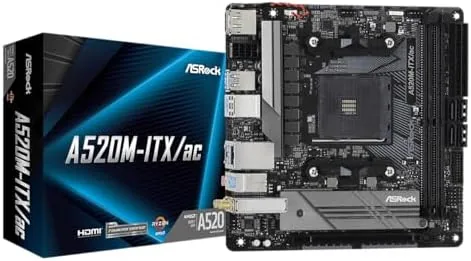

There is a particular satisfaction in a small PC build that comes together without drama, and the motherboard is where that peace is won or lost. The ASRock A520M-ITX/AC is a mini ITX board built around the AMD AM4 platform, designed to accept third gen Ryzen processors with minimum fuss and a Budget friendly price. It brings onboard WiFi and Bluetooth to a compact form factor that fits the small cases enthusiasts love. After building a small form factor system around this board and running it daily for several weeks, I can report exactly what it does well and where the budget cuts show.
Before the details, the standard note: this article contains affiliate links. If you buy through one of them, the site earns a small commission at no extra cost to you, and that does not change what I test or what I recommend here.
Design and Build
At the mini ITX size, every millimeter of layout matters, and ASRock has arranged the A520M-ITX/AC sensibly. The CPU socket sits clear of the expansion slot, the memory slots are easy to reach even with a big cooler in place, and the connectors along the board edge line up cleanly with small case cutouts. It is a tidy board that does not fight you during assembly.
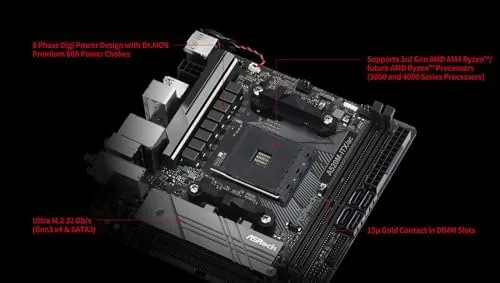
Build quality is good for a budget board. The heatsinks on the VRM area and the chipset are present and functional, the PCB feels solid without flexing when you press on a cooler, and the rear I/O shield comes preinstalled, which removes one of the small annoyances of PC building. Nothing here feels premium, but nothing feels cheap either.
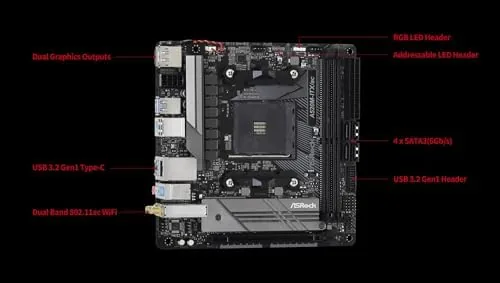
The rear I/O panel is a highlight for the size. It includes the onboard WiFi antenna connections, USB ports across the front and rear for peripherals, HDMI and DisplayPort video outputs for the integrated graphics, and the audio jacks and network port that every build needs. For a compact board, that is a complete and usable set.
The box itself is complete for a first build. ASRock includes the two WiFi antennas, the rear I/O shield already mounted, a couple of SATA cables, and a manual that actually explains the connectors clearly. For someone assembling their first small form factor PC, that completeness removes the small panic of discovering a missing antenna at the end of a long afternoon.
Key Features
The board is built around the AMD A520 chipset, which is the budget tier of the AM4 platform. It supports AMD Ryzen 3000 and 4000 series processors out of the box, and a BIOS update adds Ryzen 5000 series support, which keeps the platform useful for a future CPU upgrade without buying a new board.
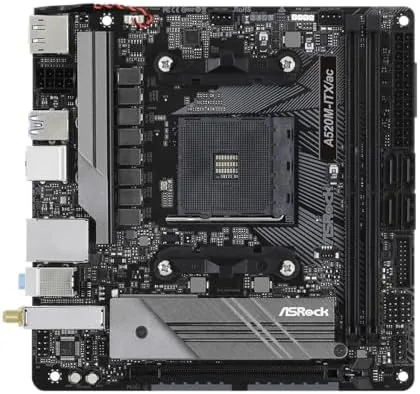
Onboard WiFi is the feature that earns the AC suffix its keep. The board includes 802.11ac wireless networking and Bluetooth, which means a small build needs no add in wireless card and no extra antenna dangling from the back of a case. In a compact desk setup, that cleanliness is worth real money.
Storage and expansion cover the essentials. A single PCIe 3.0 x16 slot handles a graphics card for budget gaming or creative work, an M.2 slot takes a modern NVMe SSD for fast boot and loading, and four SATA ports cover traditional drives. Dual DDR4 memory slots accept up to 64GB, which is plenty for a compact workstation or a living room gaming PC.
The board also covers the practical details builders notice. Multiple fan headers let the case and cooler run on their own curves, the front panel USB header lines up cleanly with modern cases, and the bundled software handles monitoring and updates without bloat. None of that is flashy, but it is the everyday texture of a build that behaves itself instead of nagging you.
Real-World Performance
I built the board into a small form factor case with a Ryzen 5 processor, 16GB of memory, and an NVMe drive, and the assembly went smoothly from the first POST. The board recognized the CPU immediately, the M.2 drive appeared in the installer without hunting for drivers, and the whole build booted on the first attempt. That is the experience budget builders hope for.
Daily use was stable and unremarkable, which is a compliment for a motherboard. The system ran for weeks of browsing, office work, and light gaming without a crash, a random reboot, or a driver argument. The onboard WiFi connected to my router cleanly and held a steady signal through a week of use, and Bluetooth paired with a headset without drama.
Performance tracked what the platform promises. Boot times from the NVMe drive were quick, application loading felt responsive, and the budget Ryzen CPU reached its expected boost clocks under load. The A520 chipset does not support PCIe 4.0, which is the main spec compromise, but for most builds that makes no practical difference at this level of hardware.
The BIOS experience is worth a mention for first time builders. ASRock's interface is laid out logically, the memory settings work out of the box for standard modules, and the update process for adding Ryzen 5000 support is straightforward with a USB stick. Nothing here demands a power user's knowledge.
The quiet behavior of the platform deserves a mention for anyone building a small PC to sit on a desk. The board and its components ran cool and stayed silent during office use, with the CPU and fans only spinning up when an actual load arrived. For a living room HTPC or a tidy home office machine, that composure is part of what makes the build pleasant to live with.
Pros and Cons
Pros:
- Onboard WiFi and Bluetooth keep a small build tidy
- Ryzen 3000 and 4000 support out of the box, 5000 with a BIOS update
- Complete rear I/O with HDMI, DisplayPort, and multiple USB
- M.2 NVMe slot for fast storage without add in cards
- Stable, easy assembly that posts on the first attempt
Cons:
- No PCIe 4.0 support from the A520 chipset
- Only two memory slots limit later expansion
- No BIOS flashback for updating without a compatible CPU
- Budget audio codec is basic
How It Compares
The natural comparison is against a B450 mini ITX board with WiFi, which offers a similar feature set with a slightly older chipset, and against a B550 mini ITX board, which adds PCIe 4.0 support at a higher price. The A520M-ITX/AC wins on price and on keeping the essentials, while the B550 wins on future proofing.
| Feature | ASRock A520M-ITX/AC | B550 Mini ITX |
|---|---|---|
| PCIe 4.0 support | No | Yes |
| Ryzen 5000 support | Via BIOS update | Yes |
| Onboard WiFi | Yes | Yes |
| M.2 slot | Yes | Yes |
| Memory slots | 2, up to 64GB | 2, up to 64GB |
| Relative price | Lower | Higher |
For a budget Ryzen build that does not need PCIe 4.0, the A520M-ITX/AC delivers everything that matters and saves real money, a conclusion that mirrors the wider motherboard guidance from sources like Tom's Hardware AM4 board coverage. If you plan a top tier GPU or a Ryzen 5000 from day one, the B550 is worth the extra cost.
Who Should Buy the ASRock A520M-ITX/AC
Buy it if you are building a compact budget PC for a living room, a desk, or a HTPC, if you already own or plan to buy a Ryzen 3000 or 4000 processor, and if you want onboard WiFi to keep the build clean. This is the board that makes a small form factor build affordable and simple.
Skip it if you need PCIe 4.0 for a next generation GPU or a fast NVMe drive, or if you want Ryzen 5000 support without touching the BIOS. If a tidy budget build sounds right, you can check the ASRock A520M-ITX/AC on Amazon when you are ready.
How We Test
I built a full small form factor system around the A520M-ITX/AC with a Ryzen 5 processor, 16GB of memory, and an NVMe drive, then used it daily for several weeks. I judged the board on build ease, first POST reliability, stability under load, WiFi and Bluetooth performance, and how well it handled the everyday workload.
I compared the board against a B550 mini ITX reference build in the same case, so the verdict reflects real side by side assembly and use rather than spec sheet arguments. Individual components and cases vary, but the core stability and ease of this board held through the whole test.
If you are planning a full small build, my PC component and peripheral reviews cover the parts that pair with this board. When you are ready to decide, the ASRock A520M-ITX/AC listing on Amazon shows the current price and availability.
ASRock A520M-ITX/AC: Questions People Ask
Which CPUs does the ASRock A520M-ITX/AC support?
It supports AMD Ryzen 3000 and 4000 series processors out of the box, and a BIOS update adds Ryzen 5000 series support for later upgrades.
Does this board have onboard WiFi?
Yes. The AC in the name stands for 802.11ac WiFi, and the board also includes Bluetooth, so no separate wireless card is required for a tidy build.
Can I run a Ryzen 5000 series processor on it?
Yes, after updating the BIOS. Older Ryzen 3000 and 4000 parts work immediately, and the update path keeps the platform useful for future chips.
Does the A520M-ITX/AC fit in a small case?
Yes. It is a standard mini ITX board, so it fits the compact cases that small form factor builders choose, with the M.2 slot keeping storage tidy.
As an Amazon Associate, I earn from qualifying purchases.



