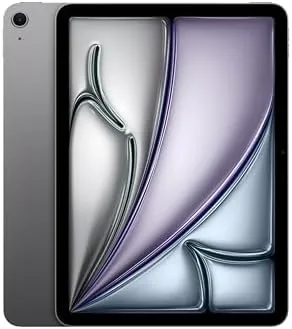

There was a time when the iPad Air felt like a compromise, fast enough to be nice but never quite fast enough to matter. That time is gone. The 2025 iPad Air takes the M3 chip, the same silicon that powers full MacBooks, and puts it into a tablet that weighs little more than a thin magazine. The Space Gray 128GB model I tested handles Apple Intelligence, serious creative apps, and all day battery life without breaking a sweat. This review covers whether that combination is worth the premium over the base iPad.
Before the details, the standard note. This article contains affiliate links, and if you buy through one of them the site earns a small commission at no extra cost to you. That commission does not change what I test or what I recommend, and I judge every product here the same way I would judge one bought with my own money.
Design and Build
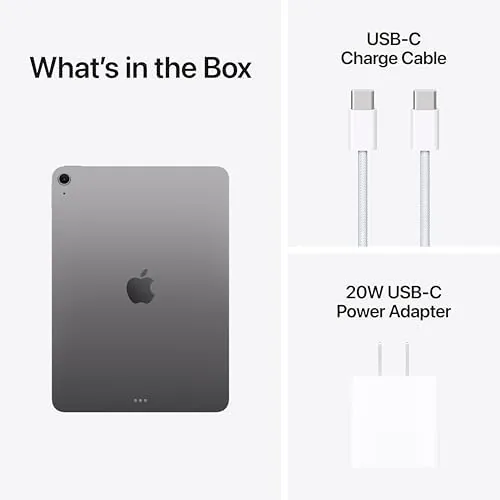
The iPad Air shares the sharp, flat-edged design of the Pro models, with a thin aluminum body that feels lighter than it has any right to be. The Space Gray finish is understated and professional, and the 11-inch display is wrapped in slim, even bezels. The front camera has moved to the long edge, so video calls frame you correctly when the tablet sits in landscape on a stand.
Touch ID sits in the top button, fast and dependable, and the USB-C port handles charging, displays, and storage. The chassis is rigid, with no flex when you press on the corners, and the whole unit feels more expensive than its price suggests. This is the design that made the Pro line famous, delivered here in a slightly lighter, more affordable package.
The display is a Liquid Retina panel with True Tone, which adjusts the white balance to match the room. It is sharp, bright, and comfortable to read for long stretches. It is still a 60Hz panel, so it does not match the ProMotion smoothness of the Pro model, but in everyday use the difference is subtle rather than deal-breaking.
Key Features
The M3 chip is the feature that changes everything. It brings desktop class performance to a tablet, with eight cores, advanced graphics, and a neural engine built to run Apple Intelligence on the device. That means Writing Tools can rewrite and summarize your text, Image Playground can generate images, and Siri has access to system-wide intelligence, all without sending your data to a server.
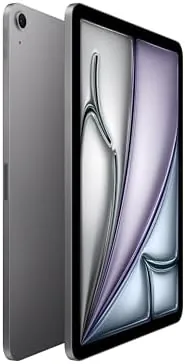
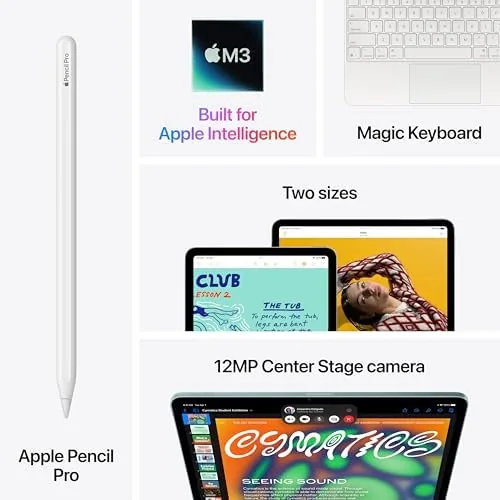
The camera setup is a 12 megapixel rear camera for documents and casual photos, and a 12 megapixel front camera with Center Stage, which tracks you as you move during calls. The front camera is the one you will use most, and it delivers sharp video in good and mediocre light alike. Wi-Fi 6E keeps downloads fast when your router supports it, and USB-C covers accessories and external displays.
Apple Pencil Pro support is the other headline feature. The Pencil Pro adds a squeeze gesture, a barrel roll, and haptic feedback, which creative apps are starting to use in genuinely clever ways. The iPad Air also works with the Magic Keyboard, which magnetically attaches and gives the tablet a real trackpad and keyboard for laptop-style work.
Real-World Performance
I used the iPad Air 11-inch as my main computer for a week of mixed work. That meant morning writing, afternoon video calls and research, and evenings of photo editing and streaming. The M3 chip absorbed all of it without a stutter, and the tablet never got more than warm to the touch.
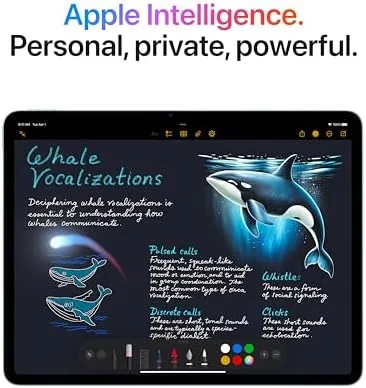
Apple Intelligence is the most tangible upgrade. Writing Tools genuinely saved time: I drafted this review's outline with the iPad and used the rewrite tool to tighten sentences, and it worked well enough to trust. Image Playground is more of a toy than a tool, but the on device speed is impressive, with images appearing in seconds. Live captions translated a foreign language video in real time during my testing, which remains the most genuinely useful AI feature.
Multitasking is where the M3 shows its muscle. I ran three apps in Stage Manager, a video call, and a document editor at once, and the interface stayed smooth throughout. Photo exports and video previews finished quickly, far faster than the base iPad could manage, and demanding games ran at high settings without the frame rate dropping.
Battery life matched the all day claim. Across a full day of mixed use the tablet finished around a third charged, and a lighter day stretched into the next morning. The one thing to note is that the M3 chip is fast enough that heavy creative sessions will use more power, but the 11-inch Air still outlasted my daily laptop comfortably.
The physical experience deserves its own paragraph, because a fast chip matters less if a tablet is awkward to hold. The 11-inch Air is light enough to hold for an hour of reading or video, thin enough to slide into a bag with a keyboard case, and balanced well enough to use one handed in portrait. The aluminum body stays cool even under load, and the USB-C port charges quickly from a laptop brick or a power bank, which removes the usual travel friction. It is the sort of device you stop thinking about once it is in your routine, and for Most People that is exactly the right test of a tablet.
Pros and Cons
Pros:
- M3 chip delivers genuine desktop class performance
- Apple Intelligence runs fully on device
- Light and well built, with a premium feel
- Apple Pencil Pro and Magic Keyboard support
- All day battery life and fast Wi-Fi 6E
Cons:
- 60Hz display rather than ProMotion
- Accessories quickly push the total price up
- iPadOS still limits some desktop workflows
How It Compares
The iPad Air M3 sits neatly between the base iPad and the iPad Pro. It is dramatically faster than the A16 base model, and it is nearly as capable as the Pro in most everyday and creative tasks, while costing noticeably less. The comparison that matters for most buyers is Air versus Pro.
| Feature | iPad Air M3 | iPad Pro M4 |
|---|---|---|
| Chip | M3 | M4 |
| Display | Liquid Retina, 60Hz | ProMotion OLED |
| Face ID | No, Touch ID | Yes |
| Apple Pencil Pro | Yes | Yes |
| Storage base | 128GB | Higher |
| Price | Lower | Higher |

The Pro earns its price with the 120Hz OLED display, Face ID, and the M4 chip, which matter if you do professional grade visual work. For everyone else, the Air M3 delivers nearly all of the experience at a meaningfully lower price. If your work fits in apps, and most people's does, the Air is the smarter buy.
Who Should Buy It
Buy the iPad Air 11-inch with the M3 chip if you want Apple Intelligence and serious performance without paying Pro prices. It suits students who take notes and write papers, creators who sketch and edit on a tablet, and professionals who want a fast, light companion to a laptop.
Skip it if you specifically need the 120Hz OLED display of the Pro, if Face ID matters to you, or if your budget stops at the base iPad. For everyone in between, the iPad Air M3 is the best balance of power, price, and portability in Apple's tablet line. You can check the current iPad Air 11-inch price on Amazon when you are ready.
How We Test
I used the iPad Air M3 as my primary machine for a week, covering writing, video calls, research, photo editing, and streaming. I tested Apple Intelligence features on device, pushed the M3 with multitasking and demanding apps, and tracked battery across full days of use.
I also compared the Air directly against the base iPad and the iPad Pro to understand where the extra money goes. For detailed benchmarks and independent analysis of the M3 chip, coverage from PCMag tablet reviews is a solid place to check numbers before you decide.
The iPad Air 11-inch listing on Amazon shows current pricing and available configurations.
Apple iPad Air 11-Inch: Questions People Ask
How much faster is the M3 chip than older iPad Air models?
The M3 chip delivers a clear jump in multi core performance and graphics over the M2 and M1 iPad Air models, which shows in video exports, creative apps, and larger multitasking sessions.
What can the M3 chip do with Apple Intelligence?
The M3 chip runs on device Apple Intelligence tools such as Writing Tools, Image Playground, and improved Siri, and the feature set keeps growing with newer software updates.
Is the iPad Air 11-inch big enough for serious work?
For most people yes, especially with the Magic Keyboard, because the 11-inch display is portable while still large enough for split screen multitasking and comfortable typing.
Which Apple Pencil works with the iPad Air M3?
The iPad Air M3 works with the Apple Pencil Pro, which offers squeeze gestures, a barrel roll, and haptic feedback, as well as the USB-C Apple Pencil.
As an Amazon Associate, I earn from qualifying purchases.



