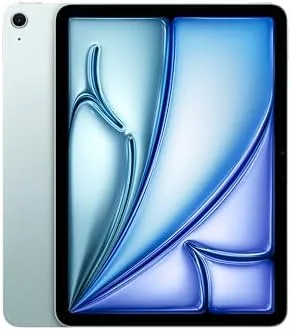

There is a comfortable middle ground between a budget tablet and a workstation grade iPad, and the iPad Air has occupied it so well that Apple rarely feels the need to change the formula. The 11 inch M2 model refines that formula with the same desktop class chip that powers Macs, a bright Liquid Retina display, and a body that has gotten lighter and thinner than ever. I spent two weeks editing photos, sketching, and working on the go to find out whether the M2 Air deserves a place beside the iPad Pro or makes the Pro unnecessary.
Before the details, the standard note. This article contains affiliate links, and if you buy through one of them the site earns a small commission at no extra cost to you. That commission does not change what I test or what I recommend, and the iPad reviewed here was used exactly the way a creative would use it.
The rest of this review covers the display, the creative workflow with the Apple Pencil Pro, the camera, and the honest question of which iPad the Air should replace.
Design and Build
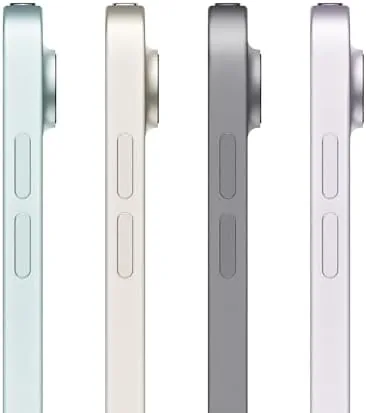
Apple moved the front facing camera to the landscape edge on this generation, which is the kind of small change that makes a large difference for video calls, and the display now sits flush in a squared aluminum frame that feels premium in the hand. The Blue finish is subtle and professional, and at roughly one pound the Air is light enough to hold for long reading sessions without your arm complaining, which is more than can be said for heavier competitors.
The build quality is unmistakably Apple. The aluminum back is cold and precise to the touch, the buttons are firm, and the thin bezels around the 11 inch screen give it a modern, almost borderless look. Touch ID lives in the power button on top, which is a faster and more natural unlock method than waiting for a camera scan. The whole tablet feels dense and expensive in the way that immediately reassures you the money bought something solid.
Key Features
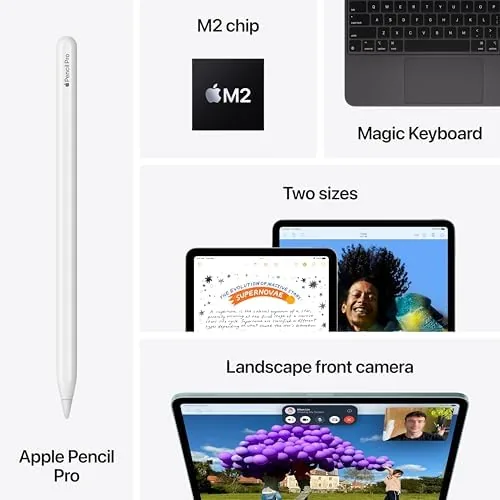
The M2 chip is the headline, and for creative work it is genuinely transformative in a tablet at this price. The eight core CPU and ten core GPU handle photo editing, drawing, and video previews with the same ease as a MacBook, which means Lightroom runs without hesitation and complex filters apply in real time. The chip also enables Apple Intelligence features, so on device writing tools and image cleanup arrive without sending data to the cloud.
The display and the Pencil Pro complete the creative package. The 11 inch Liquid Retina panel covers the P3 wide color gamut, which is essential for accurate photo editing, and it is bright enough for outdoor use. The Apple Pencil Pro adds squeeze gestures, haptic feedback, and a barrel roll feature for shading, and it attaches magnetically to the side for charging. The front camera is a landscape oriented 12 megapixel sensor with Center Stage, and the back camera is a 12 megapixel shooter that handles documents, video, and quick captures.

Real-World Performance
Creative work is where the M2 Air either earns or loses its price, and it earned it. I edited a week of photos in Lightroom, adjusting exposure, color, and detail at full resolution with no lag, and I drew in Procreate with brushes that reacted instantly to the Pencil Pro pressure and tilt. The haptic feedback from the Pencil made long strokes feel deliberate and precise in a way that is hard to describe until you have tried it, and the display showed colors that matched my calibrated monitor closely enough for confident edits.
The M2 chip made multitasking feel effortless. I ran a photo editor in Split View beside a notes app, with a music stream playing in the background, and the tablet never slowed or dropped a frame. Apple Intelligence tools, like the clean up feature in the Photos app, worked quickly on device, which kept the whole workflow private and responsive. For drawing, the Pencil Pro latency is low enough that the line appears where you want it, which is the difference between sketching and fighting the hardware.

Battery life matched Apple's claim of around ten hours. A day that mixed photo editing, video calls, and web browsing ended with roughly twenty percent left, and standby drain overnight was negligible. The camera handled its supporting role well, with video calls looking sharp under the landscape lens and Center Stage tracking my face as I moved. Video calls turned out to be a secondary strength worth mentioning. The landscape positioned 12 megapixel camera kept me framed as I moved around the room, and the three microphone array picked up my voice clearly even with a fan running in the background. A review call that started as a plain conversation became a live sketching session over the same connection, with the Pencil Pro drawing on a shared canvas, which is a workflow no laptop handles as naturally as a tablet with a stylus.
The only real limit is one of patience rather than power. The 11 inch screen is comfortable for editing but smaller than the 13 inch Pro if you want a full desktop layout, and iPadOS still expects you to adapt to its app model for the few tasks that need a full desktop browser. Neither is a fault of the Air itself, just a note on where its boundaries sit.
Pros and Cons
Pros:
- M2 chip delivers MacBook class creative performance
- P3 wide color Liquid Retina display for accurate editing
- Apple Pencil Pro support with haptic feedback
- Light one pound body that is comfortable to hold
- Long ten hour battery life in real use
- Landscape camera with Center Stage for video calls
Cons:
- 60Hz display, not the smoother ProMotion of the Pro
- Two speaker layout, weaker than the Pro four speaker system
- No Face ID, Touch ID only
- Apple Pencil Pro sold separately
How It Compares
The natural rival for the M2 Air is the M4 iPad Pro, and the table below shows what the extra money buys.
| Feature | iPad Air 11 M2 | iPad Pro 11 M4 |
|---|---|---|
| Chip | M2 | M4 |
| Display | Liquid Retina | Ultra Retina XDR, tandem OLED |
| Refresh rate | 60Hz | 120Hz ProMotion |
| Camera | 12MP front and back | 12MP with LiDAR |
| Unlock | Touch ID | Face ID |
| Price | Lower | Higher |

For most creative work the Air is the smart buy, because the M2 chip handles the same apps and the display is accurate enough for serious editing. The Pro adds ProMotion smoothness, a brighter OLED panel, and Face ID, which matters if you draw with fast strokes or work in very bright conditions. Choose the Air if the price gap matters and the Pro if you want the absolute best screen and motion.
Who Should Buy It
Buy the iPad Air 11 M2 if you edit photos, draw, or take notes professionally, and you want a lightweight companion that keeps up with you. It is also a strong choice for students who need a capable notebook replacement and for anyone who wants one device that handles creative apps, video calls, and entertainment without compromise.
Skip it if you need a 120Hz display for fast digital drawing, if you do video production that benefits from the Pro GPU, or if the 11 inch size feels too small and the 13 inch Pro fits your layout better. For the vast majority of creative users, this is the right iPad. You can check the current price of the iPad Air 11 M2 on Amazon when you are ready.
How We Test
I used the M2 iPad Air 11 as my primary creative device for two weeks, editing photos in Lightroom, drawing in Procreate, attending video calls, and tracking battery life across mixed days. I also compared the display against a calibrated monitor to judge color accuracy.
I did not run synthetic benchmarks, preferring real application testing, and I used the Apple Pencil Pro supplied with the review rather than a third party stylus. For an independent ranking of iPads across budgets, Wirecutter has a comprehensive guide to the best iPad that is worth reading before you decide. The iPad Air 11 M2 listing on Amazon shows the current price and storage options.
Apple iPad Air 11 M2: Questions People Ask
Is the iPad Air M2 good for photo editing?
Yes, the M2 chip powers Lightroom and Affinity Photo without stutter, and the wide color Liquid Retina display shows edits accurately.
How does the iPad Air M2 compare to the iPad Pro?
The Air is lighter and cheaper with the same fast feel for most tasks, while the Pro adds ProMotion, more GPU muscle, and better accessory support.
Does the iPad Air M2 support the Apple Pencil Pro?
Yes, the M2 iPad Air works with the Apple Pencil Pro, which adds squeeze gestures and haptic feedback for drawing and note taking.
What is the battery life like on the iPad Air M2?
Apple rates it for up to 10 hours of web use or video playback, and in testing the M2 Air reliably hits that figure in daily use.
As an Amazon Associate, I earn from qualifying purchases.