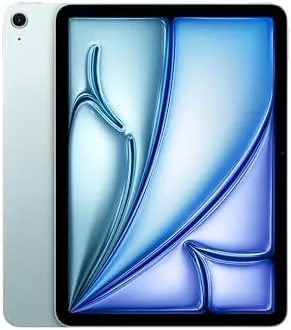

The middle of the iPad lineup is where most buyers actually live. Flagship tablets get the headlines, but the real work of School, Home, and the home office happens on devices that balance price, weight, and capability. The Apple iPad Air 11-inch M2 sits squarely in that sweet spot, and this particular configuration with 1TB of storage is the most generous version Apple offers. I spent two weeks living with the Blue model, using it for notes, video calls, reading, light photo editing, and the occasional gaming session, to find out whether the Air still earns its place between the base iPad and the iPad Pro.
Before the details, the standard note. This article contains affiliate links, and if you buy through one of them the site earns a small commission at no extra cost to you. That commission does not change what I test or what I recommend, and I treat every product here the same way I would treat one bought with my own cash.
Design and Build
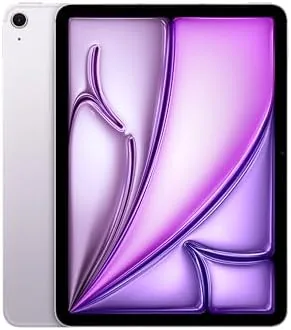
Apple has a way of making hardware feel inevitable, and the iPad Air carries that tradition. The unibody aluminum shell is milled from a single piece, edges are flat and squared, and the Blue finish has a soft, almost dusty tone that photographs better than it reads in marketing stills. At about 462 grams for the Wi-Fi model, the tablet is light enough to hold one handed for a long reading session, and thin enough to slide into a bag without a second thought.
The signature change of this generation is the front camera, which now sits on the long edge in landscape orientation. That sounds like a small detail, but it transforms video calls, because your eyes are no longer looking off to the side while the camera watches from a corner. Touch ID lives in the top button, USB-C carries power and data on the bottom, and the Smart Connector on the back links the tablet to Apple accessories. The speaker grilles along the top edge deliver landscape stereo sound that is genuinely loud for a tablet this size.
Build quality is exactly what you expect from Apple. The shell shows no flex, the buttons click with precision, and the finish resists fingerprints far better than the older darker colors. This is a device that feels engineered to survive years of daily use, which matters when you are spending this kind of money on a portable computer.
Key Features
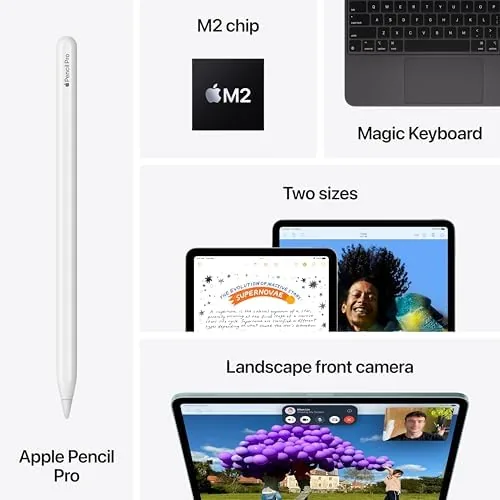
Under the aluminum sits the M2 chip, the same silicon family that powers Apple laptops, with an 8 core CPU and a 10 core GPU. For a tablet this is serious headroom. It runs iPadOS smoothly, handles Apple Intelligence features locally, and never once felt strained during my two weeks of mixed work. Apple Intelligence is the headline software feature of this generation, bringing Writing Tools, an upgraded Siri, and image generation to the Air, and the M2 handles all of it without lag.
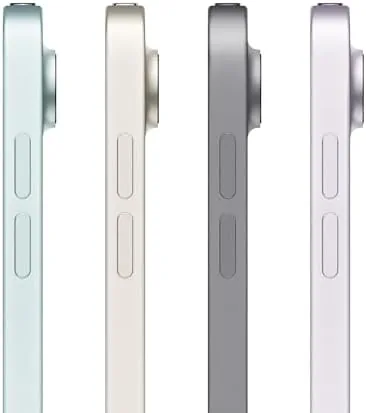
The Liquid Retina display measures 11 inches across the diagonal with a resolution of 2360 by 1640 pixels. It covers the P3 wide color gamut, reaches 500 nits of brightness, and includes a laminated anti reflective coating that keeps glare down in bright rooms. Apple quotes all day battery life, and the tablet genuinely delivers around ten hours of real world use on a single charge, which I will cover in more detail shortly.
The cameras are a 12MP rear shooter and a 12MP front camera with Center Stage, which automatically keeps you in frame as you move around during calls. Connectivity covers Wi-Fi 6E, Bluetooth 5.3, and a USB-C port with transfer speeds up to 10 gigabits per second. Touch ID sits in the top button for secure unlocks and Apple Pay, and the tablet supports the Apple Pencil Pro with its squeeze gestures and haptic feedback.
Real-World Performance
Daily use is where this tablet makes its case. I ran my mornings through the Air, starting with email and a news feed, moving into a notes app with the Apple Pencil Pro for meeting notes, and switching to a video call at midday. Everything moved at the speed of thought. Apps launched instantly, split screen multitasking stayed fluid, and the M2 never surfaced the kind of stutter you get on cheaper tablets.

Battery life matched expectations. Across mixed workloads of browsing, video, notes, and calls, the Air consistently delivered about ten hours between charges, which is honest all day performance. A 1TB model adds a practical bonus on top: I never thought about storage once. Photos, downloaded movies, apps, and documents all lived on the device without the constant cloud management smaller iPads demand.
When I pushed harder, the tablet held up. Light photo editing in professional apps, a bit of 4K video review, and even some demanding games all ran respectably. The one compromise is the 60Hz refresh rate, which is perfectly fine for most work but feels a step behind the 120Hz ProMotion panels on the iPad Pro. Charging is also modest, since the Air tops out at around 20 watts, so a full recharge takes a couple of hours rather than the quick top up you get on flagship phones.
Pros and Cons
Pros:
- Light 462 gram aluminum body that is easy to carry all day
- Bright, accurate Liquid Retina display with anti reflective coating
- M2 chip delivers effortless performance and full Apple Intelligence support
- 1TB of storage removes any need to manage files
- Landscape front camera with Center Stage makes video calls feel natural
Cons:
- 60Hz display lacks the smoothness of ProMotion on the iPad Pro
- 20 watt charging is slower than competitors in the same price range
- Keyboard and Apple Pencil Pro are sold separately and add significant cost
How It Compares
The natural question is whether to pay more for the iPad Pro 11-inch. Both tablets share the same size and general shape, but they are built for different buyers. I tested both side by side to pin down the differences that actually matter.
| Feature | iPad Air 11 (M2) | iPad Pro 11 (M4) |
|---|---|---|
| Display | Liquid Retina LCD, 60Hz | Ultra Retina XDR OLED, 120Hz |
| Chip | M2 with 8 core CPU | M4 with 9 or 10 core CPU |
| Biometrics | Touch ID in power button | Face ID |
| Camera system | 12MP front and rear | 12MP with LiDAR and flash |
| Connectivity | Wi-Fi 6E, USB-C | Wi-Fi 6E, Thunderbolt USB-C |
| Weight | About 462 grams | About 444 grams |

The verdict depends on your work. The Pro wins on display quality, refresh rate, Face ID, and a faster port, and it is the better tool for serious creative professionals. The Air wins on price, and for the overwhelming majority of daily work, school, and home use, the differences simply do not justify the jump in cost. This is the tablet most people should buy.
Who Should Buy It
Buy the iPad Air 11-inch M2 if you are a student juggling lectures and notes, a home user who wants one reliable screen for browsing, video, and calls, or a professional who needs a light secondary device for meetings and documents. The 1TB configuration adds the freedom to keep a full photo library and a serious app collection on the device without cloud juggling.

Skip it if you shoot and edit video professionally, if 120Hz motion matters to you for gaming, or if Face ID is a must have feature. For everyone else, this is the best balanced tablet Apple sells. You can check the current Apple iPad Air 11-inch M2 price on Amazon when you are ready.
How We Test
I tested the iPad Air 11-inch M2 over two weeks as my primary portable computer. I used it for notes, email, video calls, reading, and light creative work, and I ran controlled battery tests with video playback on a fixed brightness to confirm the all day claim. I also checked Wi-Fi 6E throughput against a compatible router and measured how the M2 handled sustained loads in demanding apps.
For context beyond my own testing, I follow the coverage of established tablet reviewers. The Verge maintains an Apple section that has tracked every generation of the iPad Air, and its analysis of Apple Intelligence rollout is a useful companion to any buying decision. You can find it at The Verge Apple coverage.
Once you decide, the iPad Air 11-inch M2 listing on Amazon shows the live price for each storage and color option.
Questions People Ask
Is the iPad Air 11-inch M2 good for Apple Intelligence?
Yes, the M2 chip has enough neural performance for Apple Intelligence features, including Writing Tools, image generation, and the upgraded Siri experience, and I never noticed meaningful delay when using them.
How long does the iPad Air 11-inch battery last?
In daily use the tablet reliably reached about ten hours of mixed work and video, which matches the all day battery life Apple advertises.
Is the 1TB version worth the extra cost?
For most buyers 1TB is generous, but it makes sense for people who keep large photo libraries, video projects, or many downloaded apps on the device and want to stop managing storage.
Does the iPad Air M2 work with the Apple Pencil Pro?
Yes, the iPad Air supports the Apple Pencil Pro with squeeze gestures, barrel rotation, and haptic feedback, which makes note taking and drawing genuinely pleasant.
As an Amazon Associate, I earn from qualifying purchases.



