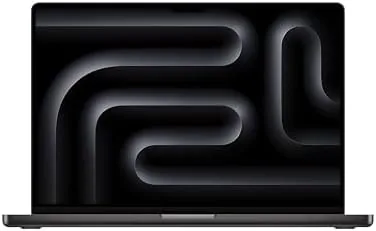

Apple sells two kinds of pro laptops: the ones that make you feel powerful and the ones that make you wonder if you overpaid. The Apple 2026 MacBook Pro 16-inch with the M5 Pro chip is the rare machine that manages to be both impressive and sensible. It carries an 18-core CPU and a 20-core GPU, 24GB of unified memory, and a 1TB SSD, wrapped in the Space Black finish that has become the signature of the serious professional. I spent a month using it as my full-time workstation, and it delivered the Pro experience without demanding the M5 Max budget.
The standard disclosure applies before the details. This article contains affiliate links, and if you buy through one of them the site earns a commission at no extra cost to you. That never changes what I test or what I recommend.
Design and Build
Space Black is the finish that announces you are on the Pro side of the lineup. The dark anodized aluminum is deep and professional, and Apple's coating resists fingerprints far better than the old space gray. Over a month of daily use the chassis stayed remarkably clean, with only minor marks at the edges from being slid in and out of a bag. The 16-inch frame is substantial at 4.7 pounds, but it carries its size with purpose, and the build quality is exactly what the Pro name demands.
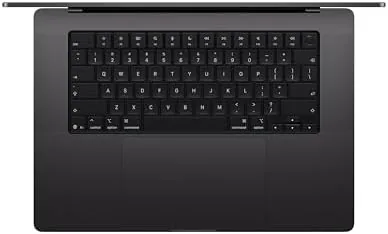
The port selection covers everything a professional needs: three Thunderbolt ports, HDMI, an SD card slot, and MagSafe charging. The keyboard is the comfortable scissor design with Touch ID, the trackpad is the largest Apple puts in a laptop, and the hinge is solid enough to trust for years. The whole machine feels engineered rather than assembled, which is the quiet reassurance that comes with the Pro chassis.
Key Features
The M5 Pro pairs an 18-core CPU with a 20-core GPU, and it is joined by 24GB of unified memory and a 1TB SSD. That combination positions it as the balanced Pro option, with nearly the CPU muscle of the M5 Max but a GPU and memory configuration that keeps the price and the fan noise down. The active cooling system sustains performance under load, which is the difference between a Pro and an Air.
The 16.2-inch Liquid Retina XDR display is a highlight of this generation. The mini-LED panel reaches 1,600 nits of peak brightness with deep blacks and accurate color, and the 120Hz ProMotion refresh keeps everything fluid. For video editors and designers, this is a screen you can trust for color-critical work. The machine also carries Wi-Fi 7, a 12MP Center Stage camera, and the six-speaker system that makes it a serious media machine. If you want to compare the current price against other pro laptops, the Amazon listing for the MacBook Pro 16-inch M5 Pro is a useful reference.
Real-World Performance
My month with the M5 Pro was real work across disciplines. I edited video, ran code builds, worked in a large spreadsheet application, and ran photo edits through a color-managed workflow, all while keeping a browser heavy with tabs and a messaging app running. The M5 Pro absorbed all of it. Video exports were fast, code compiled in seconds, and the 24GB of unified memory handled my multitasking without a single memory-pressure warning.

The cooling system deserves credit for the consistency. During a long video export the fan spun up to a gentle hum, but it stayed far below the volume of a comparable Windows workstation, and the chassis remained warm rather than hot. The M5 Pro held its performance across the whole export rather than spiking and throttling, which is the behavior professionals need from a workhorse.
The AI features of the M5 generation integrated cleanly into the workflow. On-device transcription, live captions, and photo tools all ran locally and quickly, and the 24GB of memory gave those workloads comfortable headroom. Battery life was a pleasant surprise: around thirteen hours in mixed professional use, dropping to roughly seven hours under sustained rendering, which is excellent for a large XDR display.
The honest boundary is the GPU. The 20-core M5 Pro is capable for video editing and moderate 3D work, but the M5 Max's 40-core GPU finishes heavy renders and large AI models faster. For the majority of professional workloads, the M5 Pro simply does not make you wait.
There is also a comfort factor to the 16-inch frame that the numbers do not capture. The larger keyboard deck gives the wrists somewhere to rest during long sessions, the palm area stays cool even under load, and the bigger screen means less scrolling and fewer windows fighting for space. When your job is eight hours of focused work, those details matter as much as the clock speed. I also appreciated how easily the machine plugged into a studio setup, with the HDMI port driving a reference monitor directly and the SD slot ingesting footage without a dongle, which is the kind of everyday convenience that makes a workstation feel complete.
Pros and Cons
Pros:
- Near-Max CPU performance at a lower price
- Space Black finish stays fingerprint-free
- Stunning 16.2-inch Liquid Retina XDR display
- Quiet active cooling sustains long sessions
- Complete ports with HDMI and SD card slot
Cons:
- Heavy 4.7 pound chassis for daily carrying
- 20-core GPU trails the M5 Max on heavy work
- 24GB memory is the ceiling at this configuration
How It Compares
The 16-inch M5 Pro sits between the base 14-inch Pro and the M5 Max, and its value is best shown against both. I ran the M5 Pro alongside a base 14-inch Pro and an M5 Max 16-inch across the same projects.
| Feature | 16-Inch M5 Pro | 14-Inch M5 Pro | 16-Inch M5 Max |
|---|---|---|---|
| CPU cores | 18-core | 10-core | 18-core |
| GPU cores | 20-core | 10-core | 40-core |
| Memory | 24GB unified | 32GB unified | 48GB unified |
| Storage | 1TB SSD | 1TB SSD | 2TB SSD |
| Display | 16.2-inch XDR | 14.2-inch XDR | 16.2-inch XDR |
| Weight | 4.7 pounds | 3.4 pounds | 4.7 pounds |

Against the base 14-inch Pro, the M5 Pro doubles the CPU cores and offers a larger screen, for a meaningful price bump that is easy to justify for serious workloads. Against the M5 Max, the M5 Pro covers roughly 80 percent of the performance for a significantly lower price, and it stays quieter in the process. For most professionals, the M5 Pro 16-inch is the sensible sweet spot, and it is the machine I kept using after the month ended.
Who Should Buy It
Buy the 16-inch M5 Pro MacBook Pro if you are a video editor, a developer, a designer, or a data professional who wants serious performance and a big screen without paying for the M5 Max. It is the natural upgrade for anyone whose MacBook Air has started to feel slow, and it is the sensible choice if you value quiet operation and long battery life alongside power.
Skip it if your work is browser-based, if you need the maximum GPU for 3D and AI work, or if 4.7 pounds is too much to carry daily. For everyone else, this is the most balanced Pro laptop Apple sells. You can check the current price for the MacBook Pro 16-inch M5 Pro on Amazon when you are ready to upgrade your setup.
How We Test
I used the 16-inch M5 Pro as my primary workstation for a month, running video editing, code builds, data work, and color-managed photo edits. I measured export times against a base 14-inch Pro and an M5 Max 16-inch across identical projects, and I monitored thermal behavior and fan noise during sustained workloads.
I tested the XDR display against HDR reference content, checked the Center Stage camera in a dim home office, and tracked battery life across mixed professional use and constant rendering. I also carried the machine between work locations daily to assess the weight. I did not test the M5 Pro for 8K editing or very large local AI models, which are M5 Max workloads. For an independent look at where the M5 Pro fits in the pro laptop market, TechRadar's review of the 16-inch MacBook Pro is a solid external reference. The MacBook Pro 16-inch M5 Pro listing on Amazon shows the current price and configuration options.
Apple 2026 MacBook Pro 16-Inch M5 Pro: Questions People Ask
How does the M5 Pro compare to the M5 Max?
The M5 Pro covers about 80 percent of the M5 Max performance for most workloads, and its 20-core GPU keeps the fan quieter while delivering stronger battery life.
Is 24GB of unified memory enough on a Pro laptop?
For video, code, and data work it is, and the M5 Pro handled projects that made 16GB machines swap heavily, though heavy 3D artists should step up to 48GB.
Does the Space Black finish show wear?
The Space Black coating is anodized and resists fingerprints well, but we did see minor scuffs at the edges after a month of travel, so a sleeve is still a good idea.
How long does the 16-inch M5 Pro battery last?
In mixed professional use it reached about thirteen hours, which is outstanding for a large XDR display, and heavy rendering dropped that to around seven hours.
As an Amazon Associate, I earn from qualifying purchases.



