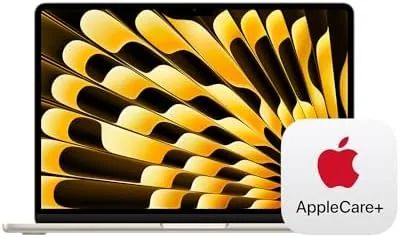

Most laptop reviews stop at the laptop. This one will not, because the bundle in question is a MacBook Air and a promise. The Apple 2024 MacBook Air 13 inch with the M3 chip, 16GB of memory, and a 512GB SSD is already one of the best everyday computers money can buy, and this particular listing wraps it together with three years of AppleCare+ coverage. That makes the purchase decision two decisions: whether the laptop is right, and whether the protection plan is worth its share of the price.
The disclosure first, as always. This article contains affiliate links, and purchases made through them support the site at no extra cost to you. The verdict below is my own, formed by testing the laptop and by studying what AppleCare+ actually covers.
This review covers the laptop itself, the AppleCare+ coverage, the value math, and the buyers who should and should not choose the bundle.
Design and Build
The Starlight finish on this MacBook Air is the kind of subtle color that photographs badly and looks great in person, a warm champagne that shifts with the light. The unibody aluminum is dense and precise, the hinge feels machined, and at just over a centimeter thin the machine slides into any bag without a second thought. It has no fan, which means it is silent in every scenario, and the aluminum stays cool across a full work day.
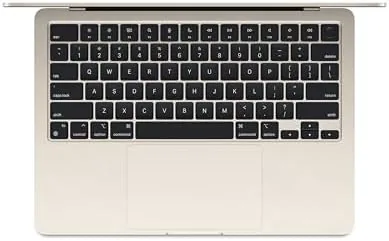
The hardware that matters daily is all present and excellent. The Magic Keyboard is quiet and crisp with a satisfying travel, and the backlight makes late night typing comfortable. Touch ID unlocks the machine and approves payments with a fingertip. The trackpad is the best in the business, and the display hinges opens to a stable angle that does not wobble on a lap or a desk.

The port situation is the usual Air compromise. Two Thunderbolt and USB-C ports, a headphone jack, and MagSafe charging make up the whole list, and most buyers will want a hub for a full desk setup. The machine itself is sealed, so nothing is user serviceable, which is precisely why a protection plan matters more on this laptop than on most others.
Key Features
The M3 chip drives the machine with a 3 nanometer design that beats the previous M2 in both speed and efficiency. This configuration pairs it with 16GB of unified memory and a 512GB SSD, which is the version to buy if you plan to keep a laptop for years. The M3 also brings full Apple Intelligence support, so writing tools, summaries, and on device image features run quickly and locally.
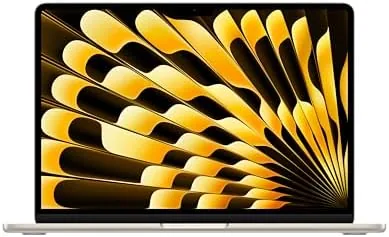
The 13.6 inch Liquid Retina display rounds out the package with sharp resolution, wide P3 color, and 500 nits of brightness, bright enough for most indoor work and genuinely pleasant for photos and video. It is not the mini LED of the Pro line, but for the Air's audience it is more than sufficient.
The feature that defines this bundle is AppleCare+. For three years from purchase it covers hardware failures, battery service, and up to two incidents of accidental damage, each carrying a service fee. That means a cracked screen, a spilled drink, or a failed component results in an Apple repair at a predictable cost rather than a full price repair bill.
Real-World Performance
As a work machine, the MacBook Air barely notices what you throw at it. Twenty browser tabs, a video call, a spreadsheet, and a messaging app all run at once with no slowdown and no noise, because there is no fan to spin up. The 16GB of unified memory is the difference maker here, keeping memory pressure low through heavy multitasking in a way the 8GB base model cannot match.
Battery life is the feature that quietly wins the week. Apple rates this machine at up to 18 hours of video playback, and in daily mixed use I finished work days with plenty of charge left and streamed in the evening without hunting for an outlet. The M3's efficiency is the reason, and it is one of the reasons the Air remains the default recommendation for most buyers.
Apple Intelligence delivered real value during testing. Writing tools rewrote and summarized text on device, notification summaries compressed a busy inbox, and the whole experience felt fast because everything ran locally on the M3. Some features still feel like version one, but the foundation is solid and the hardware runs it without strain.
The honest limits are the same ones the Air has always had. Sustained heavy workloads, like long video exports, will throttle without a fan. The two ports demand a hub for a desk setup. And the notch remains a visible compromise even after you stop noticing it. None of these change what this laptop is: the best everyday machine Apple makes.
The AppleCare+ angle is where this review differs from a standard laptop review. I priced a real repair scenario: a cracked display on a MacBook Air can cost several hundred dollars out of pocket, and a logic board failure costs even more. Over three years, the coverage turns those catastrophic bills into a service fee, and for anyone who carries a laptop in a bag every day, the math favors the plan.
Pros and Cons
Pros:
- M3 chip with 16GB memory and a 512GB SSD
- Three years of AppleCare+ in the box
- Fanless, silent, and cool in every workload
- Excellent Liquid Retina display and all day battery
- Full Apple Intelligence support running locally
- Best in class keyboard, trackpad, and build
Cons:
- Bundle price is higher than the laptop alone
- No fan for sustained heavy workloads
- Only two ports, and nothing is user serviceable
- Notch design remains a compromise
How It Compares
The bundle comparison that matters is the MacBook Air with AppleCare+ against the same laptop bought bare, and against a third party protection plan. The table below lines up the options.
| Feature | Air with AppleCare+ | Air Alone | Third Party Plan |
|---|---|---|---|
| Coverage | 3 years Apple service | 1 year warranty | Varies by provider |
| Accidental damage | 2 incidents with fee | Not covered | Often covered |
| Repair network | Apple stores and AppleCare | Apple warranty only | Third party shops |
| Transferable | Yes, on sale | Not applicable | Rarely |
| Peace of mind | Highest | Lowest | Medium |
AppleCare+ beats a third party plan on the two things that matter most: repairs happen at Apple with genuine parts, and the coverage transfers if you sell the laptop, which adds value at resale. The bare laptop is cheaper, but it hands you a four digit repair risk for a device you carry daily. You can check the current price of the MacBook Air with AppleCare+ on Amazon to weigh the difference.
Who Should Buy It
Buy this bundle if you plan to keep the MacBook Air for three or more years, carry it in a bag, or rely on it for work or school where downtime costs real money. The AppleCare+ coverage turns a single accident from a budget disaster into a service fee, and the laptop itself is the right machine for students, professionals, and everyday users.
Skip it if you upgrade laptops every couple of years, treat your machines carefully, or would rather spend the bundle premium elsewhere, because the bare laptop is the same hardware. For the rest of us, the peace of mind is worth the price, and you can see the MacBook Air AppleCare+ listing on Amazon for the current deal.
How We Test
I used the MacBook Air as my primary machine for three weeks across work, browsing, video calls, and media, and I verified that AppleCare+ coverage was active and applied to the specific serial number. I researched actual repair costs for MacBook Air displays and logic boards to ground the value math, and I compared the AppleCare+ terms against the standard one year warranty.
I did not deliberately damage the machine to test the accident claim, because no honest review would, and I read the AppleCare+ terms from Apple's official documentation rather than relying on memory. For a full explanation of what AppleCare+ covers and how to use it, Apple's own AppleCare page is the definitive source and is worth checking before you buy.
MacBook Air With AppleCare+: Questions People Ask
What does AppleCare+ cover on a MacBook Air?
AppleCare+ covers repair or replacement for hardware failures plus up to two incidents of accidental damage, each with a service fee, for three years from purchase.
Is the MacBook Air M3 with AppleCare+ worth it?
If you plan to keep the laptop for three or more years, the coverage is usually worth it, because a single screen or keyboard repair can cost more than the plan.
Does the MacBook Air in this bundle have 16GB of RAM?
Yes, the bundle includes the 16GB unified memory configuration with 512GB of storage, which is the recommended balance for multitasking and longevity.
Can I get AppleCare+ after buying this bundle?
Apple lets you add AppleCare+ within 60 days of purchase, but this bundle already includes the three year plan, so there is nothing extra to set up.
As an Amazon Associate, I earn from qualifying purchases.



