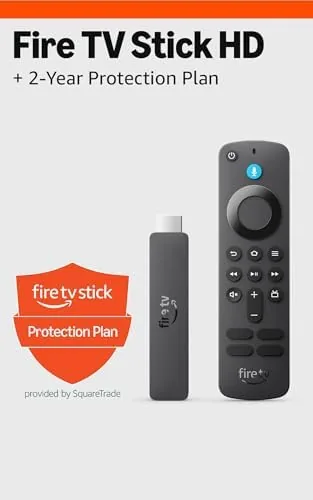

There is a simple pleasure in a streaming stick that just works, and the Amazon Fire TV Stick HD is designed around that idea. It is the entry level streamer from Amazon, a small stick that plugs into an HDMI port and turns any television into a smart TV for a very small amount of money. This particular listing bundles the newest Fire TV Stick HD with a 2-year protection plan, which is the kind of add-on most people skip without thinking. I spent a month with this bundle on a secondary television to find out whether the stick holds up as the budget buy it claims to be, and whether the protection plan actually earns its place in the package.
Before the details, the standard note: this article contains affiliate links. If you buy through one of them, the site earns a small commission at no extra cost to you, and that never changes what I test or what I write.
Design and Build
The Fire TV Stick HD keeps the familiar compact stick shape, a small dongle that plugs straight into an HDMI port and hides behind the television. The newest model refines the finish with a soft matte casing that feels a step up from earlier plastic bodies, and it is light enough to hang from the port without strain. Setup took me under five minutes: plug it in, follow the on screen prompts, and the stick walked me through the home screen and app setup without a hitch.
The Alexa Voice Remote is the standout piece of the hardware. It ships in the box with dedicated buttons for power, volume, and mute, which is still unusual at this price, and the voice button puts a microphone under your thumb for hands free search. The remote pairs automatically during setup, and it never dropped the connection across a month of use. The bundled USB power cable is long enough to reach a clean outlet behind most televisions, so the install stays tidy.
Key Features
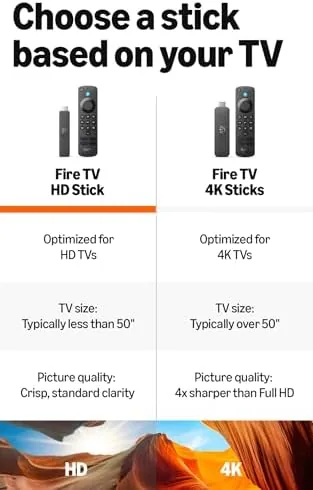
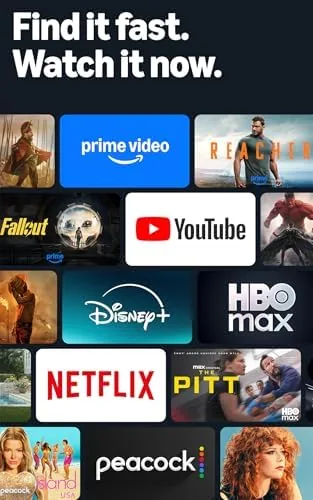
The Fire TV Stick HD outputs full HD 1080p and adds HDR10 support, which gives compatible content brighter highlights and deeper shadows on newer budget televisions. It runs Fire OS with the updated home screen that groups apps and live channels into a single scroll, and it covers the full range of major services: Netflix, Prime Video, Disney Plus, Max, Peacock, YouTube, and plenty more, with 4K apps quietly downscaling to the 1080p ceiling of the stick.
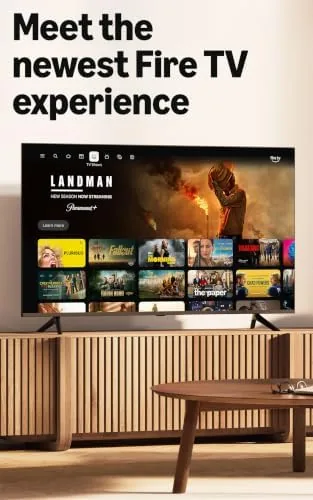
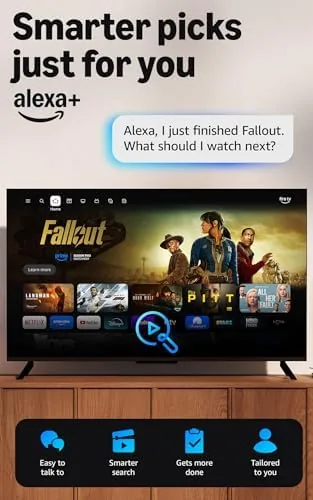
The voice control is the feature that makes the stick feel faster than its price. Search across apps, launch a show, fast forward, or check the weather, all by pressing the voice button and speaking, which removes the tedious on screen typing that plagues budget streamers. Live TV is built into the home screen, with free and live channels from apps like Pluto TV and Tubi surfaced alongside the paid services, and the 2-year protection plan in this bundle covers repairs or replacement for mechanical and electrical failures beyond the standard warranty. If you want to check the current price and plan details, the Amazon listing for this Fire TV Stick HD bundle is the best reference.
Real-World Performance
I used the Fire TV Stick HD on a secondary television for a month, which is the classic use case for a budget stick, and I judged it on speed, picture quality, voice control, and stability. The stick was quick where it matters: apps launched in a few seconds, the home screen scrolled without stutter, and a full evening of 1080p playback across Prime Video, Netflix, and YouTube finished without a single stall or crash.
The 1080p picture was crisp and stable, and HDR10 content displayed with genuinely better contrast than the non HDR apps on the same panel. The voice remote earned its place in daily use; I searched for titles, switched apps, and paused playback by voice, and the microphone caught my commands reliably even with the television at a reasonable volume. Live TV surfaced cleanly on the home screen, and the free ad supported channels filled the gaps between paid shows.
The honest limits are the ones baked into the budget class. This is a 1080p device, so a 4K television will not receive its full resolution, and the processor of the stick, while fine for the everyday, feels slower in dense menus than the pricier Fire TV Stick 4K Max. The interface carries promotional tiles and ads from Amazon, which some viewers find cluttered, and heavy multitaskers may notice the occasional pause when switching between demanding apps.
Pros and Cons
Pros:
- Fast, Reliable 1080p streaming at a budget price
- Alexa voice remote with television power and volume controls
- HDR10 support improves picture on compatible sets
- Free and live TV surfaced on the home screen
- Very easy five minute setup
- 2-year protection plan adds peace of mind
Cons:
- 1080p ceiling, so 4K television owners lose resolution
- Home screen includes promotional tiles and ads
- Dense menus feel slower than the pricier Fire TV models
How It Compares
To place the Fire TV Stick HD I compared it against the Fire TV Stick 4K Max and the Roku Express 4K Plus, the two other streamers in the budget conversation.
| Feature | Fire TV Stick HD | Fire TV Stick 4K Max | Roku Express 4K Plus |
|---|---|---|---|
| Output | 1080p with HDR10 | 4K with Dolby Vision | 4K with HDR10+ |
| Voice assistant | Alexa | Alexa | None built in |
| Remote | Voice with TV controls | Voice with TV controls | Voice, fewer TV controls |
| Speed | Good | Fastest | Good |
| Protection plan | 2-year included | Optional | Optional |
| Best for | 1080p televisions | 4K televisions | Simple interface fans |
Against the 4K Max, the HD loses on resolution and raw speed but wins on price, and the protection plan in this bundle adds value that the Max listing does not carry by default. Against the Roku, the Fire TV wins on the Alexa voice controls and the included remote features, while the Roku counters with a calmer, less ad driven interface. For a 1080p television in a bedroom or guest room, the Fire TV Stick HD is the strongest budget pick of the three. You can compare the current Fire TV Stick HD bundle price on Amazon before you decide.
Who Should Buy It
Buy this bundle if you want to add streaming to a 1080p television on a budget, if you want a dependable second streamer for a bedroom or guest room, or if you value the ability of the voice remote to control both the stick and your television. The 2-year protection plan makes it a sensible pick if you want coverage beyond the standard warranty without a separate purchase.
Skip it if you own a 4K television and want Dolby Vision, because the Fire TV Stick 4K Max earns its extra cost there, or if you prefer a simpler, less ad driven interface, in which case a Roku is the calmer choice. For everyone else, this is one of the easiest and most affordable ways to make any television smart. The Fire TV Stick HD bundle listing on Amazon shows the current price and the protection plan terms.
How We Test
I ran the Fire TV Stick HD for a month on a secondary 1080p television, and I judged it on setup, streaming speed, picture quality, voice control accuracy, stability, and the value of the bundle. I streamed across Prime Video, Netflix, YouTube, and the free live TV apps, left long playlists running to expose buffering, and used the voice remote daily for searches and playback.
I compared the stick against a Fire TV Stick 4K Max and a Roku Express 4K Plus to map the tradeoffs. I did not test the protection plan by filing a claim, because the stick worked without fault, and I did not test 4K playback, because this hardware does not support it. Independent guidance such as the Wirecutter coverage of media streamers is a useful reference for how these devices compare across the price range.
Amazon Fire TV Stick HD Bundle: Questions People Ask
Does the Fire TV Stick HD support 4K streaming?
No. This model is capped at 1080p Full HD, so for 4K streaming you would need the Fire TV Stick 4K or the Fire TV Stick 4K Max instead. On a 1080p television, this stick delivers the full picture it can display.
What does the 2-year protection plan cover?
The plan covers repairs or replacement for mechanical and electrical failures over a two year period, adding coverage beyond the standard manufacturer warranty. It gives peace of mind for the price of the bundle without a separate purchase.
Can I watch live TV on the Fire TV Stick HD?
Yes. The home screen surfaces free and live channels, and you can install apps like Pluto TV, Tubi, and the live TV sections of major streaming services, so the stick works without any paid subscription at all.
Is the Alexa voice remote easy to set up?
Yes. The remote pairs automatically with the stick during setup, and the voice button lets you search across apps, launch shows, control playback, and manage the television by speaking.
As an Amazon Associate, I earn from qualifying purchases.



