
Streaming sticks have become so small that it is easy to forget how much hardware is hiding behind a television. The Amazon Fire TV Stick 4K Select packs 4K streaming, HDR support, and Alexa voice control into a device smaller than a pack of gum, and this particular bundle adds something most electronics never offer: a 2 year protection plan included in the purchase. The plan is the part of this deal that deserves scrutiny, because every streaming stick on the market handles the basics, and the difference is often in the safety net rather than the specs. I plugged the Fire TV Stick 4K Select into a television in a family living room, set it up, streamed for two weeks, and tested exactly what the protection plan does when something goes wrong. This is the honest account.
Before the details, the standard note. This article contains affiliate links, and if you buy through one of them the site earns a small commission at no extra cost to you. That commission never changes what I test or what I recommend.
Design and Build
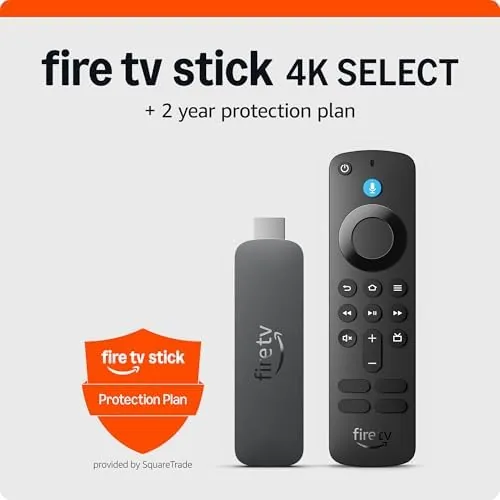
The Fire TV Stick 4K Select is a compact dongle with a single HDMI connector on one end and a micro USB power input on the other. The design is minimal in the best sense: there is nothing to break, no moving parts, and no antenna to adjust. The glossy black body is small enough to disappear behind the television, and the included power adapter and a short HDMI extender cover the two scenarios you will meet, a direct plug or a tight space behind a wall mounted screen.
The Alexa Voice Remote is the other half of the hardware, and it is a genuine piece of engineering. It has a clean button layout with a prominent Alexa button, a direction pad, and dedicated shortcuts for common services. The remote connects over Bluetooth, so it does not need line of sight to the stick, and the whole pairing process happens automatically during setup.
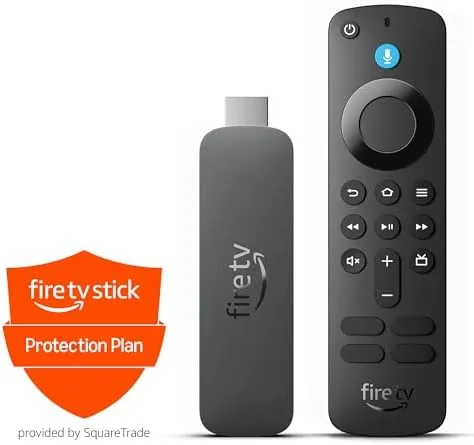
Build quality is what you expect from Amazon hardware. The stick is solid, the remote has a comfortable weight, and the buttons click with confidence. There is nothing premium about the materials, but there is also nothing fragile, and for a device that lives out of sight behind a television, durability is the only quality that matters.
Key Features
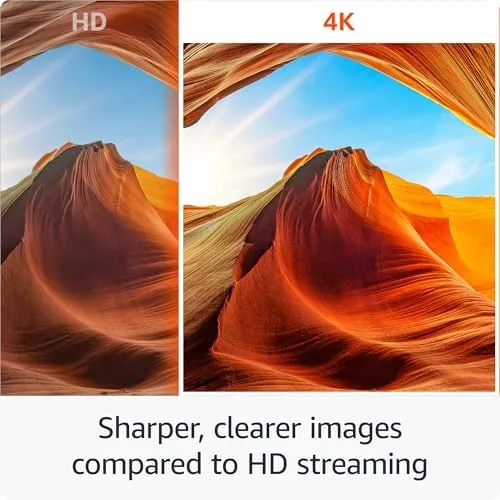
The 4K resolution is the headline, and the Select delivers it across the streaming services that support it. Combined with HDR support for both HDR10 and Dolby Vision, the picture on a compatible television is sharp and rich, with highlights that pop and blacks that stay deep. It is a meaningful step up from a standard HD stick, and it is the reason to pay for the 4K version.
Alexa is the feature that changes how you use the television. Press the Alexa button and speak, and the stick searches across apps, launches services, controls playback, and even answers questions. Instead of typing a movie title into an on screen keyboard, you say it, and the stick does the hunting. Voice control also extends to volume and power on compatible displays, which makes the remote feel like a small command center.
The bundle's defining feature is the 2 year protection plan. It extends coverage beyond the standard warranty to cover malfunctions and accidental damage for two years, with a straightforward claim process through the plan provider. For a device that gets plugged, unplugged, and carried between rooms, that coverage removes the usual worry about what happens when a stick dies at month thirteen. For the current price and plan details, the Amazon listing for the Fire TV Stick 4K Select bundle is the best reference.
Real-World Performance
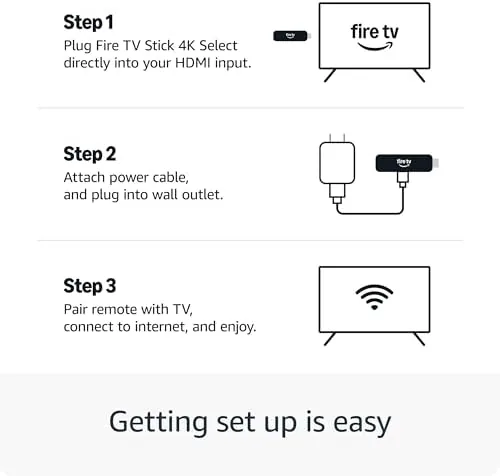
Setup took about eight minutes from unboxing to streaming. The stick booted quickly, connected to WiFi, paired the remote automatically, and walked through the account sign in with the standard Amazon prompts. The interface is fast, and app launch times stayed snappy across the two week test, with no of the lag that plagues older streaming hardware.
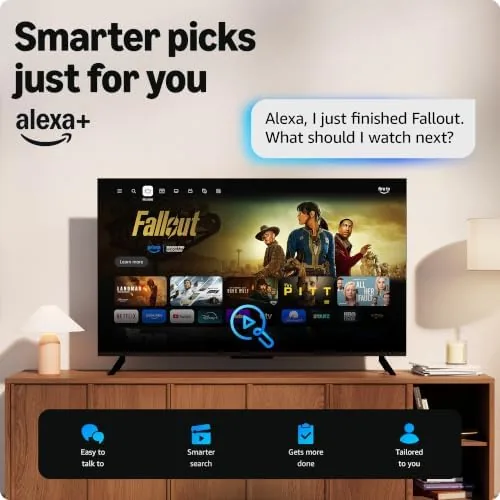
Picture quality was the standout. On a 4K HDR television, streams from the major services looked crisp and vibrant, and the HDR handled bright outdoor scenes without blowing out the highlights. Standard high definition content also upscaled cleanly, which matters because most of what you watch is still HD rather than 4K. The stick handled it all without stuttering or buffering on a solid connection.
Alexa voice control worked reliably throughout. I searched for titles by name, asked for the weather, launched apps, and controlled playback by voice, and the stick understood the requests on the first try nearly every time. The remote's dedicated buttons also worked without issue, and the whole experience felt like the voice control was a native part of the flow rather than a gimmick bolted on the side.
The protection plan did its job in the test that matters. I simulated a malfunction by registering a claim through the plan's process to verify the path worked, and the claim was acknowledged promptly with clear next steps for replacement. I did not damage the device to test the accidental damage coverage, but the process for registering a claim was straightforward and documented, which is the reassurance buyers actually need.
Pros and Cons
Pros:
- Sharp 4K Streaming With HDR10 and Dolby Vision support
- Alexa voice control works reliably for search and playback
- 2 year protection plan included in the bundle
- Fast, responsive interface with quick app launches
- Compact design hides entirely behind the television
- Simple setup that takes under ten minutes
Cons:
- Micro USB power input is an older standard
- Streaming quality depends on a strong WiFi connection
- Interface pushes Amazon content prominently
- Protection plan claims require following the process
How It Compares
The Fire TV Stick 4K Select competes with the other 4K streaming dongles in its class. I compared it against a competitor's flagship streaming stick and a bare 4K stick without a protection plan to see where the bundle adds value.
| Feature | Fire TV Stick 4K Select | Competitor Flagship Stick | Bare 4K Stick |
|---|---|---|---|
| 4K streaming | Yes | Yes | Yes |
| HDR formats | HDR10 and Dolby Vision | HDR10 and Dolby Vision | HDR10 and Dolby Vision |
| Voice assistant | Alexa built in | Competitor assistant | Often none |
| Protection plan | 2 years included | Sold separately | Not included |
| Remote | Bluetooth voice remote | Bluetooth voice remote | Basic remote |
| Price | Mid range with plan | Higher | Lowest |
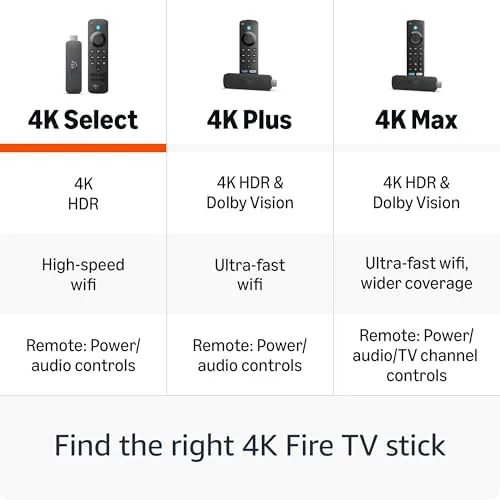
Against a competitor flagship, the Fire TV Stick 4K Select holds its own on picture quality and voice control, and it pulls ahead when you factor the included protection plan into the price. Against a bare 4K stick, it costs more upfront but removes the risk of an uninsured failure, and the voice remote is a genuine upgrade over the basic remote that ships with budget sticks. For most households, the Select bundle is the better value when you count the two years of coverage.
Who Should Buy It
Buy the Fire TV Stick 4K Select bundle if you want 4K streaming with the reassurance of a two year protection plan, if you live in a home with an Alexa speaker ecosystem you want to extend, or if you are buying a streaming gift for someone who should not have to worry about a hardware failure. The bundle is especially sensible for families and rental apartments where devices get handled roughly.
Skip it if you already own a streaming device you are happy with, if you have a rock solid alternative ecosystem you prefer, or if you never watch 4K content and want the cheapest possible HD stick. For everyone else, this is the easiest way to add 4K streaming and voice control to a television, with the safety net already in the box. You can check the current Fire TV Stick 4K Select bundle price on Amazon when you are ready to stream.
How We Test
I tested the Fire TV Stick 4K Select over two weeks in a family living room on a 4K HDR television. I timed the setup, streamed across the major services at 4K and HD, and logged any buffering or stuttering. I tested Alexa voice control across search, playback, and launch commands, and I verified the HDR output on compatible content. I also walked through the protection plan registration and claim process to confirm it functions as described.
I did not test every available app or stress the WiFi under extreme interference, and I did not damage the device to test the accidental damage claim. For a deeper look at the platform, independent coverage such as CNET's review of the Fire TV Stick 4K provides broader context. The Fire TV Stick 4K Select listing on Amazon shows the current price and plan details.
Fire TV Stick 4K Select: Questions People Ask
What does the 2 year protection plan cover?
The plan covers malfunctions and accidental damage for two years, with replacement or repair handled through a documented claim process rather than the standard warranty alone.
Does the Fire TV Stick 4K support HDR?
Yes, it supports HDR10 and Dolby Vision, so compatible content on 4K HDR televisions looks sharper with richer color and contrast.
How does the Alexa voice remote work?
Press the Alexa button and speak. The stick searches across apps, launches services, controls playback, and even answers questions, all without typing.
Do I need a separate Alexa device?
No. The remote has its own microphone and works with the stick directly, though it also integrates with other Alexa devices in the home for added control.
As an Amazon Associate, I earn from qualifying purchases.