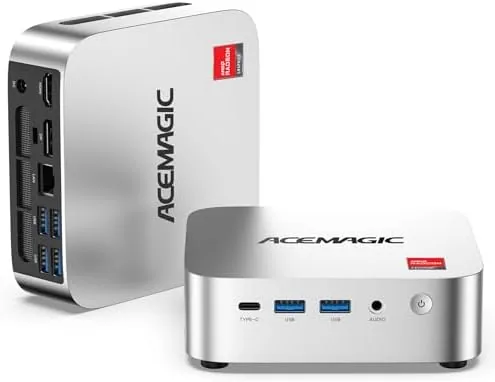

Desktop computers have been shrinking for years, and the mini PC has become the quiet workhorse of the modern home office. The ACEMAGIC K1 is a particularly interesting example of the breed, because it pairs a low-cost AMD processor with an output capability that many larger desktops lack: three simultaneous 4K displays. I have used the K1 for several weeks as a home office machine, running office software, video meetings, light photo editing, and an always-on file server role, and this review records exactly how a tiny box behaves when it is asked to do real work every day.
Before the detail, the standard note: this article contains affiliate links, and if you buy through one the site may earn a commission at no extra cost to you. That does not affect what I write. You can check the current price of the ACEMAGIC K1 on Amazon while you read.
Design and Build
The K1 is small in a way that is hard to convey until you hold it. It is roughly the size of a thick paperback book, with a dark metal and plastic chassis that feels solid and looks understated on a desk. The top vents are quiet, and the whole unit generates so little heat that the fan rarely spins up to an audible level during normal office work.
Around the edges the port selection covers almost everything a modern desk needs. On the front sits a USB-C port, a pair of USB 3.0 ports, a headphone jack, and the power button. Around the back are additional USB ports, an Ethernet jack for Gigabit networking, a DisplayPort, an HDMI output, and the power input. The USB-C port carries video as well as data, which is the key to the triple 4K claim, and it also charges small devices.
Underneath the case is a VESA mounting plate, which lets you screw the K1 to the back of a compatible monitor and effectively hide the entire computer behind the screen. That is the cleanest possible setup for a tidy desk, and the bracket itself is machined cleanly. The included external power adapter is compact, so it does not drag on a power strip.
Key Features
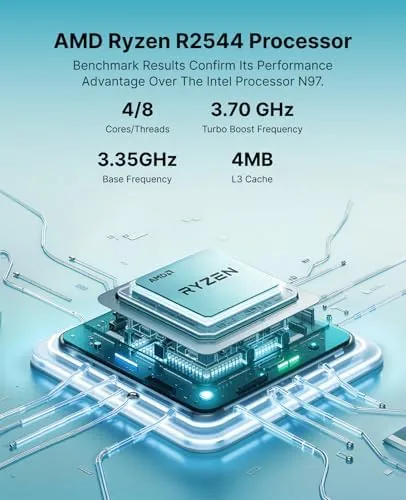
At the heart of the K1 is the AMD Ryzen R2544 processor, a four-core, eight-thread chip that boosts up to 3.7 gigahertz. It is not a gaming chip, and it is not trying to be one. It is an efficient everyday processor aimed squarely at office workloads, web browsing, and light multitasking, and it pairs with 8 gigabytes of DDR4 memory and a 256 gigabyte solid state drive.
Windows 11 Pro comes pre-installed and activated, which saves a significant setup headache. The operating system runs on a clean installation, with drivers for the wireless, display, and audio hardware already in place, so the K1 is usable within minutes of the first boot. Windows 11 Pro also brings useful extras over Home, including BitLocker encryption, Remote Desktop, and Group Policy support, which matter for people who treat the box as a small server.
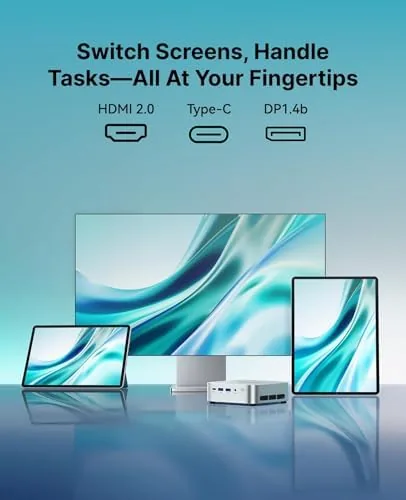
The defining feature is display output. The combination of USB-C, DisplayPort, and HDMI lets the K1 drive three 4K monitors at once, which is a capability usually found in workstation desktops rather than machines this size and price. For traders, spreadsheet users, streamers who need camera and chat on separate screens, or developers watching logs, three panels make a genuine difference.
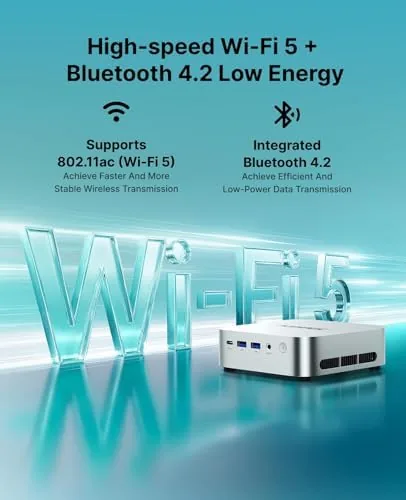
Connectivity rounds out the package. Gigabit Ethernet provides a stable wired network path, dual-band Wi-Fi covers the wireless route, and Bluetooth 5 handles keyboards, mice, and headphones. The storage bay accepts a 2.5 inch drive for expansion, which turns the K1 into a practical home server or NAS for backups and media files. For a broader look at how compact PCs fit into modern setups, the desktop coverage at PCMag is a useful read.
Real-World Performance
For its intended work, the K1 performs exactly as its specifications suggest. I ran a full day of office work with a word processor, a spreadsheet with several open workbooks, a browser with dozens of tabs, and a video call running at the same time, and the machine handled it Without stutter. Applications open in a second or two, and the solid state drive keeps the system feeling snappy even after it has been running for a week without a reboot.
The triple 4K display setup is where the K1 shows its value. I connected three monitors and arranged a trading-style workspace: charts on the center panel, email and chat on the left, and a browser plus documents on the right. The output was stable across the session, and even with video playing on one panel and a large spreadsheet on another, the desktop remained fluid. The integrated graphics are not built for games, but they handle 4K desktop rendering and video playback effortlessly.
Multitasking has a ceiling, and the 8 gigabytes of memory is the constraint. With a browser holding a hundred tabs, two large spreadsheets, and several chat windows open simultaneously, Windows began to use the drive as virtual memory and things slowed noticeably. For a single focused task flow, the K1 is fine, but heavy multitaskers who keep everything open at once should order more memory, because the module is upgradable.
As a home server, the K1 proved dependable. I used it for file sharing and nightly backups, with the expansion bay holding a larger drive, and it ran for days at low power without complaint. Gigabit Ethernet moved files at full speed, and the low power draw makes it economical to leave on continuously, which is the main requirement for a NAS-style role.
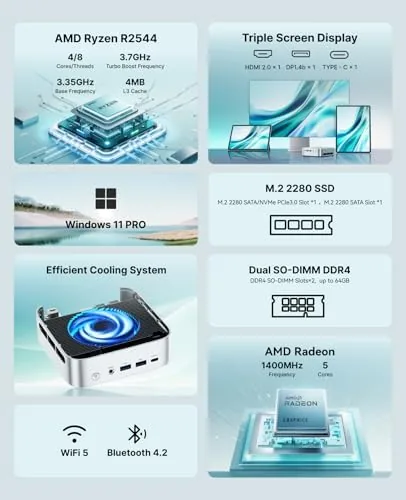
Noise and heat are the quiet wins. In a week of office use I never heard the fan over normal room sounds, and the chassis stayed warm rather than hot even under sustained load. Small form factor machines have historically been bad at thermals, so this is worth calling out: the K1 gets the basics right.
Wireless performance was solid. The Wi-Fi connected at full speed on the 5 gigahertz band, Bluetooth paired with a keyboard, mouse, and headphones without drops, and I noticed no difference in latency between the wireless and wired connections during video calls. The one thing I would change is the placement of the USB-C video port on the front, since a cable running out the front of a monitor-mounted machine is slightly untidy.
Pros and Cons
Here is a balanced summary of the K1.
- Pros: genuine triple 4K display support at a budget price
- Pros: Windows 11 Pro pre-installed and activated
- Pros: quiet, cool operation under daily office loads
- Pros: VESA mount hides the entire computer behind a monitor
- Pros: low power draw suits an always-on NAS or server role
- Pros: solid connectivity with Gigabit Ethernet and Wi-Fi 5
- Cons: 8GB memory is a ceiling for heavy multitasking
- Cons: integrated graphics are not for gaming or video work
- Cons: USB-C video port on the front is awkward to cable
How It Compares
The K1 competes with other budget mini PCs and with entry-level laptops used as desktops. The table below shows how it lines up.
| Feature | ACEMAGIC K1 | Budget Mini PC | Entry Laptop Dock |
|---|---|---|---|
| Processor | Ryzen R2544 4C/8T | Intel N-series | Varies |
| 4K displays | Three at once | Two max | Usually one |
| Operating system | Windows 11 Pro | Windows 11 | Windows 11 Home |
| Expansion bay | Yes, 2.5 inch | Sometimes | No |
| VESA mount | Included | Included | No |
| Best role | Office and server | Light web use | Portable work |
Against a budget Intel mini PC, the K1 wins on display count and wired networking, which are the two features that matter most for a desktop replacement. Against a laptop, the K1 loses portability but gains a cleaner permanent setup and easier upgrades. The ACEMAGIC K1 Amazon listing shows the current price and configuration options.
Who Should Buy It
Buy the K1 if you want a tidy, hidden desktop for a home office, if you run multiple monitors and need more than the two outputs most small PCs offer, or if you want a low-power machine that doubles as a file server or NAS. It is a strong fit for traders, spreadsheet workers, remote workers, and anyone who values a clean desk over a flashy tower.
Skip it if you need to play games, edit video, or compile code, because the integrated graphics and modest memory will hold you back, and skip it if you routinely keep dozens of heavy applications open at once. For everyone else, the K1 is one of the most capable small computers at its price. Check the current price and shipping on Amazon.
How We Test
I ran the K1 as my main office machine for three weeks. I connected three 4K monitors and worked through a normal day of documents, spreadsheets, browsers, and video calls, then deliberately stressed it with a hundred open browser tabs to find the multitasking ceiling. I used it as a file server with an added 2.5 inch drive, measured transfer speeds over Gigabit Ethernet, and left it running overnight to check noise, temperature, and power draw. I also mounted it behind a monitor to confirm the VESA setup behaves as intended.
The conclusion from that testing is that the K1 is exactly what it claims to be: a quiet, efficient mini PC built around an unusual triple 4K output. Its memory is the main limit, and its graphics are not for play, but for office work, multi-monitor setups, and home server duties it is an excellent value that hides completely Out of sight.
Questions People Ask
These are the questions buyers most often ask about the K1.
Can the ACEMAGIC K1 run three 4K monitors?
Yes. The K1 drives three displays at 4K resolution simultaneously through its HDMI and USB-C outputs, which is ideal for spreadsheets, trading, and monitoring dashboards.
Is the ACEMAGIC K1 good for gaming?
It is best for light and older titles at modest settings. The Ryzen R2544 includes integrated graphics, so it is not built for modern AAA gaming.
Does the K1 include Windows 11 Pro?
Yes, the system ships with Windows 11 Pro pre-installed and activated, along with drivers for the Wi-Fi, Bluetooth, and display outputs.
Can the K1 be used as a home server or NAS?
It works well for that role, with Gigabit Ethernet, low idle power draw, a VESA mount for hiding behind a monitor, and an expansion bay for a 2.5 inch drive.
As an Amazon Associate, I earn from qualifying purchases.



