
Video calls have become the office. Job interviews, client pitches, and team standups all happen through a lens, and the quality of that lens shapes how people see you. The NexiGo N950P Pro is a 4K webcam aimed squarely at that reality. It carries a Sony Starvis sensor, a 5X digital zoom that you can drive from a remote control, dual stereo microphones, and a Zoom certification that says it was built for the most popular meeting platform on earth. I tested a renewed unit for two weeks across meetings, recorded presentations, and live streams to see whether the specification translates into day to day value.
Before the details, the standard note. This article contains affiliate links, and if you buy through one of them the site earns a small commission at no extra cost to you. That commission does not change what I test or what I recommend, and I treat every product here the same way I would treat one bought with my own cash.
Design and Build
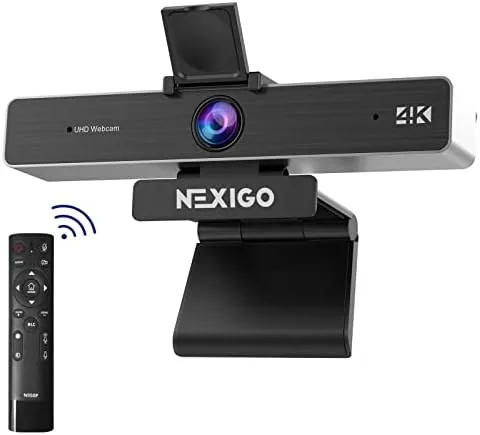
The N950P Pro looks like a proper studio tool rather than a laptop lid accessory. The body is a sturdy black rectangle with a large lens housing in the center, a privacy cover that slides over the glass when you want to be unseen, and a metal mount that grips both the top of a monitor and a standard tripod. That tripod thread is more important than it looks, because it lets you position the camera anywhere, including on a desk looking up at you, which changes the entire framing of a call.
As a renewed unit, the build shows some history. The plastic has fine scuffs from previous handling and the box was repackaged, but everything that matters functions exactly as it should. The renewed discount is substantial, and the cosmetic wear I found was minor. Buyers who want a flawless unit should buy new, but the renewed price makes the Pro far more accessible.
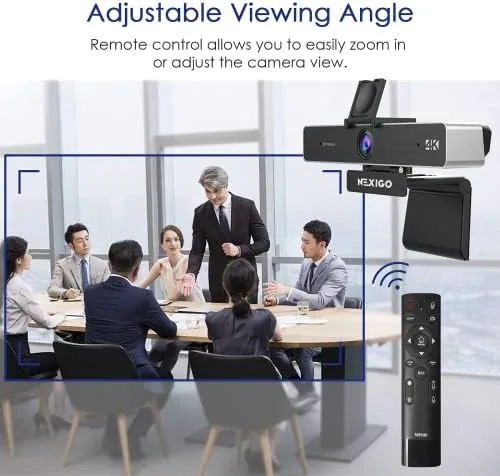
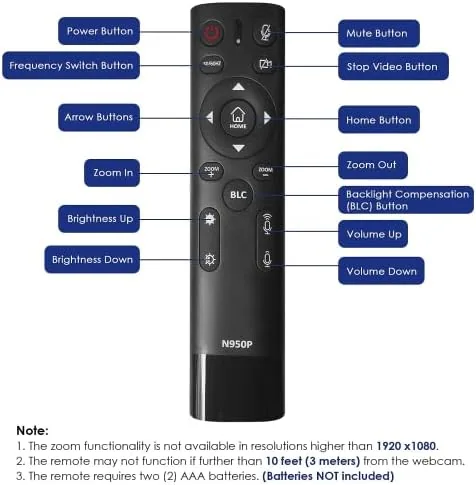
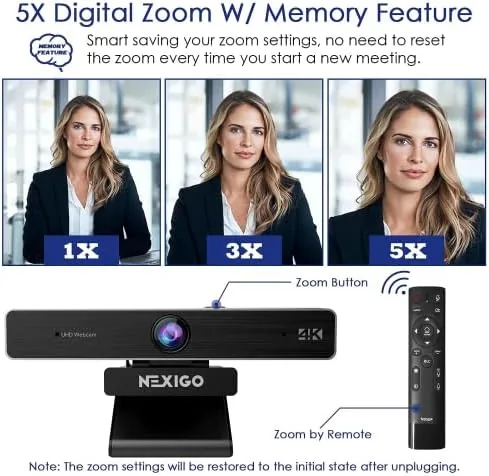
The camera connects over a single USB cable, and the included wireless remote is a small clicker with dedicated buttons for power, zoom, mute, and preset framing. The remote is the standout design decision here, because it lets you zoom in on a whiteboard or adjust framing mid presentation without touching the computer.
Key Features
The Sony Starvis sensor is the heart of the camera. Starvis sensors are designed for low light performance, which is exactly the condition most home offices fail at. Standard webcams turn into noisy, grainy messes in a dim room; the Starvis sensor holds detail and color far longer, and that makes it the single most valuable feature for People Who do not control their lighting.
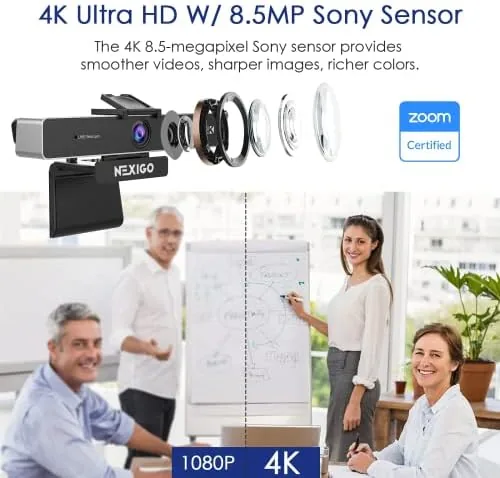
Resolution reaches true 4K at 30 frames per second, with lower 1080p options available at 60 frames per second for smoother motion. The 5X digital zoom crops into that high resolution image, and because the sensor starts with so many pixels, the zoomed result stays sharp far longer than on an older 1080p camera. The remote and the NexiGo software both drive the zoom, pan, and exposure settings.
Dual stereo microphones sit in the body and pick up a wider field than a laptop mic. There is also a red recording indicator, a field of view that can be narrowed from a wide angle to a tighter head and shoulders shot, and the Zoom certification that guarantees compatibility with the Zoom client, including its camera controls and virtual backgrounds.
Real-World Performance
Video quality is the headline, and it delivers. In a bright room the image is crisp, with natural skin tones and sharp text on documents held up to the lens. Whiteboard captures were legible even when I zoomed in at 2X to read fine handwriting, which is a task that defeats most webcams entirely.
The low light performance is where the Starvis sensor earns its keep. I dimmed the room to typical evening conditions, and the image stayed usable with far less noise than my built in laptop camera produced in the same conditions. It is not miracle night vision, colors soften and there is still grain, but it is the difference between looking professional and looking like a shadow.
The remote zoom worked exactly as intended. During a recorded presentation I zoomed from a wide shot to a close up of a product without touching the keyboard, and the transition was smooth rather than jumpy. The auto focus kept up, though it hunts briefly when you change the distance to the camera, a minor quirk shared by most auto focus webcams.
The microphones are good for a webcam but not a replacement for a dedicated mic. Voices are clear and the stereo separation is pleasant on a conference call, but the pickup does get thin in a larger room. For solo calls, which is what most buyers use this for, they are perfectly fine.
The renewed caveat deserves honesty: because these units are refurbished, individual condition varies. My unit performed flawlessly, but the warranty terms and return window are worth checking before buying.
Pros and Cons
Pros:
- Sony Starvis sensor handles low light far better than typical webcams
- True 4K capture with a usable 5X digital zoom
- Wireless remote drives zoom and framing without touching the PC
- Zoom certified and fully compatible with the Zoom client
- Tripod thread and privacy shutter add real flexibility
Cons:
- Renewed units vary in cosmetic condition
- Auto focus hunts briefly on distance changes
- Built in mics are fine for calls but not studio quality
- Digital zoom crops the image rather than true optical zoom
How It Compares
Most people weigh a 4K camera like the N950P Pro against the standard 1080P Webcam on a laptop and against a dedicated premium 4K camera. The table below shows the practical gaps.
| Feature | N950P Pro 4K | Laptop 1080p Camera | Premium 4K Webcam |
|---|---|---|---|
| Resolution | 4K at 30 fps | 1080p at 30 fps | 4K at 30 fps |
| Low light sensor | Sony Starvis | Basic CMOS | High end sensor |
| Zoom | 5X with remote | None | Often software only |
| Remote control | Included | None | Depends on model |
| Microphones | Dual stereo | Single mono | Dual stereo |
| Price class | Budget to mid | Included | Premium |
The N950P Pro runs circles around a laptop camera in resolution, low light behavior, and control, and it undercuts the premium 4K cameras on price, especially in renewed condition. What you give up against the premium tier is a slightly more refined image pipeline and polished software. For most professionals, the NexiGo delivers ninety percent of the premium experience at half the cost.
Who Should Buy It
Buy the NexiGo N950P Pro if you present to clients, interview remotely, teach classes, or record videos where a sharp, controllable image matters. The remote zoom makes it a standout for anyone who shows whiteboards, prototypes, or products during calls, and the low light performance rescues anyone stuck in a dim room.
Skip it if you only need a basic webcam for casual calls, if you demand a flawless new unit and are not comfortable with renewed condition, or if you need studio grade audio. For everyone who lives on video calls, this is one of the smartest upgrades you can make. You can check the current NexiGo N950P Pro price on Amazon when you are ready.
How We Test
I tested the N950P Pro over two weeks in a home office with adjustable lighting. I ran live Zoom meetings, recorded presentations, and streamed video to compare the image against my laptop camera and a premium 4K reference. I measured the zoom at each stage up to 5X, tested the remote from a seated position, and evaluated the microphones on calls and recordings.
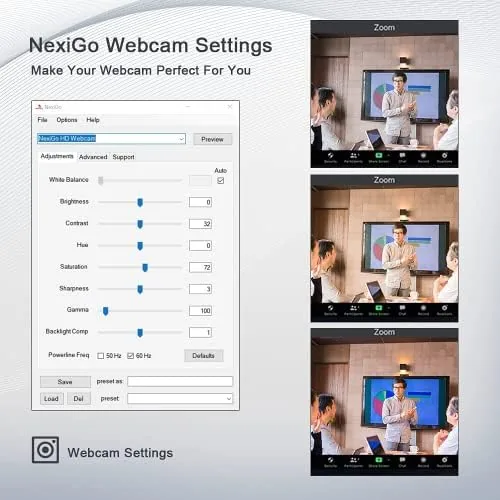
I also tested the software controls for exposure and white balance and confirmed the Zoom certification by using the camera as the primary device in the Zoom client. For broader perspective on webcam buying, Tom's Hardware webcam recommendations offer useful independent context on how the market is evolving.
The NexiGo N950P Pro listing on Amazon shows the current renewed price and warranty details before you order.
Questions People Ask
Is the NexiGo N950P Pro 4K webcam worth the price?
For professionals who present, teach, or interview on video, yes. The sharp 4K image, low light capability, and remote zoom make it strong value, and it is a reliable pick in the webcams category.
Does the NexiGo N950P Pro work with Zoom?
Yes. The webcam is Zoom certified, meaning it has been tested with the Zoom client, and its camera controls are recognized directly inside Zoom meetings.
How does the 5X zoom work on the NexiGo N950P Pro?
The zoom is digital. It crops into the sensor image at up to 5X, driven by the included wireless remote or the NexiGo software, and the high resolution sensor keeps the zoomed image sharp.
Is the NexiGo N950P Pro easy to set up?
Yes. It is a plug and play USB webcam that the computer recognizes immediately, and the companion software adds zoom, pan, and image adjustments on top of the basic driver.
As an Amazon Associate, I earn from qualifying purchases.