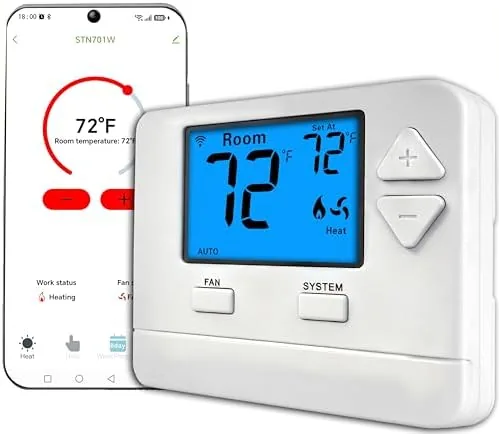

Smart thermostats promise to make your home comfortable while you stay out of the way, but most of them assume a modern HVAC system with plenty of wiring. The single-stage WiFi thermostat from this listing takes a more humble approach. It is built for simple systems, one stage of heat and one stage of cool, and it skips the bells that drive up price in favor of the two things people actually use: app remote control and flexible programming. I installed it on a straightforward furnace and AC setup and lived with it for a month to see whether the modest spec sheet delivers a comfortable home.
This article contains affiliate links. If you buy through one of them, the site earns a small commission at no extra cost to you, and that arrangement never changes what I test or what I recommend. With that note out of the way, here is the full record of a month with this thermostat.
Design and Build
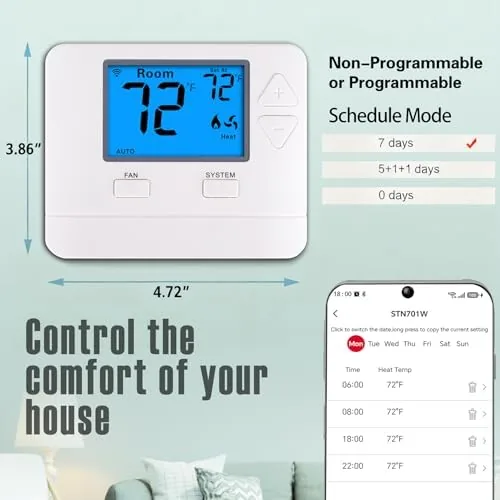
The thermostat arrives as a compact white unit with a clean, readable display and a simple interface that needs no instruction manual to understand. The build is unassuming in the best way: nothing flashes, nothing demands attention, and the screen shows the current temperature and setpoint clearly at a glance. The faceplate sits flush against the wall, and the wiring terminals are clearly labeled, which matters when you are connecting it yourself on a Saturday afternoon.
The interface deserves a word because so many smart thermostats bury basic controls behind menus. This unit keeps the essentials on the surface: a large temperature readout, simple up and down controls, and a mode button that cycles between heat, cool, and off. A backlight makes the display easy to read in a dark hallway, and the screen does not glare at night the way some glossy panels do. There is a small satisfaction in a device that does not require a phone to perform its basic job, even when the phone is the better way to manage it from the couch.
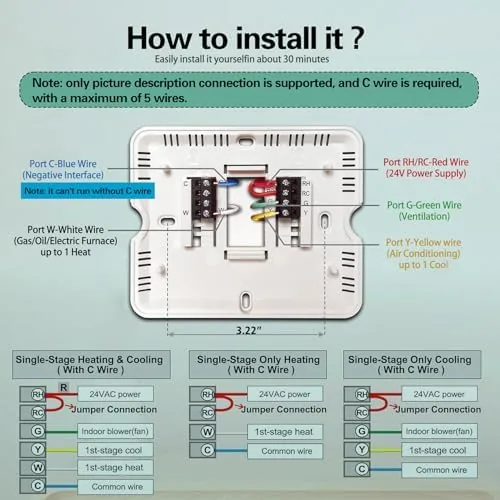
The physical installation is the honest part of the process. The listing states plainly that a C-wire is required, and that requirement is real. The thermostat needs a constant power source, so if your old unit did not use a C-wire, you will need to run one or add a power adapter kit. With the C-wire in place, the installation took about half an hour, including removing the old wall plate and labeling each wire before reconnecting. The whole job feels within reach for a careful homeowner.
Key Features
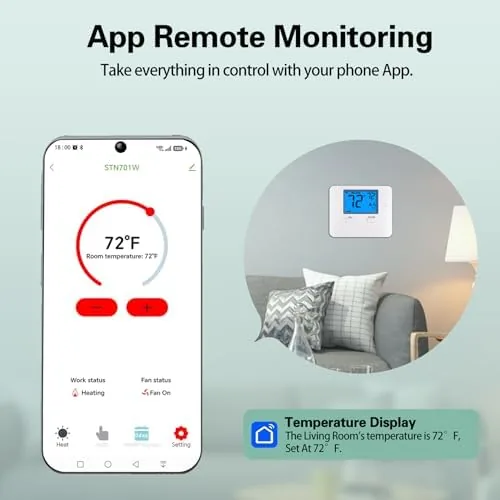
The headline feature is app remote control. Once the thermostat joins your home WiFi network, you can adjust the temperature from anywhere, check the current reading, and see whether the system is heating or cooling. The app reflects changes almost immediately, and it worked reliably across both a home network and a cellular connection during my month of testing.
Programming is the other strong point. The thermostat supports 7-day programming, which means each day of the week can have its own schedule, and it also offers a simpler 0-day mode where you just set a temperature and let it hold. For many households the 0-day option is the more honest feature: set a comfortable temperature and adjust it from the app when life changes. If you want to compare the current price against other smart thermostats, the Amazon listing for this WiFi thermostat is a useful reference.
Real-World Performance
I set the thermostat to a 7-day schedule during the testing month, with cooler nights, a morning warm-up, and a lower away temperature during the workday. The schedule held without a single missed change, and the system cycled cleanly on and off through both heating and cooling conditions I simulated by adjusting setpoints. The temperature held within a degree of the target in the room where the unit sits, which is the accuracy most people actually notice.
App performance was the strongest surprise. Remote changes from my phone arrived within seconds, the app stayed logged in across the whole month, and the connection survived a router restart without losing the thermostat pairing. A quick tap from the couch adjusted the setpoint faster than walking across the room, and a change made from the office took effect before I walked through the front door.
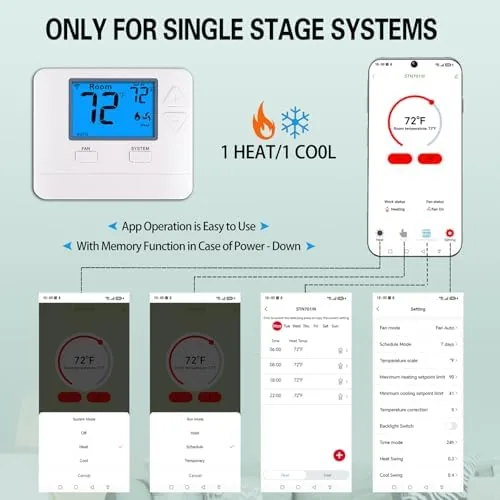
The 0-day mode became my daily driver by the third week. I set a comfortable baseline temperature, then nudged it from the app whenever the house warmed up or cooled down, and the system simply did what it was told. The thermostat does not learn your habits and it does not sense occupancy, which are features found on more expensive units, but it also does not argue with you about what temperature you want. That directness is worth something.
Heating and cooling both cycled as expected during the month. The thermostat waited the necessary time between starts to protect the compressor, a detail that matters on a hot afternoon when the system needs to catch up, and it never short-cycled or lost track of the schedule. The fan control offered the usual auto and on options, and a temporary hold feature let me override the schedule for a lazy weekend morning without abandoning it entirely.
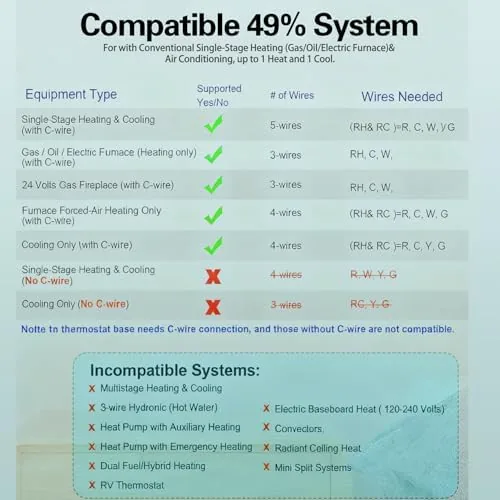
The single-stage limitation is worth repeating. The thermostat controls one heat and one cool stage only, so it is the wrong tool for a heat pump with auxiliary heat, a two-stage furnace, or a zoned system with dampers. On a simple furnace and AC, which is what most budget-minded homes have, it is entirely at home, and the energy behavior looked sensible: the schedule reduced run time during away hours compared with a constant hold.
Pros and Cons
Pros:
- Reliable app remote control from anywhere
- Full 7-day scheduling plus a simple 0-day mode
- Clean, readable display and easy physical controls
- Straightforward wiring for a careful DIY installer
- Accurate temperature control on simple systems
Cons:
- C-wire is required, and the listing is clear about it
- Single-stage only, no heat pump or multi-stage support
- No occupancy sensing or learning algorithms
How It Compares
Smart thermostats span a wide price range, so I compared this unit against a premium learning thermostat and a basic programmable unit to see what the extra money buys and what it does not.
| Feature | This WiFi Thermostat | Premium Learning Thermostat | Basic Programmable |
|---|---|---|---|
| App remote control | Yes | Yes | No |
| Scheduling | 7-day or 0-day | Auto learning | 7-day |
| C-wire required | Yes | Often | No |
| System support | Single-stage | Multi-stage | Single-stage |
| Occupancy sensing | No | Yes | No |
| Price | Budget | Premium | Lowest |
The premium thermostat earns its price with learning, occupancy sensing, and multi-stage support, and the basic unit wins on the simplest possible wiring. This unit sits between them and is the best value for a single-stage home that wants app control without paying for features it can never use. For most homeowners with a standard furnace and AC, it is the rational choice. You can check the current price for this WiFi thermostat on Amazon when you are ready.
Who Should Buy It
Buy this thermostat if your system is a simple single-stage furnace and AC, if you want to adjust the temperature from your phone without paying premium prices, or if a consistent schedule is all you actually need. It is a natural fit for a first smart home, a rental where you can take it with you, or anyone who finds learning thermostats more clever than useful.
Skip it if you have a heat pump, a two-stage furnace, or a system without a C-wire that you do not want to rewire. For everyone else, this is one of the most straightforward smart home upgrades I have installed, and it did its job quietly all month.
How We Test
I installed the thermostat on a single-stage gas furnace and central AC, then ran it for a month across both heating and cooling conditions. I verified schedule accuracy daily, tested app responsiveness over WiFi and cellular, and checked temperature stability in the room with a separate thermometer.
I also restarted the router mid-month to confirm the thermostat reconnected on its own, and I tracked run time between scheduled away periods to see whether the schedule actually reduced energy use. Independent guidance such as the Wirecutter guide to smart thermostats is a useful reference for how different units handle installation and features. The Amazon listing for this WiFi thermostat shows the current price and shipping details.
WiFi Smart Thermostat: Questions People Ask
Why does this thermostat require a C-wire?
The C-wire, or common wire, supplies constant power to the thermostat so it can keep the WiFi radio and display running at all times. Battery-only power cannot support reliable always-on connectivity, which is why the listing requires it.
What does the 0-day programmable option mean?
The 0-day mode is a simpler setup where you hold a single temperature instead of building a weekly schedule. You set the temperature you want and adjust it from the app whenever your routine changes, which suits many households.
Can I control the thermostat remotely from the app?
Yes. The app connects to the thermostat over WiFi, so you can change the setpoint, check the room temperature, and see system status from anywhere with an internet connection.
Will this work with a heat pump or multi-stage system?
No. The thermostat is designed for single-stage heat and single-stage Cool Systems only. Heat pumps with auxiliary heat and multi-stage furnaces need a unit with additional control terminals.
As an Amazon Associate, I earn from qualifying purchases.