

There comes a point in every growing network where the switches multiply, the power adapters turn into a snake pit, and you find yourself wondering whether a single box could do all of it. The TP-Link TL-SG1428PE is that box for a lot of small businesses, offices, and ambitious home networks. It packs 24 gigabit ports with Power over Ethernet Plus, a 250 watt power budget, two fiber uplinks, and a set of management tools that sit one step above a dumb switch without demanding a networking certification. I spent a month running a small camera fleet, three wireless access points, and a couple of VoIP phones from one TL-SG1428PE, and this is what the experience actually looks like.
Before the details, the standard note. This article contains affiliate links, and if you buy through one of them the site earns a small commission at no extra cost to you. That commission never changes what I test or what I recommend.
Design and Build
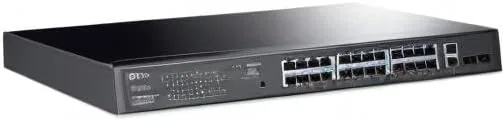
The TL-SG1428PE is a standard 19-inch rack-mount switch finished in the dark charcoal gray TP-Link uses across its business range. The front panel carries 24 gigabit ports arranged in a single row, with the last four ports grouped as a high-priority PoE section that serves the power-hungry devices. Above the ports sits a compact status row with LEDs for link, speed, PoE, and system activity. Two SFP slots sit to the side of the port block for fiber uplinks, and they accept the usual mini-GBIC modules if you want to reach a distant building or a core switch.
Build quality is exactly what a device of this class should be: a sturdy steel chassis, rack ears that bolt on without fuss, and a rear panel with a recessed power inlet and a grounding stud. The unit is fan-cooled, which is unavoidable at a 250 watt PoE budget, and the fan is quiet enough to disappear in a utility closet or server rack. It comes with a rackmount kit and rubber feet, so it works equally well flat on a shelf or bolted into a frame, and the front-facing LEDs mean You Can read the whole network at a glance without leaning around the rack.
Key Features
The headline spec is the power budget. All 24 ports deliver 802.3at PoE+ at up to 30 watts per port, and the switch shares a 250 watt pool across them. In practice that means four high-draw devices at full 30 watt allocation, or a much larger number of modest devices, so you size your load against the pool rather than the port count. The two SFP slots give you gigabit fiber uplinks, which matters if your cameras or access points sit at the far end of a long run where copper is impractical.
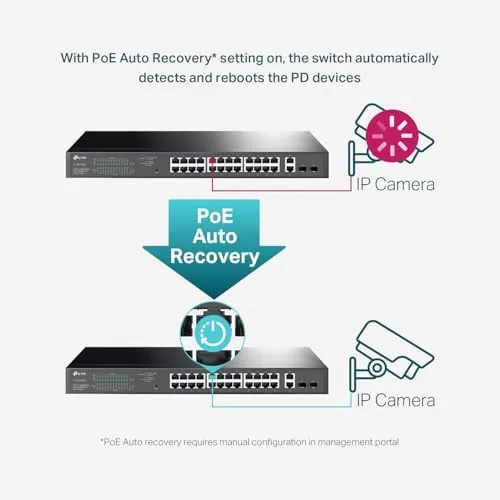
On the management side, the TL-SG1428PE is what TP-Link calls an easy smart managed switch. There is no CLI and no cloud controller, but the web interface covers the settings that actually matter on a small network: per-port VLAN assignment, quality of service based on 802.1p priorities, IGMP snooping for multicast traffic, port mirroring, loop protection, and link aggregation for bundling ports together. PoE management is there too, with per-port power limits, priority, and the automatic recovery feature that reboots a dead device by cycling its PoE power. If you want to check the current price against other PoE switches, the Amazon listing for the TP-Link TL-SG1428PE shows the latest figures.
Real-World Performance
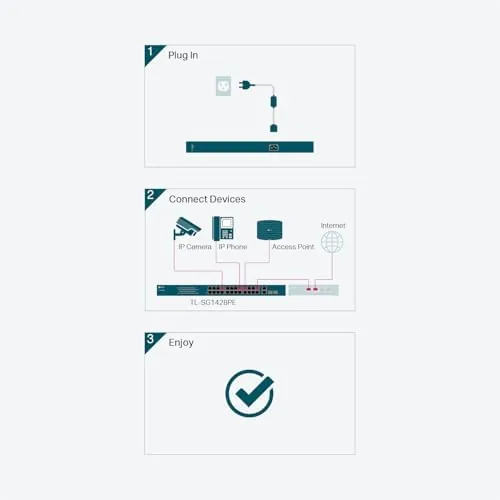
Setup begins in an unmanaged mode, which is a thoughtful touch: plug in the switch, connect your devices, and traffic flows immediately while you read the manual. I ran the unit like this for the first two days before opening the web interface, and there was not a single dropped frame from the cameras during that window. When I did move to the management page, the interface loaded quickly at the default IP, and the configuration applied without a reboot for the changes I made.
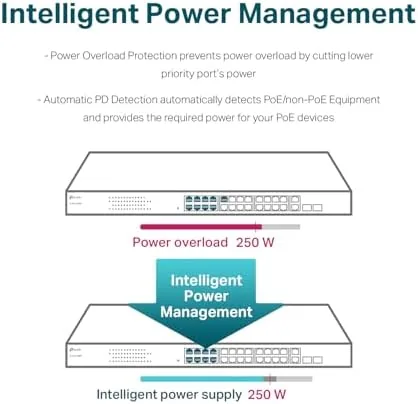
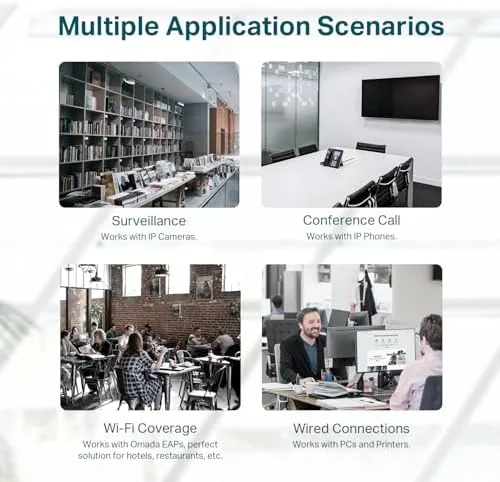
The PoE budget was the star of the test. I connected a six-camera surveillance system drawing about 8 watts per camera, three Wi-Fi access points pulling roughly 11 watts each, and two desk phones, for a total load in the low 90 watt range. That is less than half the 250 watt budget, so every device ran at full power with plenty of headroom, and the PoE status page confirmed each port negotiating the expected wattage. The automatic recovery feature earned its keep when one camera hung during a firmware push: the switch cycled that port's power, and the camera came back online within a minute without a trip to the wiring closet.
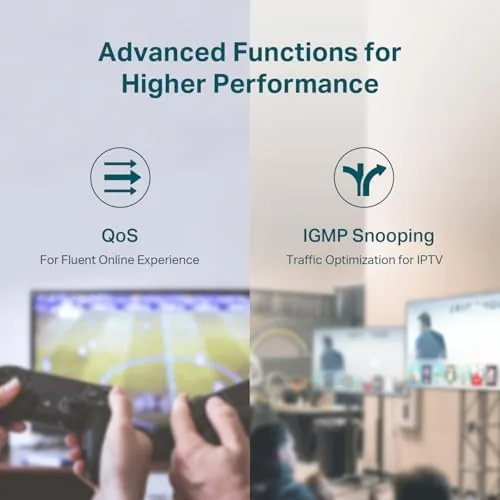
Switching throughput was unremarkable in the best way. File transfers between a NAS and a workstation sustained full gigabit speeds, the access points delivered steady wireless bandwidth, and the IGMP snooping kept the streaming multicast traffic off the wired ports that did not need it. The switch ran warm but stable under load, and the fan stayed quiet enough that I could hold a conversation next to the rack. The only real friction came from the web interface itself: it is functional but dated, and a couple of settings live one level deeper than they should.
Pros and Cons
Pros:
- 250 watt PoE+ budget with up to 30 watts per port
- 24 gigabit ports plus two SFP fiber uplinks
- Useful VLAN, QoS, IGMP, LAG, and loop protection settings
- PoE auto recovery reboots stalled devices automatically
- Works straight out of the box before you touch the web page
Cons:
- Fan-cooled, so it is not silent in a quiet room
- Web interface is functional but dated
- No cloud management or remote app control
How It Compares
Most buyers weigh the TL-SG1428PE against a plain unmanaged PoE switch or against TP-Link's fully managed line. I compared the three across the features that decide the purchase.
| Feature | TL-SG1428PE | Unmanaged PoE Switch | Fully Managed Switch |
|---|---|---|---|
| Ports | 24 Gigabit PoE+ | 24 Gigabit PoE+ | 24 Gigabit PoE+ |
| PoE budget | 250W | Varies, often lower | 250W and up |
| VLAN and QoS | Yes, web based | No | Yes, advanced |
| CLI and APIs | No | No | Yes |
| Fiber uplinks | 2 SFP slots | Sometimes none | 2 or more SFP slots |
| Learning curve | Gentle | None | Steep |
Against an unmanaged switch, the TL-SG1428PE costs a little more but earns it the first time you need to segment cameras onto their own VLAN or restart a stuck device from a page instead of a physical power cycle. Against a fully managed switch, you give up the command line and SNMP depth, but you also skip the learning curve, the licensing, and the steep price. For a small office, a camera system, or a large home, the easy smart middle ground is the right answer, and the TL-SG1428PE sits squarely in it.
Who Should Buy It
Buy this switch if you are deploying or expanding an IP camera system, if you need to power a set of wireless access points from one central location, or if you run a small office where a few VLANs and quality-of-service settings would make life noticeably easier. It is also a fine upgrade for anyone who has outgrown daisy-chained unmanaged switches and wants clean cable management, PoE, and a single management page.
Skip it if your network needs less than half its capacity and you will never touch a management page, in which case a cheaper unmanaged switch is money saved. If you need advanced routing, SNMP monitoring, or cloud management, step up to TP-Link's managed line instead. For everyone in between, this switch will likely be the last networking purchase your small system needs. When you are ready, check the current price for the TP-Link TL-SG1428PE on Amazon.
How We Test
I ran the TL-SG1428PE as the core switch for a month in a small office setup, connecting a six-camera surveillance system, three wireless access points, two VoIP phones, a NAS, and several workstations. I logged the total PoE draw per port, verified the power budget under load, and tested the auto recovery feature by deliberately hanging a camera. I configured VLANs to isolate the cameras, enabled IGMP snooping for the streaming traffic, and tested link aggregation between the switch and the NAS. I also measured sustained transfer speeds and monitored the fan noise and chassis temperature during an eight-hour load.
I did not test the switch with PoE injectors, and I did not test it in an outdoor or dust-prone enclosure, which would require a weatherproof cabinet. Independent coverage such as PCMag's guide to the best network switches is a useful starting point for comparing this class of gear across brands. The TP-Link TL-SG1428PE listing on Amazon shows the current price and delivery options.
TP-Link TL-SG1428PE: Questions People Ask
How much PoE power does the TL-SG1428PE provide?
The switch has a total PoE budget of 250 watts shared across its 24 PoE+ ports, with up to 30 watts available to a single port when a device needs it.
What management features does the TL-SG1428PE offer?
It is an easy smart managed switch with a web interface covering VLANs, quality of service, IGMP snooping, port mirroring, link aggregation, and loop protection.
Can the TL-SG1428PE power a mix of cameras and access points?
Yes. The 250 watt budget comfortably runs a fleet of IP cameras, VoIP phones, and wireless access points at once, though you should total the device requirements before loading all 24 ports.
Is the TL-SG1428PE fanless?
No. A switch driving up to 250 watts of PoE generates heat, so the unit uses a cooling fan. It is noticeable in a quiet home office but unobtrusive in a rack or closet.
As an Amazon Associate, I earn from qualifying purchases.



