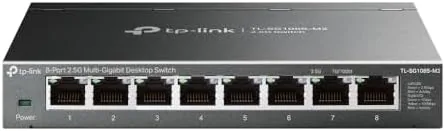

Gigabit was once more than any home network needed, and then the NAS arrived, the backup drives filled, and suddenly a 100MB per second ceiling started to feel like a bottleneck. The TP-Link TL-SG108S-M2 is the answer to that specific problem. It is an 8 port unmanaged switch that runs each port at 2.5G, three times the speed of gigabit, with plug and play setup and a Fanless body that stays silent on a desk. I ran it in my home office for a month with a NAS, a desktop, and a few streaming devices, and this review covers the real throughput and the day to day behavior.
The disclosure first. This article contains affiliate links, and if you buy through one of them the site earns a small commission at no extra cost to you. That commission never changes my findings. The switch tested is the model in the current listing, and the TP-Link TL-SG108S-M2 listing on Amazon has the live price and details.
The logic of 2.5G is simple. A gigabit switch tops out around 118MB per second in real file transfers, which a modern SSD, NAS, or even a decent internet plan can easily exceed. A 2.5G switch lifts that ceiling to nearly 300MB per second, which matches what most consumer hardware can actually deliver. The TL-SG108S-M2 brings that speed to eight ports without the complexity or the cost of a managed enterprise switch.
Design and Build
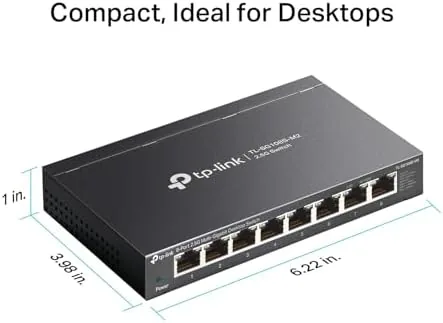
The TL-SG108S-M2 is a compact metal box about the size of a paperback, with eight ports lined up along one edge and the power jack and status LEDs on the opposite side. The metal body acts as a heatsink, which is why it can run completely fanless even under sustained load. It sits flat on a desk or mounts to a wall with the included bracket, and it disappears into a setup instead of dominating it.
The construction is solid and simple. The metal chassis has no flex, the ports are arranged with enough spacing for thick cable boots, and the status LEDs are small and readable without being obnoxious. The power adapter is compact, and the switch draws so little power that it runs cool to the touch even after days of continuous use.
There is no configuration to speak of, which is the entire point of an unmanaged switch. Plug in the power, plug in the cables, and the switch links up automatically at the highest speed each device supports. There is no web interface, no app, no software to install, and no reset button to fumble with when things go wrong, because with a switch like this they rarely do.
Key Features
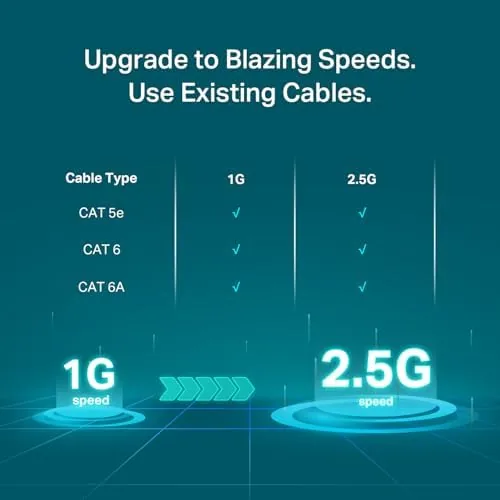
The eight 2.5G ports are the entire feature set, and they are the right feature to have. Each port negotiates up to 2.5Gbps and steps down automatically for older gigabit and slower devices, so the switch is fully backward compatible. A 1G device plugs in and works at 1G, while a 2.5G NAS or desktop gets the full faster rate.
The unmanaged design is a feature in itself. There are no VLANs to configure, no QoS rules to balance, and no firmware to babysit, which is exactly what a home office or a media setup wants. The switch forwards traffic at full wire speed on every port simultaneously, so a backup from a NAS and a stream to the TV do not fight each other.
The fanless operation matters more than it sounds. Because the switch has no fan, it makes zero noise and draws minimal power, so it can live on a desk, in a bedroom, or on a shelf next to the TV without adding a hum to the room. The metal body dissipates heat passively, and it stays cool enough to leave on permanently.
Real-World Performance
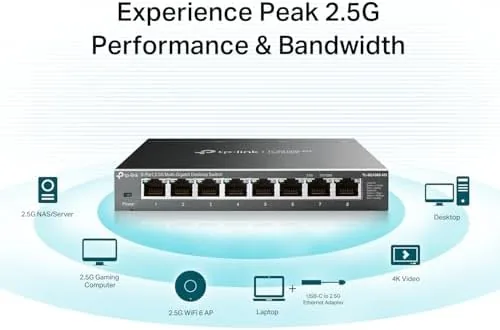
The real world numbers are what sold me. I connected a desktop with a 2.5G port to a NAS through the switch, and large file transfers ran at around 280MB per second, roughly two and a half times what the same setup delivered through a gigabit switch. A 50GB video folder transferred in minutes instead of an afternoon, and the speed stayed consistent from the first byte to the last.
The switch handled mixed traffic without a hiccup. I ran a NAS backup, a 4K stream to a TV, and a video call on the desktop all at the same time, and every device got full speed with no stutters on the call or the stream. The non-blocking design means the ports do not share a single bottleneck, which is the difference between a real switch and a hub from the past.
Backward compatibility worked without any attention. My older gigabit devices, a printer and a streaming stick, linked up at 1G immediately, while the 2.5G devices negotiated the faster rate on their own. I never had to touch a setting or restart anything during the whole month, which is the highest compliment a network device can receive.
The honest limits are minor. The switch is unmanaged, so it cannot prioritize traffic or create separate network segments, which only matters in a business setting. And while 2.5G is a massive step up from 1G, it does not reach the 10G speeds that a serious home lab might want, so it is a practical upgrade rather than an enthusiast one.
Pros and Cons
Pros:
- Eight ports run at a full 2.5G each
- Plug and play with no configuration at all
- Fanless design runs completely silent
- Backward compatible with gigabit and slower devices
- Metal body stays cool under sustained load
- Wall mount option keeps the desk clear
Cons:
- Unmanaged, so no traffic priority controls
- Does not offer 10G speeds for serious home labs
- No link aggregation between ports
- Each device needs a 2.5G port to see the full speed
How It Compares
The TL-SG108S-M2 competes with gigabit switches and with pricier 10G gear. The table below lines up the three options for a home office.
| Feature | TL-SG108S-M2 2.5G | Gigabit Switch | 10G Switch |
|---|---|---|---|
| Per port speed | 2.5Gbps | 1Gbps | 10Gbps |
| Real file speed | About 280MB/s | About 118MB/s | About 1GB/s |
| Noise | Silent, fanless | Silent, fanless | Often fan noise |
| Setup | Plug and play | Plug and play | More involved |
| Price | Moderate | Low | High |
| For most homes | Ideal | Legacy | Overkill |
A gigabit switch is cheaper and still fine for basic browsing, but it caps your NAS and backup speeds at a fraction of what modern hardware can do. A 10G switch removes the ceiling entirely, but it costs several times more, runs warmer, and usually needs active cooling, plus every device needs an expensive 10G adapter to benefit. The 2.5G switch is the sweet spot where most households actually live.
Who Should Buy It
Buy the TP-Link TL-SG108S-M2 if you have a NAS, a media server, or a fast desktop that deserves more than a gigabit connection, or if you are tired of file transfers that crawl. It is the right pick for anyone on a multi-gigabit internet plan, for home offices moving large video files, and for people who want a silent switch they never have to think about.
Skip it if all your devices are gigabit and staying that way, or if you are building a home lab that genuinely needs 10G. For the vast majority of homes, eight 2.5G ports is the perfect balance of speed and simplicity, and the TP-Link TL-SG108S-M2 on Amazon shows the current price.
How We Test
I used the TP-Link TL-SG108S-M2 in my home office for a month. I connected a 2.5G desktop, a NAS, a TV, a printer, and a streaming stick, and I ran large file transfers to measure real throughput against a gigabit baseline. I ran simultaneous backups, 4K streams, and video calls to test mixed traffic, and I monitored the switch temperature and noise across days of continuous operation.
I did not test the switch in a fully managed enterprise network, because that is not its role, and I did not measure 10G performance, which it does not offer. For a broader look at home networking hardware, PCMag has a roundup of the best network switches. The full spec sheet is on the TL-SG108S-M2 Amazon listing.
Questions People Ask
Is the TL-SG108S-M2 truly plug and play?
Yes, it is an unmanaged switch, so you connect your Ethernet cables and power and it starts moving traffic with no software or configuration.
Does the switch work with 1G devices?
Yes, every port negotiates down to lower speeds, so older 1G devices and modern 2.5G hardware can all share the same switch.
Is the switch loud?
No, the switch is fanless, so it runs completely silent and can sit on a desk or in a bedroom without any noise.
Can it be mounted on a wall?
Yes, the metal body includes wall mounting options, so you can keep it out of the way under a desk or on a rack.
As an Amazon Associate, I earn from qualifying purchases.



