
Networking equipment rarely gets the credit it deserves, and a humble unmanaged switch earns less than most. The TP-Link TL-SG1005D is the plainest possible answer to a common question: how do I connect more wired devices than my router has ports for? If a home office holds a desktop, a printer, a network drive, and a game console, the one or two ports on a typical router run out fast. This switch turns a single uplink into five full gigabit ports with no configuration, and this review records a month of daily use at exactly that desk.
Before the numbers, the disclosure: this article contains affiliate links. If you buy through one, the site earns a small commission at no cost to you, and it does not sway the testing or the recommendations in this TP-Link switch review.
Design and Build
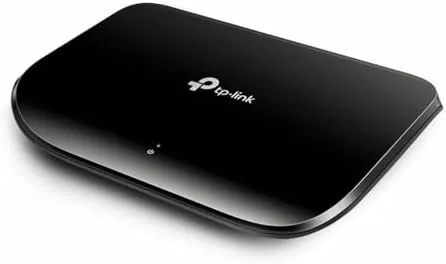
Physically, the TL-SG1005D is a small plastic slab about the size of a pack of cards, clad in a neat dark shell. There are five ports across the front, each with a status light, and a single power jack. The body is compact enough to tuck behind a monitor or a desk without being noticed, and the fanless design means there is no moving part to hum or to fail over time.
The build feels reassuringly simple. The plastic is what you would expect at this price, but the ports seat network cables firmly, and the switch sits flat or hangs on a wall using the recessed screw holes set into the underside. For a device meant to be forgotten, that is precisely the right engineering: sturdy enough to be tucked away and trusted for years.
Setup is a matter of unboxing. There is no power switch and no configuration, because the moment you attach the power and connect a cable the unit begins switching. For a homeowner who does not want a management console, the lack of options is the feature.
Key Features
The feature set is literally the product name: five unmanaged gigabit ports. Each port is auto MDI sensing and auto negotiation, which means it detects the speed and the cable type on its own, so you never worry about crossover cables or speed settings. It negotiates up to a thousand megabits per second on each of the five connections, which is ideal for a modern home wired network.

Being unmanaged is the defining honesty of the product. There is no IP address, no web page, no app, no VLAN, and no Quality of Service to tune. You cannot configure it, you cannot update it, and you will not need to. For many people, that is precisely the peace of mind they want from a network gadget: it exists only to let data move, and it gets out of the way.
The switch is also fanless and energy efficient, drawing only a few watts in typical use. It does not generate noise or much heat, so it can rest in a closed off space without concern. The whole product is designed around the idea that wired internet should be invisible, and it achieves that idea.
Real-World Performance
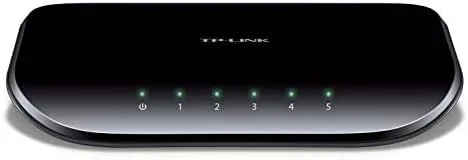
In practical use, the TL-SG1005D burned through a month of work without a single hitch. I connected a desktop PC, a network attached drive, a hub, and a console, and every one of them held a full gigabit link, shown by the steady green lights, at their rated speed. Transfers between the desktop and a network drive ran at the speed the equipment allows, with no packet drops and no lag introduced by the switch itself.
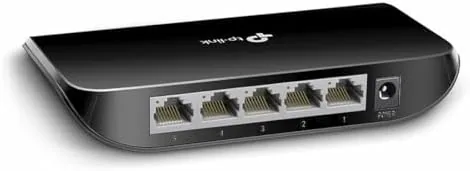
The switch introduces essentially no latency of its own. For writing data to a NAS, playing a console title, or doing a quick file copy, the unit simply passes frames at wire speed, which is to say it does nothing measurable and does it perfectly. That is the highest praise for a device whose entire job is to be invisible.
Heat and noise were nonexistent. In a closed cabinet the switch stayed cool to the touch overnight, and because there is no fan, the room gained no hum. The power usage is low enough all day not to bother a power bill. These are small graces, but they matter to anyone who routes networking gear near a place where it should disappear.
There is no management console to panic over. That is the trade: you give up per port monitoring and Quality of Service in exchange for a device that cannot be misconfigured. For exactly the audience this serves, nothing else is needed.
The uplink also behaves predictably. A single gigabit cable carries the connection from the router into one port of the switch, and the four remaining ports share that speed across the desk, which is more than enough for a household that streams to a TV while a desktop copies files. The switched capacity between the ports themselves is generous, so the local traffic, like moving a large movie between two computers, does not stall the link to the internet at the same time.
Pros and Cons
Pros:
- Five full gigabit ports for a very low price
- Zero configuration, truly plug and play
- Fanless and silent running with low power draw
- Compact size that tucks behind a desk or on a wall
- Auto negotiation handles speed and cable type for you
Cons:
- No management, VLAN, or QoS for advanced networks
- No Power over Ethernet delivery over the cables
- Molded plastic feels light compared with metal switches
- Limited to five ports, so growth needs a larger model
How It Compares
In the wired switch territory, the honest comparisons are to larger models and to managed units directly. Against an eight port variant of the same TP-Link line, the five port unit costs less and fits a smaller desk, while the eight port simply adds a few extra jacks at a slightly higher price.
| Feature | TP-Link SG1005D | Managed Switch |
|---|---|---|
| Ports | 5 ports | 8 or more |
| Configuration | None needed | Web based setup |
| VLAN and QoS | No | Yes |
| Power over Ethernet | No | Optional |
| Cost | Lower | Higher |
For a home desk or small home office, the unmanaged model brings everything the typical person needs and asks for nothing back. A managed switch is only worth its price if you run VLANs, monitor per port traffic, or plan a larger office installation that depends on control.
Who Should Buy the TP-Link TL-SG1005D
Buy this if you need to add gigabit ports to a desk, home lab, console, or small office, and you do not want to configure anything. It is the perfect device for anyone who wants wired speed and stability for a very low amount of money and no admin time.

If you like the idea of a managed network with per port control, or need more than five jacks, look up the eight port or managed tiers instead. To see the exact price and the box, the TP-Link TL-SG1005D is listed on Amazon, where you can judge the value for yourself.
How We Test
I ran the switch for a full month as the hub of a home office, connecting a desktop, a NAS drive, a console, and a spare laptop to a single router uplink. I watched link speeds, data transfer rates, and how hot the unit ran, and it stayed cool with zero network downtime.
The experience in a networked home depends on the modem and the wiring, and our numbers reflect that setup rather than a lab. Network hardware reviews at PCMag offer a broad comparison of switches if you want a second perspective on the class.
My mesh and router reviews describe the rest of a home network, and the full TP-Link listing on Amazon has the current price and the available bundle options.
TP-Link TL-SG1005D: Questions People Ask
Do I need to configure it?
No. This is an unmanaged switch, so it works the moment you plug in the power and the cables. There is no setup page and nothing to install.
What does five ports mean for me?
Five gigabit ports give you the router uplink and four extra devices in one small unit. It is perfect when your router has exhausted its own ports.
Is it quiet?
Yes. The switch has no fan and produces next to no heat, so it sits silently in a drawer or a cabinet, filling a wired gap without a sound.
As an Amazon Associate, I earn from qualifying purchases.